

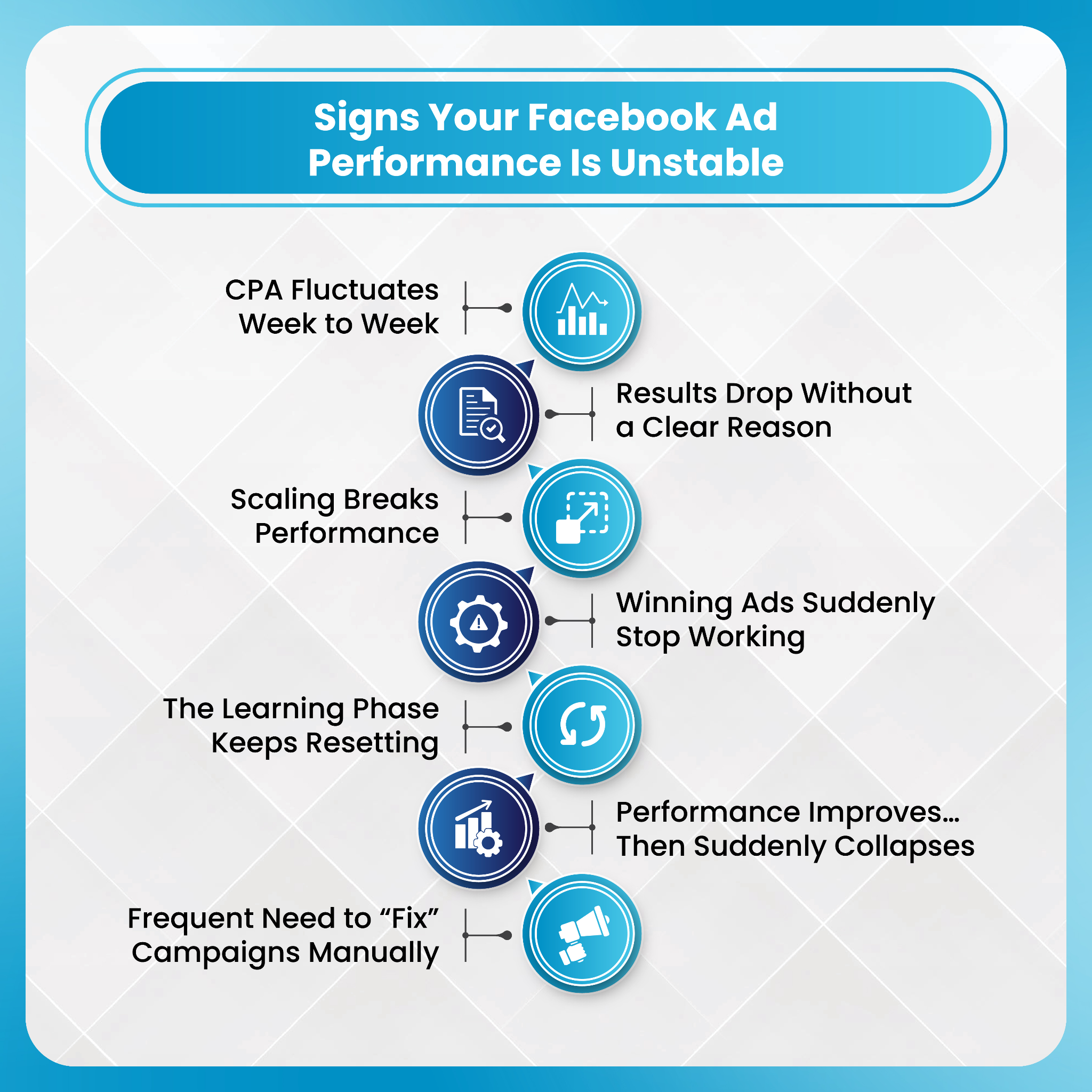
A sudden drop in Facebook Ads performance rarely announces itself politely. One week a client's lead generation campaign is humming along at a predictable cost per lead, and the next week CPL has doubled, conversions have stalled, or impressions have quietly fallen off a cliff. For agencies managing dozens of client accounts at once, these moments create real pressure.
The instinct to act fast is understandable. Clients want answers, and account managers want to show they're on top of things. But reactive changes, pausing ad sets, slashing budgets, or rewriting ad copy before understanding what actually happened, often make things worse. A campaign that resets its learning phase unnecessarily, or an account manager who "fixes" a tracking issue that was never broken, can turn a temporary dip into a prolonged recovery.
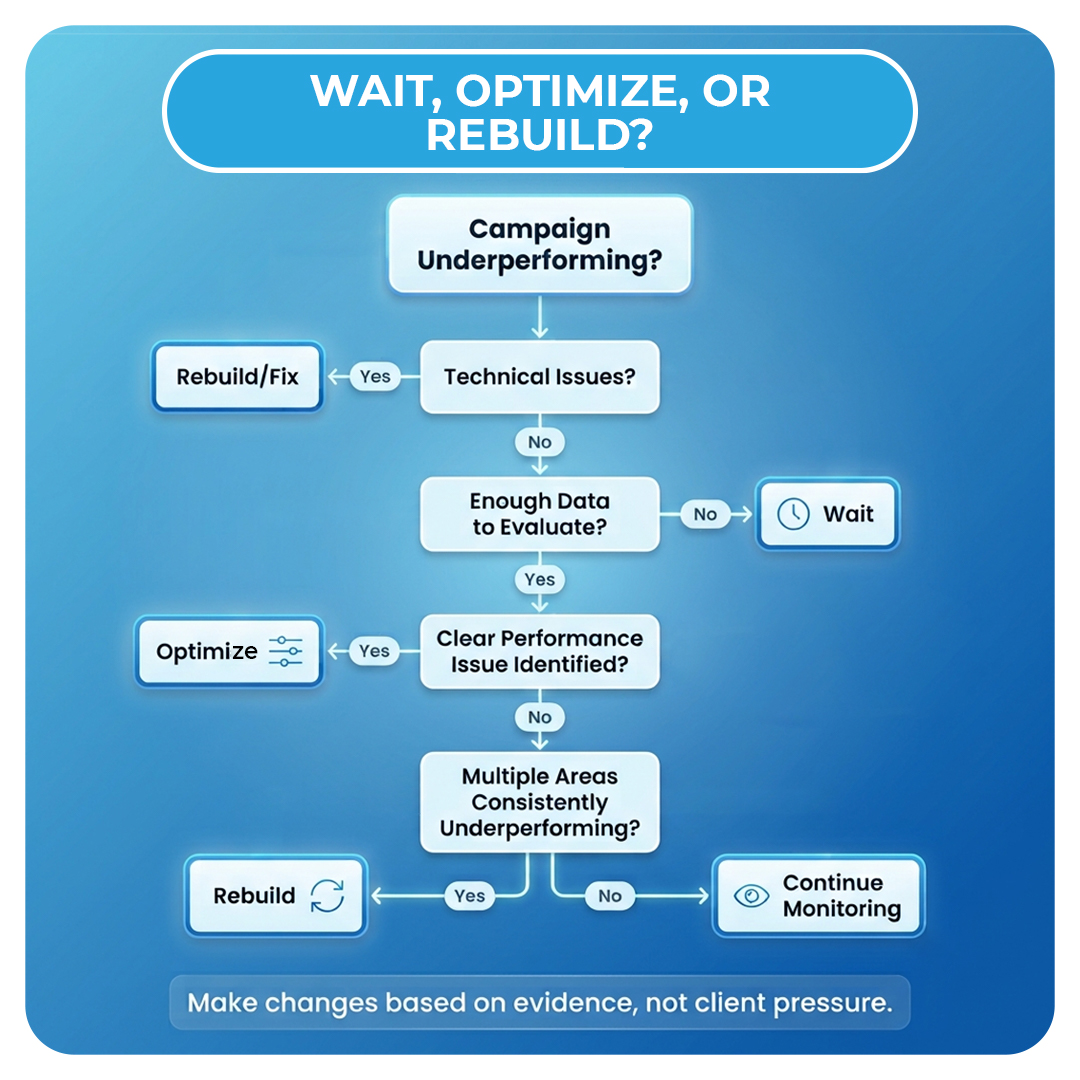
Agencies need a systematic way to investigate performance drops before touching the campaign. This means confirming the decline is real, identifying which metrics moved first, methodically checking for common causes, and only then recommending evidence-backed changes.
This blog walks through that process step by step, along with how to communicate findings to clients and how to build monitoring systems that catch problems earlier across multiple accounts.
Establish Whether the Performance Drop Is Genuine
Before diagnosing anything, agencies need to confirm the decline is actually meaningful and not just normal account fluctuation. Facebook Ads performance naturally varies day to day, especially for smaller campaigns with limited conversion volume.
- Compare historical performance. Pull results from the previous 7, 14, and 30-day periods to establish a baseline. A single bad day often looks dramatic in isolation but means little against a longer trend. Comparing multiple timeframes helps separate noise from an actual pattern.
- Identify the scope of the decline. Determine whether the drop happened suddenly or built gradually over several days. Then check whether it affects the entire account or just one or two campaigns. An account-wide sudden drop points to a different set of causes than a single campaign's gradual decline.
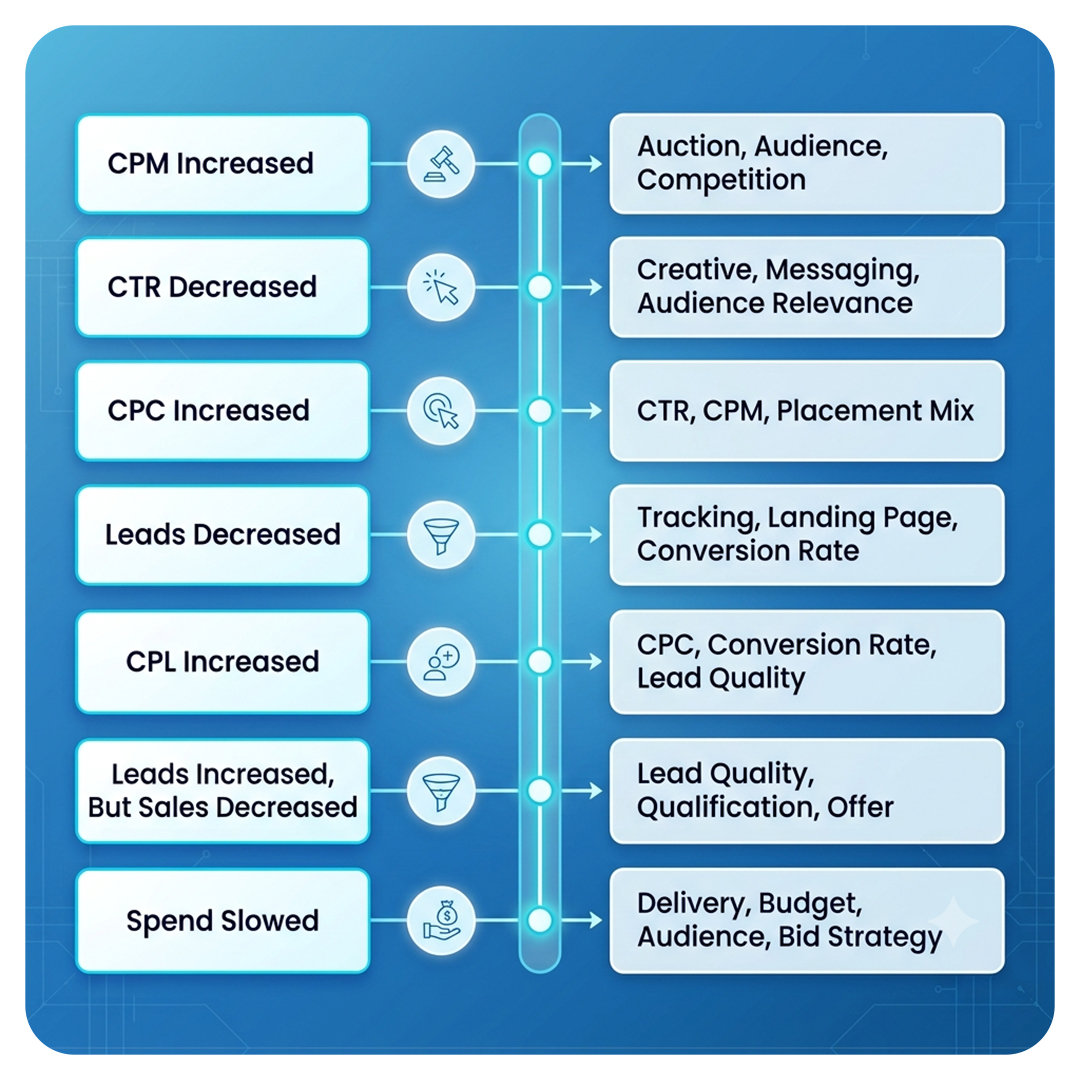
- Identify the first affected metrics. Walk through the funnel in order: impressions, CPM, CTR, CPC, conversion rate, CPL, and ROAS. The metric that moved first often reveals where the problem actually started, rather than where its effects eventually showed up.
- Rule out reporting inconsistencies. Facebook's reporting can lag, attribution windows can shift reported numbers retroactively, and low-volume campaigns can show misleading swings simply because they don't have enough data to be statistically stable. Before assuming a real decline exists, confirm it isn't an artifact of delayed reporting or a naturally small sample size.
Identifying the first metric to change matters because it narrows the investigation. A campaign where CPL rose because conversions fell, while clicks and CTR stayed flat, points toward a tracking or landing page problem. A campaign where CTR dropped first points toward creative fatigue. Skipping this step often leads agencies to guess at a cause and make unnecessary edits to audiences or creatives that were never the issue.
Investigate the Most Common Causes of Facebook Ads Performance Drops
Once a decline is confirmed as genuine, the next step is working through the most common underlying causes. No single explanation covers every case. Multiple factors can combine to push CPL higher or conversions lower, so agencies should treat this as a process of elimination rather than a search for one definitive answer.
1. Recent Campaign Changes and Learning Phase Resets
Start by reviewing what actually changed in the account recently. This includes:
- Targeting Adjustments, such as new audience exclusions, expanded or narrowed interest groups, or changes to lookalike audience sources.
- Budget Changes, including significant increases or decreases that can shift how the algorithm paces spend and bids.
- Creative Updates, like swapping out ad images, videos, or copy, even on existing ad sets.
- Placement or Optimization Event Changes, including switching the conversion event an ad set optimizes for.
Significant edits to any of these elements can push an ad set back into the learning phase, during which delivery and cost efficiency are typically less stable. Meta has cited a benchmark of roughly 50 optimization events within seven days as a general guide for exiting the learning phase. This figure should be treated as a platform reference point, not a guaranteed threshold that applies identically to every account or industry.
Reviewing recent account activity first prevents agencies from jumping to conclusions about audience fatigue or creative burnout when the real cause might simply be a budget change made five days earlier.
2. Creative Fatigue and Declining Audience Engagement
If no recent changes explain the drop, look at individual ad performance. Compare CTR, frequency, engagement rate, and conversion trends across each active ad, not just at the campaign level.
Creatives experiencing fatigue typically show a pattern where CTR declines gradually while frequency climbs, meaning the same audience is seeing the same ad repeatedly without new engagement. This differs from a messaging or offer problem, where CTR might stay reasonable, but conversion rates drop because the audience clicks but doesn't convert.
Separating these two issues matters because the fix is different. Fatigue usually calls for creative refreshes or audience expansion, while a messaging problem calls for testing new offers or landing page copy.
3. Audience Saturation and Targeting Issues
Audience-related problems often hide behind metrics that look like creative issues. Agencies should examine:
- Audience size and overlap, since overlapping ad sets can compete against each other in the auction, driving up costs for both.
- Frequency trends, which indicate whether the same audience members are being shown ads too often relative to the audience size.
- Changes in audience composition, particularly for lookalike or retargeting audiences that depend on a seed list which may have shrunk or shifted.
- Recent exclusions, which can unintentionally restrict delivery to a smaller, less responsive pool of users.
It's also worth checking whether campaigns have started reaching users outside the intended customer profile, which can happen when broad targeting settings allow the algorithm to pursue volume over qualified reach.
4. Delivery Problems and Auction Competition
Sometimes the issue isn't the audience or the creative but the auction itself. Review CPM trends alongside impressions, spend, delivery status, and the bid strategy currently in use.
A sudden CPM increase paired with rising impressions usually points to increased competition in the auction, which is common during seasonal periods or when competitors ramp up spend. A CPM increase paired with falling impressions and reduced spend, however, suggests a delivery restriction, which could stem from an account flag, a rejected ad, or a policy issue that's limiting how the campaign can serve.
Checking the account's delivery insights and any notifications about ad rejections or restrictions should happen early in this step, since these issues are often resolved differently than auction-driven cost increases.
5. Conversion Tracking and Attribution Errors
A decline in reported conversions doesn't always mean a decline in actual business results. Tracking errors can make a healthy campaign look broken. Agencies should verify:
- Meta Pixel and Conversions API activity, confirming events are still firing consistently and haven't dropped off due to a website update or a code change.
- Event configuration, checking for duplicate events, misconfigured event parameters, or missing conversion signals that would understate true performance.
- Cross-platform comparisons, matching Ads Manager conversion counts against website analytics and CRM records to see whether the discrepancy exists only in Meta's reporting.
- Attribution settings, since a change to the attribution window can cause reported conversions to shift even when actual lead volume hasn't changed.
Validating tracking before making optimization decisions is one of the most important steps in this entire process. Agencies that skip it risk "fixing" campaigns that were never actually underperforming, while the real problem sits unnoticed in a broken pixel event.
6. Landing Page and Conversion Funnel Issues
If tracking checks out and ad-level metrics look stable, the problem may sit outside the ad campaign entirely. Test the landing page experience directly, including:
- Page loading speed, since slow load times can cause users to abandon before a form or checkout step loads.
- Forms, buttons, and checkout functionality, confirming that recent website updates haven't broken a submission process.
- Offer or page content changes, checking whether a client updated pricing, messaging, or page layout around the same time the decline started.
Comparing link clicks, landing page views, and completed conversions side by side helps pinpoint exactly where users are dropping off. A healthy number of link clicks paired with far fewer landing page views suggests a page loading or redirect issue, while landing page views that don't convert point to a problem within the page itself.
Build a Repeatable Facebook Ads Diagnostic Workflow
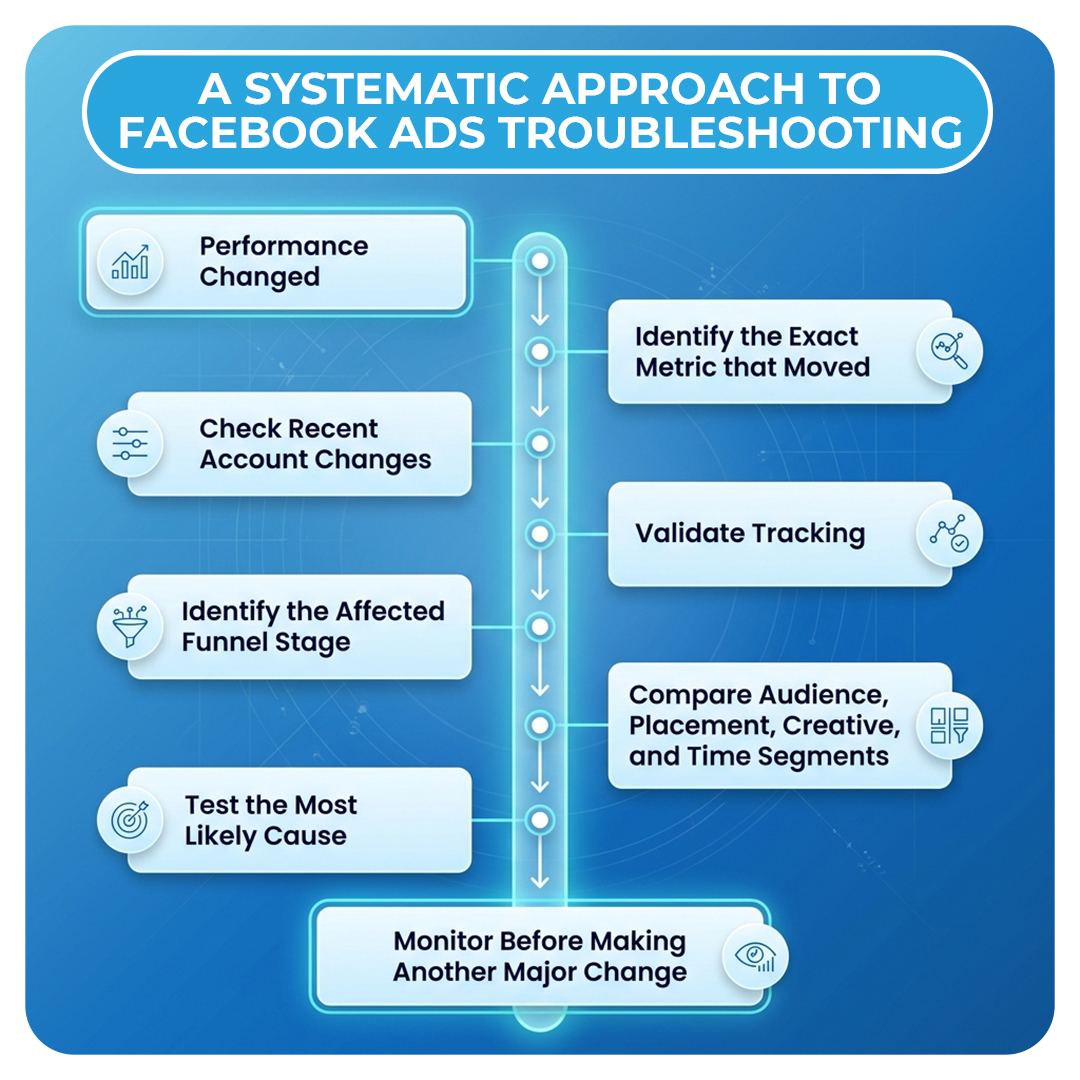
Investigating performance drops case by case works, but it's inefficient when repeated across dozens of accounts without structure. Agencies benefit from turning the process above into a standardized workflow that any account manager can follow consistently.
Step 1: Identify the Affected Campaigns
Isolate exactly which campaigns, ad sets, and ads are experiencing the decline. This prevents the common mistake of adjusting unaffected campaigns simply because they belong to the same client account.
Step 2: Locate the First Performance Change
Pinpoint when the decline began and which metric moved first. Comparing the affected period against historical data helps reveal whether this follows a pattern seen before, such as seasonal dips or recurring auction competition during certain months.
Step 3: Review Account Activity
Check recent edits across budgets, targeting, creatives, and bidding, along with any website or conversion-event changes made around the same time. This step should happen before deeper investigation, since it often surfaces the cause quickly.
Step 4: Investigate the Relevant Performance Layer
Based on findings so far, focus the investigation on the layer most closely tied to the affected metrics, whether that's creative, audience, auction, tracking, or landing page performance. There's no need to check every possible cause exhaustively if the data already points toward one area.
Step 5: Validate the Suspected Cause
Cross-check the suspected issue against historical data and, where possible, external reporting like website analytics or CRM data. Verifying the cause before recommending action reduces the risk of implementing a fix that doesn't address the actual problem.
Step 6: Document Corrective Actions
Record what was found, what action is being recommended, and how results will be monitored going forward. This creates accountability and gives the team a clear reference point to evaluate whether the corrective action actually worked.
How Agencies Should Communicate Performance Drops to Clients?
Diagnosing the problem is only half the job. How an agency communicates that information to a client shapes whether trust grows or erodes during a rough patch.
- Explain what changed. Clearly state when the decline happened and which specific metrics were affected, using the actual data rather than vague language like "performance has softened."
- Separate confirmed causes from possibilities. Be explicit about what's been verified versus what's still being investigated. Telling a client "we've confirmed the pixel is tracking correctly, but we're still testing whether creative fatigue is contributing" is more credible than offering a single confident explanation that hasn't been fully validated.
- Use supporting data. Share the relevant performance comparisons and account findings that led to the conclusion, rather than relying on general explanations that sound reassuring but lack substance.
- Share corrective recommendations. Outline the proposed next steps, what changes will be made, and over what timeframe results will be evaluated.
- Set realistic expectations. Avoid promising immediate recovery before changes have had time to take effect. Facebook's algorithm often needs several days to stabilize after any adjustment, and setting that expectation upfront prevents frustration later.
Clients respond better to evidence-based communication than to defensive explanations or overly optimistic assurances. When a client understands both the identified issue and the agency's specific plan to address it, they're far more likely to stay patient through the recovery period.
Maintain Consistent Facebook Ads Monitoring Across Multiple Client Accounts
Diagnosing one performance drop well is useful. Building a system that catches problems earlier across every client account is what actually scales. Agencies managing multiple accounts need a structure that doesn't depend entirely on manual, case-by-case troubleshooting.
- Establish account-specific benchmarks. Every client has different historical performance, objectives, and industry norms. Setting benchmarks and reporting intervals based on each account's own history gives account managers a meaningful baseline, rather than comparing every client against a generic industry average.
- Maintain campaign change logs. Documenting significant edits, whether budget changes, targeting updates, or creative swaps, makes Step 3 of the diagnostic workflow far faster. Pairing this with standardized diagnostic checklists ensures every account manager investigates issues the same way.
- Prioritize account-level issues. Not every fluctuation deserves the same urgency. Organizing investigations based on severity and business impact helps teams focus attention on the accounts where a decline actually threatens client results, rather than spreading resources thin across minor fluctuations.
- Create clear team handoffs. Establish defined procedures for how account managers, strategists, and fulfillment specialists communicate findings and corrective actions. When handoffs are inconsistent, issues get rediscovered repeatedly instead of resolved once and tracked going forward.
Industry benchmarks can provide useful context when evaluating whether a client's numbers are reasonable. According to WordStream's 2026 Facebook Ads Benchmarks, based on more than 1,800 campaigns, the average conversion rate for Facebook lead campaigns was 8.54%, while the average cost per lead was $27.39.
Supporting Consistent Campaign Management With DashClicks White Label Facebook Ads
Diagnosing performance drops across multiple client accounts takes time and dedicated attention. For agencies also handling client onboarding, strategy, and reporting, this can stretch internal teams and slow down troubleshooting.
A fulfillment partner like DashClicks can help agencies maintain consistent campaign execution and ongoing optimization across accounts. DashClicks' White Label Facebook Ads support helps agencies streamline these processes, making it easier to identify performance deviations and manage campaign workloads.
Agencies can benefit from this support in several ways:
- Consistent campaign execution: Standardized fulfillment processes help maintain consistency across client accounts and make unusual performance changes easier to identify.
- Additional optimization capacity: Agencies can support ongoing campaign management without handling every execution task internally.
- Scalable service delivery: As client numbers grow, fulfillment support helps agencies manage increasing workloads without placing additional pressure on internal teams.
- Clearer client communication: Branded reporting and client dashboards give agencies a consistent way to present campaign findings, performance trends, and recommendations.
Importantly, agencies retain control over client relationships, campaign strategy, recommendations, and final decisions. The white label Facebook advertising agency supports execution while the agency remains the strategic point of contact for its clients.
Outsourcing does not automatically prevent performance declines or guarantee better results. However, reliable fulfillment support can provide the additional capacity and consistent processes agencies need to monitor campaigns, investigate issues, and manage multiple accounts more effectively.
Diagnose First, Optimize Second
Sudden performance drops in Facebook Ads campaigns are rarely solved by quick fixes. The agencies that handle these situations well are the ones that resist the urge to change something immediately and instead work through a structured process: confirming the decline is real, identifying which metric moved first, checking the most common causes systematically, and validating the suspected issue before recommending action.
Building this into a repeatable workflow, backed by consistent monitoring and clear documentation, turns performance troubleshooting from a stressful scramble into a predictable process. Combined with transparent client communication and a structured account monitoring system, agencies put themselves in a far stronger position to catch issues early, address them with evidence rather than guesswork, and maintain client trust even when the numbers temporarily move in the wrong direction.