

DashClicks Blog
The industry's top experts offer their best advice, research, how-tos, and insights—all in the name of helping you level-up your business and online marketing skills.
Join Us!
.svg)
.svg)
.svg)
.svg)
.svg)

7 Signs Your Search Strategy Needs Expert Guidance
A poorly constructed search strategy can quietly undermine months of research work, often without researchers realizing where things went wrong. For those conducting a systematic review, the quality of the search is not just a technical detail; it is the foundation that determines whether the final evidence base is complete, credible, and defensible.
These seven signs offer a practical self-check for any literature search workflow.
7 Signs Your Search Strategy Needs Help
- The research question is vague or shifting, making it impossible to map terms consistently across sources.
- The PICO framework has not been applied, leaving population, intervention, comparator, and outcome elements undefined.
- Boolean operators are used inconsistently or incorrectly, producing either unmanageable result sets or suspiciously few records.
- Coverage is limited to one or two bibliographic databases, missing the breadth that a systematic review requires.
- Grey literature sources such as conference proceedings, theses, and government reports have been excluded entirely.
- There is no documented balance between sensitivity and precision, so the strategy cannot be justified or reproduced.
- The search strategy has never been peer reviewed by an information specialist or librarian, leaving structural errors undetected.
Where Search Strategies Start to Break Down?
Recognizing the signs above is a useful starting point, but understanding why these problems develop is what helps teams address them at the root. The earliest failures tend to cluster around two related issues: an unclear research question and a weak translation of that question into database language.
When the Research Question Is Still Too Fuzzy?
Most search strategy failures begin long before anyone opens PubMed or types the first keyword. They start at the planning stage, when the research question itself is not yet clear enough to guide a structured search.
A vague or shifting research question creates immediate downstream problems. Without a defined population, intervention, comparator, and outcome, the PICO framework cannot be applied properly, and there is no reliable basis for deciding what to include or exclude. Inclusion logic becomes inconsistent, and the search terms selected one day may contradict those chosen the next.
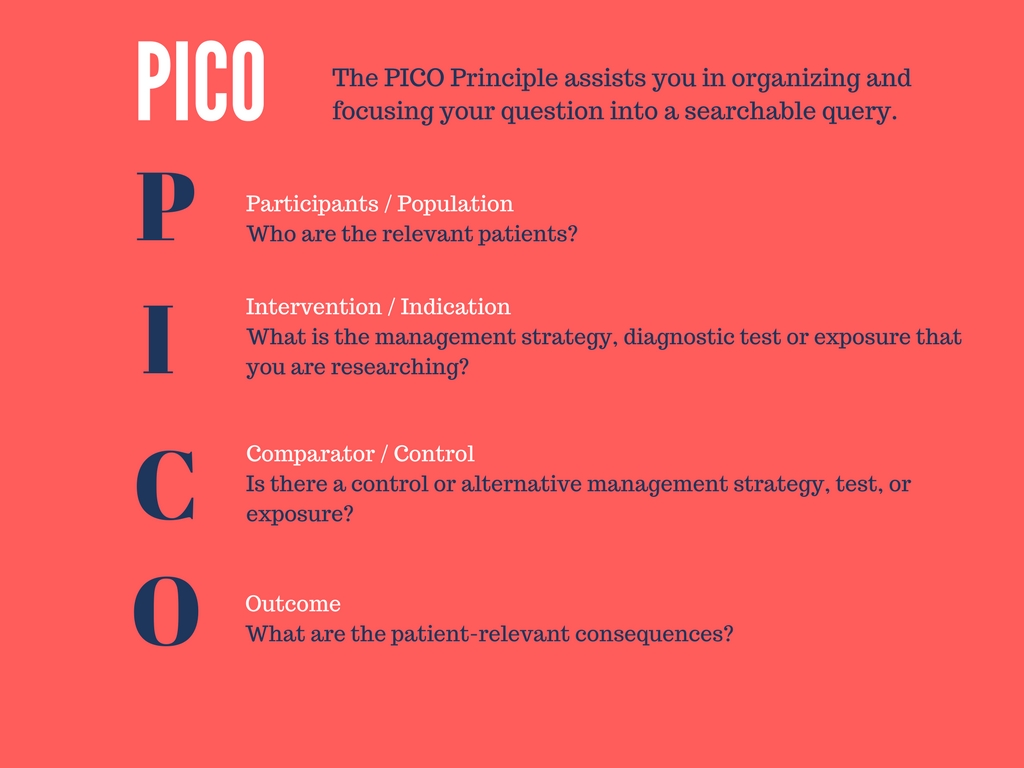
Image Source: Logan University
When concept blocks are built on an unstable question, every subsequent decision inherits that instability. Early guidance from an information specialist at this stage often prevents significant revisions later, once the search is already underway.
When Keywords and Controlled Terms Miss the Topic?
Even when the research question is reasonably clear, the translation into database language is where many strategies quietly lose ground. Researchers often rely on natural language keywords alone, missing the controlled vocabulary that databases like MEDLINE use to index records systematically.
MeSH terms exist precisely to bridge the gap between how researchers describe a topic and how that topic is classified within a database. Without them, relevant records are indexed under terms the search never retrieves.
Boolean operators compound the problem when concept blocks are poorly constructed. A misplaced AND or OR between related terms can eliminate entire clusters of relevant literature, much like how setting realistic SEO expectations early in a project prevents costly corrections later. For complex topics, hiring an SEO agency or a specialist in search architecture is often the clearest path to a structurally sound strategy.
Coverage Gaps That Experts Spot Quickly
Even when the research question is well-defined and the terminology is mapped carefully, a strategy can still fall short if the sources themselves are insufficient. Coverage gaps are among the most consequential weaknesses in a literature search, and they are also among the easiest to overlook without specialist input.
Too Few Sources for the Question You Are Asking
Relying on one or two bibliographic databases is one of the most common structural weaknesses in a literature search, and one of the hardest to detect without specialist input. Each database indexes different journals, applies different coverage criteria, and prioritizes different subject areas.
MEDLINE, EMBASE, and the Cochrane Library are frequently used together precisely because each captures records the others miss. EMBASE, for instance, has stronger coverage of European journals and conference abstracts, while MEDLINE skews toward North American biomedical literature. Running a search through only one of these sources means a portion of the relevant evidence base is never seen, which distorts the findings before analysis even begins.
For a systematic review to meet methodological standards, the source selection itself must be justifiable and documented. An expert will assess which databases are appropriate for the specific topic rather than defaulting to the familiar ones.
Missing Grey Literature and Trial Records
Even a well-constructed multi-database search can leave significant gaps if grey literature is excluded. Conference proceedings, government reports, regulatory documents, and unpublished studies contain evidence that peer-reviewed journals do not always capture.
Trial registries add another layer. ClinicalTrials.gov and similar registries record studies regardless of whether results were ever published, making them essential for identifying potential publication bias. When these sources are absent, the review may systematically favor positive findings.
Experts flag this gap quickly because it carries direct implications for bias risk and the overall credibility of the evidence synthesis.
Image Source: Bloomberg
Your Results Are Broad, Thin, or Off Target
When a search strategy is structurally imbalanced, the evidence shows up in the results themselves. The two failure modes are sensitivity and precision, and both are recognizable once you know what to look for.
A sensitivity-heavy strategy retrieves thousands of records, most of them weakly related to the research question. Reviewers spend hours screening noise, and the signal-to-noise ratio makes the process unsustainable. A precision-heavy strategy does the opposite, returning a narrow set of results that misses obviously relevant studies indexed under slightly different terms.
In PubMed, this balance is shaped by specific technical decisions. Field tags determine where the database looks for a term, whether in the title, abstract, or MeSH heading. Adjacency operators control how close two terms must appear to count as a match, and Boolean operators govern how concept blocks combine. Adjust any one of these, and the result set shifts, sometimes dramatically.
The problem is that iterative tweaking has a ceiling. Researchers can refine a strategy through multiple rounds without resolving a deeper structural flaw, such as a concept block that conflates two distinct ideas or a term hierarchy that is mapped incorrectly. At that point, the adjustments produce diminishing returns, much like running a thorough SEO audit when the underlying site architecture is what needs attention.
For a systematic review, persistent instability in the result set is a reliable indicator that expert review of the full strategy is warranted.
No One Has Checked the Strategy Properly
Even a well-constructed search strategy can carry undetected errors that only become visible when someone with the right training reviews it. This is where quality assurance becomes a decisive factor, not an optional refinement.
The peer review guidelines developed for systematic searches offer a structured way to evaluate whether a strategy meets methodological standards before it is finalized. PRESS guidelines, in particular, provide a reproducible framework for checking syntax, logic, term selection, and conceptual coverage in a systematic way.
Information specialists and librarians are especially well-positioned to apply this kind of review. Where a researcher may read past a misplaced Boolean operator or an incomplete concept block, a trained information specialist recognizes the pattern immediately.
What peer review catches is not always obvious to the person who built the strategy. A search that appears coherent from the inside often contains coverage gaps, redundant terms, or structural inconsistencies that only surface under a methodical external check. Skipping this step leaves those errors embedded in the final search, where they silently affect results.
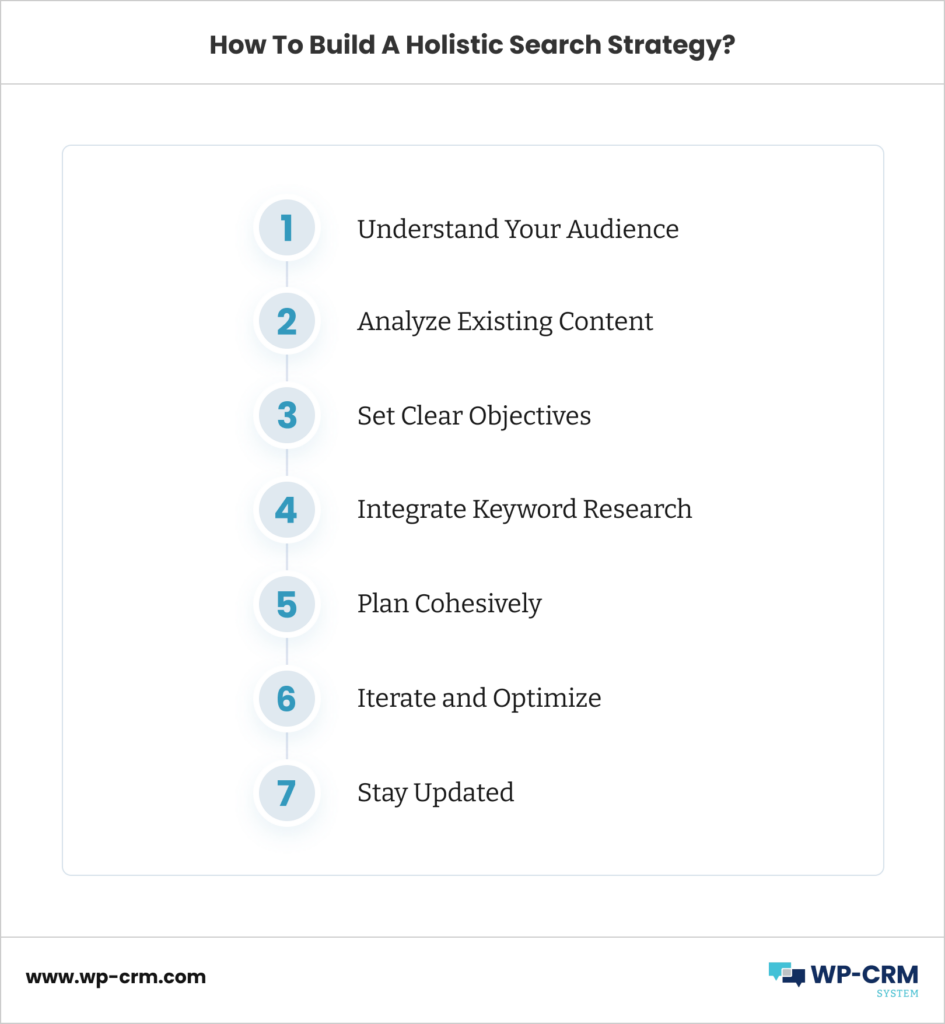
Image Source: WP-CRM
What to Do When These Signs Show Up?
When multiple warning signs appear together, as outlined throughout this article, they rarely point to a minor adjustment. They typically reflect a structural issue with the search strategy itself, one that individual tweaks are unlikely to resolve.
At that point, bringing in expert guidance early is the more efficient path. An information specialist can assess the full strategy against systematic review standards, identify coverage gaps, and flag logic errors that internal review tends to miss. That input also strengthens the defensibility of the final search, which matters during peer review and publication.
For any team planning a new review or revisiting an existing one, the clearest next step is a careful evaluation of the search structure before the work goes any further.
The Value of Specialist Expertise
Search strategies become increasingly difficult to manage as research questions grow more complex. What begins as a straightforward literature search can quickly expand across multiple databases, controlled vocabularies, grey literature sources, and screening requirements. At that stage, even small weaknesses in search construction can affect the completeness and reliability of the final evidence base.
Specialists bring a level of methodological expertise that helps address these challenges. Information specialists and librarians are trained to evaluate search logic, identify coverage gaps, refine concept blocks, and ensure that strategies remain both comprehensive and reproducible. Their involvement can improve the overall quality of the search while reducing the risk of overlooked evidence.
The importance of expert guidance is recognized across many fields where search quality directly influences outcomes. Whether the goal is evidence synthesis, information retrieval, or digital search performance, organizations often rely on specialists to review complex processes, identify weaknesses, and strengthen overall methodology. This emphasis on structured search practices is reflected in how companies such as DashClicks approach search-focused work, where strategic planning and expert oversight play an important role in achieving reliable results.
As search requirements become more sophisticated, expert review is often the most effective way to ensure that a strategy remains comprehensive, defensible, and aligned with its intended objectives.
Conclusion
A search strategy is more than a collection of keywords and database queries. It is the framework that determines whether a review captures the full scope of relevant evidence or overlooks important studies that could influence the findings.
The warning signs discussed throughout this article, including unclear research questions, incomplete terminology, limited source coverage, imbalanced results, and a lack of peer review, often indicate deeper structural issues within the search process. While some problems can be addressed through refinement, others require a more systematic evaluation of the strategy itself.
For researchers conducting systematic reviews, recognizing these issues early is often the difference between a search that is merely functional and one that is comprehensive, reproducible, and defensible. When uncertainty remains, expert guidance can help identify weaknesses, strengthen methodology, and provide greater confidence in the final evidence base.
Ultimately, the strength of a systematic review depends on the strength of the search that supports it. Investing time in building and validating that foundation is one of the most important steps in producing reliable research.


Delegating Repetitive Agency Tasks: What to Hand Off to a Remote Assistant?
Running an agency means wearing too many hats at once. One hour you are reviewing a client report, the next you are sorting emails, then you are back to chasing invoices. None of these tasks are particularly hard. But together, they eat up your day in small bites until there is barely any time left for the work that actually grows the business.
This is the trap most agency owners fall into. Not because they are bad at managing time, but because they never stop to ask: does this task actually need me?
The honest answer is that a large chunk of your weekly work does not. And that is where smart delegation comes in.
Why Agencies Struggle to Let Go?
There is a reason many agency owners hold on to repetitive tasks for too long. At first, the team was small. You do everything yourself because that is just how it works. Then the business grows, but the habit of handling everything personally does not go away.
Some people feel that handing off tasks means losing control. Others worry about the time it takes to explain things properly. And some just assume it is faster to do it themselves.
All of this is understandable. But none of it is actually true once you build the right system and bring in the right person.
The First Step: Separating "Your Work" from "The Work"
Before you can delegate anything, you need to get clear on one thing. Which tasks require your expertise, judgment, or relationships? And which tasks just require someone following a clear process?
Here is a simple way to think about it:
- Sending a proposal requires your thinking. But formatting that proposal into a PDF does not.
- Writing a strategy for a client requires your knowledge. But pulling competitor data to support it? Someone else can do that.
- Handling a difficult client call needs you. But scheduling that call and sending the follow-up summary does not.
This separation is not always obvious at first. A useful exercise is to track your time for one week. Not loosely. Write down everything. You will be surprised how many hours go toward things that follow a predictable pattern every single time. Those are your delegation targets.
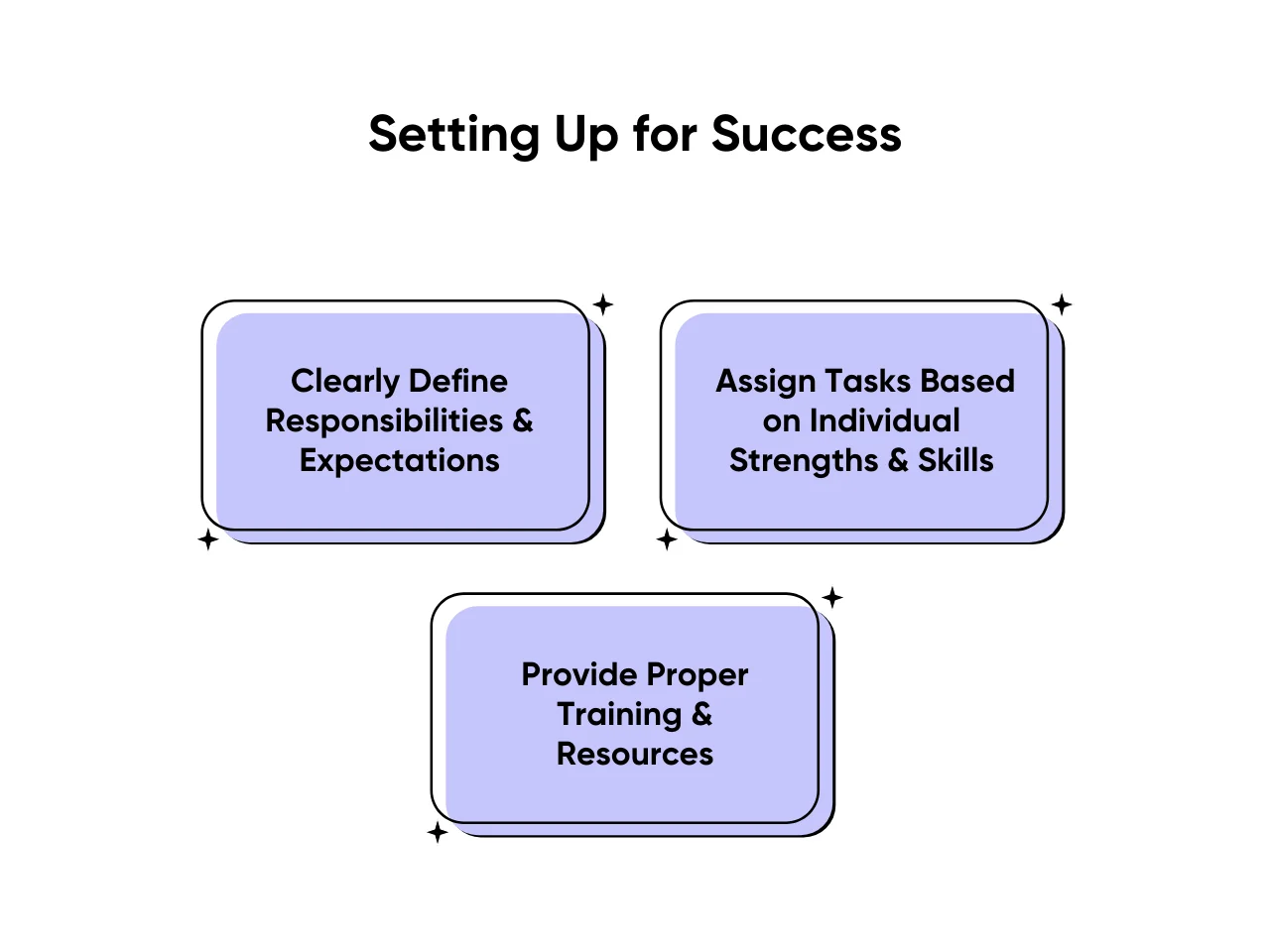
Image Source: Pearl Talent
Tasks You Can Hand Off Right Away
Once you start looking, the list gets long quickly. Here are the categories where most agencies waste the most time:
Inbox and Communication Management
- Responding to generic client questions
- Following up on unpaid invoices
- Sending meeting confirmations
- Filtering spam from real inquiries
All of this can be handled by someone working to a clear playbook you set up once.
Reporting
If you are manually pulling data from tools and dropping numbers into a spreadsheet or slides every week, that is exactly the kind of task a remote assistant can own. You just review the final output.
Scheduling and Coordination
- Managing client calls, team syncs, and onboarding sessions
- Sending reminders and calendar invites
- Rescheduling when things shift
A remote assistant handles all of this without you ever opening a calendar app.
Research Tasks
- Prospect research and lead list building
- Competitor comparisons
- Finding contact information
- Putting together a list of potential partners
These tasks take time but not expertise.
Social Media Scheduling
If content is already approved, someone else can format it, schedule it, and track basic engagement numbers. You stay out of the tool entirely.
Administrative and Finance Tasks
- Invoice tracking and payment follow-ups
- Creating expense reports
- Maintaining simple records and spreadsheets
None of this needs the agency owner.
When to Hire a Virtual Assistant?
If the list above sounds familiar, you are already at the point where it makes sense to hire a virtual assistant. Not eventually. Now.
Most agency owners wait too long on this. They think they need to reach a certain size or revenue level first. But the reality is that getting off the hamster wheel of repetitive work is often what allows the business to grow in the first place. When you are not buried in admin, you can focus on landing bigger clients, improving your service, or building the systems that create real leverage.
The key is not finding someone to dump random tasks on. It is finding someone you can train properly, give clear instructions to, and then actually trust to follow through. Start with two or three tasks. Let them build familiarity with how you work. Then gradually expand what they own.

Image Source: MyTasker
What Good Delegation Actually Looks Like?
There is a difference between handing something off and explaining it poorly, then being frustrated when it comes back wrong.
Here is what good delegation requires:
- Clear Documentation: Before you ask someone to handle a task, write down exactly how you do it. A step-by-step process with examples, preferred tools, and what a finished result should look like. A short Loom video often works better than a written guide.
- A Review Process: Do not assume everything will be perfect on day one. Build in a check for the first few weeks until you are confident in the output.
- Specific Feedback: If something is not right, say what specifically was off and how you want it done differently. Vague frustration does not help anyone improve.
Tasks That Are Not Good Fits for Delegation
Not everything should go on the list. Some things really do need you.
- Client Strategy and Recommendations: Clients are paying for your thinking, not someone else following a template.
- Difficult Client Conversations: If a client is unhappy or there is a sensitive situation to navigate, that should not be outsourced.
- Highly Unpredictable Work: If a task requires constant judgment calls that are hard to document, it is not the right fit yet.
- New Processes You Have Not Figured Out Yourself: You cannot document something you have not done enough times to understand properly.
How to Think About Building This System Over Time?
The goal is not just to get a few tasks off your plate this week. It is to build a structure where more and more operational work flows away from you over time. Think of it in three phases:
Phase 1: Identify and document Find the most time-consuming repetitive tasks. Write them down clearly. Bring in help and spend a few weeks building confidence in the handoff.
Phase 2: Spot the patterns Look at what is still reaching you. Are there decisions you keep making that follow a predictable logic? Can those be turned into rules your assistant can follow without checking in?
Phase 3: Build real leverage You now have an assistant or small team running a significant portion of the operational work. Your job becomes reviewing key outputs, maintaining client relationships, and focusing on growth.
This does not happen overnight. But it does not take years either. The agencies that get there fastest are the ones that start early and iterate quickly rather than waiting for perfect systems before beginning.
How DashClicks Helps You Actually Delegate (Without Creating More Work)?
If the goal is to get repetitive work off your plate, the biggest mistake agencies make is trying to delegate and build every system from scratch at the same time. That is where platforms like DashClicks fit in, they give you a ready-made operational layer so your assistant is not starting from zero.
Instead of stitching together multiple tools for reporting, client communication, and task tracking, DashClicks centralizes a lot of the work you are trying to offload anyway.
1. Automated Reporting (Eliminates Weekly Manual Work)
One of the easiest tasks to delegate, reporting, often still ends up taking hours because the process itself is messy.
With DashClicks’ marketing reporting software :
- Data from multiple channels is pulled automatically
- Reports are generated in a consistent format
- Your assistant only needs to review and send, not build from scratch
This directly aligns with the blog’s idea: you review outputs, not assemble them.
2. Client Communication & CRM (So You’re Not Stuck in Your Inbox)
Inbox management is one of the biggest time drains mentioned earlier. DashClicks addresses this with its built-in contacts management software and communication tools.
Using DashClicks CRM + Inbox:
- Your assistant can manage client conversations in one place
- Follow-ups, updates, and responses can follow predefined workflows
- You only step in when something actually needs your judgment
This reduces the constant back-and-forth that keeps pulling you out of deep work.
3. Task & Workflow Management (Clear Playbooks for Delegation)
Delegation breaks when there is no structure. DashClicks includes a workflow system that helps you standardize tasks.
With DashClicks Tasks / Fulfillment system:
- You can create repeatable processes for things like onboarding, reporting, and follow-ups
- Your assistant follows a defined workflow instead of asking what to do next
- Progress is visible without you chasing updates
This directly supports what the blog emphasizes: clear processes over ad-hoc delegation.
4. White Label Dashboard (Cleaner Handoff to Assistants + Clients)
When tools are scattered, assistants struggle to manage work efficiently. DashClicks provides a centralized, white label dashboard.
- Your assistant works inside one system instead of juggling 5–6 tools
- Clients can access reports and updates without emailing you
- You reduce both internal confusion and client dependency on you
5. Lead Management & Prospecting Support
The blog mentions research and lead generation as easy delegation wins. DashClicks supports this through its lead management software.
With DashClicks lead management features:
- Your assistant can manage leads, track prospects, and organize outreach data
- You stay focused on closing, not compiling lists
Where DashClicks Fits in Your Delegation System?
DashClicks does not replace a virtual assistant, it makes your assistant effective faster.
- Without a system: You delegate tasks → spend time explaining → fix mistakes → repeat
- With DashClicks: You delegate tasks → plug them into structured workflows → review outputs
That shift is what turns delegation from “more work upfront” into actual leverage.
A Practical Way to Start This Week
Pick one task from your current week that you have done at least three times in the past month. Write down how you do it. That is the first thing you hand off.
Do not overthink the whole system before you start. One task, properly documented, properly handed off, properly reviewed. Then build from there.
The agencies that scale well are not the ones with the most talented founders working the most hours. They are the ones that figured out early what the founder actually needs to own and build systems around everything else.
Your time is the most limited resource in the business. Start treating it that way.

10 AI-Powered Tools Agencies Are Using to Create More Fun and Engaging Content for Clients in 2026
Content teams at agencies are under more pressure than ever. Clients want more formats, faster delivery, and better results, but budgets aren’t going up. At the same time, attention spans on social media keep shrinking, so content from six months ago barely gets noticed now.
Agencies that are adapting well to these new challenges are using better tools instead of just working harder. AI is now doing much more than writing captions or making stock images. By 2026, agencies will use AI to create film-quality video, realistic voices, brand-safe images, and content that actually engages people. They’ll do all this much faster than before.
Alongside creative AI tools, many agencies are also turning to platforms like DashClicks to streamline their workflows, manage client campaigns, and automate reporting. While AI tools enhance content creation, platforms like DashClicks help agencies scale operations efficiently and deliver consistent results across multiple clients.
Here are 10 AI-powered tools and resources that help agencies quickly create what clients need for today’s most important formats.
AI Influencer Marketing Tools
Influencer marketing has become one of the highest-ROI channels for agencies managing e-commerce and D2C brands. But the operational overhead - finding creators, managing outreach at scale, tracking gifting and affiliate revenue, and proving ROI - has historically required large teams or disconnected point solutions. AI-powered influencer marketing platforms now automate the most time-intensive parts of the workflow, from creator discovery to personalized outreach to content performance tracking.
1. Influencer Hero
Influencer Hero is an all-in-one influencer marketing platform built for agencies and brands managing campaigns across multiple clients. It combines a 450M+ global creator database across eight platforms (Instagram, TikTok, YouTube, Facebook, Pinterest, Snapchat, X, and Twitch) with AI-powered outreach, a built-in influencer CRM, product gifting, affiliate tracking, and a UGC content library - eliminating the need to stitch together separate discovery, outreach, and analytics tools.
Key Features:
- AI-powered outreach with personalized first lines generated from each creator's last three posts, achieving a 43% average response rate
- 20+ discovery filters including audience demographics, engagement rate, brand affinity, and fraud detection
- Built-in influencer CRM with campaign boards, deal pages, and rules-based automation (e.g., auto-generate Shopify discount codes on contract sign)
- Product gifting directly from CRM via Shopify integration with automatic tracking sync
- UGC Content Library with AI Post Detector, Visual Quality Scoring, and semantic search
- Deep e-commerce integrations: Shopify, WooCommerce, Magento, BigCommerce, Amazon
- Reporting across seven specialized tabs including ROI and sales attribution, EMV calculations, and automated COGS tracking
Who is this best suited for?
Agencies running influencer campaigns for e-commerce and D2C brands who need a single platform to manage the full workflow - from creator discovery through payment. Particularly strong for teams managing high-volume outreach (the platform supports up to 10,000 outreach emails per month on higher plans) and brands that need direct Shopify integration for gifting and affiliate tracking. Case studies include a UK e-commerce brand generating $687K in Q4 revenue and a D2C brand scaling from $0 to $1.2M in one year through the platform.
AI-Powered Video and Creative Visual Production Tools
Video is now the dominant form of media on every major channel. There’s a growing gap between agencies that can produce high-quality, authentic video content efficiently and those that can’t scale production. This technology gives teams of any size much more creative ability when it comes to making videos.
2. Runway ML
For the last several years, Runway has been a standard part of agency workflows for creating original, high-quality video content from just a written description or a still image reference.
The latest version lets agencies make custom video content for client-facing assets like branded video intros, video mood reels, background videos for social media, and visual concept decks. Before this technology, you’d need a stock footage license or a full production that could take days.
Key Features
- Text and image-generated video
- Motion control to direct the final video
- Remove and replace backgrounds
- Inpainting for seamless video
- Export sets (presets) for each major social networking platform
- Frame-by-frame video editing tools
Who is this best suited for?
Agencies that need original video assets, especially when launching campaigns, telling their brand story, or presenting visual concepts to clients, will benefit from using Runway. It helps increase video production capacity without the costs of traditional production methods.
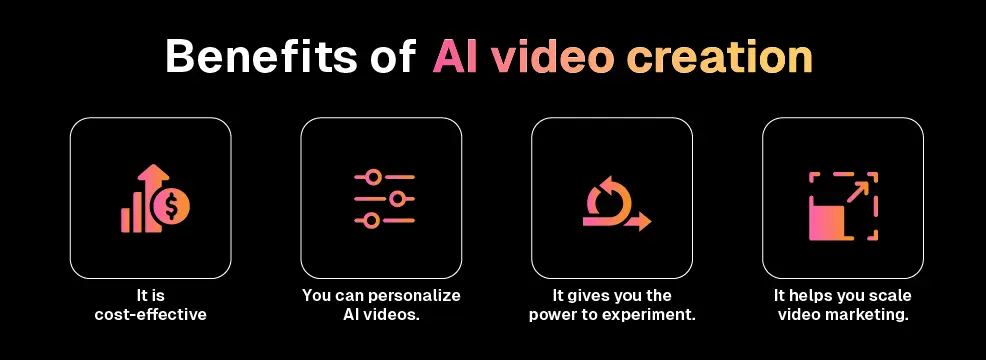
Image Source: Whatmore
3. Vidmage AI
Face-swapping video content is one of the most consistently engaging formats on short-form, user-generated video sites, making VidMage AI the tool that agencies are building into their workflows to create this type of content.
VidMage is a creative platform that lets you face-swap photos, videos, and GIFs. But it does much more than just face swaps. VidMage includes an AI video generator, an image upscaler, and an object removal tool. This gives creative teams a full suite of production tools to create both brand-focused and entertainment-driven videos.
It stands out for its high-quality output and practical features. The 4K export delivers assets to clients with no extra post-processing. Batch processing meets the volume needs of active campaigns. Real-time, local face swap on Mac solves data security and privacy issues. For brands in finance, healthcare, or any business with sensitive images, local processing removes a major roadblock.
Key Features
- Face swapping for photos, videos, and GIFs
- Multi-face or partial facial feature swaps
- Real-time, local face swap technology (on Mac)
- Batch processing for campaign volume
- 4K resolution output
- AI-generated video, upscaler, and object removal
- Free trial with watermarks
Who is this best suited for?
VidMage is best for social media agencies and content studios focused on entertainment, lifestyle, or influencer campaigns where shareable, personality-driven video content is the goal.
4. Opus Clip
Agencies spend a lot of time clipping, captioning, and reformatting long-form video into short social media content. OpusClip automates the most time-consuming tasks. It identifies highlights in a long video, cuts out clips, adds captions with style, and formats them for TikTok, Reels, and Shorts.
OpusClip does not provide editorial judgment, but it handles a high volume of work. This is where most agency time is spent.
Key Features
- Use of AI for identifying highlights and extracting clips
- Auto captioning using speaker detection technology
- Automatically resizing formats for TikTok, Reels, and Shorts
- Scoring clips for virality so the best-performing clips can be prioritized
- Adding custom-brand overlays and logos
- Exporting large quantities at once for high-volume use
Who is this best suited for?
Agencies working with clients to manage social media for podcasts, webinars, interviews, or long YouTube videos can produce short-form clips without spending a proportionate amount of hours editing.
Video Tools with AI Spokespeople and Presenters
Agencies know some clients are camera-shy. These tools solve that problem by letting you create professional-quality presenter videos from a script. No camera, no studio, no scheduling needed.
5. HeyGen
Agencies use HeyGen to produce explainer videos, product demos, and onboarding materials that need a human presenter for credibility and engagement, but don’t have the budget for a traditional video shoot.
HeyGen’s biggest benefit for agencies is language versatility. One script can be translated, voiced, and lip-synced into more than 40 languages. Multilingual content production is now practical for clients with global audiences, not just a theoretical option.
Key Features
- 100+ realistic AI avatars
- Script-to-video workflow
- Video and voice translation into 40+ languages with lip sync
- Custom user-created avatar based on the actual spokesperson
- Brand template integration
- Batch video generation
Who is this best suited for?
Agencies that produce multilingual explainer videos, product demos, and onboarding videos for software as a service (SaaS), e-commerce, and enterprise clients.
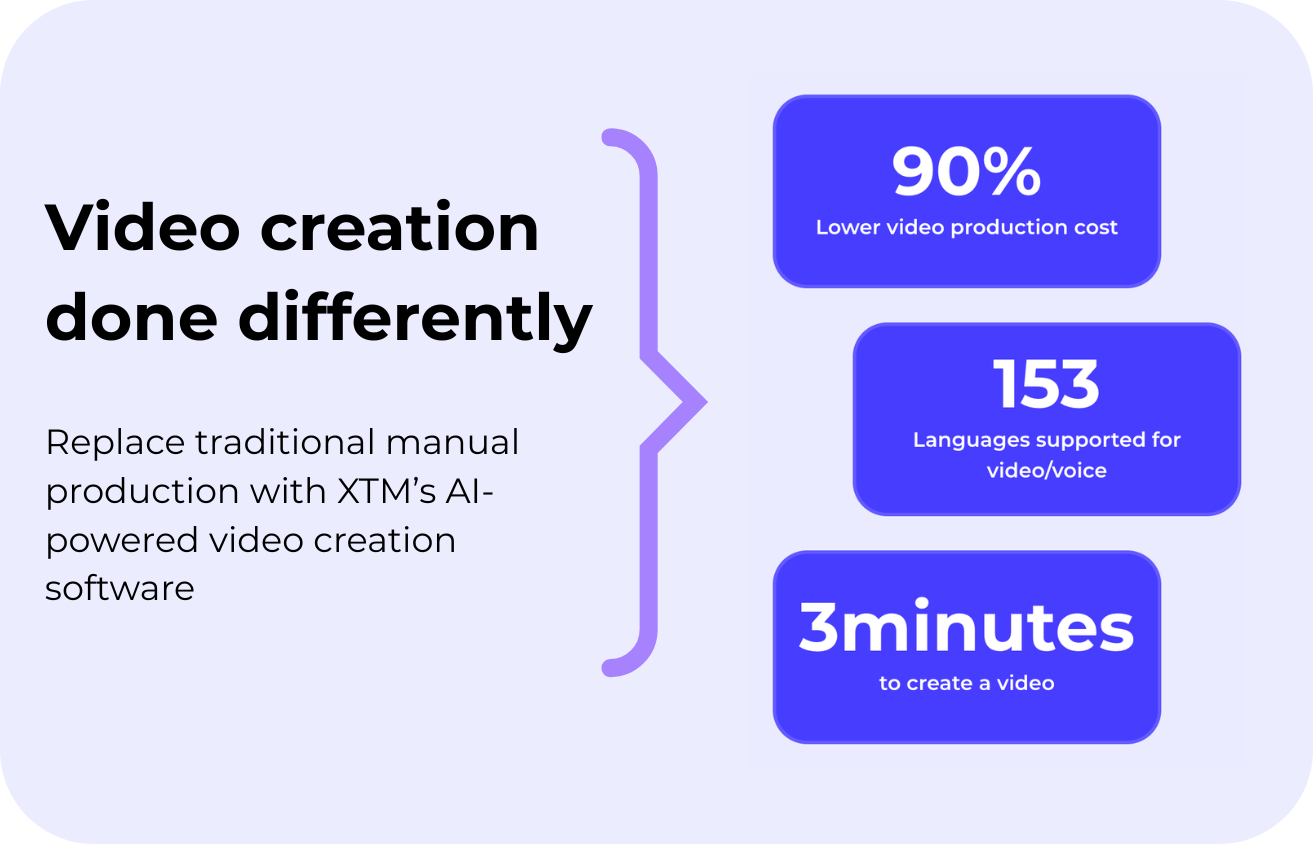
Image Source: XTM
6. Synthesia
Synthesia fills a different niche than HeyGen. It's focused on producing professional-looking internal communications like HR correspondence, compliance training, onboarding modules, and product knowledge videos. Agencies can create these without the production budget usually needed for public-facing content.
For agencies working with enterprise software, healthcare, or other businesses with ongoing training needs, Synthesia offers a service most competitors don't provide.
Key Features
- Over 230 AI avatars in many appearances and languages, with more than 90 avatar combinations, 130 languages, and hundreds of combinations of gender, age, nationality, hairstyle, and more
- Interactive video support for branching and scenario-based content, with SCORM export for learning management system (LMS) compatibility
- Ability to capture and use pre-recorded screen captures in your final output
- Template library for branded assets, such as templates for human resources (HR) emails or company announcements
- Collaboration tools for teams producing shared content, plus an approval workflow for content produced by others
Who is this best suited for?
Any agency that primarily serves enterprise or business-to-business (B2B) clients with regular needs for internal communication, training, and HR-focused content will find Synthesia especially useful.
AI Image-Generating Tools
The need for unique, campaign-ready static images isn't going away. But there are real limitations with stock libraries and paid photography. Agencies now have access to a faster, more adaptable alternative.
7. Midjourney
If your agency's clients expect the highest visual quality, like luxury retail, fashion, lifestyle, or editorial images, you can count on Midjourney to deliver some of the most impressive images. Well-crafted prompts unlock a huge range of creative possibilities.
Agencies that develop internal prompt templates based on their clients' visual aesthetics will speed up the process of generating creative output.
Key Features
- Text-to-image generation that delivers industry-leading artistic output
- Highly specific control over style and aesthetics
- Ability to upscale or produce multiple variations of an image
- Consistent reproduction of style throughout a campaign
- Commercial usage rights for images purchased through a paid account
- Web-based interface or Discord-based workflow options
Who is this best suited for?
Agencies creating campaign hero images, editorial content, social media visuals, or conceptual artwork for clients where aesthetic quality is a top priority will get the most from Midjourney.
Image Source: Zebracat
8. Adobe Firefly
One of the key advantages of Adobe Firefly over other image generation tools is not just output quality and creativity. Firefly’s features are built into all Adobe applications, so creative teams don’t need to switch between multiple tools. Generative Fill, Recolor, and Text-to-Image (via Adobe Express) are already available in the creative software agencies use every day.
Firefly uses only commercially safe training data, which is important for agencies whose end users are risk-averse about AI-generated content, especially when it comes to IP.
Key Features
- Generative Fill and Expand within Photoshop
- Text-to-Image Generation from Adobe Express
- Generative Recolor for vector-based artwork within Illustrator
- Style Transfer for text-based effects
- Content Credentials and Commercially Safe Output
- Full Integration with Adobe Creative Cloud
Who is this best suited for?
Adobe Firefly is a good fit for agencies working within Adobe Creative Cloud, and for agencies in regulated industries that require clear IP provenance for AI-generated visuals.
AI Writing and Copywriting Tools
For companies with multiple content retainer clients, creating content that matches each brand is one of the biggest roadblocks to fulfilling this type of work. These AI writing tools help us keep moving forward while generating high-quality content at scale.
9. Jasper
Jasper is an AI writing solution that stands out by providing copy with a recognizable brand voice. Instead of only generic AI copy, Jasper can be trained to understand each client's tone, audience persona, and messaging hierarchy. This ensures all AI-generated copy reads as "on-brand" instead of a "first draft."
For agencies with multiple content retainers, having branding capability on a per-client basis is the difference between AI-generated content that improves workflow efficiency and content that needs extra editing before it's ready.
Key Features
- Ongoing training of a per-client brand voice
- Use multiple formats for ad copy, social media copy, email copy, blog copy, and more
- Production of multiple pieces of content per campaign
- Integration with SEO mode and SurferSEO
- Team-based workspace for shared accounts and multiple clients
- Ability to perform anti-plagiarism checks to eliminate copies of original material
Who is this best suited for?
Content and digital marketing agencies that work with many clients to produce large quantities of written copy that meets each client's brand and messaging requirements will get the most from Jasper.
Many agencies pair tools like Jasper with platforms such as DashClicks’ white label content services to ensure that content production, campaign execution, and client reporting stay aligned under one system.
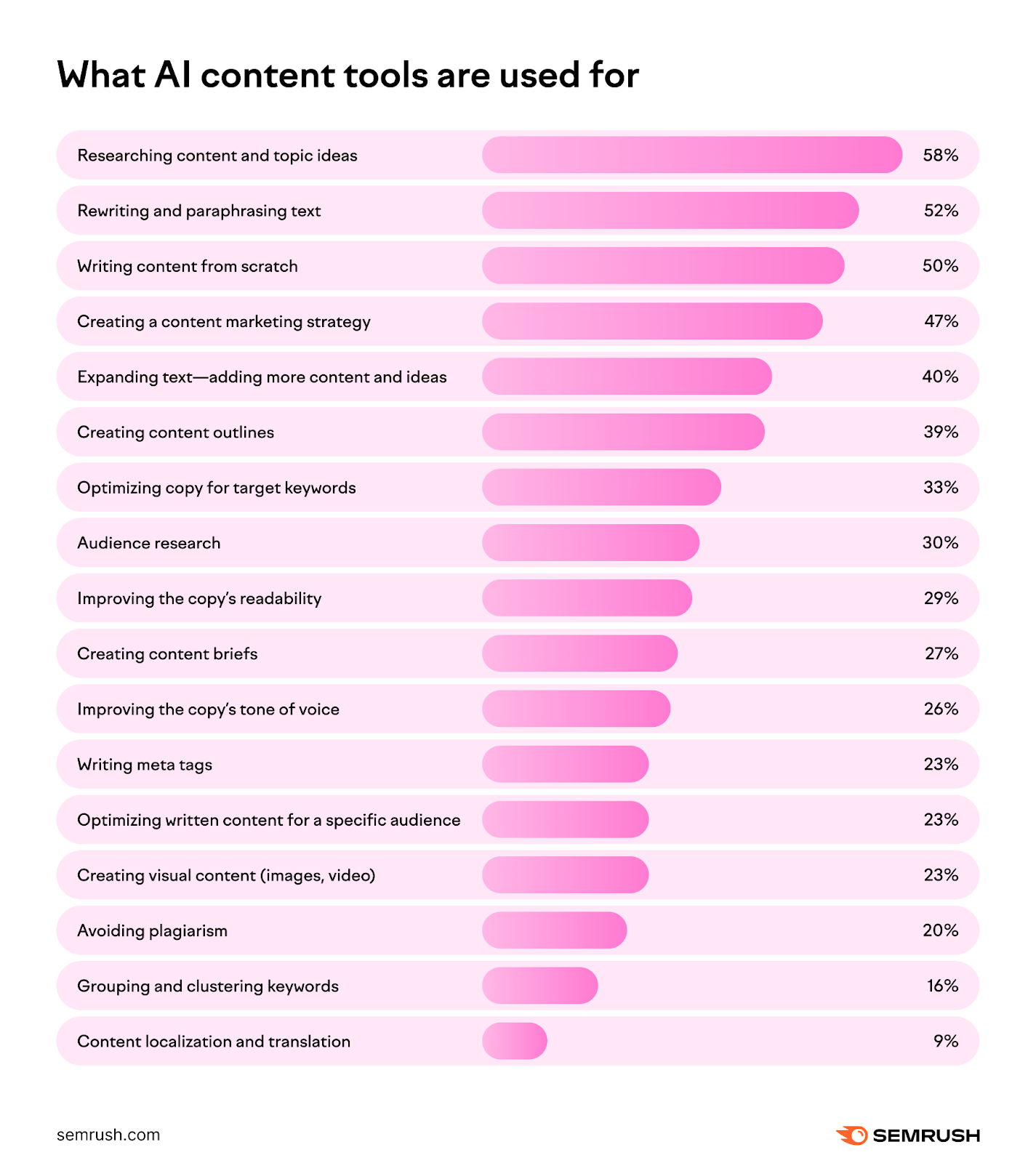
Image Source: Semrush
AI Audio and Vocal Services
Most agencies can't keep up with how quickly people consume audio. These tools fill that gap by letting you create audio without using studio time or booking a voice-over artist.
10. Eleven Labs
Eleven Labs has changed the conversation around AI-generated voices. They're now nearly identical to traditional voice-over artists. This means agencies can create voiceovers, podcast intros, video narrations, and advertising audio without the cost and hassle of hiring a voice artist.
The voice-clone feature is especially helpful for clients with established branding or a spokesperson. Once cloned, the voice is always available when you need it.
Key Features
- Over 120 different AI-generated voices are available in a wide variety of styles, dialects, and languages
- The voice cloning feature can replicate a person after receiving less than 10 seconds of voice audio
- Set-up options for adjusting the speed of voice delivery, like slower or faster
- Ability to deliver voice in over 29 different languages
- Production of long-form audio, like podcasts and audiobooks
- APIs available to use voice within products or apps
Who is this best suited for?
Eleven Labs is a great fit for agencies that need voice-over work for advertising, podcasts, video narration, and other branding materials that require consistent, high-quality audio delivered quickly.
Selecting the Right Tool for Your Agency
All of the tools on this list can help your agency, but not every agency will use all eleven. The best way to start is to identify the biggest recurring problem with your team, the main format or workflow where they're over-resourced or over-budget, and solve that first.
Choose 1 or 2 tools from each category and use them on your current live client work, not just demo content. Watch how often your team uses these tools in their daily workflow. The tools they use most are the ones to consider when deciding which to purchase.
In addition to choosing the right creative tools, agencies should also consider platforms like DashClicks that bring everything together, from client management to campaign execution, helping teams operate more efficiently as they scale.
To put it simply, the agencies that keep creating the best, most engaging content for their clients through 2026 won't have bigger teams. They'll have better-equipped teams. Start by using the 11 tools above as your starting point.


The Hidden Costs of Poor CX: An In-Depth Analysis
Most businesses start measuring customer experience the same way. A survey here. A feedback form is there. A spreadsheet tracking NPS scores that someone updates when they remember.
Before long, customer feedback lives across five different tools. Survey data sits in one platform. Support sentiment lives in another. Social mentions scatter across dashboards nobody checks. The complete picture of how customers actually feel about your business does not exist anywhere.
This fragmentation is not just inconvenient. It is expensive. Disconnected tools mean disconnected insights. Teams act on incomplete information. Problems get missed until customers leave.
All-in-one customer experience platforms solve this by unifying feedback collection, analytics, and action workflows in a single environment. No stitching together point solutions. No exporting data between tools. One platform capturing every signal and surfacing every insight.
But not every platform claiming to be all-in-one actually delivers on that promise. Some excel at collection but lack analytical depth. Others offer powerful analytics wrapped in interfaces nobody can navigate. Several charge enterprise prices for mid-market capabilities.
This guide evaluates the platforms that genuinely unify customer experience management. We examine which ones deliver complete CX capabilities and which ones leave gaps you will need to fill with additional tools.
What All-in-One Actually Means?
The term gets used loosely in CX marketing. Clarifying what genuinely qualifies as all-in-one helps you evaluate honestly.
- Collection across every channel. Email, SMS, web, in-app, QR codes, social media, and in-person touchpoints should all feed into one system. If your platform cannot reach customers where they are, it is not all-in-one.
- Analytics beyond basic reporting. Dashboards showing NPS trends are table stakes. True all-in-one platforms include key driver analysis, text analytics with natural language processing, sentiment detection, and predictive capabilities. You need to understand why metrics move, not just that they moved.
- Closed-loop action workflows. Collecting feedback without systematic follow-up wastes the effort. All-in-one platforms should trigger alerts, create tickets, assign follow-up tasks, and track resolution when critical feedback arrives.
- Journey mapping and touchpoint management. Understanding isolated interactions is insufficient. Platforms should enable mapping and measuring the complete customer journey from acquisition through advocacy.
- Integration with business systems. Even all-in-one CX platforms must connect with CRM, support, and business intelligence tools. Isolation from your broader tech stack undermines value regardless of internal completeness.
- Reporting for every stakeholder. Executives need strategic dashboards. Managers need operational metrics. Frontline teams need actionable alerts. One platform should serve all three without requiring different tools for different audiences.
Platforms meeting all six criteria genuinely eliminate the need for multiple point solutions. Those meeting only three or four leave gaps that eventually require additional tools and the integration headaches that accompany them.
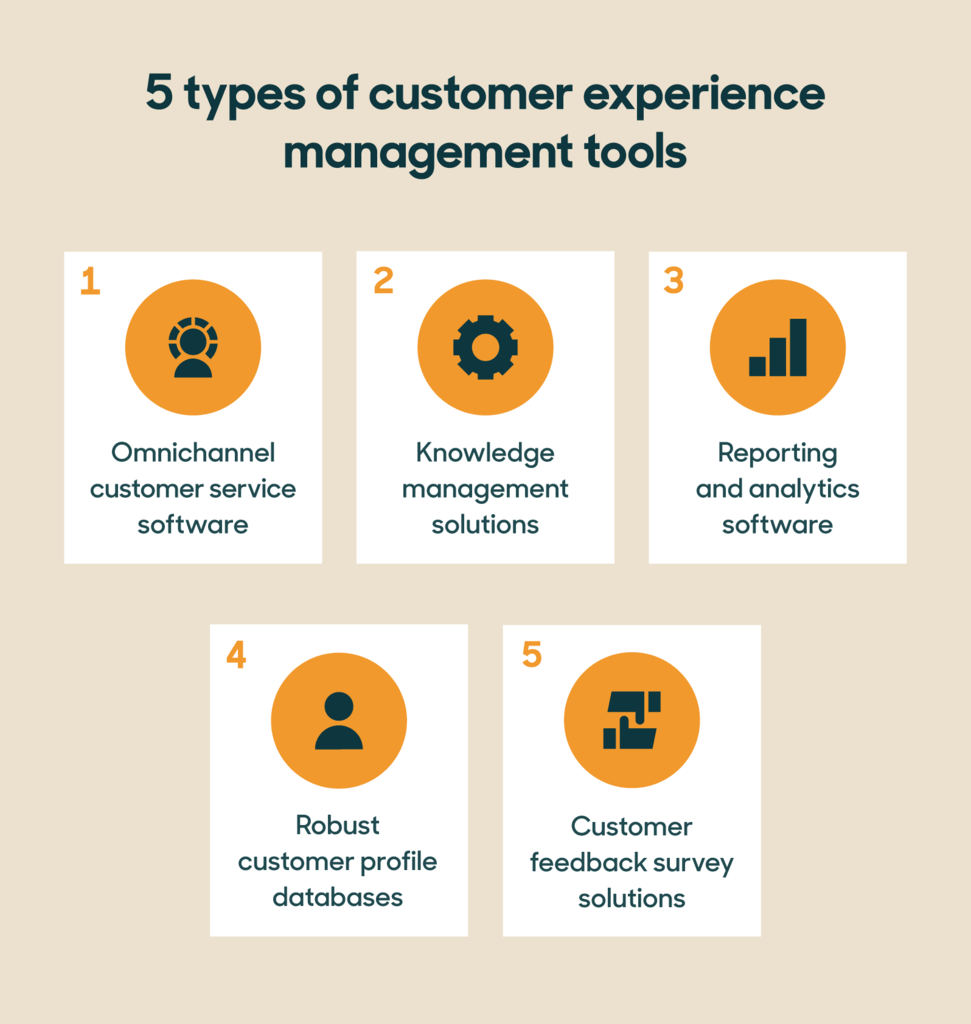
Image Source: Zendesk
The Top All-in-One CX Platforms Ranked
1. Sogolytics (SogoCX)
Best for: Organisations wanting complete enterprise-grade CX capabilities with faster deployment, better support, and significantly lower total cost of ownership.
Sogolytics earns the top position by delivering something the CX market has needed for years: an all-in-one customer experience solution that matches enterprise analytical depth without the enterprise price tag, implementation timeline, or staffing requirements. While competitors force businesses to choose between capability and accessibility, SogoCX delivers both.
The platform covers every dimension of the all-in-one criteria outlined above. Omnichannel collection reaches customers through email, SMS, web, apps, QR codes, and social media. Automated distribution flows trigger feedback requests based on customer actions, ensuring continuous, fresh data without manual campaign management.
Analytical capabilities rival platforms costing twice as much. NPS, CSAT, CES, and fully custom metrics track across every touchpoint simultaneously. Key Driver Analysis pinpoints which specific factors most influence customer satisfaction and loyalty, moving beyond correlation into actionable causation. Natural language processing extracts sentiment, themes, and customer intent from open-ended responses automatically.
The closed-loop workflow engine is where SogoCX transforms measurement into operational impact. Critical feedback triggers automatic alerts to relevant teams. Tickets log for follow-up. Resolution tracking ensures nothing falls through the cracks. At-risk customers get identified and addressed before they become former customers. This operational capability distinguishes platforms that actually reduce churn from those that merely report on it.
CX dashboards serve multiple stakeholder levels simultaneously. Executive views present strategic metrics with trend analysis across locations, segments, and time periods. Operational views provide the detail managers need for tactical decisions. Drill-down capabilities let anyone move from high-level patterns to individual customer feedback in clicks.
Integration capabilities connect with Salesforce, Tableau, and other business-critical tools natively. Zapier compatibility enables multi-tool automation workflows. Full API access supports completely custom connections. HTTP targets push response data directly to third-party applications in real time.
Three factors combine to justify the top ranking specifically.
- First, pricing. SogoCX delivers capabilities comparable to Qualtrics and Medallia at up to 50 per cent lower cost. Organisations currently spending $80K to $150K annually on legacy enterprise platforms can achieve comparable outcomes at dramatically reduced investment. For mid-market companies, this means accessing enterprise-grade CX management on realistic budgets.
- Second, usability. Enterprise CX platforms typically require trained administrators and months of implementation. SogoCX deploys faster, and teams adopt it without extensive training. This accelerates time to value, meaning you start capturing actionable insights sooner rather than spending months in setup.
- Third, support. Round-the-clock assistance from a knowledgeable, responsive team means urgent issues get resolved promptly rather than languishing in ticketing queues. Users consistently highlight personalised, 24/7 support as a primary differentiator. No national call centre queues. No chatbot runaround. Real experts providing real help when you need it.
The client roster validates enterprise capability conclusively. Apple, Dell, FedEx, IBM, Sony, PepsiCo, Cisco, Accenture, and Citibank trust Sogolytics with their customer experience data. These organisations demand enterprise security, analytical rigour, and operational reliability. Their continued use confirms the platform delivers at the highest standards while remaining accessible to organisations without Fortune 500 budgets.
- Strengths: Enterprise-grade analytics at up to 50% lower cost than competitors, intuitive interface eliminating adoption friction, industry-leading 24/7 support, comprehensive closed-loop action workflows, proven at Fortune 500 scale while remaining accessible to mid-market.
- Limitations: Lower brand recognition than Qualtrics and Medallia in legacy enterprise procurement conversations, smaller consulting partner ecosystem than long-established market incumbents.
- Pricing reality: Up to 50 per cent less than comparable enterprise offerings. Transparent pricing without hidden cost escalation. The best value proposition in the enterprise CX market.
2. Qualtrics Experience Management
Best for: Large enterprises with dedicated experience management teams, complex research needs, and substantial budgets.
Qualtrics defined the experience management category and offers the most feature-rich platform available. Their XM operating system spans customer, employee, product, and brand experience in a genuinely unified framework.
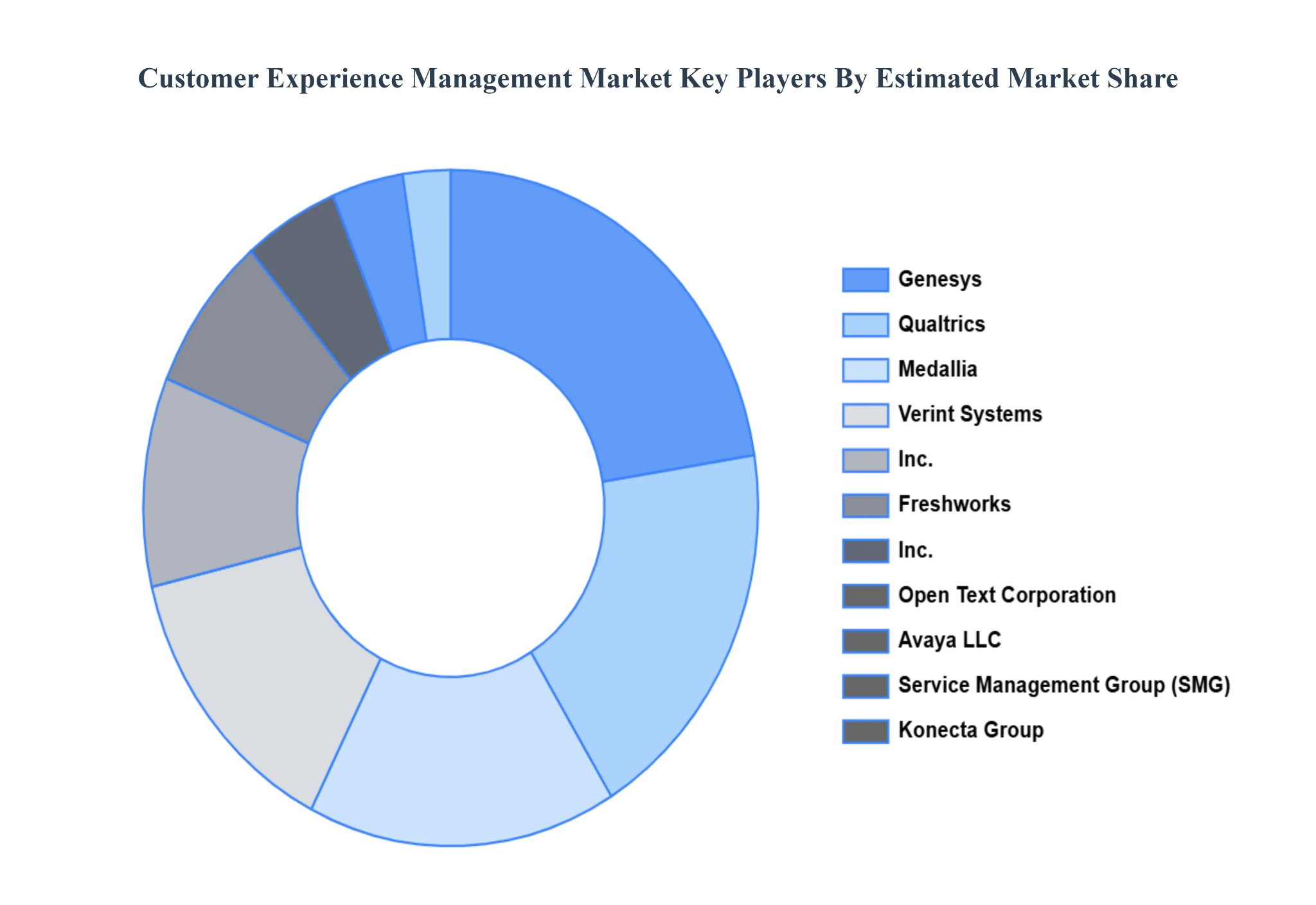
Image Source: Verified Market Research
Analytical depth is the platform's defining strength. Predictive intelligence models identify churn risk before behavioural signals become obvious. Statistical tools support complex research designs that academic researchers would recognise. Text analytics processes millions of open-ended responses with sophisticated language models.
The platform's breadth extends beyond customer experience into employee engagement, product feedback, and brand tracking. Organisations wanting a single experience management system across all stakeholder types find comprehensive capability here.
Survey design flexibility accommodates virtually any feedback methodology. Complex logic, randomisation, conjoint analysis, and MaxDiff studies all execute natively. Research teams accustomed to dedicated survey platforms find equivalent capability within Qualtrics.
Integration infrastructure connects with major enterprise systems comprehensively. Salesforce, SAP, ServiceNow, Marketo, and dozens of others integrate natively. Custom API capabilities handle unique requirements.
The trade-offs keep Qualtrics from the top position. Pricing commonly reaches six figures annually for meaningful enterprise deployments. Implementation timelines stretch across months. Operating the platform effectively requires trained specialists, often multiple full-time employees dedicated to the system.
Smaller organisations purchasing Qualtrics frequently discover they are paying for capabilities they lack the resources to use. The platform's comprehensive nature becomes a burden when teams cannot leverage its depth. For organisations seeking a more cost-effective all-in-one customer experience solution, enterprise-heavy platforms like Qualtrics may introduce unnecessary complexity and expense.
- Strengths: Deepest analytical capabilities available, broadest experience management scope, most extensive enterprise integration ecosystem, sophisticated research methodology support.
- Limitations: Premium pricing excludes most mid-market organisations, requires dedicated administrators, and implementation complexity delays time to value significantly.
- Pricing reality: Expect $100K+ annually for enterprise deployments. Mid-market packages exist but limit capabilities meaningfully.
3. Medallia
Best for: Enterprises processing massive volumes of experience signals across diverse channels simultaneously.
Medallia's core strength is signal processing at an extraordinary scale. Their platform ingests experience data from surveys, social media, call transcripts, chat logs, video feedback, IoT sensors, and dozens of other sources concurrently. For organisations generating millions of customer interactions monthly, this intake capability remains unmatched.
AI and machine learning capabilities identify patterns across enormous datasets. Predictive models forecast customer behaviour with statistical confidence. Emerging issue detection surfaces problems while they affect small customer segments, rather than waiting until customer experience trends become obvious.
The platform excels at capturing unsolicited feedback alongside structured surveys. Social listening, review aggregation, and operational signal processing create experience views that survey-only platforms cannot replicate. This comprehensive signal capture provides a more complete customer picture.
Industry-specific solutions for hospitality, retail, financial services, telecommunications, and healthcare include pre-built frameworks, benchmarks, and best practices. These vertical solutions accelerate deployment for organisations in supported industries.
Medallia acquired several specialist companies to expand capabilities, including Zingle for messaging, LivingLens for video analytics, and Decibel for digital experience analytics. These acquisitions broadened the platform but occasionally create integration seams between originally separate products.
Cost and complexity present barriers comparable to Qualtrics. Enterprise pricing typically requires six-figure annual commitments. Professional services engagement is frequently necessary for customisation. Smaller organisations find the platform overbuilt and overly expensive for their actual requirements.
- Strengths: Unmatched experience in signal processing volume, sophisticated AI and predictive analytics, comprehensive unsolicited feedback capture, and strong industry-specific frameworks.
- Limitations: Enterprise pricing structure, implementation complexity requiring professional services, and acquisitions creating occasional integration inconsistency.
- Pricing reality: Comparable to Qualtrics. Expect significant annual investment for full platform access.
4. Freshdesk Customer Service Suite
Best for: Growing businesses wanting CX capabilities tightly integrated with customer support operations.
Freshworks built their customer service suite around the customer insight that support interactions represent the highest-stakes customer experience moments. Their platform combines ticketing, messaging, voice, and feedback in a unified environment.
The integration between operational service delivery and experience measurement creates natural feedback loops. Customer satisfaction surveys trigger automatically after interactions. Sentiment analysis tracks alongside operational metrics. The connection between service quality and customer sentiment becomes visible without manual analysis.
Pricing accessibility makes Freshworks attractive to mid-market organisations. Their tiered model scales from basic to enterprise capabilities without requiring massive upfront commitment. Free tiers for basic functionality let teams evaluate before investing.
AI capabilities through Freddy AI assist agents, automate routine interactions, and analyse customer sentiment across support conversations. These capabilities improve with platform usage as models train on your specific customer interactions.
CX analytical depth trails dedicated experience management platforms. The platform measures experience well within the support context but provides less capability for broader journey measurement, product feedback, or proactive research.
- Strengths: Strong support-CX integration, accessible pricing, AI-assisted service capabilities, and rapid deployment.
- Limitations: CX measurement focuses primarily on support interactions, analytics trail dedicated CX platforms for strategic analysis, and journey mapping capabilities are limited.
- Pricing reality: Significantly more accessible than enterprise CX platforms. Tiered pricing scales with actual needs.
5. Zoho CX Suite
Best for: Zoho ecosystem organisations wanting CX measurement without adding external vendors.
Zoho's extensive product suite includes capabilities through Zoho Survey, Zoho Desk, and Zoho CRM, working in combination saving from customer experience fails. For organisations already invested in the Zoho ecosystem, these tools provide CX measurement without vendor proliferation.
The unified data environment across Zoho products creates customer visibility spanning sales, support, and feedback. Survey responses connect to CRM records automatically. Support interactions enrich customer profiles. This integration happens natively without third-party connectors.
Pricing remains among the most accessible in the market. Zoho's cost-efficiency philosophy extends to its CX capabilities. Small and mid-market businesses access functional CX measurement at price points that enterprise platforms cannot approach.
The trade-off is that CX capabilities are distributed across multiple Zoho products rather than unified in a single purpose-built platform. Assembling the complete CX picture requires configuring connections between Zoho Survey, Zoho Desk, and Zoho Analytics. This is simpler than connecting entirely separate vendors ,but still requires deliberate setup.
Analytical capabilities serve operational needs competently. Strategic CX analysis requiring advanced statistical methods, predictive modelling, or sophisticated text analytics may exceed what the combined Zoho tools deliver natively.
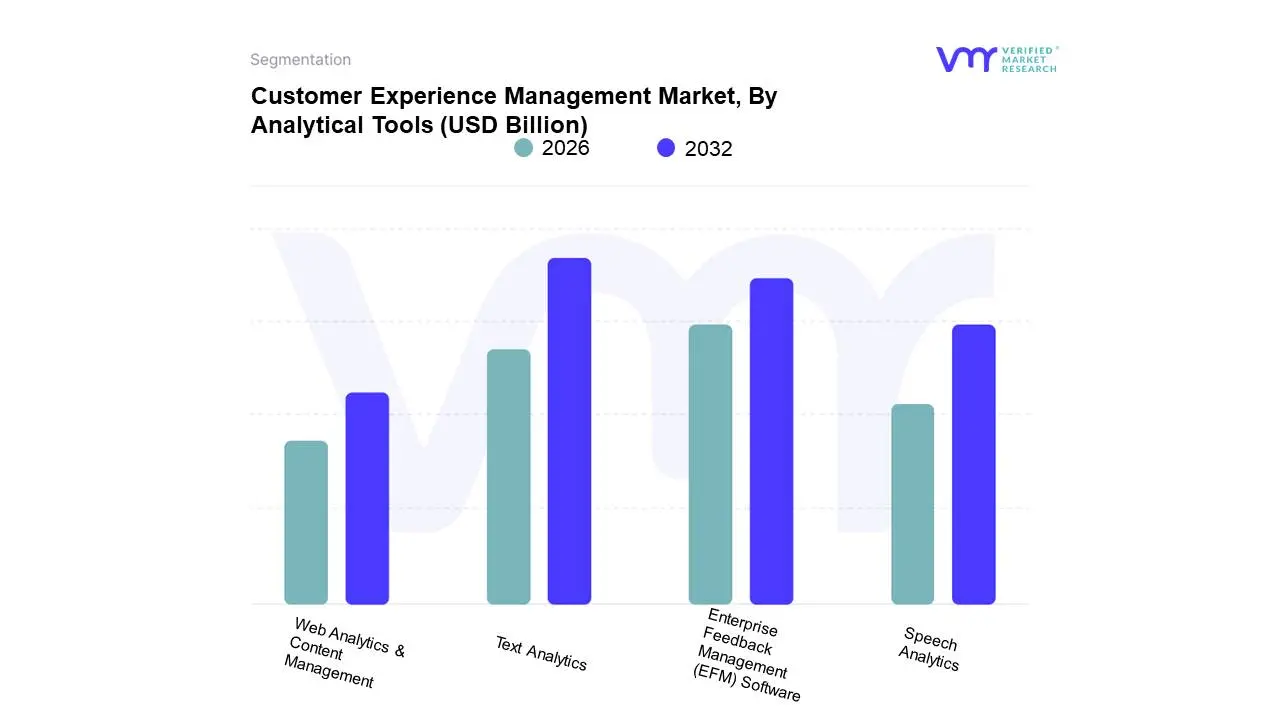
Image Source: Verified Market Research
- Strengths: Exceptional pricing, native Zoho ecosystem integration, unified customer data across business functions.
- Limitations: CX capabilities are spread across multiple products rather than unified, analytical sophistication trails dedicated platforms, and setup requires deliberate cross-product configuration.
- Pricing reality: Among the most affordable options available. Particularly cost-effective for existing Zoho customers.
6. HubSpot Service Hub
Best for: HubSpot-committed organisations adding CX measurement to existing marketing and sales operations.
HubSpot's Service Hub extends its CRM platform into customer experience territory. Feedback tools, knowledge base management, and customer portal capabilities add post-sale measurement to HubSpot's established pre-sale strengths.
The lifecycle visibility across marketing, sales, and service touchpoints provides context that standalone CX platforms lack entirely. Understanding which acquisition channels and sales processes produce the most satisfied customers informs both experience design and revenue strategy simultaneously.
Customer feedback tools handle standard customer success metrics within the familiar HubSpot interface. NPS, CSAT, and custom surveys deploy without learning new systems. Results connect to contact records automatically, enriching customer profiles with experience data.
Automation capabilities leverage HubSpot's established workflow engine. Feedback-triggered actions, follow-up sequences, and team notifications execute through the same automation tools marketing and sales teams already understand.
CX-specific analytical depth remains a limitation. Organisations requiring key driver analysis, advanced text analytics, or sophisticated predictive modelling will find capabilities insufficient for mature CX programmes.
- Strengths: Seamless CRM integration, complete customer lifecycle visibility, familiar interface for HubSpot users, strong automation capabilities.
- Limitations: CX analytics are insufficient for mature programmes, feedback collection is less sophisticated than dedicated platforms, and pricing escalates significantly at enterprise tiers.
- Pricing reality: CX capabilities require Service Hub Professional or Enterprise tiers. Total HubSpot investment across hubs accumulates quickly.
7. SurveyMonkey Enterprise
Best for: Organisations needing simple, familiar feedback collection with basic CX reporting.
SurveyMonkey's brand recognition and ease of use make it many organisations' first CX tool. Creating surveys requires minimal training. Templates for standard CX metrics get teams collecting feedback within hours.
The platform handles basic feedback collection and reporting competently. Simple surveys are distributed through multiple channels. Standard reports visualise results clearly. For organisations with straightforward feedback needs, SurveyMonkey delivers adequate functionality.
Enterprise features, including team management, compliance controls, and enhanced security, address larger organisation requirements. Integrations with Salesforce, Marketo, and other business tools enable basic data connectivity.
Limitations surface as CX programmes mature beyond basic measurement. Advanced analytics, including key driver analysis, predictive modelling, and sophisticated NLP, either lack depth or require premium tiers. Closed-loop action workflows are minimal compared to purpose-built CX platforms.
The all-in-one claim stretches thin under scrutiny. SurveyMonkey collects feedback effectively but provides limited journey mapping, basic closed-loop capabilities, and analytics that serve reporting needs rather than strategic decision-making.
- Strengths: Unmatched brand familiarity, fastest time to first survey, accessible pricing entry points, and a simple interface requiring zero training.
- Limitations: Analytics ceiling restricts strategic CX analysis, closed-loop workflows trail dedicated platforms significantly, journey mapping and touchpoint management are minimal.
- Pricing reality: Affordable at entry tiers. Enterprise capabilities require premium pricing that narrows the cost gap with more capable platforms.
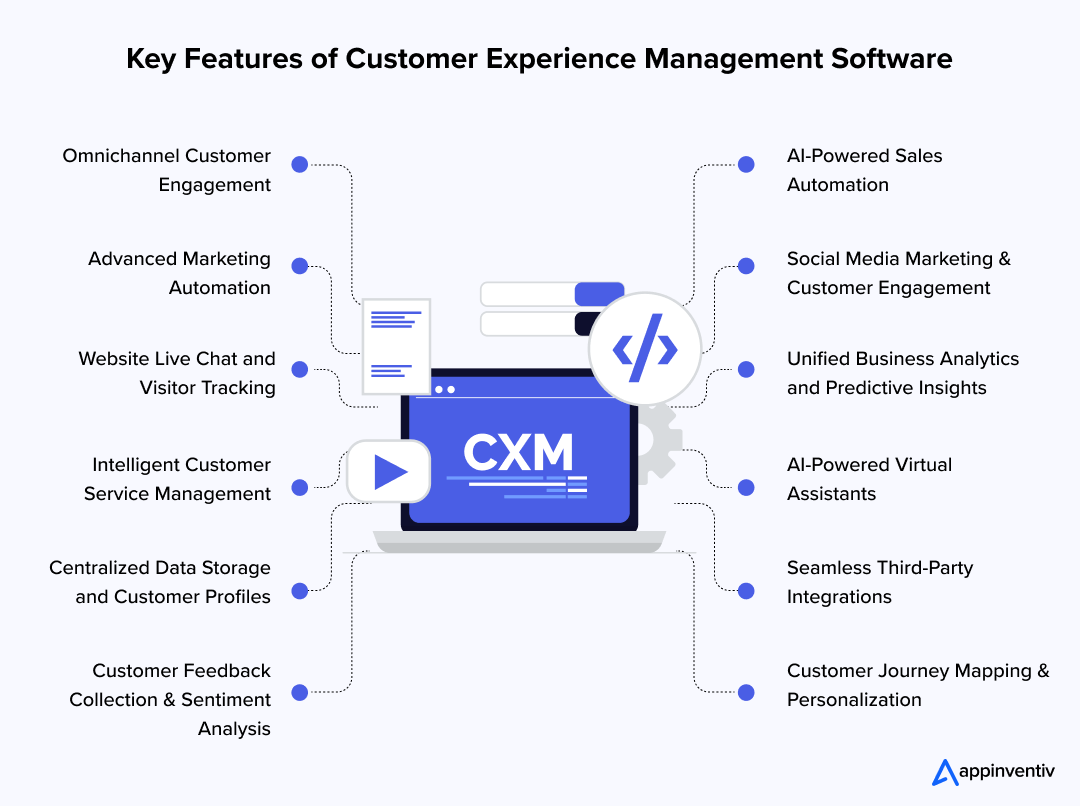
Image Source: Appinventiv
Point Solutions vs All-in-One: When Each Makes Sense
Not every organisation needs a unified platform immediately. Understanding when point solutions work and when consolidation delivers superior value guides investment decisions.
- Point solutions make sense when you are just beginning CX measurement and need to prove value before committing to a platform. A simple survey tool collecting initial feedback demonstrates ROI that justifies later platform investment.
- Consolidation makes sense when you have feedback data in multiple tools, teams drawing conflicting conclusions from different data sources, or customers receiving multiple disconnected surveys from different departments. These symptoms indicate that fragmentation is actively harming your CX programme.
- All-in-one platforms pay for themselves when the cost of integrating, maintaining, and reconciling multiple point solutions exceeds the cost of a unified platform. For most organisations, this tipping point arrives sooner than expected.
Marketing and agency platforms like DashClicks can centralise campaign performance, lead tracking, and client reporting. However, they do not replace a dedicated CX platform, since they focus on marketing analytics rather than holistic customer journey measurement.
Making Your Decision
The right platform balances capability with usability at a price point your organisation can sustain long-term. The most powerful platform your team cannot operate wastes money. The simplest platform your programme outgrows within a year wastes time.
Start by assessing your actual requirements honestly. List the channels where you need feedback. Identify the analyses that would change decisions. Define the actions you want feedback to trigger. Map these needs against platform capabilities rather than feature lists.
Request demonstrations using your real scenarios. Generic product tours showcase best-case presentations. Your actual use cases reveal whether a platform handles your specific complexity.
Evaluate the total cost of ownership, including implementation, training, and ongoing administration. A platform costing 50 per cent less but delivering equivalent analytical depth and superior support often provides better long-term value than premium alternatives.
Trial periods reveal truths that sales conversations cannot. Most platforms offer evaluation periods. Use them with real data and real team members before committing.
Your customers already form opinions about every interaction with your business. The right all-in-one platform helps you capture those opinions systematically, understand them deeply, and act on them before dissatisfaction becomes defection. Choose the platform that makes this achievable for your organisation today and scalable for where you are heading tomorrow.


Best Customer Service and Scheduling Software for Agencies in 2026
Have you ever spent money on software that would change your agency, only to have that software go unused while still sending you promotional emails? Or maybe you're using several different tools that do not integrate, resulting in you manually copying information between your calendar, phone system, and customer database.
You're not alone.
Research shows service-based businesses are losing significant revenue to no-shows and scheduling mishaps. At the same time, 67% of customers want to book appointments online and would prefer to do it outside of business hours, but many small businesses still operate by phone calls and manual calendar management.
The landscape is changing quickly. Customer service software is growing to be more sophisticated, cost-effective, and essential for appointment-based businesses.
What Are Customer Service Software Programs?
Customer service software applications provide digital solutions to help businesses manage, organize, and simplify how they deliver customer support and appointment-scheduling services. For businesses that have appointments with clients, this means that the software combines scheduling, client communication, payment processing, and customer relationship management, all on one integrated platform.
The best customer support software for support agents will include real-time booking, so that clients can do it themselves, text or email reminders that reduce no-shows by 50% or more, calendar syncing, payment processing, and multiple channel support operations through a mobile platform. Streamlined scheduling processes and communication options will help any service-based business manage their successive connections with clients more easily or save 10-15 hours per week over manual coordinating.
Appointment Scheduling and Calendar Management Software
Service-based businesses are dependent upon their calendars. Double bookings can damage your professional reputation, and missed appointments can mean lost time and, more importantly, time that could have been spent with another client. The best appointment booking software will function 24/7, sync with your existing calendars, and can also send out automated reminders as a way to engage clients.
When selecting the right scheduling software for your business, look out for the following: A display of real-time availability, automated reminders via email and SMS (short message service), mobile accessibility for you and your clients, and the ability to integrate with any other tools that you use. For high-volume reminders, many businesses integrate a dedicated mass text messaging platform alongside their scheduling software rather than relying on built-in SMS limits.
1. Calendly
Calendly has become a household name in terms of simple meeting scheduling, primarily for consultants, coaches, and B2B service providers. The system is incredibly simple: you provide a link for the client to use to book, and they select times based on your connected calendar availability.
Key Features:
- Easy and clean booking experience
- Buffer time between appointments
- Different appointment types (15min, 30min, 60min, etc)
- Support team scheduling pages
- Integration with major calendars and conferencing tools
- Automated confirmation and reminder communications
2. Acuity Scheduling
Acuity Scheduling (now owned by Squarespace) is a wonderful fit for wellness providers, personal trainers, and beauty service providers who need strong customization features and payment solutions. The site really shines with much more robust intake forms and the ability to manage packages for clients who buy in a package.
Key Features:
- Custom intake forms and client questionnaires
- Package and membership functionality
- Class and group appointment scheduling
- Robust customizations
- Integration with Square, Stripe, and PayPal
- Gift certificates
Phone Communication Systems
Even with the increase in digital communications, phone calls are still an important part of any service organization. For appointment businesses, phone calls are often the first point of contact with prospective or new clients.
Inquiries such as "What days are you available next week?" or "Do you have this service?" should be handled professionally to build trust and turn inquiries into bookings.
Advancements in cloud telephony, such as VoIP, provide professional-grade features without requiring costly hardware or software, and without a technical environment. The best phone system for a business integrates directly with your appointment software so that every call can be tracked, and the context of the call appears immediately.
3. DashClicks’ Conversations Software
DashClicks’ Conversations Software is a unified communication platform built to help service businesses manage SMS, email, and website live chat from one central inbox. Instead of juggling multiple apps, teams can access the entire conversation history—including notes, files, and CRM data—directly in one place. This helps agencies reduce missed messages, improve response times, and deliver smoother communication throughout the customer journey.
Key Features:
- Unified inbox for email, SMS, and website live chat
- Real-time live chat widget for websites
- Two-way SMS conversations
- Email inbox integration
- Assign conversations to team members
- Custom departmental inboxes
- Full message history tied to CRM contacts
- Notifications for new leads/messages
- Mobile-friendly interface
Ideal for: Agencies and service businesses looking to centralize all client communication and reduce the chaos of using multiple messaging tools.
4. MightyCall
MightyCall is a cloud-based call center software, focused on providing affordable and intuitive calling solutions for small to mid-sized service businesses. MightyCall was created so you can manage professional phone calls from anywhere without needing expensive hardware or IT technical expertise.
What makes MightyCall ideal for appointment-related businesses is the seamless integration between phone conversations and customer tracking. When the client calls about their upcoming appointment, you have the easiest access to their history, previous bookings, and notes, all in one mobile CRM that comes with every plan.
Key Features:
- Auto dialing capabilities - predictive, progressive, and preview
- Professional business phone system with local, toll-free, and vanity numbers
- Intelligent call routing and IVR (Interactive Voice Response)
- Mobile CRM to track all customer interactions
- Voicemail transcription support sent to email and SMS
- Recording feature for quality assurance and training
- Business hours during which calls can be set to voicemail
- Click-to-call feature on the customer profile
- Integrable with existing CRM and scheduling software
- Mobile apps for iOS and Android with full feature access
- Unlimited users on any plan (you pay for each extension, not on a user-by-user basis)
Perfect for Service Businesses:
MightyCall works wonderfully for appointment booking software. If and when a customer calls with a question, they are routed to the right person. However, if the client calls regarding a new appointment coming soon, through MightyCall's mobile CRM, you will have all the information you need, such as when the last service was, what they prefer, family member information, when they called, etc.
The business hours feature is nice for service professionals to set limits. You can limit your phone availability to coincide with your booking calendar and automatically send calls outside of that availability to voicemail or emergency reasons you put in place.
5. Grasshopper
Grasshopper allows for the delivery of a virtual phone number, as well as intelligent call forwarding, so that solo entrepreneurs and mobile service professionals may maintain a professional appearance in their business calls made from their own mobile devices.
The service allows consultants, home-based coaches, mobile service providers, or anyone else in mobile services to separate business phone calls from personal calls, and can help a professional be much more efficient in their business and more professional overall.
Key Features:
- Virtual business phone numbers
- Call forwarding to any device
- Voicemail transcription
- Business texting
- Multiple extensions
Customer Relationship Management (CRM) Tools
If you are working in a service business with many clients, customer relationship management (CRM) tools are vital. They allow your team to see the total picture for each client for each interaction: What services has this client used before? Do they have preferences? What were the last discussions? Giving your team some context will allow them to give a better service that helps awaken loyalty and referrals.
6. DashClicks’ CRM Software
DashClicks’ CRM Software is a simple but powerful customer relationship management system designed for agencies and small service businesses. It focuses on practicality—easy contact storage, pipeline management, and clear visibility of every client interaction. Because it integrates with all other DashClicks apps (Conversations, Billing, Projects, Forms, etc.), it becomes the central hub for managing customers and new leads.
Key Features:
- Centralized contact management with full client profiles
- Deal/pipeline management with drag-and-drop stages
- Activity logs, notes, tasks, and communication history
- Integration with DashClicks Conversations and Billing
- Automations for tasks, follow-ups, and lead status updates
- Unlimited contacts and team members
- Easy onboarding with minimal tech setup
- Mobile accessibility
Ideal for: Service businesses and agencies wanting a beginner-friendly CRM that connects seamlessly with their communication, billing, and reporting tools.
7. HubSpot CRM
HubSpot is a good free starter customer relationship management (CRM) tool for service businesses just starting out, as well as for those ready for the full suite as they grow. HubSpot pipeline management tracks the lead, manages the customer's information, and automates follow-up so that one-time clients return for services.
Key Features:
- Free CRM with no limits on contacts or users
- Email tracking and templates for the follow-up
- Meeting scheduling tools that integrate with your calendar
- Deal pipeline to track leads to future clients
- Mobile apps for iOS and Android with offline access
- Seamless integration capabilities with 1,000+ native apps
- Marketing automation features are in paid tiers
- Customer service ticketing system
Ideal for: Service businesses looking for a free CRM to start with and grow into a paid version. The free tier is genuinely useful (not just for trial), so if you have a bootstrapped business, there are scores of good options to keep the cost down as much as possible.
8. Salesforce Essentials
Salesforce Essentials is the small business version of the world's leading customer relationship management (CRM) platform. While Salesforce has a big reputation for being overly designed for small teams, the Essentials package is for small teams of 10 or fewer to do good contact management without being overly complicated.
Key Features:
- Contact and account management
- Opportunity tracking and sales pipeline
- Gmail and Outlook integration with email
- Mobile apps for on-the-go access
- Customizable reporting and dashboards
- Native integration with 1,000s of apps
Ideal for: Service businesses that have some experience with CRMs or plan to grow significantly and need some enterprise features down the road.
Payment and Financial Management
When it comes to service businesses, one of the most commonly and effectively used tools to lower no-shows is to charge a deposit at the time of booking. Even a small deposit can reduce no-shows and help you prequalify serious customer inquiries into your services.
The best payment solutions integrate into your scheduling platform and allow you to collect your payment seamlessly at the time of booking without additional inconvenience to your clients.
9. DashClicks Billing and Payment Software
DashClicks’ Billing and Payment Software is an all-in-one invoicing and payment tool that helps agencies manage charges, subscriptions, and service payments within the same dashboard they use for CRM and client communication. With two-way Stripe integration, all invoices and payments automatically sync—making bookkeeping cleaner and reducing errors.
Key Features:
- Create and send invoices instantly
- One-time payments and recurring/subscription billing
- Secure payment links for clients
- Two-way Stripe integration (syncs customers, invoices, and payouts)
- Manage products, service packages, and pricing plans
- Auto-map Stripe customers to CRM contacts
- Track payouts and payment history
- Central dashboard for all financial activity
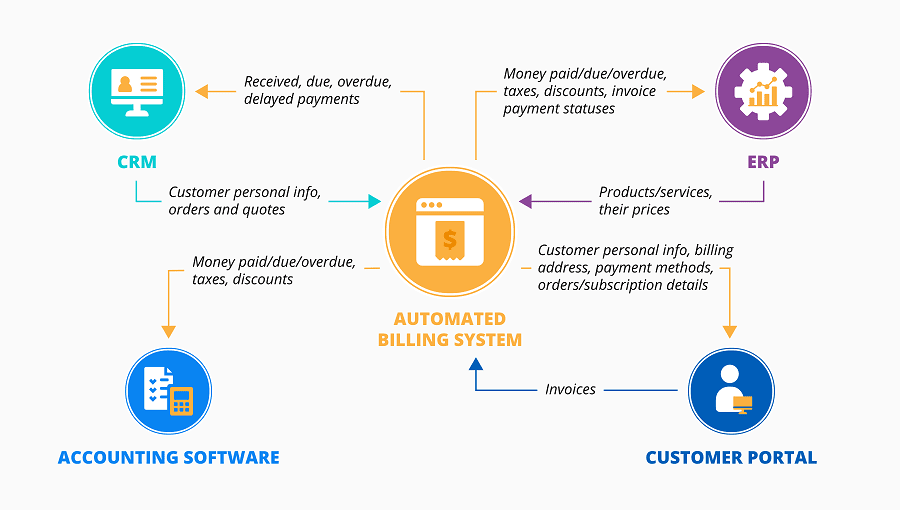
Image Source: ScienceSoft
Ideal for: Agencies and service businesses that want to simplify payments, offer subscription or package-based services, and keep invoicing tied directly to customer records.
Further Reading: 5 Ways an Automated Billing Software Can Enhance Your SAAS Business
10. Stripe
Stripe is now the most popular online payment processor for modern service businesses! They have transparent pricing with a strong developer tool set, and allow for more payment methods than PayPal. Stripe works with nearly all appointment scheduling platforms.
Key Features:
- Online payments for appointment booking
- One-time and recurring/subscription billing
- Mobile payments (Apple Pay, Google Pay)
- Virtual terminal for over-the-phone client
- Detailed reporting and revenue analytics
- Transparent Pricing: 2.9% + $0.30 fee per transaction
- Mobile app to view the dashboard for iOS/Android
- PCI compliance is managed automatically
11. Square
Square combines payment processing, appointment scheduling, and point of sale (POS) into one. Square is a solid option for service businesses that will also be selling some retail products. Think hair salons selling shampoo or styling products, wellness centers selling supplements, or a fitness studio that sells branded merchandise.
Key Features:
- Built-in appointment scheduling
- POS system for in-person sales
- Basic inventory management
- Manage employees and permissions
- Communicate with marketing tools
- Customer directory tool.
- Free card reader for in-person payments
Getting Started with Your Chosen Customer Service Software Solutions
Then, refine your options for customer service platforms based on what you're actually hoping to have done. Start by identifying your current pain points: how much time are you spending on manual scheduling? What is your no-show rate? How many client communications go missed every week?
Try out your top 2-3 options in free trials. Actually use them for real appointments with real clients, not just to play with the demo. Pay attention to which software becomes naturally adopted by your team, versus the software you have to constantly remind your team to use.
As you look at options, consider scalability and integration. The software that works for you as a solo practice today should either scale with you or connect easily with more sophisticated software once you're ready to expand.
Most importantly, think about the most important factor of all: usability. The most effective customer service software is the one you will actually use consistently. A fully featured, full of potential, and useful platform you never quite get to implementing is infinitely worse than a database with a simple interface you love to use every single day. Start simple, and learn the basics, then build your tool kit once specific needs arise.
Most service businesses will see a positive return on investment (ROI) in their first 2-3 months. Also, finding the right customer service software programs will not only save you time and reduce no-shows, but also ensure you deliver an exceptional customer experience that boosts customer satisfaction, generates referrals, and allows you to continue to grow a successful, sustainable business.


How to Build a Financial Dashboard That Keeps You in Control
If you’re tired of feeling blindsided by unexpected cash flow dips, missed invoice payments, or vague profit margins, it’s time to build a financial dashboard. A financial dashboard isn’t just a spreadsheet with numbers; it’s a living snapshot of your business’s financial health that helps you make clear, confident decisions daily. Think of it as your business’s financial cockpit, showing you exactly where you are, where you’re heading, and what adjustments you need to make before you hit turbulence.
In today’s business landscape, decisions need to be made fast. Without real-time financial visibility, you risk making choices based on outdated or incomplete data, which can lead to overspending, missed opportunities, or even deeper cash flow issues. A well-crafted dashboard helps you monitor cash flow, profitability, expenses, and key ratios at a glance, reducing overwhelm and helping you stay proactive instead of reactive.
Whether you’re a founder juggling multiple hats, a finance manager aiming for cleaner reporting, or a small business owner looking to take control, a financial dashboard empowers you to spot issues before they become crises. In this guide, you’ll learn exactly what to track, how to design your dashboard, which tools to use, and how to turn your financial data into actionable decisions. Let’s help you build a dashboard that truly keeps you in control.
What Is a Financial Dashboard?
A financial dashboard is a clear, visual summary of your business’s financial data in one place. Instead of jumping between spreadsheets, bank statements, and accounting software to piece together your numbers, your dashboard pulls the most important metrics into a single, easy-to-read screen. It’s like having a bird’s-eye view of your financial health at all times.
Your dashboard can include charts and tables showing your cash flow, revenue, expenses, gross profit, net profit, and outstanding invoices. It often updates in real-time if integrated with your accounting software, giving you current, actionable data whenever you need it. Businesses that invest in research and development can also use dashboards to monitor tax incentive opportunities, such as SR&ED credits by province, alongside other key financial metrics.
The purpose of a financial dashboard isn’t to drown you in data; it’s to simplify it. You get to see what’s working, what’s not, and where your money is going without wasting hours on manual reporting. Whether you need to check your runway, spot spending leaks, or monitor profit margins before making a hiring or investment decision, your dashboard serves as your daily guide. Simply put, it turns complex financials into clear insights that help you stay in control.
Key Metrics Every Financial Dashboard Should Track
Your financial dashboard should focus on metrics that give you a clear picture of your business’s health without overwhelming you with data. Here are the essential metrics you should track:
- Cash Flow: Shows the money moving in and out of your business so you can anticipate shortages before they happen.
- Revenue: Tracks your sales performance and growth over time.
- Gross Profit Margin: Reveals how efficiently you are producing your goods or services after direct costs.
- Net Profit: Shows what’s left after all expenses, giving a true picture of profitability.
- Accounts Receivable (AR): Highlights unpaid invoices so you can follow up and improve cash collection.
- Accounts Payable (AP): Tracks your upcoming bills to manage outflows responsibly.
- Operating Expenses: This helps you monitor where your money is going and identify areas for cost-cutting.
- Runway (for startups): Shows how many months you can operate with your current cash reserves.
By focusing on these key metrics, your dashboard will keep you informed without clutter, allowing you to make decisions confidently. You don’t need hundreds of data points; you need the right data to stay in control.
Choosing the Right Tools for Your Financial Dashboard
The right tools can make building and maintaining your financial dashboard simple, clear, and even enjoyable. Instead of manually updating spreadsheets, modern dashboard tools and bookkeeping automation software can pull data automatically from your accounting software, bank accounts, and sales systems, keeping your insights current without extra effort.
If you want an easy starting point, Google Sheets with data connectors like Coupler.io or Sheetgo can help you automate your spreadsheets without high costs. For deeper integration, tools like QuickBooks Online, Xero, or FreshBooks have built-in dashboards for small businesses, and financial software development companies can help you customize and connect these tools to match your unique processes. If you need advanced, highly visual dashboards, DashClicks is a great option to customize charts, graphs, and alerts in real time.
Keep in mind that while your dashboard helps with daily and strategic financial visibility, you'll still need specialized software for compliance. Products like Turbotax for business are essential for streamlining your annual tax filings, directly utilizing the clean, organized data already flowing through your connected accounting system.
The best tool for you depends on your business size, comfort with tech, and budget. What matters most is choosing a tool you’ll use consistently, rather than something so complex it gathers dust. Remember, a financial dashboard’s power is in clarity and consistency, not complexity.
Jeffrey Zhou, CEO and Founder of Fig Loans, explains:
“The right tool should help you spot trends, identify issues early, and give you peace of mind that your financial data is always within reach.”
How to Design a Dashboard That’s Easy to Understand?
A financial dashboard is only as useful as it is clear. If it feels cluttered or confusing, you won’t use it regularly, and it won’t help you stay in control. The goal is to design a dashboard that shows you exactly what you need to see at a glance, without digging through layers of tabs or graphs.
Start by prioritizing your key metrics—cash flow, revenue, net profit, and expenses—so they are front and center. Use clear, readable charts like bar graphs for revenue comparisons, line charts for trends, and pie charts for expense breakdowns. Avoid overwhelming your dashboard with too many colors or unnecessary widgets. Simplicity is key.
Group related metrics together, such as income and expenses, to see how they impact your cash position. Use consistent date ranges across all charts so you can spot trends easily. If your tool allows, set conditional color coding (like red for negative cash flow) to alert you visually. For those tracking physical asset holdings alongside liquid accounts, tangible investments like American Eagle gold coins can be included as a separate portfolio line item to reflect their current market value.
Remember, your dashboard is there to guide you, not to impress others with complexity. If you can open it in the morning, glance for two minutes, and know exactly where your business stands, you’ve designed it right.

Image Source: Kubera
The Power of Real-Time Data in Your Financial Dashboard
Real-time data can transform your financial dashboard from a static report into a powerful decision-making tool. When your dashboard updates automatically as transactions happen, you get an accurate, living picture of your business’s financial health, allowing you to respond quickly to challenges and opportunities.
For example, if your expenses spike unexpectedly, you’ll see it immediately rather than weeks later when reviewing monthly reports. If a client pays an invoice, your cash flow projection adjusts instantly, giving you confidence in your available cash before making a purchase or hiring decision.
Ian Gardner, the Director of Sales and Business Development at Sigma Tax Pro, explains:
“Real-time dashboards help you avoid relying on outdated data, which can lead to decisions based on assumptions rather than facts. This is especially valuable during periods of rapid growth or economic shifts when every decision counts.”
Most accounting software and dashboard tools now allow you to connect your bank accounts and sales platforms for live updates. By taking advantage of these integrations, you can reduce manual data entry, avoid errors, and maintain a clear, up-to-date view of your business’s financial position.
In short, real-time data keeps you proactive, not reactive, and empowers you to stay in control without constant guesswork.
Further Reading: How DashClicks' Dashboard Software Can Streamline Your Data Management
Visuals Matter: Best Charts and Graphs to Use
The right visuals can turn complex financial data into insights you can act on immediately. Here are the best charts and graphs to use in your financial dashboard:
- Bar Charts: Perfect for comparing monthly revenue, expenses, or profit margins over time.
- Line Charts: Great for tracking cash flow trends and revenue growth to spot patterns or dips.
- Pie Charts: Useful for showing expense or income category breakdowns at a glance.
- Waterfall Charts: Ideal for visualizing how you move from gross revenue to net profit, highlighting each expense category’s impact.
- Gauge Charts: Useful for tracking KPIs like net profit margin or runway health, showing whether you are on track.
- Tables with Conditional Formatting: Effective for AR/AP tracking with color codes indicating overdue invoices or bills.
- Heat Maps: Helpful for identifying seasonal revenue trends or high-expense periods.
Choosing visuals that match your goals will keep your dashboard clean and functional. Don’t clutter with unnecessary graphs; focus on visuals that help you understand your numbers quickly. The goal is to empower you to see what’s happening in your business in seconds, not to overwhelm you with colorful but unclear charts.
How to Set Up Alerts to Stay in Control?
Setting up alerts on your financial dashboard helps you stay in control without needing to check it constantly. Alerts act like your silent assistant, letting you know when something needs your attention so you can act quickly instead of finding out when it’s too late.
Start by identifying key thresholds for your business. For example, you might set an alert if your cash flow drops below a certain level, if an invoice remains unpaid after 30 days, or if your expenses exceed your monthly budget. Many dashboard tools and accounting software allow you to configure email or app notifications automatically when these conditions are met.
Alerts can also help you track positive developments, like hitting a revenue milestone or achieving a targeted profit margin. This not only keeps you informed but also motivates you and your team to stay aligned with your financial goals.
Xinrun Han, Marketing Manager at Mailgo, says:
“The beauty of alerts is that they reduce mental load. You don’t have to monitor every metric all the time. Your dashboard taps you on the shoulder only when action is needed. That way, you stay focused on growth without missing what matters.”
Think of alerts as a way to manage by exception. Instead of watching everything, you only step in when numbers cross a line you’ve defined. This approach saves time and keeps your attention where it matters most. Over time, you can fine-tune these alerts based on your business’s patterns, making your dashboard smarter and more tailored. The goal is to create a system that quietly works in the background while you focus on moving the business forward.
Integrating Your Dashboard With Accounting Software
Integrating your financial dashboard with your accounting software is one of the smartest moves you can make for maintaining accuracy and saving time. Instead of manually exporting data from your accounting system and updating spreadsheets every week, integration ensures your dashboard pulls the latest numbers automatically.
Most modern accounting software, like QuickBooks Online, Xero, and FreshBooks, offers direct integrations with dashboard tools such as Databox, Power BI, DashClicks or Google Data Studio. These integrations sync your income, expenses, cash flow, AR/AP, and other key metrics in real-time or at regular intervals, ensuring your dashboard reflects your current financial position.
Integration reduces the risk of human error and eliminates repetitive data entry, freeing up your time to analyze insights instead of collecting data. It also allows you to drill down into specific transactions from your dashboard when you need more context, helping you spot inconsistencies or trends without switching between platforms.
Ultimately, syncing your dashboard with your accounting software makes your financial management seamless and stress-free, empowering you to make informed decisions confidently while focusing your energy on growing your business.
Small businesses get the most from a dashboard when the finance stack runs on a modern cloud platform. If you need an online solution that automates invoicing, bank feeds, and tax reporting, consider using accounting software built for small businesses to save time on admin and work on the go. Once connected, it streams transactions into your dashboard in real time, reduces manual entry, and helps you stay compliant as you scale.
How to Customize Your Dashboard for Your Business Needs?
Every business is unique, so your financial dashboard should reflect your specific goals and challenges, not just generic metrics. Customizing your dashboard ensures it becomes a practical daily tool, showing you only the data that truly matters for your decisions.
Start by identifying your biggest priorities. If cash flow is your main concern, ensure your dashboard highlights daily or weekly cash positions and upcoming payables. If you are focused on scaling, spotlight revenue growth, customer acquisition costs, and profit margins. Service-based businesses may prioritize AR tracking and billable hours, while e-commerce businesses may add inventory turnover rates or sales channel performance.
Most dashboard tools allow you to choose which widgets or charts to display, adjust date ranges, and group data for clarity. Use consistent color coding and clear labels to make scanning your dashboard easy. If your business has seasonal trends, consider adding year-over-year comparison widgets to spot patterns.
Alex Vasylenko, Founder of Digital Business Card, explains:
“Your dashboard is there to support your decision-making, not to impress with complexity. Customize it to fit your business model and stage. That way, it stays useful, not overwhelming. A clear dashboard helps you stay proactive and in control every day.”
A cluttered dashboard leads to decision fatigue, while a focused one builds momentum. The goal isn't to track everything—it’s to track what moves the needle for your business right now. As your company evolves, revisit and refine your dashboard so it keeps reflecting your current priorities, not outdated ones. A well-designed dashboard becomes more than a tool—it becomes a habit that keeps your strategy grounded and your decisions sharp.
Common Mistakes to Avoid When Building Your Dashboard
Building a financial dashboard is a smart move, but there are common mistakes that can turn it into clutter rather than clarity. One of the biggest mistakes is tracking too many metrics. While it’s tempting to monitor everything, it will overwhelm you and make it hard to spot what truly matters. Focus only on the 5–8 metrics that directly impact your goals.
Another mistake is using overly complex visuals. Flashy charts may look impressive, but if they require extra effort to interpret, you’ll end up avoiding your dashboard. Choose simple, clear visuals that deliver instant understanding.
Many business owners also fail to update or review their dashboards regularly. Even with automated data, if you don’t make it a habit to check and act on your dashboard insights, it loses its purpose. Block a time each week to review and adjust as needed.
Lastly, ignoring context can lead to misinterpretation. For example, seeing a revenue dip without comparing it to seasonal trends can cause unnecessary panic. Always review metrics within the right time frame and business context.

Image Source: Gartner
Avoiding these mistakes ensures your dashboard remains a practical, decision-driving tool that keeps you in control, not overwhelmed.
How to Use Your Dashboard to Make Better Decisions?
A well-maintained financial dashboard doesn’t just show you what’s happening—it helps guide what you do next. When used consistently, it becomes a real-time window into your business’s health and direction. That’s why founders and operators who treat their dashboards as living tools—not static reports—tend to make clearer, faster decisions.
Jesse Morgan, Affiliate Marketing Manager at Event Tickets Center, says:
“Your financial dashboard isn’t just a reporting tool. It’s your decision-making compass. Check it regularly to spot patterns, issues, and opportunities before they turn into emergencies. That way, you can act with clarity instead of emotion.”

Image Source: Databox
For example, if your dashboard shows a declining cash flow trend, you can decide to delay a non-essential expense or focus on collecting outstanding invoices before it impacts payroll. If your revenue is consistently above target, it might be the right time to invest in marketing or hire new team members to support growth.
Use your dashboard to validate your gut feelings with data. Before making a pricing change, check your profit margins and sales trends. Before committing to a large purchase, review your cash runway and upcoming liabilities. Over time, this practice builds financial discipline, helping you make decisions rooted in reality rather than assumptions.
Set a weekly “dashboard review” time to spot issues and plan the week. By treating your dashboard as a decision-making partner, you’ll stay proactive, catch leaks early, and align daily actions with your long-term business goals confidently.
Maintaining and Updating Your Dashboard Over Time
A financial dashboard isn’t something you set up once and forget; it’s a living tool that should evolve with your business. As your priorities, services, and goals shift, your dashboard should adjust to continue serving you effectively. Schedule a quarterly review of your dashboard to check whether the metrics you track are still aligned with your current goals. For example, if you’ve moved from focusing on survival to scaling, you may need to add metrics like customer acquisition costs or marketing ROI while reducing the emphasis on short-term cash flow.
Beatus Hoang, Senior Growth Manager at Exploding Topics, explains:
“Keep your integrations healthy. If your dashboard syncs with your accounting software, make sure the connections stay active and the data is pulling correctly to avoid inaccuracies. Remove metrics you no longer review to keep the dashboard clean and focused.”
Take feedback from your team if they also use the dashboard. They may identify additional data points that would improve decision-making across departments. By maintaining your dashboard regularly, you keep it relevant and valuable, ensuring it remains a clear, effective guide rather than a stagnant report. A well-maintained dashboard keeps you in control, making it easier to navigate challenges and seize opportunities confidently.
How Dashclicks' Dashboard Software Can Help?
The Dashboard Software by DashClicks offers exceptional tools to create a comprehensive financial dashboard that meets the needs of businesses and financial professionals. With its intuitive features, users can seamlessly organize, analyze, and visualize financial data to make informed decisions.
One of the standout features of the white label dashboard software is real-time data updates, ensuring that all financial metrics and reports are always accurate and up-to-date. This eliminates the need for manual data entry and provides users with the confidence to rely on their dashboard for immediate insights. Additionally, the software supports a user-specific dashboard, which means it can be tailored to display the most relevant financial information for each individual or team. This level of customization improves efficiency and ensures that everyone remains focused on their priorities.
Another valuable feature is the drag-and-drop functionality, which simplifies the process of building and modifying financial dashboards. Users can effortlessly arrange and adjust charts, graphs, and other data visualizations, allowing them to create a dashboard that perfectly fits their workflow. With DashClicks' user-friendly interface and robust capabilities, building a financial dashboard becomes a streamlined, efficient, and highly productive experience.
Take Control of Your Finances With a Dashboard
Building a financial dashboard isn’t just about organizing numbers; it’s about gaining the confidence and clarity you need to run your business proactively. Instead of reacting to surprises at the end of the month or quarter, a well-designed dashboard helps you see what’s happening in your business every day, empowering you to make informed decisions calmly.
Whether it’s spotting a slow leak in your cash flow, noticing a consistent rise in expenses, or tracking revenue growth, your dashboard acts as your financial compass, guiding your choices with clear, current data. It reduces overwhelm, replacing dozens of scattered spreadsheets and manual reports with a simple, focused snapshot you can rely on.
Remember, the best dashboard is the one you will use. Start simple, track only the metrics that matter most, and adjust as your business evolves. Take advantage of tools that automate data collection to save time while maintaining accuracy, and set up alerts so you’re always aware of changes that need immediate action.
In a world where businesses move fast, having a financial dashboard keeps you prepared, steady, and ready to capitalize on opportunities while protecting your business from unexpected risks. Take the time to build and maintain your dashboard, and you’ll transform your financial management from reactive stress to confident control.


No results found.
Please try different keywords.
Get Started with
DashClicks Today
Get found online, convert leads faster, generate more revenue, and improve your reputation with our all-in-one platform.
.svg)
Unlimited Sub-Accounts
Unlimited Users
All Apps
All Features
White-Labeled
Active Community
Mobile App
Live Support
100+ Tutorials
Unlimited Sub-Accounts
Unlimited Users
All Apps
All Features
White-Labeled
Active Community
Mobile App
Live Support
100+ Tutorials
Unlimited Sub-Accounts
Unlimited Users
All Apps
All Features
White-Labeled
Active Community
Mobile App
Live Support
100+ Tutorials


