

DashClicks Blog
The industry's top experts offer their best advice, research, how-tos, and insights—all in the name of helping you level-up your business and online marketing skills.
Join Us!
.svg)
.svg)
.svg)
.svg)
.svg)

The Ultimate Web Hosting Glossary Terms Every Beginner Should Know
Starting a website can feel challenging, especially for newcomers. Many technical expressions appear unfamiliar. Understanding basic web hosting terms enables new users to make informed choices and communicate effectively with service providers. This guide provides concise explanations of key concepts, making it easier for beginners to start with confidence.
What Is Web Hosting?
Web hosting is a service that stores website files, allowing people to access them online. Providers use computers called servers to keep these files available. When someone enters a site address, the server sends the right files to their browser. Reliable hosting ensures that a website stays reachable and loads quickly for visitors.
Think of it as renting a space where your website “lives.” Instead of storing your files on your personal computer, hosting companies store them on specialized machines called servers—computers designed to stay online 24/7.
Whenever someone types your website address into their browser, their device connects to the hosting server, retrieves your files (text, images, code, videos), and displays your website.
A Simple Analogy
- Your website = your house
- Your domain name (example.com) = your home address
- Your web hosting = the land your house sits on
Without hosting, your website has nowhere to live, and no one can visit it.
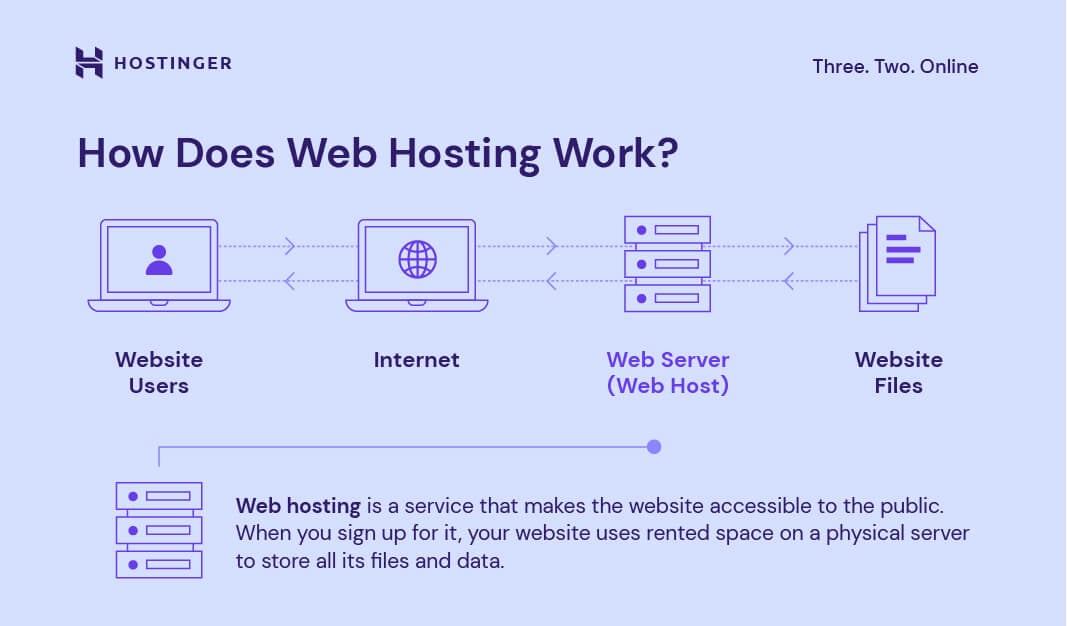
Image Source: Hostinger
Important Web Hosting Jargon
Before diving into the full glossary, it’s helpful to understand why these terms matter. Web hosting comes with a lot of technical language, and beginners often feel overwhelmed when comparing plans or talking to support teams. Knowing the basic jargon makes it easier to choose the right hosting, avoid common mistakes, and understand what you’re actually paying for.
These terms often influence your website’s speed, security, storage capacity, and overall performance. Even a simple difference—like “shared hosting” vs. “VPS”—can completely change how your site behaves.
With that in mind, let’s break down the most important hosting terms in a simple, beginner-friendly way.
1. Domain-Related Terms
- Domain Name: A domain name is a website’s unique address on the internet. It allows users to find a specific site without needing to remember a numerical address. Domain names typically end with extensions such as .com, .net, or .org. Registering a domain gives someone the right to use that address for a certain period.
- Subdomain: A subdomain is a prefix added to a main domain, creating a separate section of a website. For example, “blog.example.com” is a subdomain of “example.com.” Subdomains help organize content or create dedicated areas without requiring the registration of additional addresses.
- DNS (Domain Name System):The Domain Name System (DNS) associates domain names with their corresponding numerical IP addresses. DNS servers translate easy-to-remember addresses into numbers that computers use to locate websites. Configuring DNS records correctly ensures that visitors are directed to the intended site.
- TLD (Top-Level Domain):A TLD is the extension that appears at the end of a domain name, such as .com, .net, .org, or country-specific extensions like .in or .uk. Different TLDs serve different purposes—some are general, while others are restricted to certain regions or industries.
- Domain Registrar: A domain registrar is a company authorized to sell and manage domain names. When you purchase a domain, you do so through a registrar, which also helps you renew, transfer, or update ownership details for that domain.
- WHOIS: WHOIS is a public database that stores information about domain ownership, including the registrant’s name, registration dates, and contact details. Many registrars offer privacy protection so personal details aren’t publicly visible.
- Nameserver: Nameservers act like directory services for your domain. They tell the internet where your website is hosted by pointing your domain name to the correct server’s IP address. Without nameservers, visitors wouldn’t be able to reach your website.
2. Server-Related Terms
- Server: A server is a powerful computer that stores and delivers website content to users. Servers run constantly, so websites are always accessible. These machines handle requests from multiple users simultaneously, which means a single server can host either many websites or a single large site.
- Bandwidth: Bandwidth refers to the amount of data transferred between a website and its visitors over a given time period. Higher bandwidth supports more traffic and larger files. If bandwidth is too low, visitors might experience slow loading times or even temporary outages during busy periods.
- Disk Space: Disk space is the storage capacity allocated for website files, emails, databases, and media. Every image, video, or document uploaded uses part of this space. Selecting an appropriate amount of storage helps prevent issues such as failed uploads or missing content.
- Shared Hosting: Shared hosting means several websites reside on the same server and share its resources. This option is usually affordable and suitable for smaller sites. Because resources are divided, high traffic on one site can affect others using the same machine.
- Virtual Private Server (VPS): A Virtual Private Server, or VPS, divides a physical server into several independent sections. Each section operates like a separate machine with dedicated resources. This arrangement offers greater control and flexibility than shared hosting while costing less than a dedicated setup.
- Dedicated Hosting: Dedicated hosting provides an entire server for a single user. This arrangement offers maximum performance and security. Users gain complete control over software, resources, and settings. Dedicated servers are ideal for large sites or those with high traffic and specific technical requirements.
- Cloud Hosting: Cloud hosting distributes website data across multiple connected servers, rather than relying on a single machine. This structure enhances reliability and helps manage sudden spikes in visitor numbers. If one server goes offline, others can keep the site running smoothly. As businesses scale, they might also utilize a virtual private cloud to create isolated and secure computing environments within these broader networks.
- Uptime: Uptime measures the amount of time a website remains available to visitors. High uptime indicates that a site is rarely offline, which is important for building trust. Service providers often promise a specific percentage, such as 99.9 percent, to demonstrate their reliability. To maintain consistent availability, many teams rely on a real-time website uptime monitoring tool to receive instant alerts when downtime occurs.
- CPU (Processor): The CPU is the part of the server responsible for processing tasks and handling website requests. A higher CPU capacity allows a server to manage more traffic and run more complex applications without slowing down.
- Caching: Caching stores frequently accessed website data temporarily so it can be delivered faster the next time it's requested. This reduces load times and decreases the strain on your hosting server.
- CDN (Content Delivery Network): A CDN is a network of servers distributed across multiple locations worldwide. It stores copies of your website’s static content and delivers them from the server closest to each visitor, improving loading speed and performance.
- Load Balancing: Load balancing distributes incoming traffic across multiple servers. This helps prevent any single server from becoming overloaded, ensuring better uptime and more stable performance during high-traffic periods.
- Latency: Latency refers to the time it takes for a request to travel from a visitor’s device to the server and back. Lower latency results in faster page loading and is influenced by factors such as server location and network quality.
3. Control Panel & File Management Terms
- FTP (File Transfer Protocol): FTP stands for File Transfer Protocol, a method for uploading or downloading files between a computer and a server. Hosting providers provide users with FTP access to manage their website content. Using FTP clients, users can move multiple files efficiently and securely.
- Database: A database stores and organizes information needed by a website, such as user accounts or posts. Many content management systems rely on databases to function properly. Choosing the right database system supports smooth site operation and fast access to information.
- Backup: A backup is a copy of website files and data saved in case something goes wrong. Regular backups protect against accidental loss, hacking, or technical failures. Reliable providers often offer automated backups to facilitate easier recovery for users.
- cPanel / Plesk: cPanel and Plesk are user-friendly control panel systems that allow you to manage your hosting account without technical skills. They offer tools for managing domains, files, databases, email accounts, backups, and more.
- One-Click Installer (Softaculous, etc.): One-click installers allow users to quickly install applications like WordPress, Joomla, or Drupal. They automate setup steps such as database creation, making it easy for beginners to start building websites.
- File Manager: The File Manager is a tool inside the control panel that lets you view, upload, edit, and delete website files directly from your browser. It’s useful for small adjustments without needing FTP software.
- Email Hosting: Email hosting enables users to create professional email addresses linked to their domain (e.g., info@yourdomain.com). Hosting providers store and manage your email data and often include features like spam filtering and storage.
4. Security-Related Terms
- SSL Certificate: An SSL certificate encrypts data exchanged between a website and its visitors. This security feature prevents sensitive information from being intercepted. Sites with SSL display a padlock symbol in browsers and use the “https” protocol in their addresses.
- Firewall (WAF: Web Application Firewall): A Web Application Firewall monitors and filters incoming traffic to block harmful requests. It protects websites from attacks such as SQL injections, bots, and malicious scripts.
- Malware Scanning: Malware scanning involves checking your website regularly for malicious files or code that could harm visitors or compromise your data. Many hosting providers offer automated scanning and removal tools.
- Brute Force Protection: Brute force protection safeguards your website by blocking repeated login attempts from attackers trying to guess passwords. It helps prevent unauthorized access to your hosting account or CMS.
- DDoS Protection: DDoS protection defends your website against attacks that flood your server with excessive traffic. These attacks can slow down or shut down your site, so protection ensures stability and uptime.
- Two-Factor Authentication (2FA): 2FA adds an extra security layer by requiring a second verification step—such as a code sent to your phone—when logging in. This prevents unauthorized access even if someone obtains your password.
Conclusion
Grasping these essential web hosting terms empowers beginners to create, maintain, and protect their websites. A clear understanding leads to better decision-making and smoother communication with service providers. This glossary provides a helpful foundation for anyone ready to start an online project.

How to Use AI for Boosting Your Clients’ Landing Page Conversion Rates
Do you have clients looking to increase their landing page conversion rates? It can be difficult trying the same methods over and over again with no luck, but thankfully we now have access to AI technology which can help developers make more informed decisions.
In this blog post, we’ll explore how AI can evaluate user behavior and provide insights on what changes need to be made to boost your client’s landing page conversion rate. We will cover topics such as website design recommendations, optimizing web copy for better engagement, and personalized marketing material for targeted audiences.
Ready to learn more? Let’s get started!
Understand the Basics of Artificial Intelligence (AI) and Machine Learning
Advancements in technology continue to shape our world at an unprecedented pace, and Artificial Intelligence (AI) and machine learning are two of the most exciting developments we’ve seen to date.
AI refers to the ability of machines to simulate human intelligence, while machine learning is a subset of AI that focuses on enabling machines to learn and improve on their own.
By understanding the basics of AI and machine learning, we can begin to appreciate how these technologies and the latest AI design trends are changing the way we live and work. From self-driving cars to chatbots that can process your customer service inquiries in real time, the possibilities of AI and machine learning are endless.
So let’s explore what makes these technologies so special and learn why they’re quickly becoming some of the most powerful tools in the modern world.
1. Designing Your Landing Page With AI in Mind
Incorporating AI into your landing page design can facilitate a more intuitive user experience, leading to higher conversion rates. To do this, you must utilize AI tools that can analyze user behavior and provide insights into what resonates best with your audience.

Image Source: HubSpot
For instance, AI can track which areas of the page attract the most attention, guiding where to place vital information and call-to-actions. AI can also optimize your web copy. machine learning algorithms can analyze successful landing pages and suggest adjustments to your headlines, bullet points, and call-to-actions, tailoring them to what has been proven to work.
Personalized marketing material is another area where AI shines. Similar AI-driven personalization approaches are also used in tools like Automated Cloud Billing Software to deliver smarter insights and improve business decision-making. Keep these points in mind when designing your landing page with AI, and watch your client's conversion rates soar. Keep these points in mind when designing your landing page with AI, and watch your client's conversion rates soar.
2. Identify Key Data Points to Collect From Your Visitors
Collecting and analyzing visitor data is crucial in fine-tuning your client's landing page for increased conversions. Here are some key data points to consider:
- Demographic Information: This includes age, gender, location, and occupation. This information can help you craft more targeted and relevant content.
- Behavioral Data: Track how visitors interact with your landing page. Which sections do they spend the most time on? Which buttons do they click? It can help you understand what resonates with your audience.
- Source of Traffic: Determine where your visitors are coming from. Are they coming from social media, search engines, or direct links? This knowledge can guide where to concentrate your marketing efforts.
- Device Usage: Knowing whether visitors are using mobile devices or desktop computers can influence your design choices.
- Bounce Rate: This shows how many visitors leave your page without taking any action. A high bounce rate indicates that visitors are not finding what they're looking for or the page is not engaging enough.
- Conversion Rate: This is the percentage of visitors who fulfill the desired action on your landing page (like signing up for a newsletter or making a purchase). By tracking conversion rates, you can measure the success of your optimizations.
Each of these data points, when analyzed and used correctly, can provide valuable insights that guide your AI-powered landing page optimization strategy.
3. Implement A/B Testing Strategies to Optimize Conversion Rates
To truly maximize the effectiveness of your AI-optimized landing page, consider implementing A/B testing strategies. A/B testing, also known as split testing, involves creating two versions of your landing page (version A and version B) with one distinct difference between them.
This difference could be a headline, a call-to-action, a design element, or any other feature you believe could impact conversion rates. Half of your traffic is directed to version A, and the other half to version B, and their performance is tracked and compared.

Image Source: Snov
AI can take A/B testing a step further by enabling multivariate tests, where you can change several variables at once and analyze the impact of each. It can speed up the optimization process, allowing you to quickly identify the most effective combination of elements for your landing page.
By continuously testing and adjusting your landing page based on real-time user behavior and preferences, you can ensure your page remains optimized for the highest possible conversion rates.
This data-driven approach can help you deliver a user experience that meets and exceeds your client's expectations, leading to higher engagement and ultimately, increased conversions.

Image Source: Leadpages
Remember, the power of AI lies in its ability to learn and adapt, so take full advantage of this by regularly reviewing and updating your A/B testing strategies.
4. Utilize AI-Powered Chatbots for Lead Generation
Artificial intelligence isn't just about analyzing data and personalizing content, it can also contribute significantly to lead generation via AI-powered chatbots. Chatbots are programming interfaces that simulate conversations with users.
By integrating chatbots into your landing page, you can interact with visitors in real-time, answering their queries, providing recommendations, and guiding them toward the desired action.
AI-powered chatbots can understand complex requests, personalize responses, and improve interactions over time. It is accomplished through machine learning, which helps the chatbot learn from past interactions and improve future ones.

Image Source: SentiOne
Moreover, chatbots can also collect important information about visitors, providing valuable data that you can use to further optimize your landing page.
Including a chatbot in your landing page can help increase engagement, keep users on the page longer, and ultimately, boost conversion rates. By using chatbots, you can offer 24/7 customer service, ensuring you never miss an opportunity to interact with a potential lead.
This technology, when combined with the other strategies shared in this article, can truly elevate the performance of your clients' landing pages and lead to significant increases in conversion rates. Remember, the success of AI lies in its ability to learn and adapt, so be sure to take the time to regularly review and optimize your chatbot strategies.
5. Leverage Predictive Analysis to Predict User Behaviors and Offer Personalized Experiences
Predictive analysis is a powerful tool in the arsenal of AI-driven landing page optimization. Utilizing machine learning and statistical algorithms, predictive analysis allows you to forecast user behavior, preferences, and future actions based on their historical data.
This technology goes beyond simply analyzing what has happened in the past, and ventures into the realm of predicting what will happen in the future, providing a proactive approach to landing page optimization.
With predictive analysis, you can discern patterns in a visitor's past behavior and use that information to predict what they're likely to be interested in or how they're likely to behave in the future.
This insight can be used to offer personalized experiences tailored to individual visitors. By serving up content, offers, and call-to-actions that are most relevant to the visitor, you are more likely to capture their interest and encourage them to take the desired action.
Incorporating predictive analysis into your landing page strategy can help you improve conversion rates and create a more satisfying and engaging experience for your visitors. It allows you to anticipate visitor needs, deliver personalized content, and build a deeper relationship with your audience. Just as with other AI technologies like Quarule, it's important that you continuously monitor the success of your predictive analysis strategies and make adjustments as necessary to ensure you're getting the most out of this powerful tool.

The DashClicks’ marketing reporting software is an AI-powered tool that can significantly enhance the optimization strategies of your clients' landing pages. This tool provides comprehensive insights into user behavior, offering real-time analytics that can help you make data-driven decisions to optimize conversions.
The app's behavior tracking feature allows you to understand how visitors interact with the landing page, providing key insights about which areas are attracting the most attention and engagement. With this data, you can refine the design and layout of the landing page to ensure important information and calls to action are strategically placed.
Moreover, the white label analytics software seamlessly integrates A/B testing into its platform, allowing you to easily conduct split tests and assess which versions perform better. This leads to more effective and efficient landing page optimization.
The software also comes with predictive analysis capabilities. It can also aid in lead generation with its AI-powered chatbots. These chatbots can engage with visitors in real time, providing instant customer service and guiding users toward the desired action.
By leveraging its capabilities, you can significantly boost your clients' landing page conversion rates.
Further Reading: Four Ways Marketing Analytics Tools Drive Business Growth
6. Monitor Performance Metrics and Make Data-Driven Decisions
Finally, it's crucial to continuously monitor and evaluate the performance metrics of your landing page. Metrics such as bounce rate, time on page, click-through rate (CTR), and conversion rate can provide invaluable insights into the effectiveness of your AI implementation and the overall success of your landing page. These figures can help you identify what's working, what's not, and where there's room for improvement.
Monitoring performance data is only the first step - what's crucial is the application of these metrics to make data-driven decisions. For instance, if you notice a high bounce rate, it might indicate that visitors are not finding the content or experience they were expecting, prompting you to revise your landing page copy or design. Similarly, a low conversion rate might mean that your call-to-actions are not compelling enough or your offer is not resonating with your audience.

Image Source: Gitnux
In addition to evaluating these commonly used metrics, advanced AI tools can provide more in-depth insights, such as heat maps that show where users are clicking most on your page or scroll maps that indicate how far down the page users are scrolling. These detailed metrics allow you to see how visitors are interacting with your landing page, enabling more precise and effective customization.
Remember, the key to successful AI implementation is the consistent analysis and application of data. By making data-driven decisions, you can optimize your landing page continuously, to better serve your visitors, meet your client's objectives, and maximize conversion rates.
DashClicks’ white label dashboard software is a robust tool that can significantly aid in making data-driven decisions for landing page optimization. It provides a comprehensive view of key performance metrics, including bounce rate, click-through rate, time spent on the page, and conversion rate, all in one easy-to-use interface. This real-time data not only allows for monitoring of the current performance but also helps in recognizing trends over time.
Additionally, the white label marketing dashboard offers advanced AI tools such as heat maps and scroll maps, giving detailed insights into how users interact with your page. By indicating where users click the most or how far they scroll down, these features allow for more precise customization of your landing page, facilitating a more engaging and user-friendly experience.
In essence, the software makes the continuous analysis and application of data simple and efficient, enabling you to effectively leverage AI in your landing page optimization strategy. By making data-driven decisions using DashClicks, you can continually improve your landing page to better serve your audience, meet your client's objectives, and maximize conversion rates.
Wrapping Up!
As you develop your online marketing and website optimization strategy for this year, don’t overlook the techniques and opportunities presented by artificial intelligence. AI can help us unlock new insights and make decisions that are more data-oriented and effective.
From designing your landing page with AI in mind to using predictive analysis to anticipate user behavior, there is no limit to what AI can do for our businesses. Start experimenting with these strategies today to see how leveraging artificial intelligence can benefit your organization. With a comprehensive understanding of the basics of AI and machine learning, there’s no better way to create an engaging website that will drive conversions!


No results found.
Please try different keywords.
Get Started with
DashClicks Today
Get found online, convert leads faster, generate more revenue, and improve your reputation with our all-in-one platform.
.svg)
Unlimited Sub-Accounts
Unlimited Users
All Apps
All Features
White-Labeled
Active Community
Mobile App
Live Support
100+ Tutorials
Unlimited Sub-Accounts
Unlimited Users
All Apps
All Features
White-Labeled
Active Community
Mobile App
Live Support
100+ Tutorials
Unlimited Sub-Accounts
Unlimited Users
All Apps
All Features
White-Labeled
Active Community
Mobile App
Live Support
100+ Tutorials


