

DashClicks Blog
The industry's top experts offer their best advice, research, how-tos, and insights—all in the name of helping you level-up your business and online marketing skills.
Join Us!
.svg)
.svg)
.svg)
.svg)
.svg)

How Digital Marketing Agencies Can Add Email & Chatbot Automation to Their Service Stack
At some point, digital marketing agencies run out of ways to generate good revenue. They do it through paid advertising, social media platforms, SEO, and web design. However, businesses can’t grow any further when they don’t have revenue streams. They are possible only with returning or new customers. While searching for additional communication channels and strategies, marketing agencies often forget about email and chatbot automation, which bring great results.
Agencies often skip email and chatbot automation, although this is a perfect “set it and bill it” recurring retainer offering. It often happens because they assume that automation is cost-consuming and that developers are necessary. However, in 2026, it’s no longer a point because most of the platforms offer a visual editor and templates, meaning that no coding skills are required. In a highly competitive business environment, automation is no longer an additional expense but a competitive advantage.
This guide is designed to explain why digital marketing agencies lose money without automation, make the difference between email and chatbot automation clear, and determine whether marketers need both. It will also show how to package it, provide a practical workflow, and real use cases.
Why Agencies Are Leaving Money on the Table Without Automation Services?
The majority of marketing agencies prioritize only certain activities, focusing on generating leads. They usually include paid advertising and content marketing. While these strategies remain important for businesses, they are only a half of the way towards acquiring new customers. The customer acquisition journey is a much longer process requiring different tools.
Let’s say there’s a typical paid advertising client. A marketing agency might manage to drive prospects using Google or Facebook Ads, but what happens next? Leads can ask for information, submit forms, or abandon shopping carts. However, sometimes their requests remain unnoticed. To have it all covered, agencies need to incorporate automation covering a lot of repetitive tasks while keeping prospects satisfied. That’s how marketing agencies can avoid losing potential customers and lead them towards conversion. When agencies handle the whole customer journey and each of its touchpoints, they usually get higher customer lifetime value.
Automation helps cover all sales opportunities and creates a better revenue stream. Besides, it doesn’t require constant management. Marketing agencies just need to set it up, monitor, and improve when necessary. After designing workflows, they can use these flows to deliver value to customers. This can be done in a variety of ways: automated email sequences, appointment reminders, cart abandonment campaigns, customer onboarding sequences, Instagram, WhatsApp, and Facebook automation.
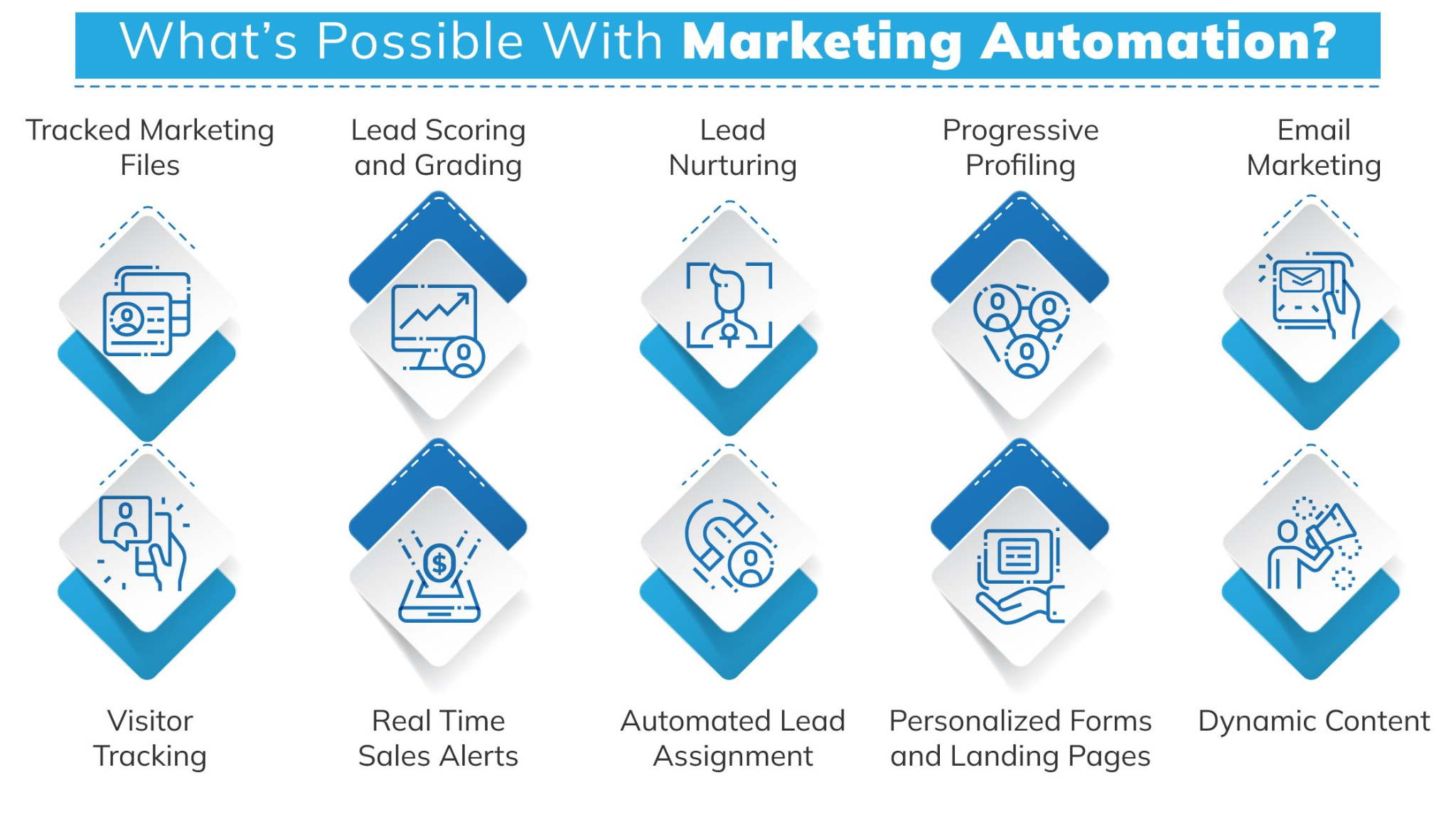
If agencies don’t provide such services, customers might prefer competitors as an option. This leads to lost opportunities.
Email Automation vs. Chatbot Automation - What's the Difference and Do You Need Both?
Although email and chatbot automation are designed to help prospects and convert them into customers, they still have different purposes.
Email Automation
Email automation helps build long-term relationships with customers by sending welcome messages, lead nurturing campaigns, customer onboarding, promotional campaigns, re-engagement sequences, and more. With its help, agencies can reach out to customers at the right time without having to do it manually. They can simply schedule the message and attain their goal.
With email automation, agencies have structured, long-term communication with customers. They can send a sequence of personalized messages based on specific triggers and resonate with the audience's needs. It contributes to trusting relationships and customer loyalty.
The main perk of email automation is that it helps agencies nurture relationships with prospects over time. When leads aren’t ready to buy right now, they can do it later, and email campaigns contribute to it. These prospects can convert after weeks or even months of receiving relevant emails that are timely and useful. This content might include educational emails, product recommendations, testimonials, promo codes, or exclusive offers. This interaction, which is ongoing, allows marketing agencies to improve repeat purchases, loyalty, and, most importantly, customer lifetime value. Email automation is highly scalable, too. After designing the workflows, they only require periodic optimization and reporting.
Chatbot Automation
Chatbot automation allows interacting with customers in real-time. It’s about engagement across different communication channels like WhatsApp, Instagram, Messenger, website chat widget, and TikTok. Bots are suitable for different tasks. They include lead qualification, FAQs, product recommendations, event registration, appointment booking, around-the-clock support, and more.
With chatbots, marketing agencies can automate their communication with customers on different platforms. Using bots allows them to provide assistance on WhatsApp, Messenger, or Instagram 24/7. Digital marketing agencies can also deliver personalized product recommendations and even automate responses to comments under posts on Instagram or TikTok. That’s how to ensure that every lead gets all the necessary attention and information, contributing to a positive outcome.
When connecting with agencies through messengers, customers expect fast answers. Chatbots make it possible. Whether a user sends a question through WhatsApp or comments under a post on Instagram, the bot engages instantly and acknowledges every prospect. They help reduce friction and improve interaction.
Do Businesses Need Both?
The answer is yes. Email and chatbot automation complement each other and cover different stages of the customer journey.
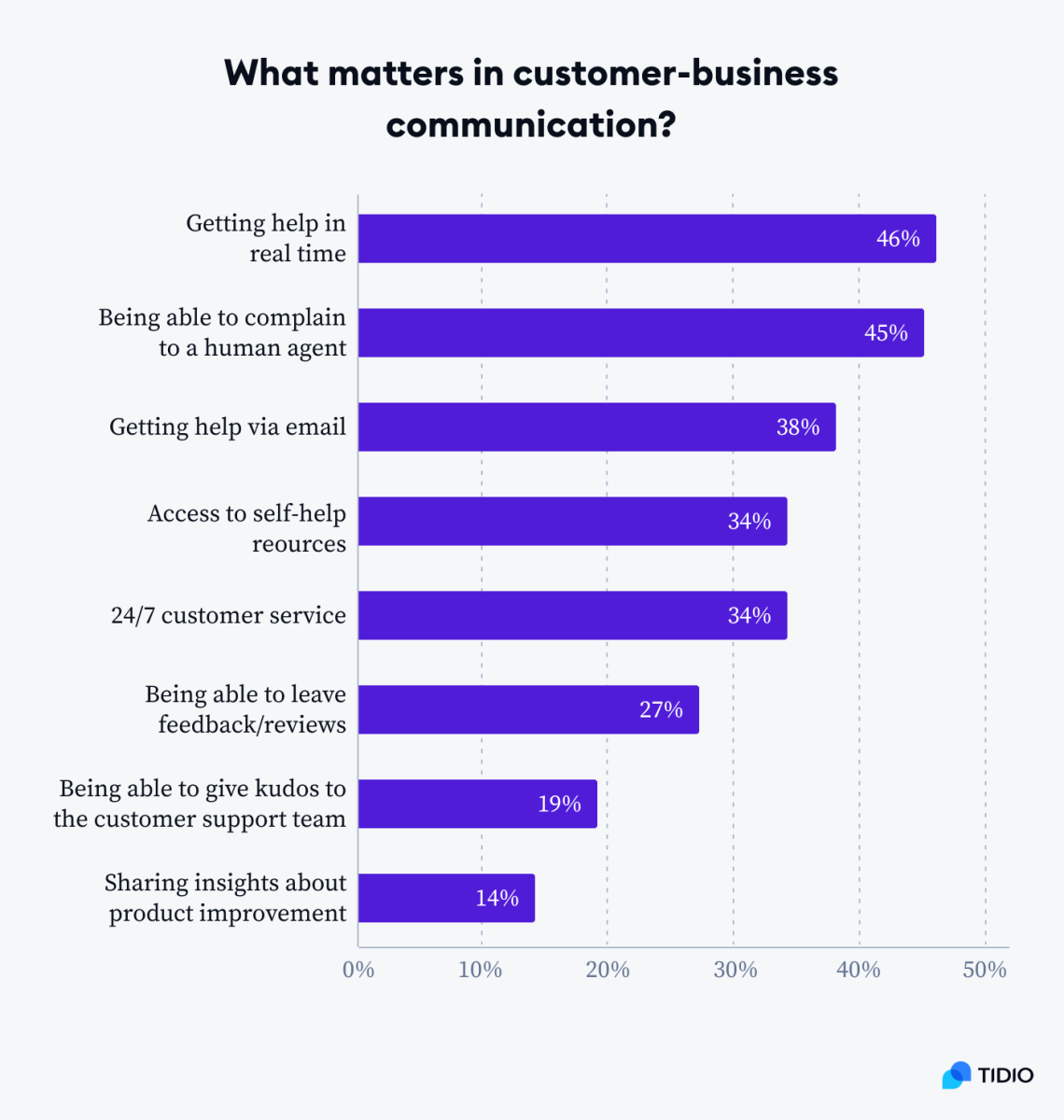
Image Source: Tidio
When users reach out through Instagram, agencies can use a chatbot to answer all their questions and collect emails for further follow-ups. Then, email automation comes in handy to deliver automated email sequences with detailed information, special offers, product launches, personalized discounts, etc. If prospects don’t convert, email automation allows you to send an abandoned shopping cart email and a message through WhatsApp or Instagram for higher visibility. Together, these channels contribute to the success of the marketing strategy and boost the number of conversions.
Using both automation channels helps marketing agencies to create complete customer journeys rather than focus on isolated campaigns. This approach enables agencies not only to generate leads but also to convert, retain, and upsell customers. It contributes to a higher customer lifetime value and overall impact the agency brings. With email and chatbot automation, marketing agencies no longer need to worry about around-the-clock responses, lead follow-ups, appointment booking and reminders, abandoned cart recovery, personal onboarding, etc. Automation handles it all and lets marketers focus on more complex tasks.
How to Package It as an Agency Service?
Often, marketing agencies present their automation services as custom projects, while it’s better to productize their offerings. Here, members of marketing agencies can find out how to present automation as an agency service.
1. Starter Automation Package
This package might include simple features for those just starting out. They are customer journey audit, one chatbot workflow, email automation sequence, CRM, basic reporting, and monthly optimization. The package is a perfect fit for small businesses with no prior experience using automation tools.
2. Full Automation Package
This automation package is suitable for mid-sized and big companies having lots of prospects and customers. Premium package includes multiple email sequences, funnel strategy development, lead scoring, multi-channel chatbot automation, behavioral segmentation, advanced reporting, CRM synchronization, and more.
3. Positioning Automation to Existing Clients
When it comes to existing customers, automation becomes a good upsell opportunity. Marketing agencies handling content marketing, social media, or SEO can show how to bring the most value from the leads generated.
Let’s take an agency running paid advertising campaigns as an example. It can also offer chatbot and email automation for nurturing prospects and making them more eager to buy. The marketing agency prioritizing social media can introduce Instagram and Facebook chatbots. In this case, chatbots will help capture and qualify leads on autopilot.
4. Positioning Automation for New Clients
If marketing agencies seek new clients, they can have automation as a competitive advantage and key differentiator. Now, when a lot of agencies still prioritize ads and social media to generate traffic, automation can be a driving force of the marketing strategy. It helps marketers to position themselves as growth partners.
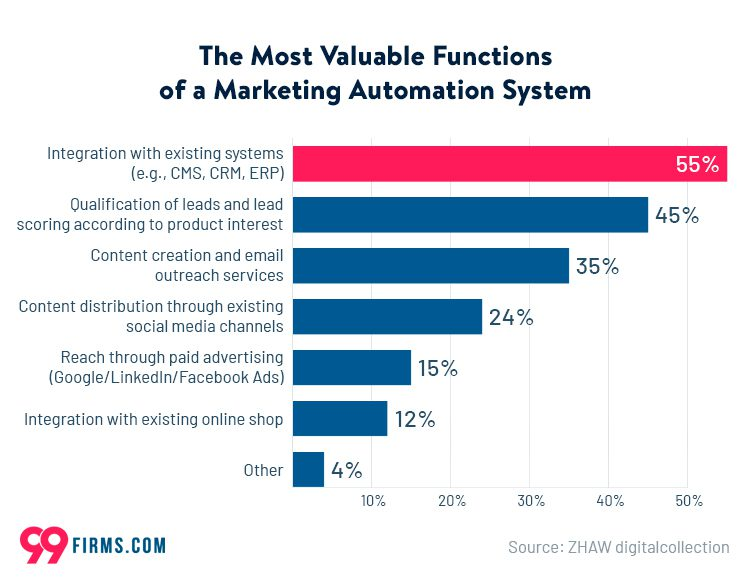
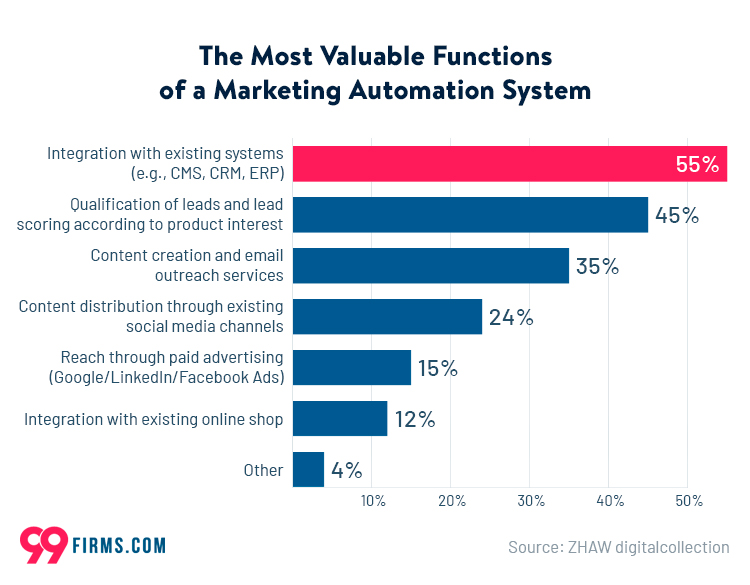
Image Source: 99firms
With bots, agencies can show how they help capture, generate, and convert leads without human involvement. This is especially relevant to clients who have slow response times, inconsistent follow-ups, missed opportunities, etc. Automation is what makes marketing agencies different from competitors and encourages clients to participate.
5. Pricing Models
Agencies can also package automation services based on a pricing model. There can be a one-time setup fee for strategy, integrations, workflow creation, and implementation. Some agencies offer monthly pricing. It covers monitoring, optimization, reporting, campaign updates, and new automation opportunities.
Manage Automated Conversations in One Place
As agencies add email and chatbot automation to their service stack, managing conversations across multiple clients can quickly become challenging. Using a centralized communication platform like DashClicks’ Conversations Software helps agencies organize SMS, email, web chat, Facebook Messenger, Instagram, and other customer interactions from one dashboard. This gives account managers better visibility into leads generated through automated campaigns while making follow-ups faster and more consistent.
Choosing the Right Platform for Your Agency
The effectiveness of automation depends a lot on goals and the platform agencies choose. This section will unveil the most crucial characteristics for a marketing automation service, allowing agencies to achieve better results in their communication with customers, customer support, lead nurturing, and many more tasks.
1. Multi-Channel Support
When choosing an automation platform, one should understand that if an agency needs multiple marketing channels, it’s an important point. It’s always better to have a single solution that offers all those channels. Otherwise, a company will face additional expenses. Fortunately, a lot of services provide multichannel support. SendPulse allows marketers to create professional automated email sequences, build chatbots for WhatsApp, Instagram, Messenger, and TikTok without any coding skills. The platform enables businesses to create a website chat widget and collect all the customer information in its CRM. By identifying a unified service, agencies significantly reduce expenses, onboarding, and management time.
2. Client Management Features
Digital marketing agencies need a platform designed for multi-client operation. These include separate client workspaces, user permissions, centralized management, team collaboration tool, and scalable billing models. All these features and tools ensure that team members can work independently and contribute to the final result. When a service offers per-user pricing, it might become more expensive as teams grow. It might bring unexpectedly high costs. That’s why thinking about this point in advance and choosing the right platform is a must.
3. White Label and Sub-Account Support
This feature is essential if agencies strive to effectively deliver automation services while ensuring a seamless client experience. With its help, businesses, instead of exposing the software vendor, present the tool as a part of their brand. It builds trust and credibility as well as improves retention.
4. Free plans
Before committing to a specific service, agencies need to test it first. It’s the best way to find out whether the platform covers all the necessary features and is easy to use. They can do it with the help of a free plan or a free trial. That’s why it’s advisable to search for an automation platform providing one of these options. By testing the workflows, marketing agencies can figure out whether this or that solution is a good fit for their business purpose. SendPulse provides its users with a free plan, which covers email marketing, chatbots, and CRM. This way, business owners avoid spending additional costs.
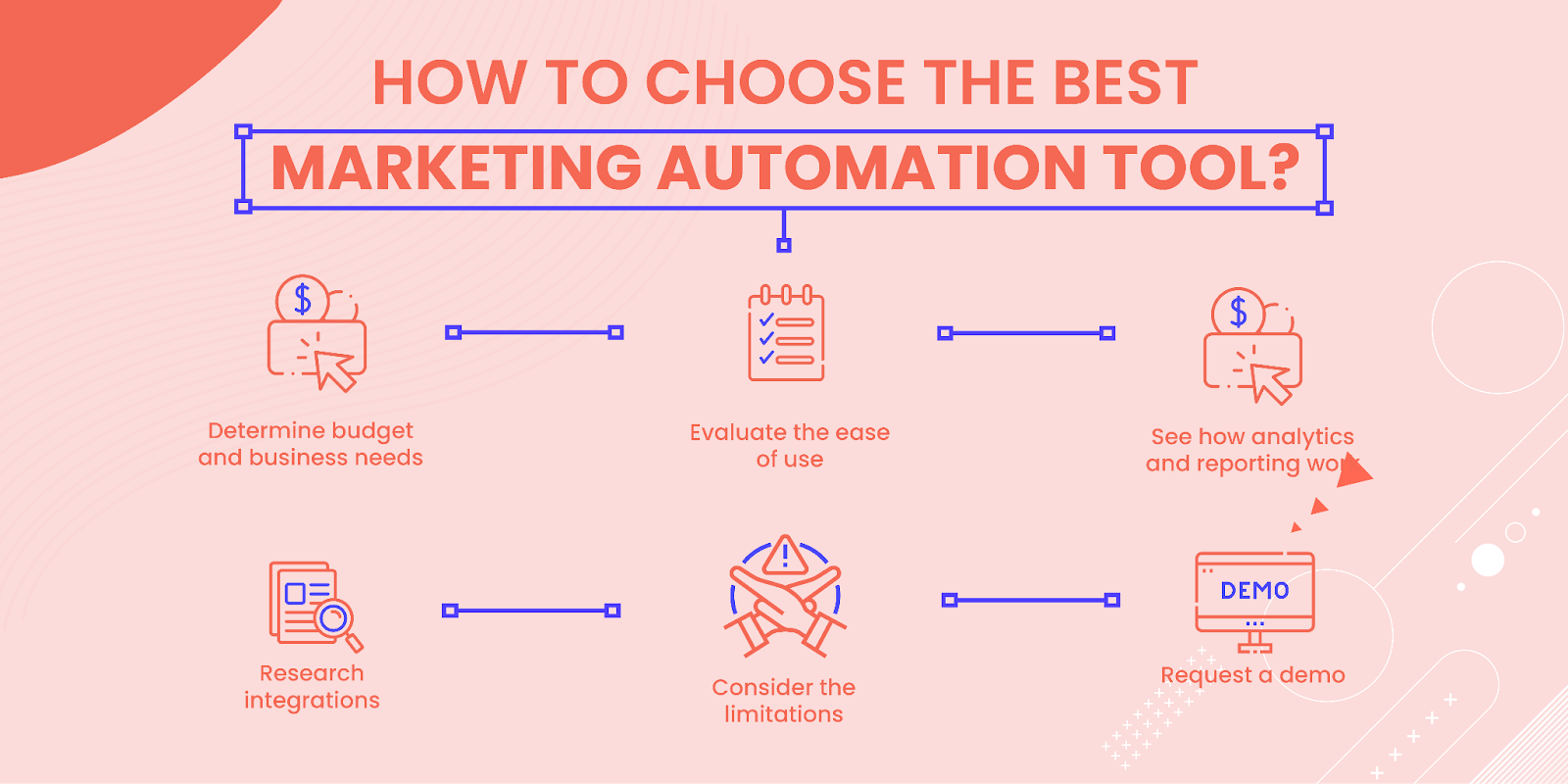
Image Source: Mailmunch
A Practical Workflow: From Onboarding a Client to Launching Their First Automation
When agencies create an automation flow, they usually follow a specific sequence of actions. This section is designed to provide a short practical workflow. It helps agencies with no experience do the same for their clients.
- Audit existing funnel gaps. Everything starts with identifying the stages at which potential customers are dropping off. These might be various scenarios. Leads might abandon their shopping carts, miss appointments, have a weak onboarding experience, etc. Once these points are identified, there’s a clear case for building an automation flow. Let’s say the percentage of prospects abandoning their carts is high, so there’s a point in creating abandoned cart reminders, encouraging leads to complete their purchases by checking out.
- Map the customer journey. The second step implies outlining a simple automaton flow. For instance, an agency offers a lead magnet, then it sends a welcome sequence, nurtures leads with informative content, presents the offer, and delivers a follow-up sequence. The workflow is simple yet effective for converting prospects into customers. With visual mapping, the value becomes more vivid for clients.
- Build the highest-impact chatbot. In 2026, a lot of digital marketing agencies communicate with customers using WhatsApp or Instagram. However, not all of them use automation. That’s a big problem when the number of inquiries is too high and becomes too difficult to handle everything manually. Here come chatbots. They enable agencies to automate initial inquiries, lead qualification, appointment scheduling, product information, and FAQs. It results in higher satisfaction and ROI.
- Connect email and chatbot workflows. Automation brings real results when channels are connected. When email and chatbot automations work together, they ensure seamless experiences for customers. For instance, a chatbot captures a prospect, and then this person receives an email nurture sequence. After that, interaction with emails encourages chatbot messages with special offers, discounts, coupon codes, etc. Once high-intent leads are identified, they are routed to sales agents for further interaction. This is the best way to provide consistency and a seamless experience across several communication channels.
- Report business outcomes. The most important outcome is not metrics but the impact. At this step, marketing agencies need to report the number of prospects generated, revenue recovered, response time, ROI, conversion rates, appointment bookings, and more. By showing measurable business outcomes, businesses can retain more customers and sell additional products.
Real Use Cases by Niche
Various marketing teams can use automation to put repetitive tasks on autopilot, provide personalized recommendations, schedule promotion email campaigns, and so on. This section will unveil each niche and what can be done with automation.
1. eCommerce
In this industry, there are many ways of taking advantage of email and chatbot automation. eCommerce clients usually use abandoned shopping cart email sequences. They help remind prospects about items in their cart and increase the chances of conversion. Maybe a person left them without checkout on purpose, or maybe just forgot to complete a purchase. WhatsApp reminder chatbots can be useful before and after the purchase. Brands can send wishlists or back-in-stock alerts, promotion reminders, or price drop notifications.
After the sale, it’s wise to deliver order confirmations, shipping updates, payment, and pickup reminders. By sending personalized discount follow-ups and customer reactivation campaigns to users’ inboxes, businesses remind customers about their products and encourage them to check them out.
2. Local Service Businesses
Usually, home service clients' appointment confirmation emails are sent to make sure that clients are available at that time. Automated reminder sequences on email, WhatsApp, Messenger, or Instagram help companies remind their customers about the service they have booked. They also use Facebook Messenger or WhatsApp chatbot to communicate with customers, share the details, pricing, and make an appointment automatically. After the service is provided, the chatbot can ask for a review or feedback to improve the service. As a result, this client has fewer missed appointments and happier customers.
3. Online Course Creators
A company involved in education usually uses a welcome email onboarding series to acknowledge new students and provide them with all course details. Course progress reminders show learners how far they have come, while student engagement campaigns focus on interacting with students. They also use a Telegram chatbot to answer students’ FAQs and solve specific issues. With automation, online course creators can ensure engagement while reducing the workload on the team.
Conclusion
Adding email and chatbot automation doesn't require coding skills, a technical team, or a big budget. The process is straightforward, and it lets marketing agencies build deeper client relationships while converting more of the leads they're already generating. Start with one client and one channel, prove the ROI, then roll it out across the rest of your service stack.
Email and chatbot automation helps agencies offer more value, strengthen client retention, and create recurring revenue opportunities without significantly increasing workload. The key is choosing automation tools that fit your clients' needs and pairing them with efficient communication and lead management processes. Platforms like DashClicks’ Conversations Software can help agencies keep automated conversations organized, respond faster, and ensure leads generated through marketing campaigns don't slip through the cracks.

Why Smart Agency Owners Automate More Than Just Their Marketing
Picture this. It's 11 p.m. and you're still logging into three different platforms to schedule tomorrow's client posts. Sound familiar? If you run an agency, you've probably lived this exact moment more times than you'd like to admit.
Here's the thing. The agencies that grow past this stage aren't the ones working harder. They're the ones who figured out, sometimes the hard way, that their time is worth more than repetitive busywork. So they built systems that run without them standing over the controls.
That instinct doesn't stay confined to the office. Once you start trusting automation to handle your client pipeline, it's a short leap to trusting it with other parts of your life, including your money. A growing number of entrepreneurs are doing exactly that, and if you're curious what that looks like in practice, the WallStreetZen verdict on Autopilot offers a good look at one app built around the same idea: set it up once, let the system do the work.
The Automation Habit Starts Small
Most agency owners don't wake up one day and automate everything at once. It usually starts small. Maybe it's an autoresponder for new leads. Maybe it's a scheduling tool so client calls stop eating your calendar. Then one workflow leads to another, and before you know it, half your agency runs on rules you set months ago.
That gradual buildup matters. It's not about chasing every shiny new tool. It's about noticing where your attention keeps getting pulled toward tasks a system could handle just as well, if not better.
And honestly, the data backs up what most agency owners already feel in their gut. Marketing automation programs return roughly $5.44 for every dollar spent, according to Forrester Wave benchmarking data cited in recent industry reporting. That's not a rounding error. That's the difference between an agency that scales and one that stalls out because the owner is too buried in manual work to think about growth.
How to Know It's Time to Automate More?
Many agency owners don't realize how much time they're losing because repetitive work gradually becomes "just part of the job." If any of these situations sound familiar, automation is likely worth exploring:
- Your team manually copies information between multiple platforms.
- Client onboarding follows the same checklist every time.
- You spend hours creating recurring reports.
- Leads are followed up inconsistently.
- Team members repeatedly answer the same client questions.
- Project updates require constant manual reminders.
- You regularly work outside business hours to finish administrative tasks.
If your business depends on people remembering every step, there's an opportunity to build a system that handles those tasks more consistently.
Further Reading: 3 DashClicks Automation Software That Will Improve Your Agency's Sales
Where Agency Automation Creates the Biggest Impact?
For most agencies, automation delivers the greatest value when it removes repetitive operational work rather than replacing strategic thinking. The more routine tasks you can systemize, the more time your team has for campaign planning, client communication, and business growth.

Here are a few areas where marketing agency automation consistently saves time:
- Lead Management: Instead of manually tracking every inquiry, agencies can automatically capture leads, assign them to the right team member, send follow-up emails, and keep prospects moving through the sales pipeline.
- Client Onboarding: Creating accounts, collecting assets, sending welcome emails, assigning tasks, and sharing onboarding documents can all become standardized workflows. This reduces delays while giving every client a consistent experience.
- Marketing Fulfillment: Publishing content, managing campaigns, monitoring performance, and organizing deliverables become far easier when repetitive processes are supported by automation instead of manual coordination.
- Reporting: Few agency tasks consume as much recurring time as building client reports. Automating report generation allows agencies to provide consistent updates while freeing account managers to focus on explaining insights instead of compiling spreadsheets.
Why This Mindset Spreads Beyond the Office?
Once automation proves itself in one part of your life, it's hard to unsee the pattern elsewhere. You start asking the same question about everything: does this really need my hands on it every single time, or could a system handle it while I focus on something that actually needs my judgment?
For a lot of entrepreneurs, that question eventually lands on personal finance. Running a business already eats most of your bandwidth. Manually researching stocks, rebalancing a portfolio, or tracking market moves on top of that? For many, it just doesn't happen. Things get put off, decisions get delayed, and money sits idle longer than it should.
This is part of why automated investing tools have picked up so much traction lately. Globally, robo-advisor assets under management have climbed to roughly $2.7 trillion, with the user base now topping 110 million people worldwide. That's not a niche trend anymore. It's a reflection of how many people, agency owners included, are applying the same "build the system, then step back" logic to their money that they already apply to their business.
It's Not About Replacing Judgment, It's About Freeing It Up
Let's be clear about something. Automation was never meant to replace good judgment. Nobody wants a client campaign running on autopilot with zero oversight, and nobody should treat their money that way either. The point isn't to disengage. It's to stop spending your limited mental energy on repetitive tasks so you have more of it left for decisions that actually require your brain.
Think about how you run your agency now compared to three years ago. You probably still review campaign performance, still make strategic calls, still step in when something needs a human touch. What changed is you're no longer manually posting every piece of content or chasing every lead by hand. The system handles the repetitive layer. You handle the thinking.
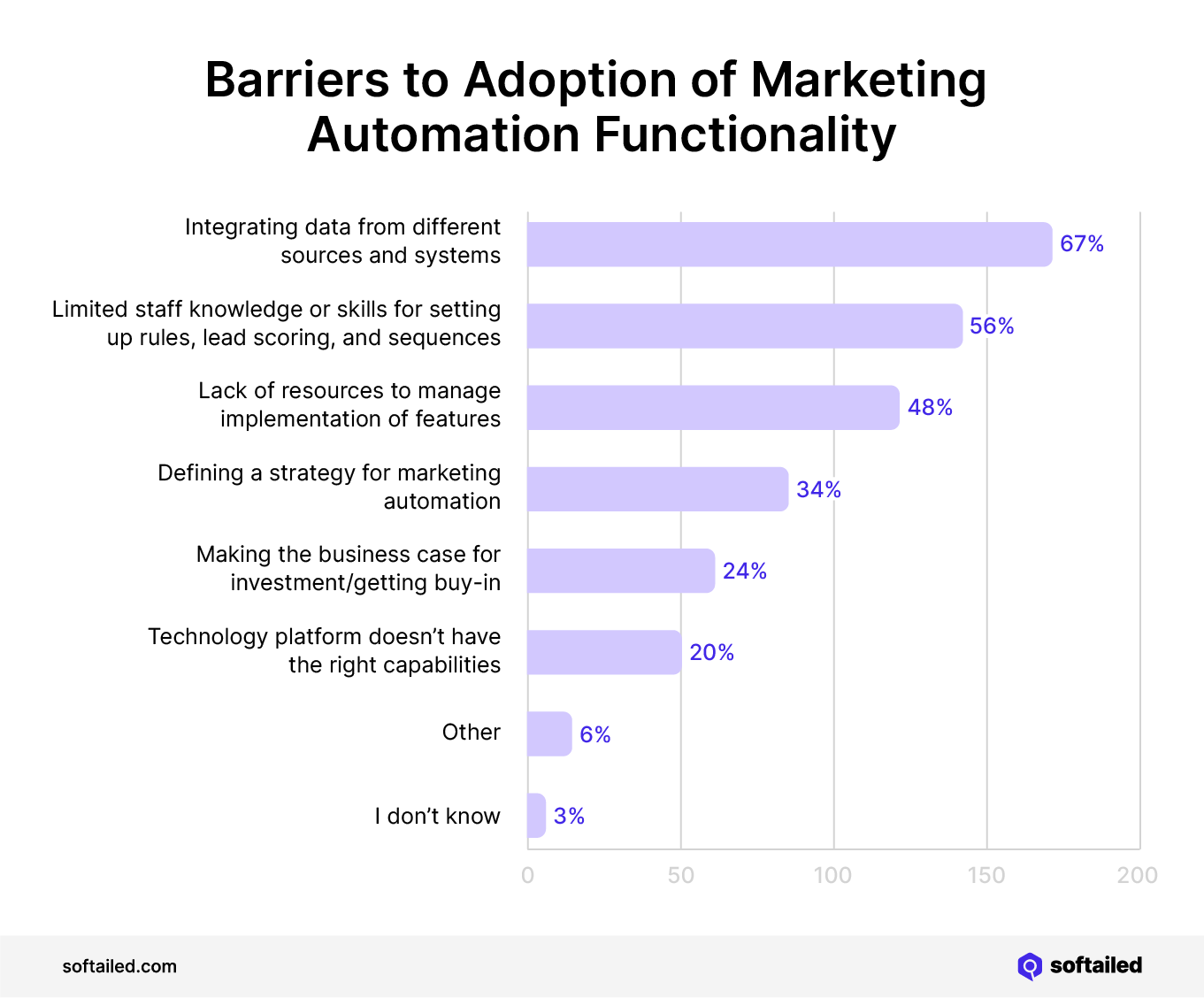
Image Source: Softailed
That same split applies pretty naturally to how some agency owners think about their investments. The system handles the routine stuff, contributions, rebalancing, staying consistent even on the weeks you're too slammed to think about it, while you still make the bigger calls about goals and risk.
A Word of Caution, Because This Matters
Now, a quick gut check here. Automation is a tool, not a strategy on its own. Whether you're talking about your agency's workflows or your personal finances, the systems only work well when you've actually thought through what you want them to do. Blindly automating a bad process just means you get bad results faster and with less friction to notice it.
The agency owners who get the most out of automation are the ones who stayed involved in the setup. They picked the right triggers, set sensible rules, and checked in regularly to make sure things were still working the way they intended. That's the mindset worth carrying into any automated system, whether it's managing client leads or managing your money.
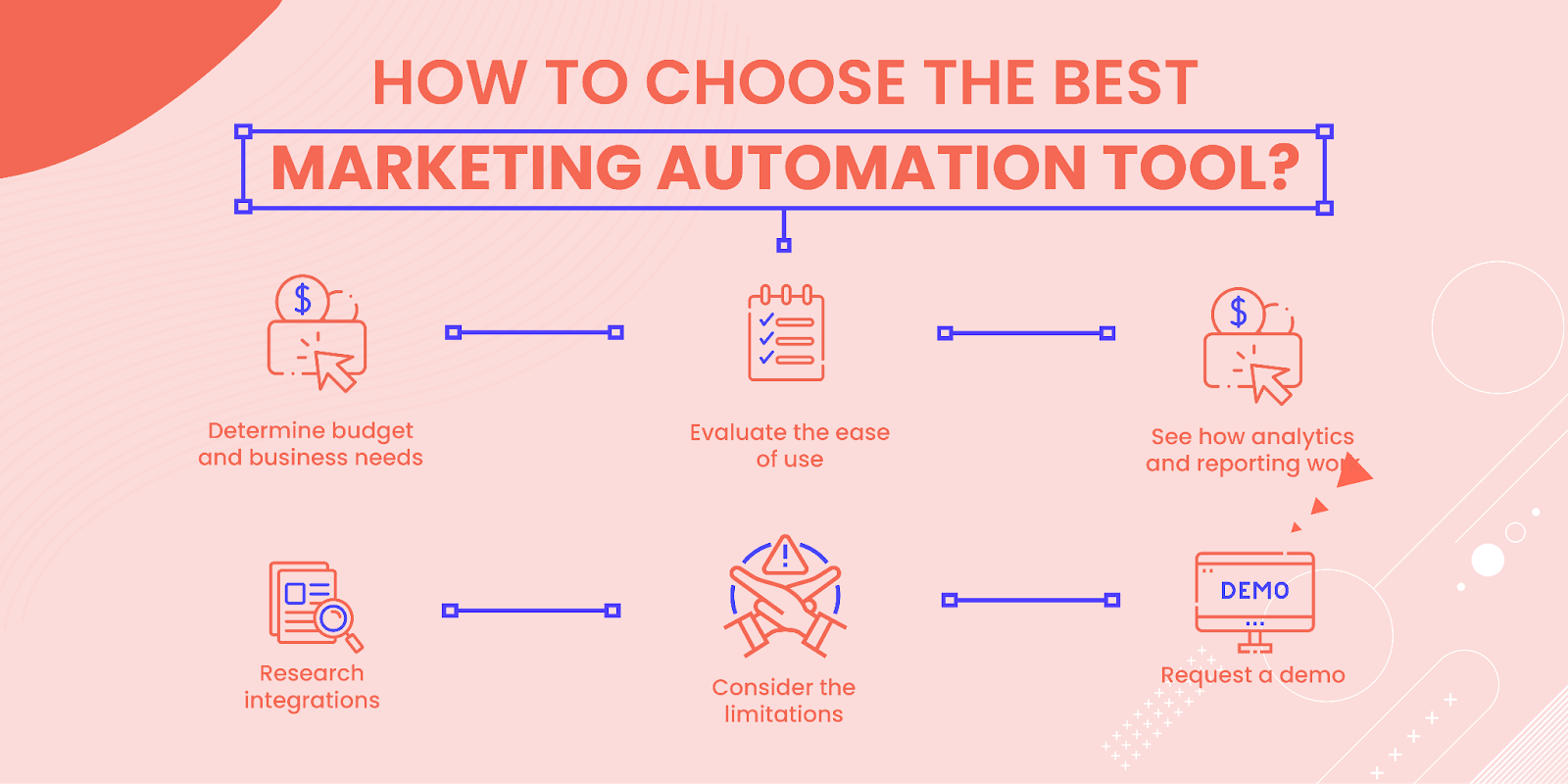
Image Source: Mailmunch
Building an Automated Agency with DashClicks
Platforms like DashClicks bring many of these workflows together so agencies don't have to stitch together multiple disconnected tools.
For example:
- DashClicks’ CRM helps agencies organize leads, automate follow-ups, and manage sales pipelines from a single platform.
- DashClicks’ InstaSites lets agencies quickly build professional websites and landing pages without lengthy development cycles.
- DashClicks’ InstaReports automatically generates white-label marketing reports across multiple channels, reducing hours of manual reporting every month.
- DashClicks’ Projects helps teams organize tasks, collaborate efficiently, and keep client work moving through standardized workflows.
- DashClicks’ Fulfillment Services allow agencies to outsource SEO, PPC, social media marketing, content creation, web design, and other digital marketing services under a white-label model, making it easier to scale without immediately expanding internal staff.
The value isn't simply that these tasks become automated. It's that agency owners spend less time switching between platforms and more time building client relationships, improving strategy, and growing recurring revenue.
Further Reading: 3 DashClicks Automation Software That Will Improve Your Agency's Sales
Bringing It Back Home
So why does any of this matter if you're running an agency and not a hedge fund? Because the underlying skill is the same. Recognizing which tasks deserve your full attention and which ones can run on rails you've already built is one of the most valuable habits an entrepreneur can develop. It's what separates agencies that burn their owners out from ones that actually grow into something sustainable.
You already know how to build a system, watch it work, and adjust when needed. That's not a marketing skill. That's a business skill, and it turns out it travels well into other parts of life too. Whether you're setting up your next client workflow or just thinking more intentionally about how your money grows in the background, the instinct to automate the routine and save your energy for what matters is the same one that's already gotten you this far.
The most successful agencies don't automate because they're trying to remove the human element from their business. They automate so their people can spend more time doing the work that actually requires creativity, expertise, and strong client relationships. Whether that means using workflow software to streamline operations, automated reporting to improve transparency, or white-label fulfillment to expand service offerings, the goal is always the same: build systems that allow your agency to grow without creating unnecessary operational complexity.


How AI Support Workflows Help Agencies Scale Client Retention
Client retention is where agency revenue is actually built.
Getting a new client costs five to seven times more than keeping an existing one. Most agencies know this. Most still spend the majority of their energy on acquisition anyway.
The ones that scale sustainably do something different. They build systems around client experience, not just campaign delivery. And right now, the most overlooked system in any agency is customer support.
Not their clients' support. Their own.
How fast does your agency respond to client questions? How consistently? What happens when a client emails at 9 pm on a Friday?
That gap between what clients expect and what agencies actually deliver is where a lot of retention quietly breaks down. And it is exactly where AI support workflows are starting to make a real difference.
Tools like Chatbase, an AI customer service platform, are making it possible for agencies to automate that support layer without building anything from scratch, trained on your own documentation, and deployed in minutes.
Why Support Quality Drives Retention More Than Performance?
Campaign performance fluctuates. Google updates hit. A month goes badly. These things happen, and most clients understand that.
What they do not forgive is feeling ignored.
A client who gets fast, clear answers to their questions, even simple ones, stays longer than a client whose emails sit in a shared inbox for 48 hours. The work might be identical. The experience is not.
Understanding how AI is used in customer service makes this clearer. AI does not just answer questions faster. It changes the entire support workflow from intake to resolution to escalation so that the client experience is consistent, regardless of who is on your team that day.
For agencies, that consistency is the retention lever most are not using yet.
What an AI Support Workflow Actually Looks Like?
An AI support workflow is not a chatbot that says "I didn't understand that, please try again."
It is a system that reads what the client is asking, finds the right answer from your agency's documentation, responds accurately, and knows when to hand off to a human with the full conversation already attached.
Here is how it works in practice for an agency:
A client emails asking when their next report is due. The AI agent pulls the answer from your service documentation and responds instantly; no one on your team is involved.
A client asks what a specific metric means in their dashboard. The agent explains it using your agency's approved language, matching your brand voice.
A client has a complaint about campaign performance. The agent detects the frustration, stops trying to resolve it automatically, and routes the conversation to the account manager with the full context already attached.
That last step is important. The account manager does not have to ask "what's going on?" They already know. The first thing they say to the client is relevant.
This is what AI agents for support workflows are actually built for: not just answering questions, but resolving them, and handing off cleanly when a human needs to step in.
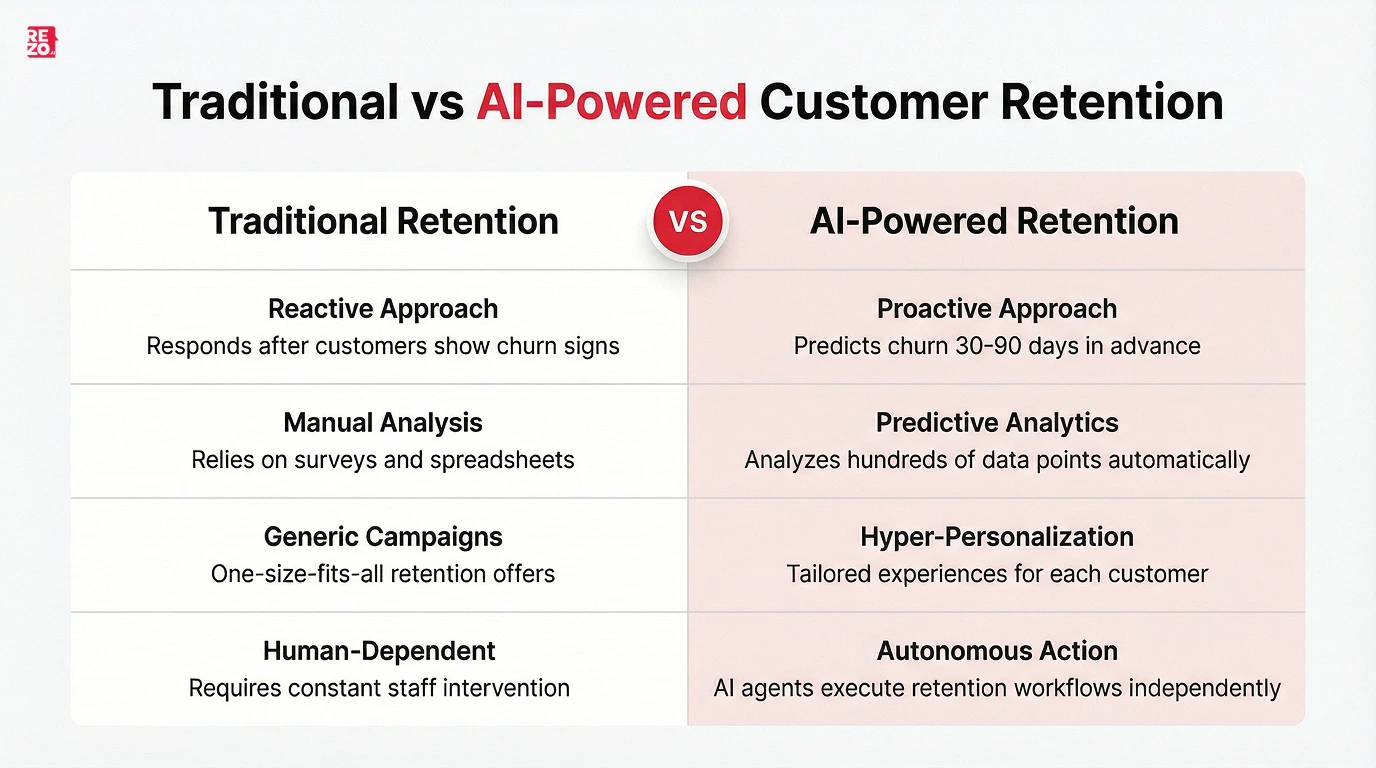
Image Source: Rezo
The Three Places AI Workflows Change Agency Retention
1. Response Time
Most client questions are not urgent. But most clients remember when they waited two days for a simple answer.
An AI agent handles the predictable layer of questions that have clear, documented answers instantly. No queue. No waiting for someone to check their inbox. The client gets a response at 11 pm on a Sunday, the same way they do at 10 am on a Tuesday.
For agencies managing multiple clients across time zones, this alone changes the support experience significantly.
2. Consistency
When support depends on which team member picks up the email, the quality varies. One person explains things clearly. Another gives a one-line answer that creates three more questions.
An AI workflow trained on your agency's documentation gives the same-quality answer every time. The same tone, the same level of detail, the same on-brand language.
Clients notice consistency. It builds confidence. Confidence drives retention.
3. Escalation Quality
This is the one thing most agencies get wrong when they think about AI support.
The goal is not to keep clients away from humans. The goal is to make sure that when a human does get involved, they are walking into the conversation fully prepared.
A well-designed AI workflow does not just escalate. It passes everything: what the client asked, what the AI responded, what the client's current sentiment is, and what data has already been retrieved. The account manager opens the conversation and already understands the situation.
That is the difference between an escalation that builds trust and one that compounds frustration.
Using AI Workflows as a Client Service Offering
Here is where it gets interesting for agencies with the right positioning.
Your clients have the same problem you do. Their customers are asking repetitive questions, waiting too long for answers, and churning because support feels slow or impersonal.
Deploying AI support workflows for your clients is a service with measurable, visible ROI. And ROI that is visible keeps clients on retainer.
Consider what this looks like for a typical ecommerce client:
They receive 600 customer inquiries per month. Order status, return policies, product questions, shipping updates. Most of these have clear answers. Most of them are being handled by a person.
You deploy an AI agent trained on their help documentation. Within 30 days, 70% of those queries are resolved without a human. Response time drops from hours to seconds. Their support team handles real issues instead of repetitive ones.
That is a result you can put in a monthly report. That is the kind of outcome that makes a client renew without negotiating.
For a full picture of how this works across different business types, Chatbase's customer support automation guide covers the setup process from knowledge base preparation to escalation design to measuring results.
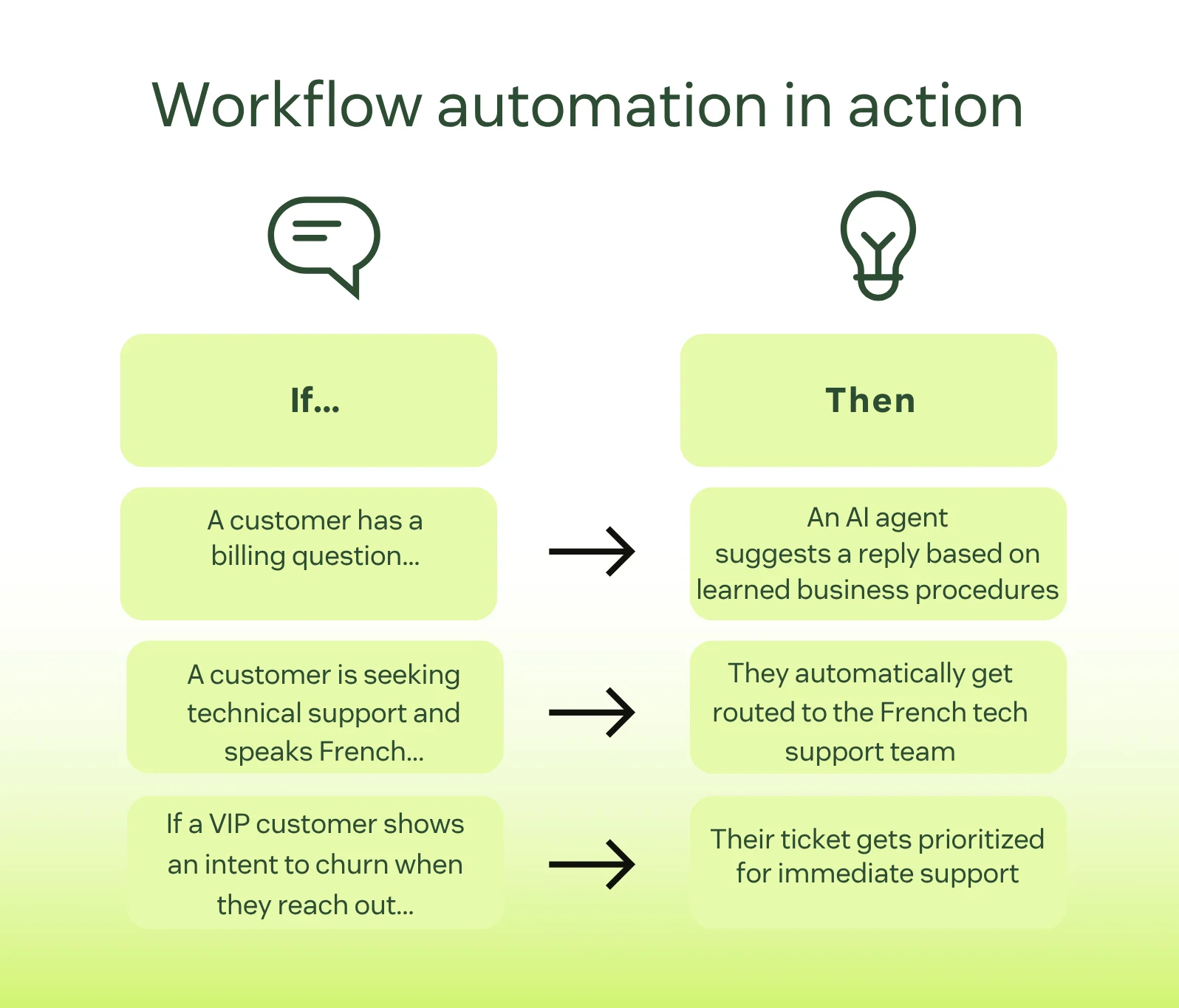
Image Source: Zendesk
What You Need to Get Right Before You Deploy?
Whether you are building this for your agency or for a client, three things determine whether it actually works.
1. The knowledge base has to be ready first
An AI agent is only as good as the content it is trained on. Outdated documentation means wrong answers. Wrong answers mean clients escalate to a human anyway, and lose trust in the process.
Before any agent goes live, audit the content it will be trained on. Make sure it is current, complete, and written clearly. This is the most important step and the one most teams skip.
2. Escalation rules have to be defined before launch
The agent needs to know exactly when to stop and hand off to a human. Which topics always require a person? What sentiment signals should trigger escalation? What happens when a client explicitly asks to speak with someone?
These rules need to be written before go-live, not figured out from complaints after the fact.
3. Someone has to own ongoing maintenance
Policies change. Services update. An AI agent trained on accurate content in January can give wrong answers in April if nobody is maintaining the knowledge base.
For agencies offering this as a managed service, maintenance is the retainer. It is what keeps clients paying month to month and what keeps the agent performing accurately over time.
How to Position This to Clients?
The framing matters more than most agencies realize.
Don't say: "We're going to add a chatbot to your support."
Say: "We're going to build you an AI support agent trained specifically on your products, policies, and brand voice so your customers get accurate answers instantly, and your team only handles the conversations that actually need them."
The second version is what actually happens. It is also what clients say yes to.
The setup, training, and ongoing maintenance of that agent become a recurring service. Not a one-time project. A retainer line that renews because the results are visible every month.
The Metrics That Show It Is Working
Once an AI support workflow is live, whether for your agency or a client, these are the numbers worth tracking:
- Autonomous resolution rate: The percentage of conversations closed without any human involvement. This is the primary signal. It tells you whether clients are actually getting answers, not just receiving responses.
- Response time: Average time from first message to resolution, before and after deployment. The difference here is usually significant.
- Escalation rate and reasons: What percentage of conversations were escalated, and why? Patterns here reveal gaps in the knowledge base or workflow design.
- Re-contact rate within 72 hours: If clients or their customers are coming back on the same issue within three days, the first resolution did not hold. This surfaces problems early.
- CSAT on agent-handled conversations: Satisfaction specifically on AI-resolved interactions. A high resolution rate with low CSAT means the agent is closing conversations without actually solving them.
These five numbers tell you whether the workflow is improving retention or just moving volume around.
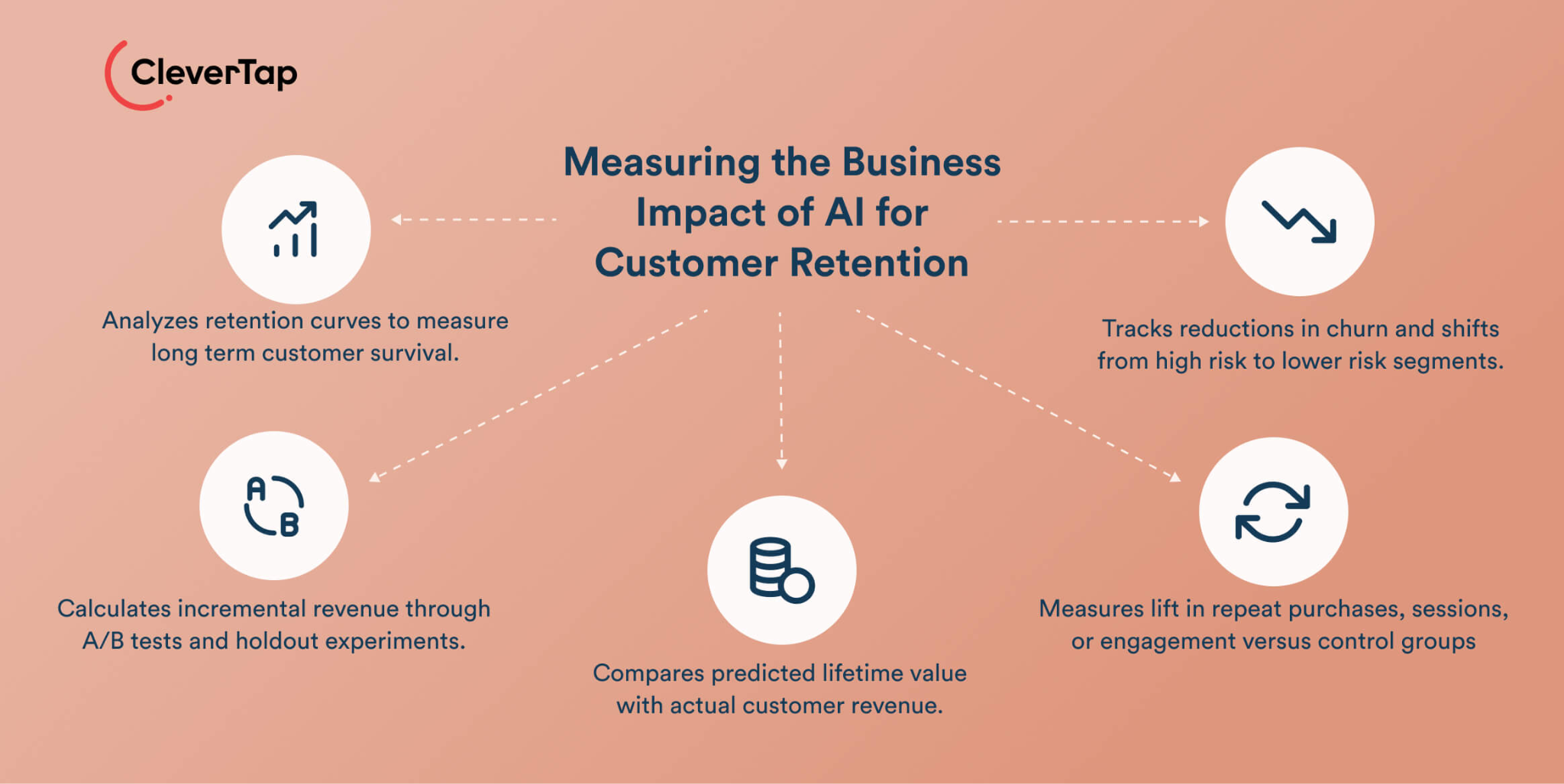
Image Source: CleverTap
Where to Start?
You do not need to roll this out across every client at once.
Pick one. Either your own agency's internal client support or one client with high support volume and repetitive, well-documented queries.
Prepare the knowledge base. Define the escalation rules. Go live on one channel. Review the data after 30 days.
Then expand what is working.
The cost of starting is low. The upside for your agency's client experience and your clients' customer results compounds over time.
How DashClicks Helps Agencies Deliver a Better Client Experience?
While AI support workflows improve response times and automate routine client interactions, agencies also need a structured way to manage projects, communicate updates, and demonstrate ongoing value. That's where DashClicks fits into the workflow.
DashClicks provides an agency management platform that complements AI-powered support by keeping client communication and service delivery organized. Agencies can use features like Conversations for centralized client messaging, Tasks to assign and track work across teams, and the reporting software to deliver automated performance reports that keep clients informed without additional manual effort.
When these operational tools are combined with AI support workflows, agencies can create a more consistent client experience. Routine questions can be handled instantly through AI, while project updates, campaign reporting, and team collaboration remain organized within a single platform. This reduces communication gaps, improves transparency, and allows account managers to spend more time on strategic conversations rather than administrative tasks.
For agencies looking to improve client retention, pairing AI-driven support with a centralized client management system helps create a service experience that is responsive, organized, and easier to scale as the business grows.
Better Client Support Keeps Clients Longer
The agencies that retain clients longest are not always the ones running the best campaigns. They are the ones with the best systems.
AI support workflows are one of those systems. They handle the predictable layer, free your team for the work that actually needs them, and give clients the kind of responsive, consistent experience that makes them stay.
Whether you build this for your own agency first or offer it directly as a client service, the opportunity is real, and the tools are available.
Start with one workflow. Measure the results. Scale what works.

Why Growing Agencies Are Investing in Custom Software Development?
Agencies are under constant pressure to improve operational efficiency, meet rising customer expectations and remain competitive in an increasingly crowded global market. As agencies scale, many discover that relying on generic software and disconnected platforms creates limitations that slow business growth and reduce productivity.
This is why more businesses are now investing in custom software development to streamline operations, automate processes and create tailored digital solutions that align with long-term business objectives. Many agencies are moving away from off the shelf software and working with a custom software company to develop scalable solutions that support evolving business needs.
The custom software development market continues to expand rapidly as businesses seeking greater flexibility and operational control invest in software solutions designed specifically for their workflows. According to industry projections, the global custom software development market is expected to reach $435.9 billion by 2035.
Why Off The Shelf Software Creates Limitations?
Many agencies initially rely on off the shelf software because it offers a quick and accessible starting point. However, as agencies grow, off the shelf solutions often struggle to support complex business processes and evolving customer demands.
Shelf software and generic tools are built for mass-market use rather than unique business requirements. While off the shelf products may work during early growth stages, they can quickly become restrictive when agencies need more advanced functionality or seamless integration across multiple tools.
Agencies frequently encounter issues such as:
- repetitive tasks
- disconnected data
- poor workflow automation
- limited customisation
- ongoing licensing fees
- integration challenges
- restricted scalability
In many cases, agencies end up paying recurring licensing fees for multiple tools that still fail to address specific business operations effectively.
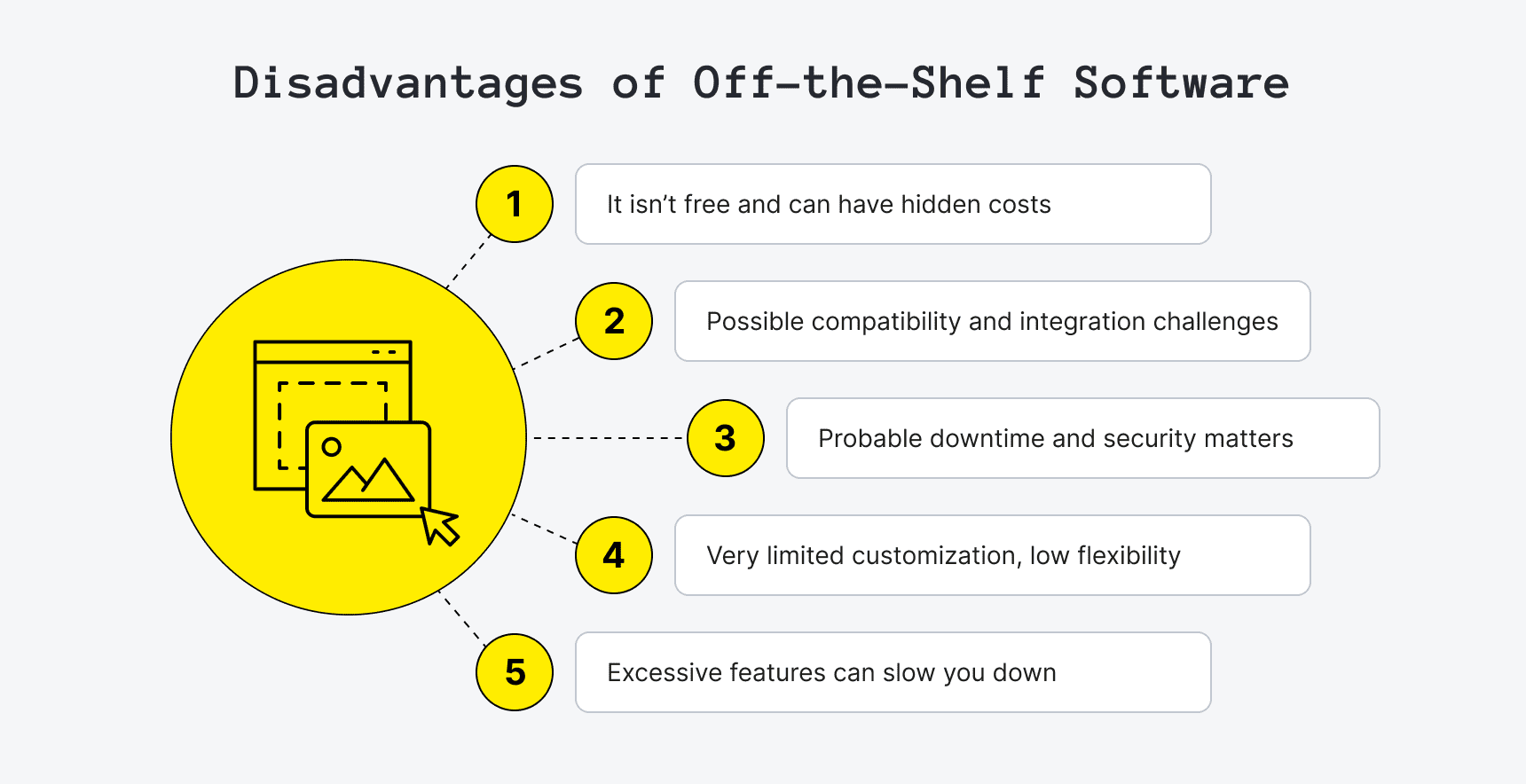
Image Source: Upsilon
This is one of the main reasons why businesses aiming for long term success are increasingly investing in custom software rather than relying on off the shelf solutions.
Custom Software Supports Business Growth
One of the biggest benefits of custom software is scalability.
Custom software development allows agencies to create software solutions tailored directly to their business needs, customer expectations and future expansion plans. Unlike generic software, custom software offers the flexibility to adapt as market changes occur.
Custom software is designed with scalability in mind, allowing agencies to handle growing customer data, user traffic and operational complexity without sacrificing performance.
Many businesses investing in custom software development report significant improvements in operational efficiency and customer satisfaction. Research also shows organisations using tailored solutions experience faster scaling and stronger business growth compared to those relying solely on shelf software.
For growing agencies, this creates a major competitive edge.
Streamlining Operations Through Tailored Solutions
Modern agencies rely on multiple platforms to manage:
- client communication
- project delivery
- reporting
- invoicing
- marketing automation
- customer data
- data management
When these systems do not integrate properly, teams waste valuable time moving information between disconnected platforms.
Custom software solutions help streamline operations by integrating seamlessly with existing systems and consolidating workflows into a central environment.
Custom applications are specifically designed for seamless integration, ensuring smooth data flow across agency operations.
Many agencies are now replacing multiple tools with bespoke software platforms that automate repetitive tasks and improve overall operational efficiency.
This helps businesses:
- streamline processes
- reduce operational costs
- improve reporting accuracy
- enhance customer experiences
- improve team collaboration
- automate processes more effectively
Custom development also allows agencies to create innovative solutions that align closely with internal business strategy and operational goals.
Improving Customer Satisfaction and Retention
Customer satisfaction plays a critical role in agency growth.
Clients now expect highly personalised experiences, faster communication and more transparent reporting. Generic software often struggles to deliver the flexibility required to meet these market demands.
Custom software development enables agencies to create tailored solutions that improve customer experiences while differentiating their services from competitors.
Custom client portals, branded communication hubs and bespoke white label client dashboard help agencies create a stronger competitive advantage in the marketplace.
Research shows companies that prioritise tailored digital solutions and UX-focused development can achieve significantly higher customer satisfaction rates.
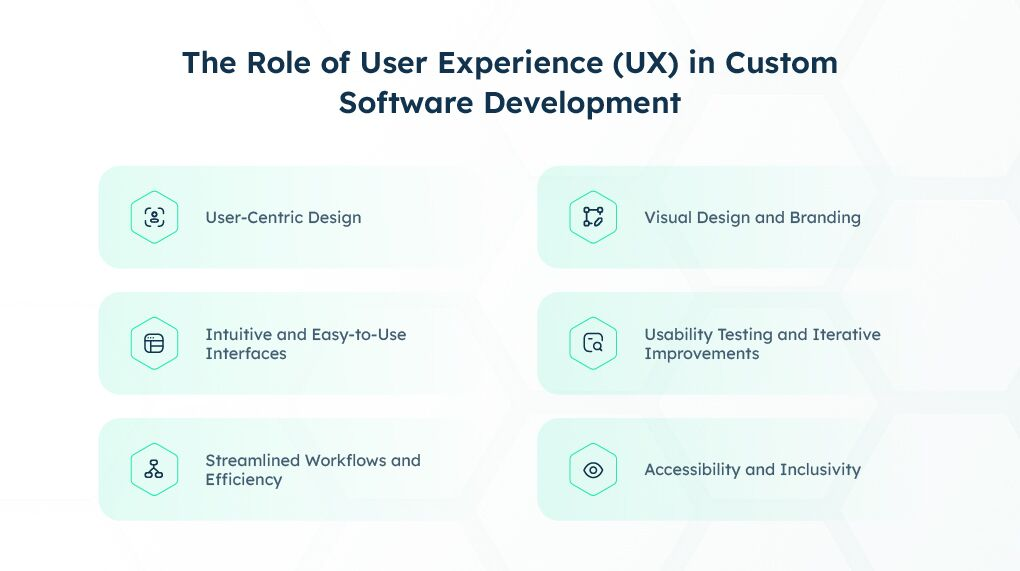
Image Source: Taazaa
As customer expectations continue to rise, agencies using custom software solutions are better positioned to remain competitive and retain long-term clients.
Enhanced Security and Data Protection
Data security is another major reason agencies are investing in custom software development.
Agencies manage large amounts of sensitive customer data, making them attractive targets for cybercriminals and data breaches.
While off the shelf software platforms often rely on shared security frameworks, custom software allows agencies to implement tailored security protocols designed specifically around their business requirements. However, since unique codebases can introduce unforeseen architectural flaws, scheduling rigorous cloud penetration testing is an essential validation step to ensure that bespoke API gateways and cloud-native databases are fully locked down against unauthorized data extraction before going live.
Custom software solutions can include:
- advanced security features
- encryption protocols
- tailored access controls
- industry-specific compliance measures
- customised security measures
This gives agencies greater control over customer data while reducing reliance on third-party vendors.
Enhanced security is becoming increasingly important as businesses face stricter regulatory expectations around data security and privacy management.
Custom software eliminates many of the vulnerabilities associated with outdated shelf software and disconnected digital solutions.
Leveraging Advanced Technologies
The rise of machine learning, cloud computing and AI-driven automation is also shaping the custom software development market.
Agencies looking to remain competitive are increasingly adopting advanced technologies to improve service delivery and operational performance.
Custom software development allows businesses to develop software that integrates:
- machine learning capabilities
- cloud computing infrastructure
- intelligent reporting systems
- workflow automation
- predictive analytics
Unlike generic software, custom solutions can be adapted continuously as market changes and business requirements evolve.
This flexibility gives agencies a significant advantage when responding to rapid technological advancements and shifting client expectations.
Businesses seeking faster time to market and greater operational agility are increasingly choosing custom software over rigid off the shelf software environments.
Reducing Long-Term Costs
While the initial investment in custom software development is often higher than purchasing off the shelf software, many agencies achieve reduced operational costs over time.
Off the shelf solutions often require:
- recurring licensing fees
- costly upgrades
- additional plugins
- multiple software subscriptions
- expensive workarounds
Custom software offers greater ownership and flexibility while eliminating many long-term licensing costs.
Building custom software also allows agencies to retain full ownership of their digital assets, intellectual property and customer data.
Studies show businesses implementing custom software solutions often experience a 20–30% increase in operational efficiency and strong ROI within the first year of deployment.
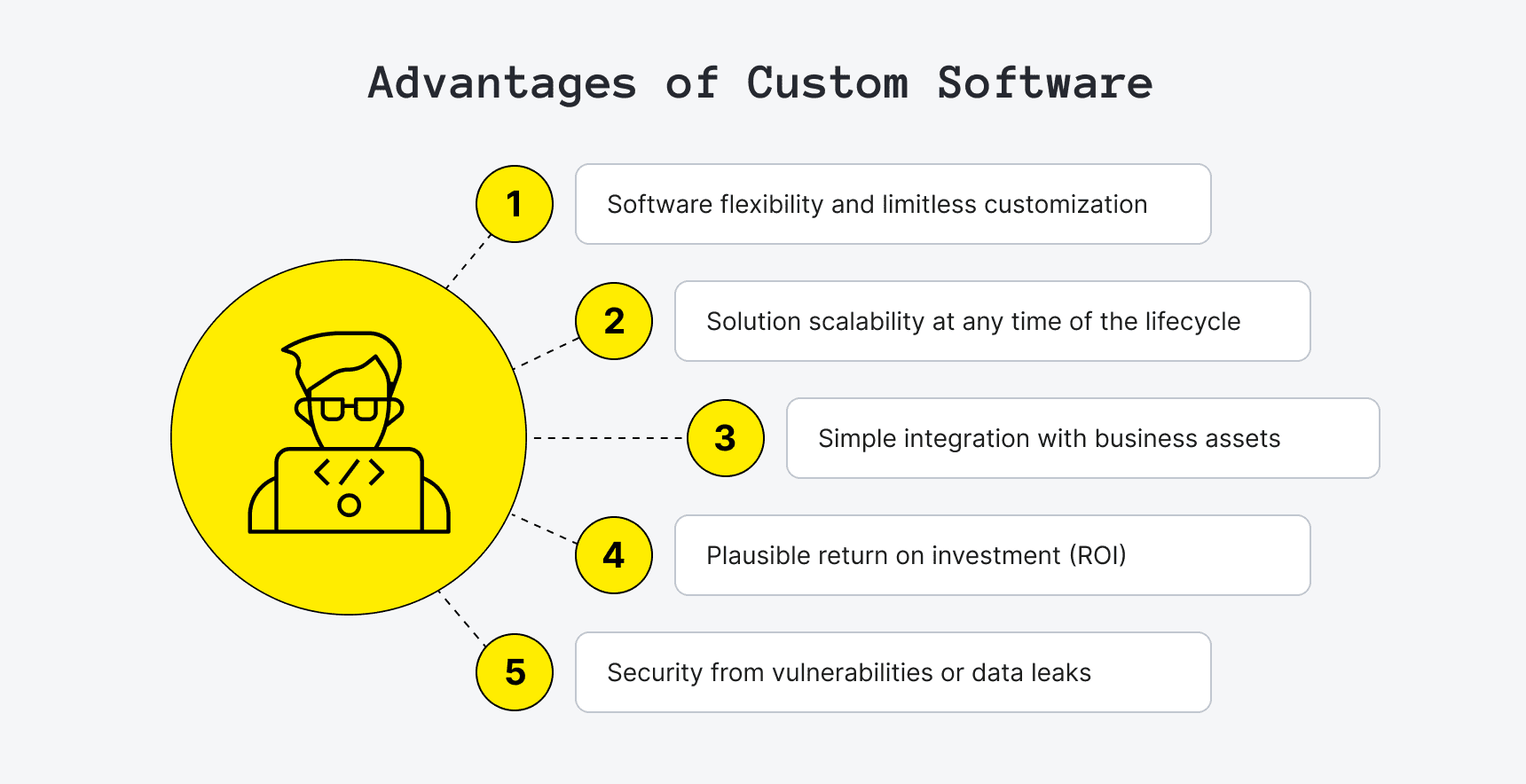
Image Source: Upsilon
Common Mistakes Agencies Make When Investing in Custom Software
While custom software development offers major long-term benefits, many agencies fail to achieve the expected results because of poor planning and unclear strategy. Avoiding common mistakes helps businesses improve operational efficiency, reduce costs and build scalable solutions that support long-term growth.
1. Building Without Clear Business Goals
Many agencies focus too heavily on features instead of identifying the operational problems they need to solve. Successful custom software projects are usually built around goals such as:
- streamlining operations
- automating repetitive tasks
- improving customer experiences
- enhancing reporting accuracy
2. Ignoring Scalability
Some agencies build software that works for current operations but cannot support future business growth, increasing customer data or more complex workflows.
Without scalable architecture, systems can become:
- inefficient
- difficult to maintain
- expensive to upgrade
3. Poor UI and UX Planning
Even advanced software can fail if employees or clients struggle to use the platform. User-friendly dashboards, intuitive navigation and simplified workflows are essential for improving productivity and adoption rates.
4. Choosing the Cheapest Development Partner
Selecting a development company based only on low pricing can create long-term problems such as:
- performance issues
- security vulnerabilities
- integration challenges
- higher maintenance costs
Agencies should prioritise technical expertise, communication quality and long-term support capabilities when choosing a custom software development company.
5. Failing to Plan Integrations
Modern agencies rely on multiple platforms for CRM management, reporting, communication and marketing agency automation. Without seamless integration, teams often continue dealing with disconnected workflows and manual data transfers.
6. Overcomplicating Features
Some agencies try to include too many features within a single platform, making the software harder to manage and maintain. In many cases, simpler and more focused software solutions deliver better operational efficiency and long-term value.
How DashClicks Supports Scalable Agency Growth?
As agencies grow, managing multiple tools, disconnected workflows and increasing client demands can quickly become overwhelming. This is why many businesses are turning to integrated platforms like DashClicks to simplify operations and improve overall efficiency.
DashClicks provides agencies with a centralised environment for managing client relationships, reporting, communication and workflow automation. Instead of relying on multiple disconnected platforms, agencies can streamline operations through a more unified system that supports scalability and long-term business growth.
The platform offers tools designed to help agencies:
- automate repetitive tasks
- improve client communication
- centralise customer data
- simplify project management
- streamline reporting workflows
- improve operational visibility
For agencies looking to reduce operational complexity while maintaining high service quality, platforms like DashClicks’ contacts management software can help create more organised and efficient client management processes.
As customer expectations continue to evolve, agencies that invest in scalable digital infrastructure and workflow automation are often better positioned to improve productivity, enhance customer experiences and remain competitive in a rapidly changing market.
The Future of Agency Operations
As market demands continue to evolve, agencies can no longer rely solely on off the shelf products and disconnected software solutions.
Custom software development is becoming a critical investment for agencies that want to:
- streamline operations
- improve customer satisfaction
- enhance operational efficiency
- protect customer data
- automate processes
- support business growth
- remain competitive
The custom software development market continues to grow because businesses increasingly recognise the limitations of generic software and the long-term value of tailored solutions.
Agencies investing in custom software development are building scalable solutions that align closely with their business objectives while creating a stronger competitive advantage within the global market.
Companies that embrace bespoke software, seamless integration and advanced technologies will be far better positioned for long term success as digital transformation accelerates across every sector.


How AI is Transforming Client Reporting for Marketing Agencies
Client reporting has always been a core function for marketing agencies. It defines how performance is communicated, how decisions are justified, and how client relationships are maintained over time. Traditionally, reporting required manual data collection, spreadsheet handling, and static presentations. This approach was time-consuming and limited the depth of insights agencies could provide.
Artificial intelligence is restructuring this process. Instead of treating reporting as a routine task, agencies now use AI to build intelligent reporting systems that deliver real-time insights, predictive analysis, and automated narratives. This shift is improving both operational efficiency and the quality of client communication.
How Reporting Is Part of Daily Operations?
Along with these changes, reporting is also integrated into day-to-day work inside agencies. It is no longer limited to client updates at the end of a cycle. Teams use reporting systems to stay aligned internally, track progress across campaigns, and coordinate actions across different functions.
This reduces the gap between planning and execution. Instead of waiting for reports to guide decisions, teams work alongside live data. Over time, reporting shifts from a final output to a system that supports coordination across different functions.
The Impact of AI on Client Reporting Systems
AI is not just improving reporting speed. It is changing how marketing data is processed, interpreted, and delivered. Agencies are moving from static reports to dynamic systems that continuously analyze performance and generate actionable insights.
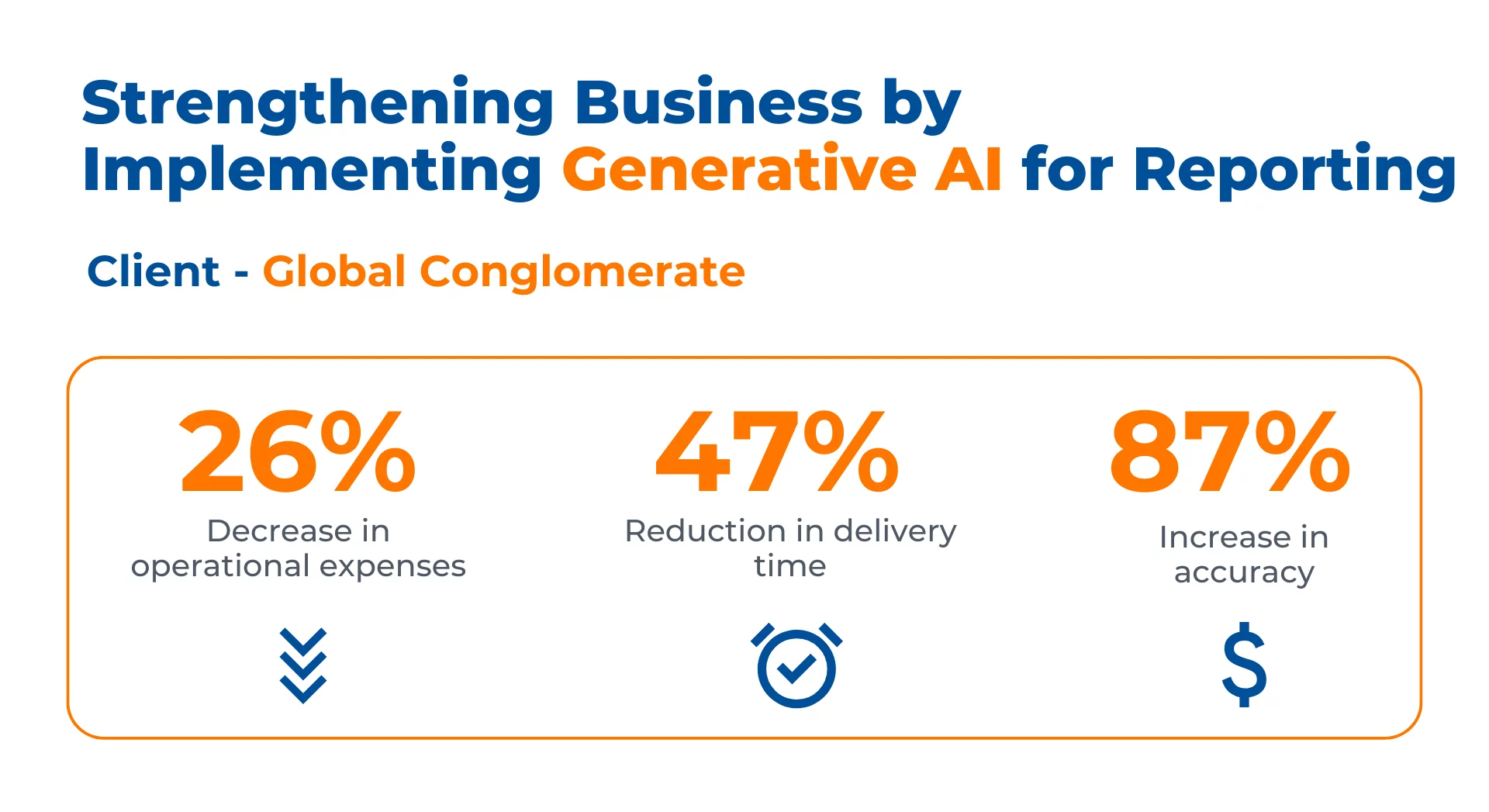
Image Source: Kanerika
1. Real-Time Data Integration and Unified Reporting
AI enables seamless integration of multiple data sources into a single reporting environment. Campaign data from advertising platforms, CRM systems, website to app converter analytics, and email tools is automatically collected and standardized.
This creates a unified dashboard where key metrics are updated in real time. Instead of waiting for weekly or monthly reports, agencies can monitor campaign performance continuously. This improves responsiveness and allows quicker adjustments to campaigns.
From a technical perspective, this is achieved through API integrations, automated data pipelines, and machine learning models that clean and normalize incoming data.
2. Automated Report Generation and Delivery
One of the most immediate benefits of AI is the automation of report creation. AI-powered systems generate structured reports based on predefined templates and performance metrics.
These reports include visualizations, summaries, and key performance indicators, all generated without manual input. Reports can also be scheduled and delivered automatically, ensuring consistency in communication.
This reduces the time spent on repetitive tasks and allows teams to focus on strategy and optimization rather than formatting and data compilation.
3. Predictive Analytics and Forward Planning
AI introduces predictive capabilities into reporting workflows. Instead of only presenting past performance, AI systems analyze historical data to forecast future outcomes. This allows agencies to anticipate -
- Changes in campaign performance
- Shifts in customer behavior
- Variations in conversion rates
This predictive approach is already transforming other sectors. In auto insurance, telematics technology collects real-time driving data to predict risk and adjust premiums accordingly. Agencies managing insurance clients can apply similar data-driven forecasting to optimize campaign spend and targeting.
With these insights, agencies can take proactive steps, such as reallocating budgets or adjusting targeting strategies before performance declines.
Predictive analytics is powered by machine learning models that identify patterns across large datasets, making reporting more strategic and forward-looking.
4. Insight Generation Through Natural Language Processing
One of the major challenges in reporting is translating complex data into understandable insights. AI addresses this through natural language processing.
AI systems can generate written summaries that explain performance trends, highlight key changes, and provide recommendations. This improves clarity, especially for clients who may not be familiar with technical metrics.
Instead of raw data, clients receive structured explanations that make reports easier to interpret and act upon. Tools use AI to read and categorize customer reviews, extracting sentiment, recurring themes, and churn-risk signals that feed directly into client dashboards. Layering these voice-of-customer insights onto campaign metrics helps agencies explain why performance shifts occur and prioritize next steps.
5. Personalized Reporting at Scale
Different clients require different reporting formats, metrics, and levels of detail. AI allows agencies to customize reporting without increasing manual workload. Reports can be tailored based on:
- Business objectives
- Industry type
- Campaign goals
- Preferred KPIs
This ensures that each client receives relevant insights while maintaining efficiency across multiple accounts. Personalization at this level enhances client satisfaction and strengthens long-term relationships.
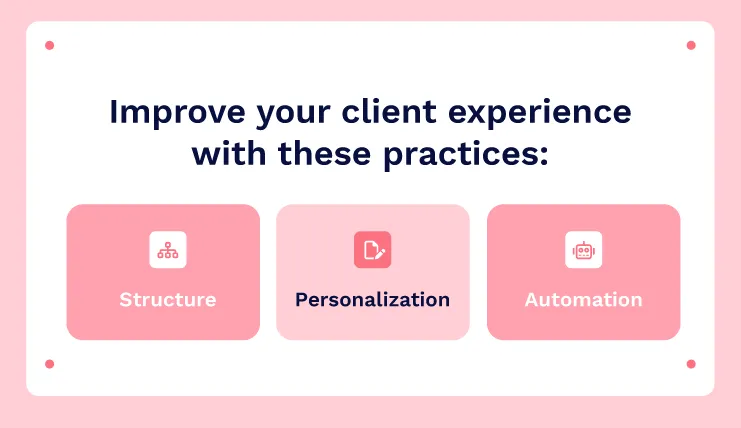
Image Source: AdClicks
6. Data Accuracy, Validation, and Deeper Analysis
AI reduces the risk of manual errors by automatically validating data. It detects inconsistencies, identifies anomalies, and ensures synchronization across platforms.
Beyond accuracy, AI also enables deeper analysis. Instead of focusing only on surface-level metrics, agencies can access insights such as the following. By leveraging AI development services, businesses can unlock more meaningful and actionable intelligence.
- Multi-channel attribution
- Customer journey tracking
- Behavioral segmentation
- ROI analysis across campaigns
This allows agencies to break down performance at a deeper level and understand what is actually driving results across channels.
Operational Efficiency and Scalability
AI significantly improves operational efficiency within agencies. Reporting tasks that previously required hours can now be completed in minutes.
This creates multiple advantages as mentioned below.
- Teams can manage more clients without increasing headcount
- Reporting frequency can be increased without additional effort
- Resources can be redirected toward strategy and campaign optimization
As a result, agencies can scale their operations while maintaining service quality.
Integration with Marketing Ecosystems
AI-powered reporting systems are not standalone tools. They are integrated into broader Marketing Mix Modeling ecosystems that connect campaign execution, data collection, and performance analysis.
This integration creates a continuous feedback loop in which insights generated from reports directly inform campaign adjustments. Campaigns become more adaptive, and decision-making becomes data-driven.
What’s Next for AI in Client Reporting?
The next phase of AI in reporting will focus on deeper automation and intelligence. Expected developments will be as follows.
- Fully automated reporting pipelines
- AI agents generating insights in real time — increasingly designed and deployed through dedicated AI agent consulting engagements
- Voice-based reporting interfaces
- Advanced predictive and prescriptive analytics
The AI in marketing market is projected to grow rapidly, reaching over $107 billion by 2028, indicating continued investment in these technologies.
Changing Client Expectations and Reporting Standards
1. Clients Expect Clear Explanations, Not Just Data
As reporting systems improve, clients are becoming more data-aware. They are no longer satisfied with surface-level metrics or basic summaries. Instead, they expect clear explanations behind performance.
When results change, the first question is no longer what happened, but why it happened. This shifts reporting from simply presenting numbers to explaining decisions. Agencies need to connect data with context; otherwise, reports lose value quickly.
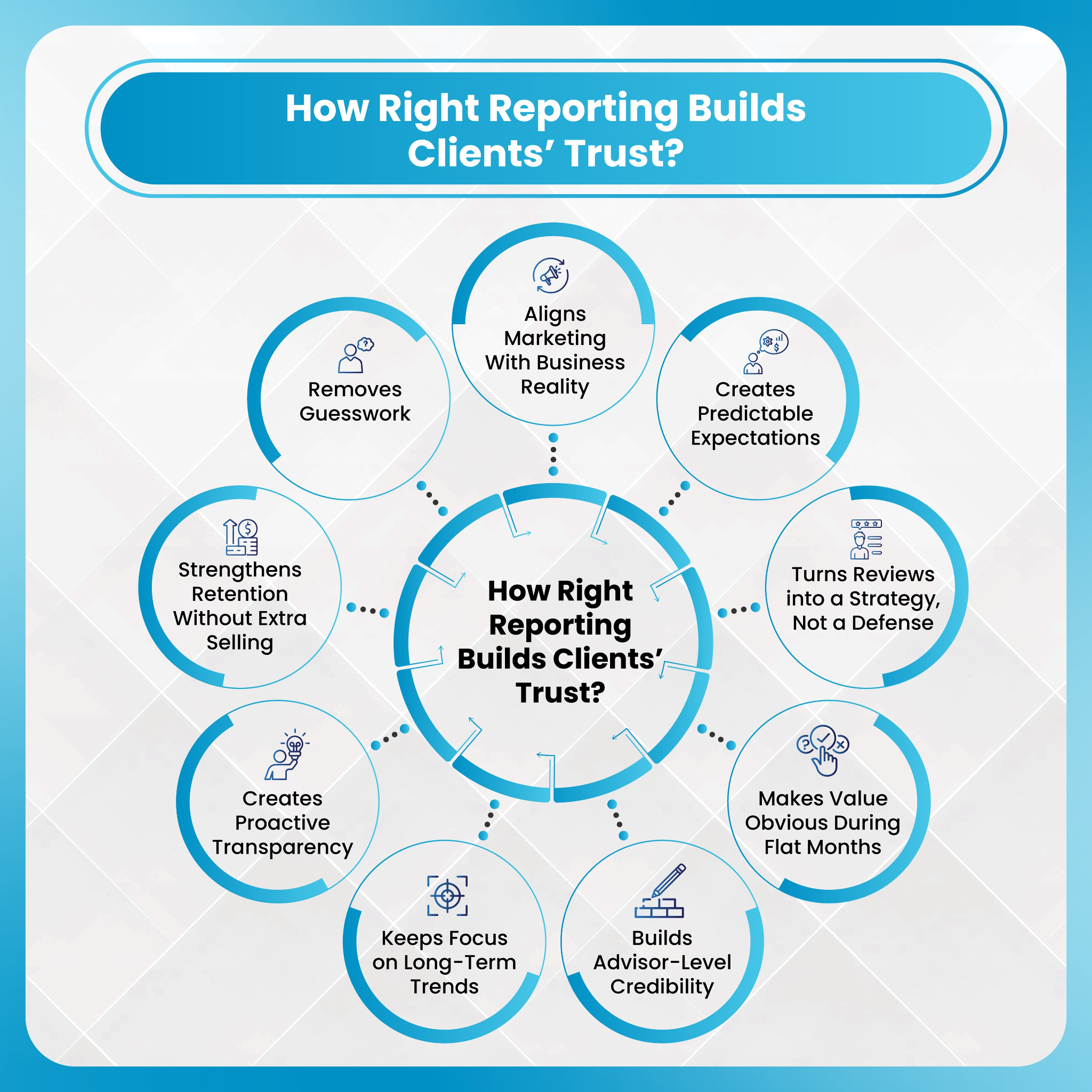
2. Faster Response Times Are Now Expected
Another shift is around speed. Clients do not want to wait for weekly or monthly reports to understand performance. They expect quick answers whenever questions come up.
This changes how teams operate internally. Reporting is no longer a scheduled task; it becomes an ongoing activity. Agencies are expected to respond quickly with clear answers whenever clients raise questions about performance. Slow responses now create more friction than missing data.
3. Reporting Is Focused More on Business Results
Clients are also focusing more on how marketing performance connects to actual business results. Metrics like clicks and impressions are no longer enough on their own.
There is increasing pressure to show how campaigns impact revenue, customer growth, and overall performance. This means reporting must clearly connect marketing performance to revenue, growth, and overall business impact.
Agencies that can clearly connect marketing efforts to outcomes will stand out, while those that stay limited to basic reporting will struggle to meet client expectations.
Challenges and Limitations of AI in Client Reporting
While AI improves reporting efficiency and insight generation, it also introduces challenges that agencies need to manage carefully. A structured approach helps ensure reporting remains accurate and reliable.
- Data Dependency and Quality Issues: While AI significantly improves reporting efficiency and insight generation, it also introduces practical challenges that agencies need to manage carefully. A structured approach to these limitations helps ensure that AI-driven reporting remains accurate, reliable, and strategically useful.
- Integration Complexity Across Platforms: Combining multiple tools into one system requires strong integrations. This can be technically complex and needs ongoing maintenance.
- Cost of Implementation: AI solutions involve upfront and ongoing costs. These include tools, infrastructure, and skilled resources.
- Risk of Over-Automation: Too much automation can reduce human input. Reports may lack context and strategic depth without proper oversight.
- Misinterpretation of AI-Generated Insights: AI insights are not always self-explanatory. They need to be reviewed and validated before use.
- Maintaining a Balanced Approach: A mix of AI and human expertise is essential. This ensures accuracy, context, and better decision-making.
DashClicks’ InstaReports for Client Reporting
DashClicks’ InstaReports Software is built to streamline and simplify client reporting for marketing agencies. It brings together data integration, automation, and customization into a single system, helping agencies deliver clear and consistent reports with minimal manual effort.
- Unified Data Integration: InstaReports connects multiple marketing platforms into one dashboard. This allows agencies to view campaign performance across channels without switching between different tools.
- Automated Report Generation: Reports are created automatically using predefined templates. This reduces repetitive work and ensures consistency in how performance data is presented.
- White-Label Reporting: The platform supports full white-label customization. Agencies can brand reports with their own logo and identity, creating a more professional and seamless client experience.
- Real-Time Performance Tracking: Campaign data is updated continuously, enabling teams to monitor performance and make timely adjustments when needed.
- Client-Friendly Visualizations: Reports include clear charts, summaries, and structured data. This makes it easier for clients to understand performance without needing technical knowledge.
- Scalable Reporting for Agencies: InstaReports supports reporting across multiple clients efficiently. Agencies can scale their operations without increasing the time spent on reporting tasks.
This type of reporting solution aligns with the shift toward more efficient, automated, and client-focused reporting systems, where clarity, consistency, and speed play a central role.
Wrapping It Up
AI is transforming client reporting from a manual, time-intensive process into a structured and intelligent system. It enables real-time data integration, automated report generation, predictive insights, and personalized communication.
For marketing agencies, this transformation improves efficiency, enhances reporting quality, and strengthens client relationships. However, the most effective approach combines AI capabilities with human expertise.
Agencies that adopt this balanced approach will be better positioned to deliver meaningful insights and maintain a competitive advantage.

Building Smarter Marketing Systems with Automation
As digital marketing continues to evolve, businesses are searching for ways to manage their campaigns more effectively. Automation has emerged as one of the most powerful solutions for improving efficiency and scalability.
By integrating automation tools into their marketing systems, companies can streamline operations and focus on long-term growth strategies.
In today’s competitive landscape, this shift is especially critical for marketing agencies managing multiple clients. Without automation, teams often struggle with repetitive tasks, delayed reporting, and inconsistent campaign execution. Automation transforms these challenges into scalable systems that support both performance and growth.
According to a report by HubSpot, 76% of companies use marketing automation in some form, highlighting how widespread and essential these systems have become in modern marketing environments.
Another important factor driving adoption is the growing complexity of digital channels. From search and social media to email and paid advertising, managing multiple touchpoints manually is no longer sustainable. Automation acts as the connective layer that brings these channels together into a cohesive system.
The Shift Toward Automated Marketing
In the past, many marketing tasks were handled manually. Teams had to track campaign performance, send emails individually, and analyze data using spreadsheets.
Today, automation tools allow businesses to manage these processes more efficiently. Automated systems can monitor marketing performance, deliver personalized messages, and generate insights that guide strategic decisions.
This shift toward automation has allowed companies to scale their marketing efforts while maintaining high levels of efficiency.
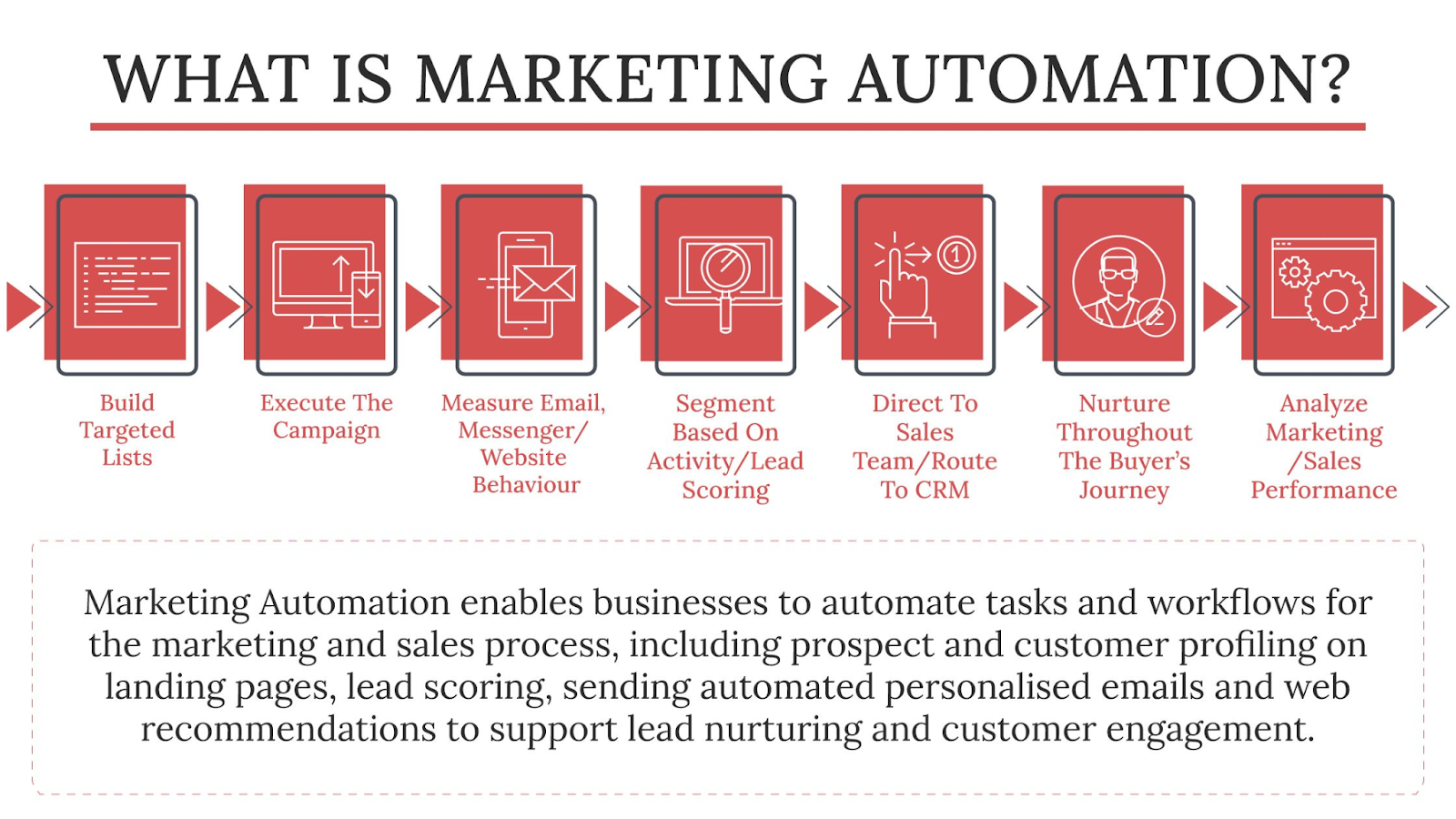
For agencies, this shift is even more impactful. Managing multiple campaigns across different platforms can quickly become overwhelming without centralized systems. Automation enables agencies to standardize workflows, reduce human error, and ensure consistent delivery across all client accounts.
Additionally, automation improves response times. Instead of reacting to issues after they occur, automated systems can flag anomalies, track performance in real time, and trigger actions that keep campaigns optimized continuously.
The Biggest Bottlenecks Without Automation
Before diving deeper into solutions, it’s important to understand the challenges that automation solves.
Many agencies and marketing teams face common operational bottlenecks:
- Manual Reporting: Creating performance reports for each client can take hours every week
- Fragmented Tools: Using separate platforms for SEO, email, CRM, and analytics leads to inefficiencies
- Inconsistent Follow-ups: Leads often go cold due to lack of timely communication
- Limited Scalability: Growth becomes difficult without increasing team size
These bottlenecks not only slow down operations but also impact client satisfaction and retention. Automation addresses these issues by creating structured, repeatable systems that run with minimal manual intervention.
In many cases, these inefficiencies compound over time. For example, as an agency acquires more clients, reporting workloads increase linearly, while team capacity does not. This creates pressure on internal teams and often leads to delays, errors, or reduced service quality.
According to McKinsey, about 60% of all occupations have at least 30% of activities that can be automated. This highlights how much time businesses are potentially losing to manual processes that could be streamlined.
Another overlooked issue is inconsistency. Without automation, processes often depend on individual team members, which can lead to variations in execution. Automation standardizes these processes, ensuring that every client receives a consistent level of service.
Ultimately, these bottlenecks limit growth. Agencies that rely heavily on manual processes often find themselves stuck, unable to scale without significantly increasing costs.
Automating Search Engine Optimization
SEO remains one of the most effective channels for attracting potential customers. However, maintaining strong search visibility requires ongoing optimization and analysis.
Tools built for seo automation help marketers handle these responsibilities by automatically tracking keyword rankings, scanning websites for technical issues, and analyzing competitors.
These tools provide valuable insights that help businesses improve their search performance while reducing manual work.
Beyond basic tracking, advanced SEO automation allows agencies to identify ranking opportunities faster, monitor algorithm changes, and adjust strategies proactively. This reduces the time between insight and action, which is critical in competitive search environments.
Automation also ensures consistency. Instead of sporadic audits, websites can be continuously monitored for issues such as broken links, page speed problems, and indexing errors.
Marketing Automation for Customer Engagement
Once businesses attract visitors through search engines or advertising campaigns, they must engage those visitors effectively. Customer engagement involves nurturing leads, delivering relevant content, and maintaining consistent communication.
Many organizations use marketing automation platforms to manage these interactions. These platforms enable marketers to create automated workflows that guide customers through different stages of the buying journey.
For example, a user who subscribes to a newsletter may receive a sequence of educational emails followed by promotional offers. This approach helps businesses maintain engagement while building trust with their audience. Choosing the right platform to run these workflows is just as important. Businesses that find their current tool limiting often explore Brevo alternatives that better support their automation needs.
For agencies, this means being able to create scalable engagement strategies across multiple clients. Instead of manually managing each interaction, workflows can be designed once and optimized over time.
Automation also enables better segmentation. Users can be grouped based on behavior, interests, or stage in the funnel, allowing for more personalized and effective communication.
How Automation Improves Marketing ROI?
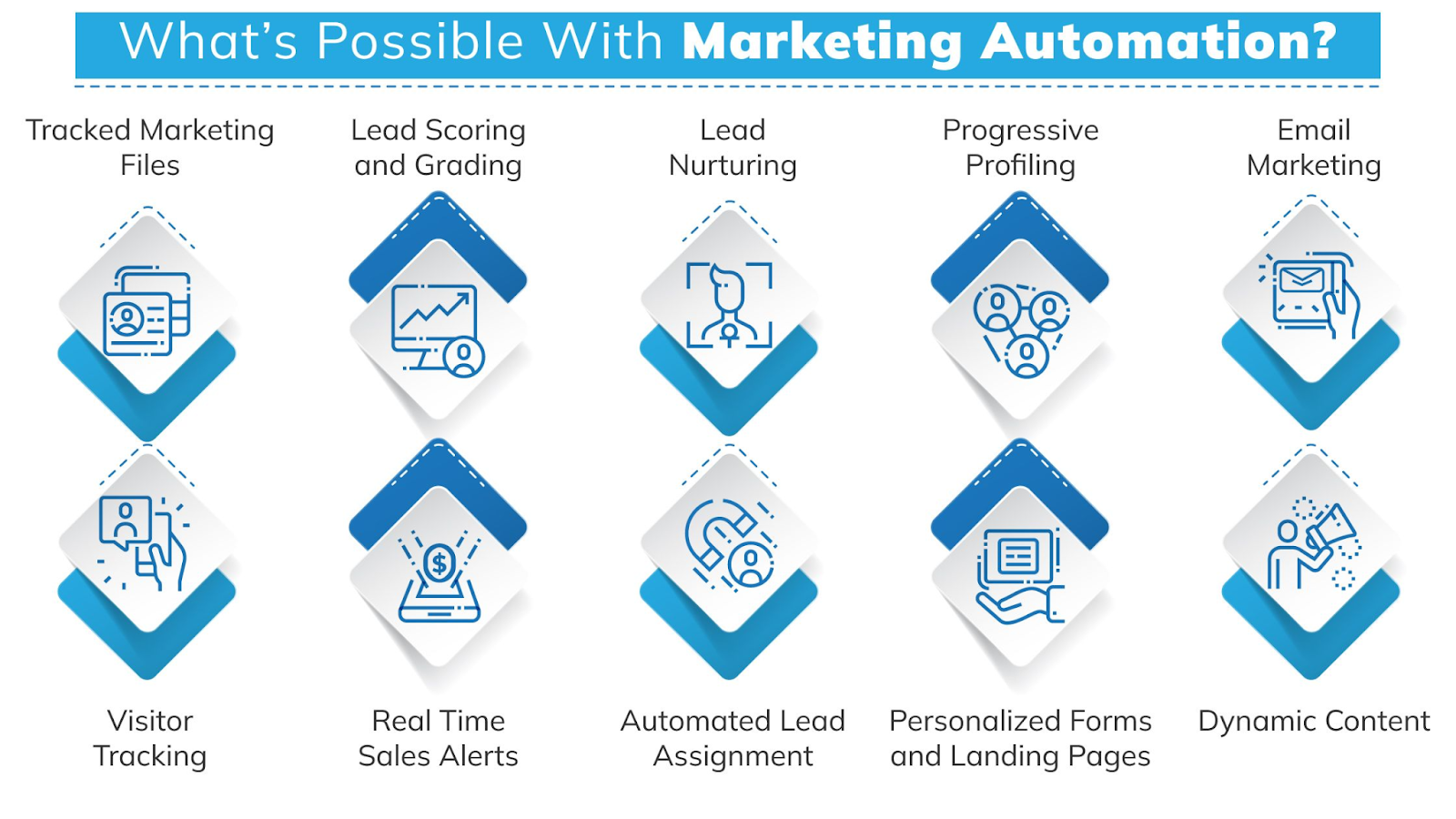
Automation is not just about saving time. It directly impacts performance and profitability. When repetitive tasks are automated, teams can focus on strategy, creativity, and optimization. This leads to better campaign outcomes and more efficient use of resources.
Some key ways automation improves ROI include:
- Faster Execution: Campaigns can be launched and adjusted more quickly
- Improved Accuracy: Reduced human error in data tracking and reporting
- Better Conversions: Timely and personalized communication increases engagement
- Resource Efficiency: Teams can manage more clients without proportional increases in workload
For agencies, this translates into higher margins and the ability to scale operations without significantly increasing overhead costs.
Additionally, marketing agency automation provides better visibility into performance metrics. With real-time data, marketers can quickly identify what is working and what is not, allowing them to allocate resources more effectively.
A study by Nucleus Research found that marketing automation drives an average increase of 14.5% in sales productivity while reducing marketing overhead by 12.2%. This clearly demonstrates the financial impact of adopting automation.
Another key benefit is consistency in optimization. Instead of making occasional adjustments, automated systems enable continuous improvements, ensuring that campaigns remain aligned with performance goals.
Benefits of Integrated Marketing Systems
When businesses combine SEO automation tools with marketing automation platforms, they create a powerful marketing ecosystem.
Some benefits of this integration include:
- Better Lead Generation: SEO attracts visitors who are actively searching for information or solutions.
- Improved Lead Nurturing: Automation platforms help convert visitors into customers through targeted messaging.
- Continuous Optimization: Automated analytics provide insights that help businesses refine their strategies.
- Efficient Marketing Operations: Automation reduces manual workload and allows teams to focus on strategic initiatives.
For agencies, integration is the key to scalability. Instead of switching between multiple tools, a unified system allows for better visibility, smoother workflows, and faster decision-making.
Integrated systems also reduce the risk of data discrepancies. When all tools operate within a single ecosystem, data remains consistent and reliable, improving the accuracy of insights and reports. With more tools connected in one place, it also makes sense to control what each application can access — ringfencing solutions add that layer of protection by restricting how integrated tools interact with your systems and data.
The Role of White Label Automation in Agency Growth
One of the most important developments in marketing automation is the rise of white label solutions.
White label platforms allow agencies to offer advanced marketing services under their own brand without building tools from scratch. This creates new revenue opportunities while maintaining brand consistency.
With white label automation, agencies can:
- Expand service offerings without increasing internal complexity
- Deliver professional reports and dashboards branded to their business
- Scale client acquisition without overwhelming their teams
This model is particularly valuable for growing agencies looking to compete with larger firms while avoiding agency operations mistakes.
Further Reading: Does Your Organization Really Need a Marketing Automation Platform?
How DashClicks Powers Smarter Marketing Automation?
Platforms like DashClicks bring multiple automation capabilities into a single, unified ecosystem designed specifically for agencies.
DashClicks helps agencies streamline operations by combining essential tools such as CRM, reporting, SEO services, and marketing automation into one platform.
- All-in-one System: Instead of managing multiple tools, agencies can centralize their operations, reducing complexity and improving efficiency. This unified approach eliminates the need for constant tool-switching and simplifies team workflows.
- Automated Reporting: DashClicks provides real-time dashboards and white label reports, eliminating the need for manual data collection and presentation. Agencies can deliver professional reports to clients quickly and consistently.
- SEO and Fulfillment Solutions: Agencies can manage campaigns, track performance, and even fulfill services through a streamlined system. This reduces operational friction and ensures consistent delivery.
- Client Management Automation: From lead tracking to pipeline management, automation ensures that no opportunity is missed and communication remains consistent. This helps agencies improve both acquisition and retention.
- White Label Capabilities: Agencies can present all services under their own brand, strengthening client trust and positioning.
- Scalability Advantage: Perhaps the most significant benefit is scalability. With DashClicks, agencies can take on more clients without proportionally increasing their workload or team size.
By consolidating these functions, DashClicks enables agencies to focus more on growth, strategy, and client success rather than operational overhead.
Preparing for the Next Phase of Digital Marketing
Automation technologies are expected to continue evolving as artificial intelligence becomes more integrated into marketing tools. Future systems will likely offer predictive insights, automated campaign optimization, and more advanced personalization features.
Businesses that adopt automation early will have a significant advantage in managing complex marketing operations.
For agencies, the future will be defined by how effectively they leverage automation to deliver faster, smarter, and more personalized results at scale.
Conclusion
Automation is transforming digital marketing by helping businesses operate more efficiently and scale their campaigns effectively. By combining SEO automation with marketing automation systems, organizations can create smarter marketing strategies that deliver consistent results.
When used alongside strong content and strategic planning, automation tools can help businesses achieve sustainable growth in an increasingly competitive digital landscape.
For agencies in particular, adopting integrated platforms like DashClicks can be a key step toward building scalable, efficient, and high-performing marketing systems.


No results found.
Please try different keywords.
Get Started with
DashClicks Today
Get found online, convert leads faster, generate more revenue, and improve your reputation with our all-in-one platform.
.svg)
Unlimited Sub-Accounts
Unlimited Users
All Apps
All Features
White-Labeled
Active Community
Mobile App
Live Support
100+ Tutorials
Unlimited Sub-Accounts
Unlimited Users
All Apps
All Features
White-Labeled
Active Community
Mobile App
Live Support
100+ Tutorials
Unlimited Sub-Accounts
Unlimited Users
All Apps
All Features
White-Labeled
Active Community
Mobile App
Live Support
100+ Tutorials


