

Many digital marketing shops find themselves struggling to retain accounts when deliverables read like technical manuals instead of commercial roadmaps. Transparent SEO reports for clients bridge that gap by connecting search engine visibility closely to pipeline metrics and business revenue. Whether non-paid channels bring in revenue matters more to decision-makers than micro-shifts across dozens of minor keywords. When an account team dumps thirty pages of uncontextualized charts on a client's desk, confusion follows, and client retention takes a direct hit.
Building standardized SEO reporting solves this friction and caps account overhead. Managers cannot rebuild slides from scratch for every client. Teams need an exact breakdown that translates dry crawl logs into commercial reality: cash spent, ranks won, and pipeline created.
Structuring SEO Reports for Clients Around Clear Commercial Goals
Busy executives often skip straight to the executive summary. If that opening page doesn't communicate commercial impact, the document may go unread. Agencies should frame SEO reports for clients around measurable objectives established during onboarding, such as increasing qualified leads, improving organic revenue, or expanding visibility for commercial keywords.
Every strong monthly recap tackles three basic questions:
- Which key commercial targets moved during the last thirty days?
- Which specific agency deliverables triggered that shift?
- What tasks will the technical team tackle across the coming month?
Consider a mid-market SaaS account: organic blog visits jump 25%, but demo bookings slide 4%. The real question is simple: did that traffic land on informational top-of-funnel guides, or did a broken demo-booking form cost sales? Credibility depends on knowing the difference between logging hours and generating revenue.
Publishing forty optimized pages represents project work; improving rankings for commercial queries represents a potential outcome. Reporting both helps clients understand what the agency accomplished and whether that work is delivering results. Commercial goals rarely start from a blank page. When an agency takes over an account, the onboarding pack usually arrives as PDFs: the previous agency's monthly recaps, audit exports and the signed scope of work. Instead of retyping those targets into a new deck, teams can open a PDF as a Word file with pdfFiller, pull out the agreed KPIs, and reuse the layout as the base template for every report that follows.
Core Campaign Performance Metrics That Demonstrate Tangible Value
Dumping sixty different charts into a slide deck causes analysis paralysis. To keep reviews focused, disciplined SEO reports for clients track eight core indicators across crawl health, search visibility, and bottom-line revenue:
- Keyword rankings. Filter out zero-intent terms and group commercial queries by intent so clients see thematic movement instead of rank noise.
- Organic traffic. Pull organic sessions from GA4, and use Search Console queries to separate brand from non-brand demand. Filter internal IPs and scraper bots immediately. Without strict exclusions, team browsing and crawler pings quietly inflate visitor counts.
- Search visibility. Watch Search Console impressions climb. That surge shows Google is testing pages across more queries—long before actual clicks appear.
- Click-through rate (CTR). Tracking click-through rates flags declining snippets or intrusive SERP features, showing when to refresh titles and meta copy.
- Conversion tracking. Track real-world actions like booked demos and sales. Clean conversion tracking ties organic visits directly to pipeline.
- Backlink growth. Log genuine referring domains with relevant context. Chasing bulk links on low-grade directories does little except expose the site to spam-related risk.
- Technical SEO audit. Monthly crawl summaries document fixed status codes, updated canonicals, resolved Core Web Vitals bottlenecks, and server issues.
- Commercial revenue. Direct CRM syncs trace organic touchpoints to closed revenue.
This eight-metric baseline cuts through the noise, anchoring monthly calls around actual commercial performance.
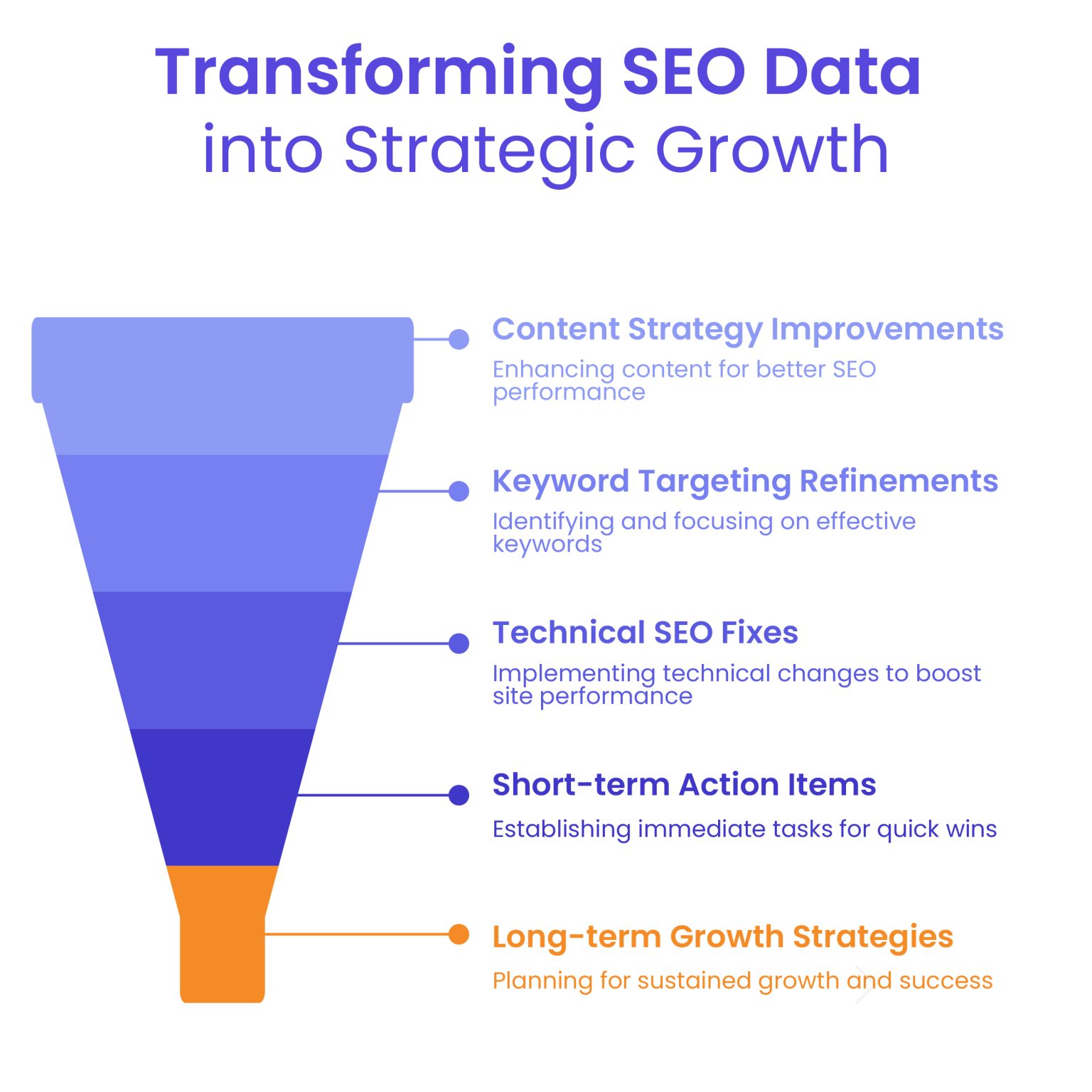
Image Source: White Label Agency
Where Campaign Numbers Come From: Audits, Rankings, and Traffic
Few things kill client confidence faster than mismatched data. Agencies keep SEO reports for clients defensible by locking down tracking pipelines before pulling the first number.
Google Search Console acts as the primary source for search demand data, logging raw impressions and actual query clicks. Once someone lands on the site, Google Analytics 4 logs behavior: engagement time, engaged sessions, and key events.
Accurate rank tracking demands its own technical backbone. Because Google reshuffles search results by city and device, rank trackers check each client's keywords on a regular schedule. Proxies are a standard part of that setup: services like Proxy-Seller give the tracking software a stable connection, so the report shows accurate ranking trends.
Site crawlers and CRM connections round out the technical data pipeline. Since GA4 and Search Console use completely different attribution models and time zones, teams should add short explanatory notes in the report footer to keep clients from getting confused.
Transforming SEO Client Reporting Data into Practical Next Steps
Effective SEO client reporting is about diagnosis, not just presenting charts. Anyone can pull a graph showing traffic dipped last month; an agency gets paid to explain why it happened and what the fix looks like.
Account managers should run every notable shift through a straightforward diagnostic checklist:
- What happened: pinpoint the exact variance, like an 8% dip in category clicks;
- Why it happened: uncover the real cause, whether a core algorithm rollout, cannibalized URLs, or an aggressive competitor push;
- What comes next: assign an engineer or writer to a specific fix with a clear completion date.
The best SEO reports for clients treat data as a springboard for decisions. If a revenue-driving landing page slides three positions, don't just report the drop, explain whether a competitor rolled out a better schema or if an internal site tweak broke links. The report should identify the affected queries and recommend an investigation into content relevance, internal links, and technical configuration.
Clients accept dips when reports pair problems with owners, actions, and hard deadlines. Agencies should distinguish verified causes from hypotheses. Clients need honest explanations, actionable recommendations, and a clear way to evaluate progress.
Further Reading: What Should Be in Your Marketing Report? 6 Things to Include (and Where to Find Them)
Managing the Client Reporting Cadence Across White Label Portals
A realistic reporting cadence prevents ad-hoc status calls. Volatile redesigns justify weekly touchpoints to squash crawl errors. But standard SEO retainers need thirty days: Google takes weeks to crawl links and adjust rankings. Generating an SEO report for clients monthly gives technical work runway to produce measurable movement.
Most agency teams organize client communication into three practical layers:
- Every week engineers look under the hood for broken redirects, missing tracking tags, or sudden indexing drops before the client notices;
- Every month account directors report finished tasks, closed tickets, and verified traffic growth, plus share next month’s top priorities;
- Every quarter agency leaders take a bird’s eye view of market share, acquisition costs, and contract goals.
Running this communication through a branded white label dashboard elevates the entire client experience. Rather than sending static PDF attachments or messy spreadsheets, agencies give clients access to live, branded web portals hosted on their own custom domain.
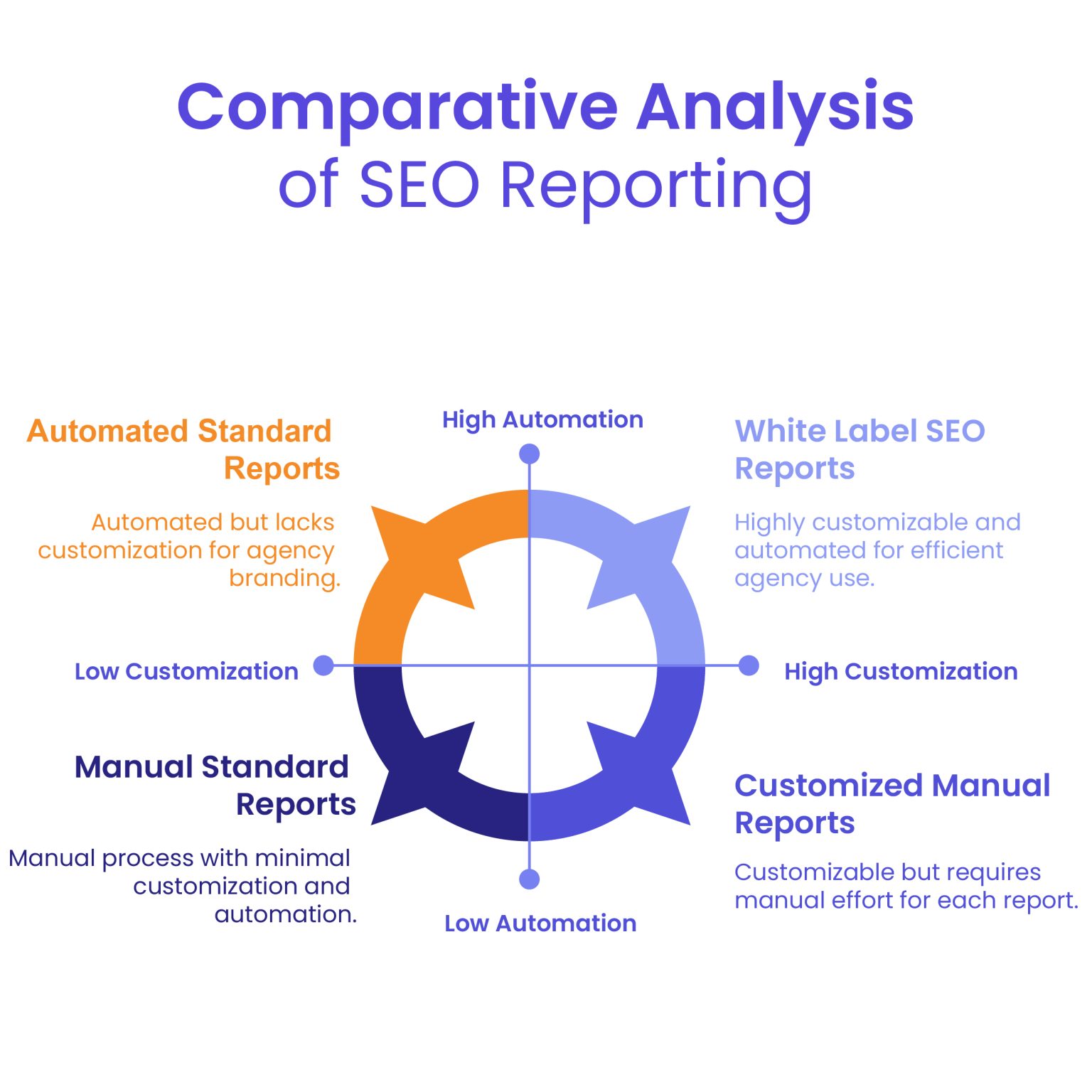
Image Source: White Label Agency
At the same time, account directors adapt SEO reports for clients when briefing non-technical founders who prefer high-level commercial takeaways.
Further Reading: How to Create White Label SEO Reports and Automate Them?
How DashClicks Analytics Software Simplifies Client SEO Reporting?
Preparing SEO reports for multiple clients can consume considerable time when teams must collect data from separate platforms. DashClicks’ Analytics Software helps agencies centralize marketing performance information in one reporting environment.
1. Track keyword performance and website analytics
The software includes track ranks that allows agencies to monitor daily keyword performance. It also supports Google Analytics integration, helping teams review search visibility alongside website activity.
For example, an agency can investigate whether improved keyword performance corresponds with increased organic traffic. If rankings improve but enquiries remain unchanged, the team can examine landing-page relevance and conversion tracking before recommending further action.
2. Centralize data across marketing channels
The platform supports integrations including Google Analytics, SEO Rank Tracker, Google Ads, Facebook Ads, TikTok Ads, CallRail, and CallTracking Metrics. Agencies can review supported data across multiple channels rather than managing each reporting source independently.
This broader view helps account managers understand SEO within the client's overall marketing strategy. However, metrics from different platforms should not be combined without accounting for differences in attribution and conversion definitions.
3. Customize reporting views
DashClick’ Analytics Software provides an overview for each integration, allows users to customize tables by removing unwanted metrics or columns, and supports custom reporting date ranges. After successful integration, the dashboard populates with available metrics in real time.
These features help agencies focus reports on the information relevant to each client. A local business may prioritize keyword performance and incoming calls, while a SaaS company may focus on rankings and website engagement.
4. Improve reporting efficiency and client visibility
By bringing supported integrations into one environment, the software can reduce repetitive data gathering and provide a consistent starting point for monthly reviews. Its white label positioning also supports agencies that want to deliver analytics within their branded service experience.
The software does not replace the need to validate data, interpret performance changes, or prepare actionable recommendations. Agencies should use the available information to explain what happened, why it matters, and what the team plans to do next.
Explore DashClicks’ Analytics Software to learn more about its reporting capabilities and integrations.
Automating Production of SEO Reports for Clients at Agency Scale
Manual spreadsheet formatting drains billable hours and eats agency profits. Account leads often lose ten to twelve hours every month copying CSV files, adjusting chart formats, and emailing slide decks. Automating data pipelines gives those specialists their time back for technical audits, conversion rate testing, and client strategy.
Direct API connectors pipe live data from Search Console, rank trackers, and site crawlers directly into agency report templates. That means account teams spend their mornings diagnosing performance anomalies instead of manually copying rows between tabs.
Agencies should also avoid common reporting mistakes:
- Confusing top-of-funnel impressions with qualified leads.
- Comparing seasonal campaigns only against the previous month.
- Including vanity metrics that do not support business decisions.
- Presenting estimated revenue as verified sales.
- Reporting completed tasks without explaining their purpose.
Automated data collection should be supported by quality checks and human review. Every report should use consistent definitions, identify significant changes, and recommend clear next steps.
High-growth agencies eliminate these mistakes through standardized review checklists. A team that routinely delivers accurate, business-driven SEO reports for clients keeps its churn low, defends its retainers, and turns reporting into a competitive advantage.
Ultimately, effective SEO reports for clients connect campaign activities with meaningful performance indicators. By combining reliable data, practical analysis, and tools such as DashClicks’ Analytics Software, agencies can simplify reporting while giving clients a clearer understanding of campaign progress and future priorities.