

DashClicks Blog
The industry's top experts offer their best advice, research, how-tos, and insights—all in the name of helping you level-up your business and online marketing skills.
Join Us!
.svg)
.svg)
.svg)
.svg)
.svg)

SEO Reports for Clients: What Agencies Should Include
Many digital marketing shops find themselves struggling to retain accounts when deliverables read like technical manuals instead of commercial roadmaps. Transparent SEO reports for clients bridge that gap by connecting search engine visibility closely to pipeline metrics and business revenue. Whether non-paid channels bring in revenue matters more to decision-makers than micro-shifts across dozens of minor keywords. When an account team dumps thirty pages of uncontextualized charts on a client's desk, confusion follows, and client retention takes a direct hit.
Building standardized SEO reporting solves this friction and caps account overhead. Managers cannot rebuild slides from scratch for every client. Teams need an exact breakdown that translates dry crawl logs into commercial reality: cash spent, ranks won, and pipeline created.
Structuring SEO Reports for Clients Around Clear Commercial Goals
Busy executives often skip straight to the executive summary. If that opening page doesn't communicate commercial impact, the document may go unread. Agencies should frame SEO reports for clients around measurable objectives established during onboarding, such as increasing qualified leads, improving organic revenue, or expanding visibility for commercial keywords.
Every strong monthly recap tackles three basic questions:
- Which key commercial targets moved during the last thirty days?
- Which specific agency deliverables triggered that shift?
- What tasks will the technical team tackle across the coming month?
Consider a mid-market SaaS account: organic blog visits jump 25%, but demo bookings slide 4%. The real question is simple: did that traffic land on informational top-of-funnel guides, or did a broken demo-booking form cost sales? Credibility depends on knowing the difference between logging hours and generating revenue.
Publishing forty optimized pages represents project work; improving rankings for commercial queries represents a potential outcome. Reporting both helps clients understand what the agency accomplished and whether that work is delivering results. Commercial goals rarely start from a blank page. When an agency takes over an account, the onboarding pack usually arrives as PDFs: the previous agency's monthly recaps, audit exports and the signed scope of work. Instead of retyping those targets into a new deck, teams can open a PDF as a Word file with pdfFiller, pull out the agreed KPIs, and reuse the layout as the base template for every report that follows.
Core Campaign Performance Metrics That Demonstrate Tangible Value
Dumping sixty different charts into a slide deck causes analysis paralysis. To keep reviews focused, disciplined SEO reports for clients track eight core indicators across crawl health, search visibility, and bottom-line revenue:
- Keyword rankings. Filter out zero-intent terms and group commercial queries by intent so clients see thematic movement instead of rank noise.
- Organic traffic. Pull organic sessions from GA4, and use Search Console queries to separate brand from non-brand demand. Filter internal IPs and scraper bots immediately. Without strict exclusions, team browsing and crawler pings quietly inflate visitor counts.
- Search visibility. Watch Search Console impressions climb. That surge shows Google is testing pages across more queries—long before actual clicks appear.
- Click-through rate (CTR). Tracking click-through rates flags declining snippets or intrusive SERP features, showing when to refresh titles and meta copy.
- Conversion tracking. Track real-world actions like booked demos and sales. Clean conversion tracking ties organic visits directly to pipeline.
- Backlink growth. Log genuine referring domains with relevant context. Chasing bulk links on low-grade directories does little except expose the site to spam-related risk.
- Technical SEO audit. Monthly crawl summaries document fixed status codes, updated canonicals, resolved Core Web Vitals bottlenecks, and server issues.
- Commercial revenue. Direct CRM syncs trace organic touchpoints to closed revenue.
This eight-metric baseline cuts through the noise, anchoring monthly calls around actual commercial performance.
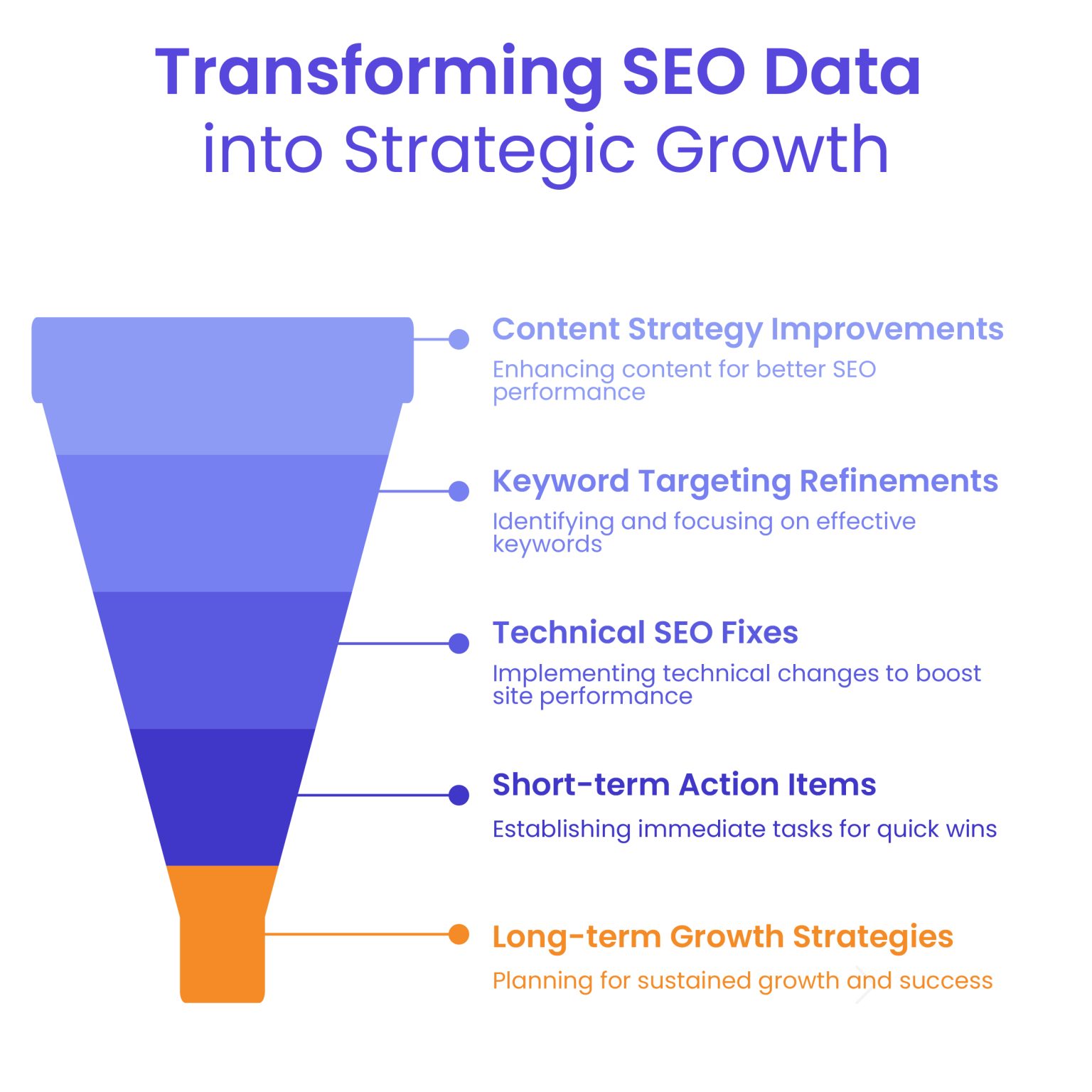
Image Source: White Label Agency
Where Campaign Numbers Come From: Audits, Rankings, and Traffic
Few things kill client confidence faster than mismatched data. Agencies keep SEO reports for clients defensible by locking down tracking pipelines before pulling the first number.
Google Search Console acts as the primary source for search demand data, logging raw impressions and actual query clicks. Once someone lands on the site, Google Analytics 4 logs behavior: engagement time, engaged sessions, and key events.
Accurate rank tracking demands its own technical backbone. Because Google reshuffles search results by city and device, rank trackers check each client's keywords on a regular schedule. Proxies are a standard part of that setup: services like Proxy-Seller give the tracking software a stable connection, so the report shows accurate ranking trends.
Site crawlers and CRM connections round out the technical data pipeline. Since GA4 and Search Console use completely different attribution models and time zones, teams should add short explanatory notes in the report footer to keep clients from getting confused.
Transforming SEO Client Reporting Data into Practical Next Steps
Effective SEO client reporting is about diagnosis, not just presenting charts. Anyone can pull a graph showing traffic dipped last month; an agency gets paid to explain why it happened and what the fix looks like.
Account managers should run every notable shift through a straightforward diagnostic checklist:
- What happened: pinpoint the exact variance, like an 8% dip in category clicks;
- Why it happened: uncover the real cause, whether a core algorithm rollout, cannibalized URLs, or an aggressive competitor push;
- What comes next: assign an engineer or writer to a specific fix with a clear completion date.
The best SEO reports for clients treat data as a springboard for decisions. If a revenue-driving landing page slides three positions, don't just report the drop, explain whether a competitor rolled out a better schema or if an internal site tweak broke links. The report should identify the affected queries and recommend an investigation into content relevance, internal links, and technical configuration.
Clients accept dips when reports pair problems with owners, actions, and hard deadlines. Agencies should distinguish verified causes from hypotheses. Clients need honest explanations, actionable recommendations, and a clear way to evaluate progress.
Further Reading: What Should Be in Your Marketing Report? 6 Things to Include (and Where to Find Them)
Managing the Client Reporting Cadence Across White Label Portals
A realistic reporting cadence prevents ad-hoc status calls. Volatile redesigns justify weekly touchpoints to squash crawl errors. But standard SEO retainers need thirty days: Google takes weeks to crawl links and adjust rankings. Generating an SEO report for clients monthly gives technical work runway to produce measurable movement.
Most agency teams organize client communication into three practical layers:
- Every week engineers look under the hood for broken redirects, missing tracking tags, or sudden indexing drops before the client notices;
- Every month account directors report finished tasks, closed tickets, and verified traffic growth, plus share next month’s top priorities;
- Every quarter agency leaders take a bird’s eye view of market share, acquisition costs, and contract goals.
Running this communication through a branded white label dashboard elevates the entire client experience. Rather than sending static PDF attachments or messy spreadsheets, agencies give clients access to live, branded web portals hosted on their own custom domain.
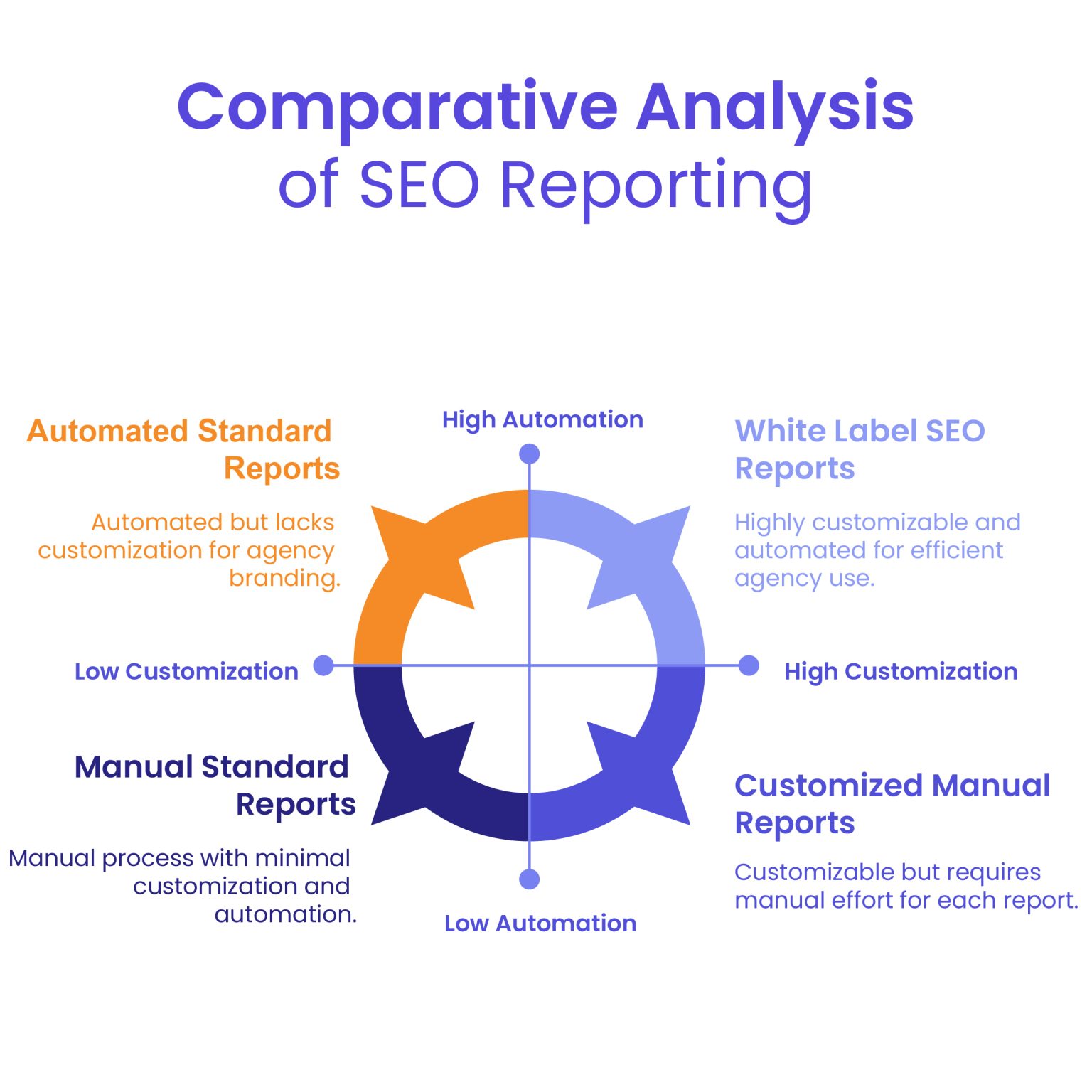
Image Source: White Label Agency
At the same time, account directors adapt SEO reports for clients when briefing non-technical founders who prefer high-level commercial takeaways.
Further Reading: How to Create White Label SEO Reports and Automate Them?
How DashClicks Analytics Software Simplifies Client SEO Reporting?
Preparing SEO reports for multiple clients can consume considerable time when teams must collect data from separate platforms. DashClicks’ Analytics Software helps agencies centralize marketing performance information in one reporting environment.
1. Track keyword performance and website analytics
The software includes track ranks that allows agencies to monitor daily keyword performance. It also supports Google Analytics integration, helping teams review search visibility alongside website activity.
For example, an agency can investigate whether improved keyword performance corresponds with increased organic traffic. If rankings improve but enquiries remain unchanged, the team can examine landing-page relevance and conversion tracking before recommending further action.
2. Centralize data across marketing channels
The platform supports integrations including Google Analytics, SEO Rank Tracker, Google Ads, Facebook Ads, TikTok Ads, CallRail, and CallTracking Metrics. Agencies can review supported data across multiple channels rather than managing each reporting source independently.
This broader view helps account managers understand SEO within the client's overall marketing strategy. However, metrics from different platforms should not be combined without accounting for differences in attribution and conversion definitions.
3. Customize reporting views
DashClick’ Analytics Software provides an overview for each integration, allows users to customize tables by removing unwanted metrics or columns, and supports custom reporting date ranges. After successful integration, the dashboard populates with available metrics in real time.
These features help agencies focus reports on the information relevant to each client. A local business may prioritize keyword performance and incoming calls, while a SaaS company may focus on rankings and website engagement.
4. Improve reporting efficiency and client visibility
By bringing supported integrations into one environment, the software can reduce repetitive data gathering and provide a consistent starting point for monthly reviews. Its white label positioning also supports agencies that want to deliver analytics within their branded service experience.
The software does not replace the need to validate data, interpret performance changes, or prepare actionable recommendations. Agencies should use the available information to explain what happened, why it matters, and what the team plans to do next.
Explore DashClicks’ Analytics Software to learn more about its reporting capabilities and integrations.
Automating Production of SEO Reports for Clients at Agency Scale
Manual spreadsheet formatting drains billable hours and eats agency profits. Account leads often lose ten to twelve hours every month copying CSV files, adjusting chart formats, and emailing slide decks. Automating data pipelines gives those specialists their time back for technical audits, conversion rate testing, and client strategy.
Direct API connectors pipe live data from Search Console, rank trackers, and site crawlers directly into agency report templates. That means account teams spend their mornings diagnosing performance anomalies instead of manually copying rows between tabs.
Agencies should also avoid common reporting mistakes:
- Confusing top-of-funnel impressions with qualified leads.
- Comparing seasonal campaigns only against the previous month.
- Including vanity metrics that do not support business decisions.
- Presenting estimated revenue as verified sales.
- Reporting completed tasks without explaining their purpose.
Automated data collection should be supported by quality checks and human review. Every report should use consistent definitions, identify significant changes, and recommend clear next steps.
High-growth agencies eliminate these mistakes through standardized review checklists. A team that routinely delivers accurate, business-driven SEO reports for clients keeps its churn low, defends its retainers, and turns reporting into a competitive advantage.
Ultimately, effective SEO reports for clients connect campaign activities with meaningful performance indicators. By combining reliable data, practical analysis, and tools such as DashClicks’ Analytics Software, agencies can simplify reporting while giving clients a clearer understanding of campaign progress and future priorities.


Top 6 Best SEO APIs for Digital Experts
Engineers and digital marketing professionals frequently try to determine the absolute best SEO API on the market. Finding clean programmatic search data requires aggressive testing. Reading through endless developer documentation to calculate exact endpoint costs drains engineering resources rapidly. Marketing vendors often obscure their true prices behind confusing credit systems. They bury throughput limits deep within their technical wikis.
We break down the exact expenses associated with the leading tools. You need accurate data. You need predictable billing. Here is the exact ground truth regarding the most popular data extraction vendors.
Key Takeaways
- Base subscription requirements frequently double the advertised cost of raw endpoint access.
- The exact financial impact of a single query fluctuates wildly depending on the specific search engine rankings API requested.
- Strict caching policies heavily dictate monthly billing limits for high-frequency trackers.
- Free tiers exist purely to verify technical connections rather than sustain live production applications.
- Upfront annual billing discounts drastically reduce the baseline expense of long-term ownership.
- Certain API SEO tools charge extra for parsing mobile results or handling generative AI snippets.
- Hidden hourly throughput caps break autonomous agentic workflows routinely.
- The most dependable SEO data API providers handle proxy rotation entirely on their server side.
- Custom enterprise plans often demand long negotiations to reveal their best API for SEO pricing.
Why the Right SEO Data API Matters?
Machine learning teams rely on consistent extraction protocols. Building custom internal dashboards requires pristine inputs. Contaminated data ruins the entire operation. An unstable SEO data API disrupts automated reporting schedules instantly.
We think stable endpoints reduce the manual exhaustion associated with tracking thousands of digital assets. Frequent algorithm shifts break fragile web scrapers overnight. Dedicated vendors manage the entire proxy infrastructure. They solve the CAPTCHAs silently. They parse raw HTML structures into clean JSON responses. Purchasing direct access to a dedicated SEO ranking API stops the endless cycle of repairing broken Python scripts.
A reliable SEO integration API acts as the strict backbone for custom digital products. Different vendors charge radically different rates for the exact same organic position data. Selecting an overpriced vendor burns quarterly budgets immediately. Honestly, cost predictability matters just as much as technical uptime. Engineering teams need a dependable SEO rank API to track competitors without constantly worrying about invisible hourly throughput caps. The transition to generative search results makes static scraping nearly impossible. You require tools that actively click elements and execute JavaScript.
Choosing the wrong provider means you receive outdated blue links instead of the actual user experience.
Common Agency Use Cases for SEO APIs
SEO APIs aren't just for software developers. Agencies increasingly use them to automate repetitive SEO tasks, improve reporting accuracy, and build scalable client workflows.
Some common use cases include:
- Pulling keyword rankings into custom dashboards
- Monitoring competitor rankings across multiple locations
- Building automated client reports
- Tracking SERP features and AI Overviews
- Integrating SEO data into CRM and reporting platforms
- Powering internal SEO tools and automation workflows
For growing agencies, APIs reduce manual work while making reporting faster and more consistent.
How Do We Evaluate These Tools?
Finding the exact best SEO data API requires strict testing criteria. The analysis looked directly at raw pricing structures and endpoint capabilities. Vendor documentation provided the strict technical limits.
The raw pricing data indicates specific billing models punish high-volume queries aggressively. Evaluating the best SEO API providers requires looking far past the lowest advertised tier. True evaluation involves calculating the exact cost of pulling one million records. The review measured available endpoints across different search environments. Documentation clarity was heavily scrutinized. The exact scaling rules for each API SEO tools package were mathematically defined.
Reviewing the best SEO API means identifying hidden overage penalties. Some vendors restrict concurrent connections arbitrarily. Others demand massive upfront capital commitments before issuing a sandbox key. The assessment focused on identifying systems that support modern SEO API automation without demanding ridiculous subscription upgrades.
The 6 Best SEO Data API Options
So, let`s discuss the best SEO data APIs you can use!
1. SE Ranking
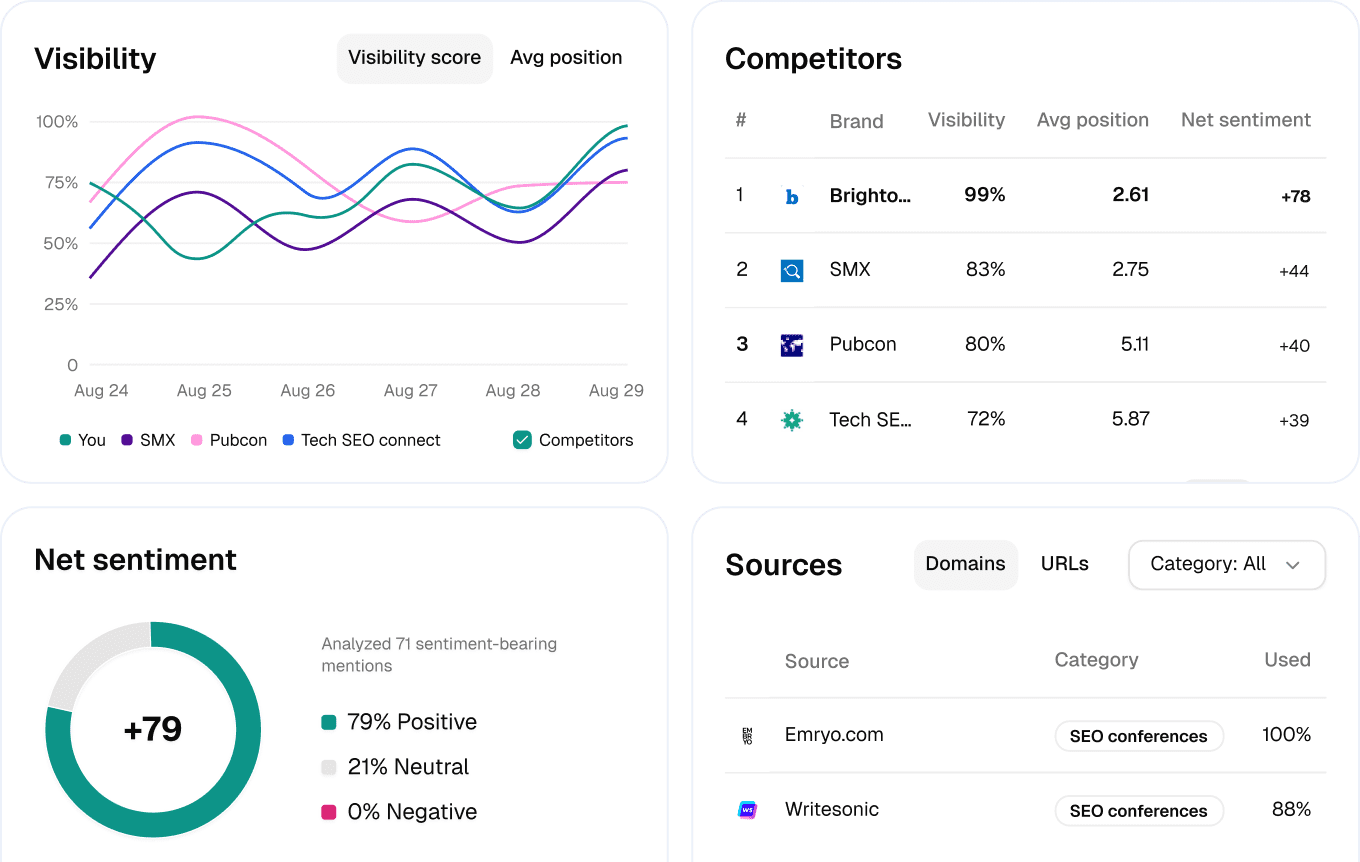
SE Ranking provides a standalone application interface built for teams requiring metric data without logging into a visual web application. Their backend system supports an exhaustive list of specific data points across multiple regional databases. It supports ISO 3166-1 alpha-2 codes for highly precise regional targeting. The product operates on a distinct credit system where specific endpoints drain different credit amounts.
Key features of SE Ranking:
- Rank Tracker metrics
- Website Audit issue extraction
- Backlink monitoring and tracking
- Keyword Research database queries
- AI Search analysis tools
- Domain Research statistics
- Project Management programmatic controls
Pricing:
The service operates on a pay-as-you-go system or bulk volume plans. A standalone pay-as-you-go plan starts at $50.00 per month yielding 250,000 credits. They offer a 14-day trial including 100,000 free credits.
The exact cost of a query depends heavily on the requested endpoint. A keyword report usually costs 10 credits per individual record. Retrieving 1,000 keywords across 50 domains consumes 500,000 credits immediately.
Standard web platform plans include a set amount of monthly credits. The intermediate Core plan includes 25,000 monthly credits. The Growth plan includes 100,000 credits. The Project interface uses standard subscription limits rather than drawing from this separate credit pool.
1-Year Ownership Calculations:
- Solo Developer Scenario: A developer utilizing the standalone pay-as-you-go system at the entry-level will spend $50.00 monthly. Twelve months equates to exactly $600.00 per year for a total allocation of 3,000,000 credits.
- Mid-Sized Agency Scenario: An agency requiring 1 million credits monthly will need the $200.00 tier. The annual cost reaches $2,400.00.
- Enterprise Scenario: A massive operation choosing an annual volume discount starting at 12 million credits will pay $2,148.00 per year.
Best For:
Agencies building custom client dashboards. It works exceptionally well for teams needing backlink and site audit data alongside standard position tracking without building separate scrapers.
Pros:
- No active web application subscription is strictly required to purchase standalone data access.
- The system accepts precise regional database codes which improves local tracking accuracy significantly.
- Flexible credit scaling supports sudden traffic spikes without breaking connections.
Cons:
- The internal credit math gets complicated rapidly when mixing different endpoint requests.
- Certain legacy pricing plans require specific add-on purchases to unlock basic technical access entirely.
Verdict:
The deliberate separation of the technical interface from the visual web platform is a brilliantly hostile move against competitors. Because clients can purchase a standalone package, they avoid paying for visual web dashboards they never intend to open. This isolated pricing model saves engineering teams substantial money over a fiscal year. They pay exactly for the rows they request. We think this structural choice forces competing API SEO tools to reconsider their bundled pricing tactics.
2. Bright Data SERP API
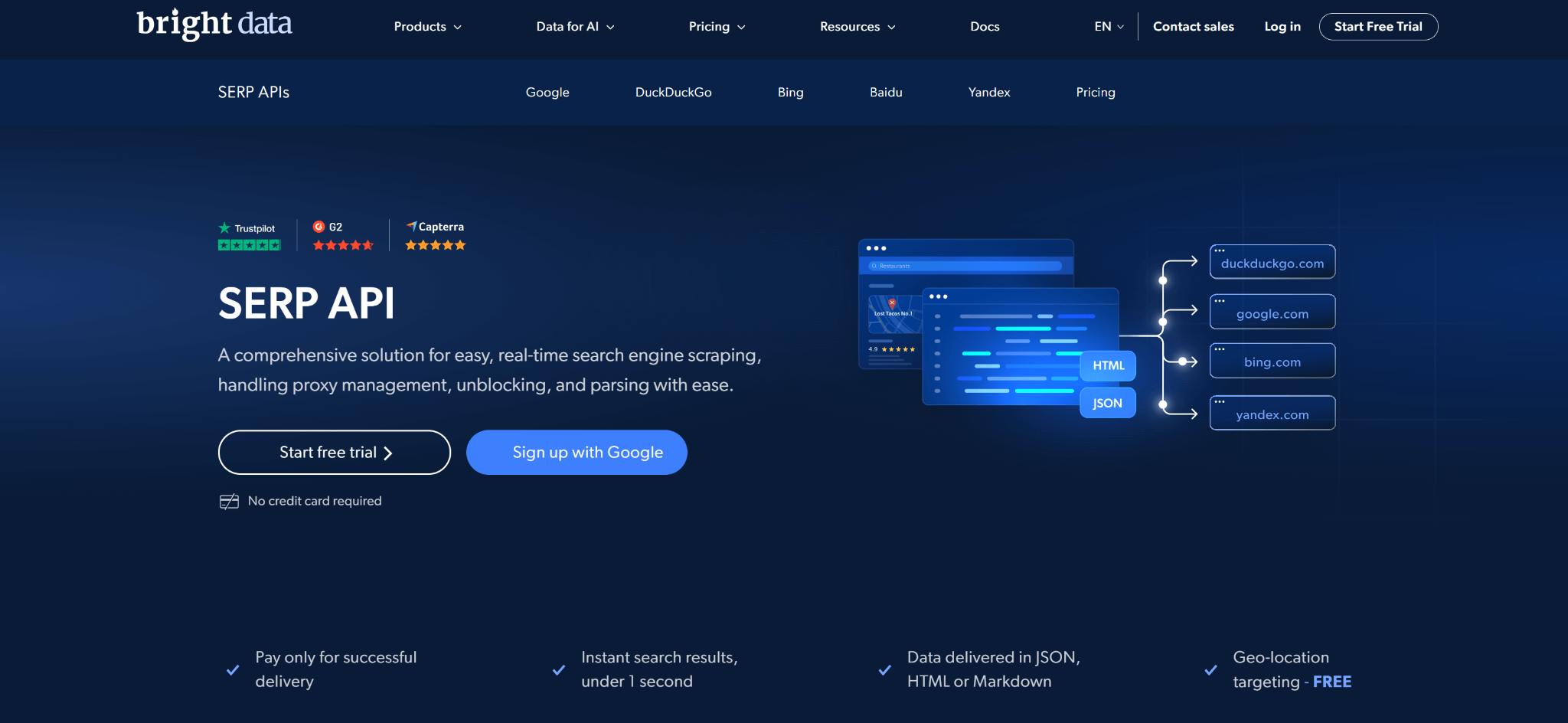
Bright Data operates a massive residential proxy infrastructure designed for extreme extraction tasks. The system bypasses location blocks easily. It simulates human behavior perfectly to avoid triggering security challenges. The interface handles the complicated rendering processes silently on their own servers.
Key features of Bright Data:
- Full JavaScript rendering capabilities
- Automatic CAPTCHA solving mechanisms
- Desktop and mobile user agent spoofing
- Automatic retries upon failed connections
- IP rotation mechanisms across 195 countries
- Data validation protocols ensuring accuracy
- Multiple format deliveries (JSON or HTML)
- Built-in browser fingerprinting
Pricing:
Bright Data uses a strict success-based billing model. Failed requests cost absolutely nothing. Their pay-as-you-go tier charges $1.50 per 1,000 results. Teams seeking scale usually purchase the $499 monthly subscription, which yields 380,000 results at $1.30 per 1,000. The largest standard tier costs $1,999 monthly for 2 million results. Asynchronous collection requests remain completely free. Deep parsing is included in the base unit price. Bright Data matches the first deposit dollar-for-dollar up to $500. Customers can pay directly through the AWS Marketplace.
1-Year Ownership Calculations:
- Solo Developer Scenario: A single user pulling exactly 50,000 results monthly on the pay-as-you-go plan pays $75.00 monthly. The total 1-year ownership costs $900.00.
- Mid-Sized Agency Scenario: A growing team selecting the base $499 monthly subscription tier will spend exactly $5,988.00 over a single year.
- Enterprise Scenario: A massive operation on the $1,999 monthly tier spends $23,988.00 annually. This excludes the potential $500 initial deposit match discount.
Best For:
Large operational teams. Machine learning firms executing high-volume market research requiring deep residential IP networks.
Pros:
- There are zero hidden charges for raw bandwidth usage.
- The architecture allows unlimited concurrent requests which speeds up massive extraction jobs dramatically.
- Asynchronous retrieval actions do not drain financial balances.
Cons:
- The system requires substantial technical knowledge to configure properly for specific geographic targeting.
- Custom enterprise plans lack transparent public pricing parameters entirely.
Verdict:
This particular provider entirely removes the unpredictable costs associated with raw web scraping. Because they only bill for successful HTTP responses, teams never burn money on dead proxy connections. We think this specific billing policy makes Bright Data the most financially predictable choice for heavy enterprise scraping. You pay exactly for the search engine rankings API rows returned successfully.
3. Zenserp
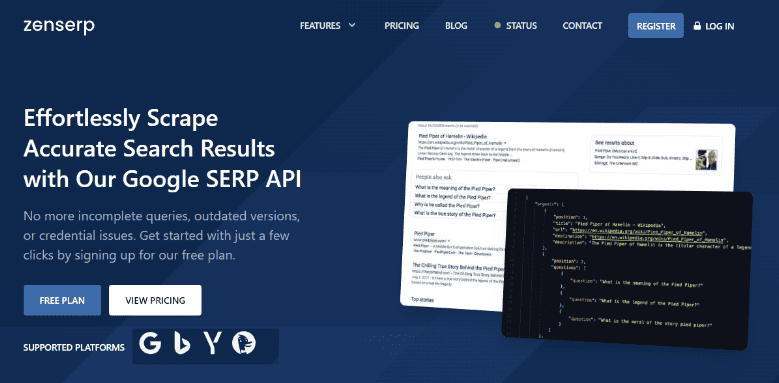
Zenserp delivers live search results through an incredibly fast infrastructure. They boast an average response time of roughly four seconds. The service covers multiple different endpoints spanning various digital properties. It supports massive automated scraping operations without dropping connections.
Key features of Zenserp:
- Standard web search extraction
- Image and news discovery parameters
- Video ranking information including channel data
- Product page commercial insights
- Trending topic extraction directly to JSON
- Asynchronous batch processing
- Bulk index checking graphical user interface
Pricing:
Zenserp divides its pricing into very clear usage buckets. The Small plan costs $49.99 monthly granting 25,000 searches. The Medium plan charges $149.99 monthly for 100,000 searches. They provide a generous free plan allowing 50 requests per month with zero credit card requirements. Selecting annual billing triggers a permanent 20% discount. Standard plans cap concurrent connections at exactly 400. The system sends automated warning alerts when usage reaches 90 percent.
1-Year Ownership Calculations:
- Solo Developer Scenario: A small operation selecting the Small plan pays $49.99 monthly. Applying the 20% annual discount drops the total 1-year ownership cost to $479.88.
- Mid-Sized Agency Scenario: A business selecting the Medium plan (100,000 searches) at $149.99 monthly would normally pay $1,799.88. Applying the 20% annual billing discount drops the total 1-year ownership cost to $1,439.88.
- Enterprise Scenario: A massive operation on the 1 million search Enterprise plan spends $899.99 monthly. The discounted 1-year total sits at $8,639.88.
Best For:
Developers requiring lightning-fast response times for live applications. High-volume location-specific monitoring tasks requiring granular geographical coordinates.
Pros:
- Strong service level agreements kick in immediately at the Medium tier.
- The included request builder converts variables directly into production-ready code snippets instantly.
- There are absolutely no hidden extra fees for checking different search types like images or news.
Cons:
- Direct technical support availability remains highly limited on the lowest pricing tiers.
- Fast priority queuing is strictly locked behind the expensive Premium tier.
Verdict:
Their strict adherence to a flat search count rather than a confusing credit system makes long-term budget forecasting incredibly simple. The visual request builder operates as an excellent technical bridge. It helps novice developers construct complex queries without reading hundreds of pages of documentation. Providing a pure SEO rank API without tying it to an expensive marketing dashboard demonstrates clear respect for engineering teams.
4. Semrush
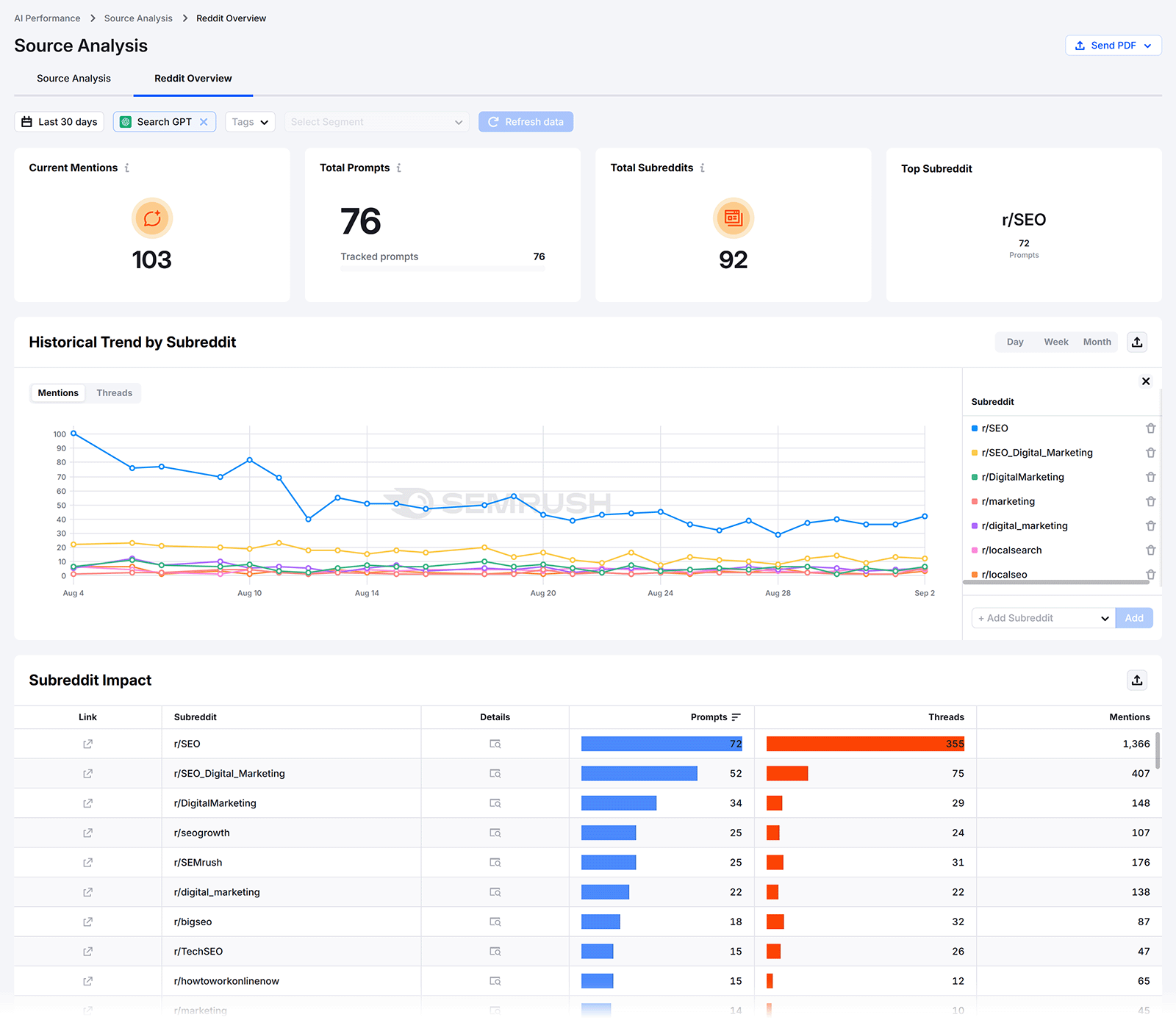
Semrush controls a massive digital analytics database stretching back years. Their programmatic access provides identical numerical data to their visual web platform. They separate their technical access carefully into specific targeted toolkits. The endpoints export massive CSV files for deep spreadsheet analysis.
Key features of Semrush:
- Domain Analytics extraction
- Keyword Gap Analysis metrics
- Backlink Analytics tracking
- Paid Advertising Research block data
- Position Tracking campaign sync
- Site Audit extractions
- Adwords Cost estimations
Pricing:
Securing technical access to Semrush requires jumping through notoriously expensive hoops. Technical access is strictly blocked on entry-level plans. Teams must purchase the Advanced plan at $549 monthly or the Semrush One Advanced plan at $455.67 monthly (when billed annually) just to unlock the door. After paying the base subscription, users must purchase separate API units. Units are sold in massive blocks starting at 2 million. A single line of backlink data costs exactly 40 units. Unused units expire monthly and never roll over. Adding 1 million units costs roughly $100 monthly. The newer MCP package includes a default allowance of 50,000 units.
1-Year Ownership Calculations:
- Solo Developer Scenario: A solo developer cannot afford this system. The barrier to entry blocks small projects completely.
- Mid-Sized Agency Scenario: The required Semrush One Advanced base plan costs $5,468.04 annually ($455.67 x 12). Assuming a team adds a minimal 1 million unit block for $100 monthly ($1,200 annually), the total 1-year ownership costs at least $6,668.04.
- Enterprise Scenario: A massive team buying the base $549.00 monthly plan plus 5 million units (approx $500 monthly) will spend exactly $12,588.00 annually.
Best For:
Massive enterprise marketing departments already heavily invested in the Semrush visual ecosystem. Teams needing deep competitive intelligence stretching back a decade.
Pros:
- The historical data depth remains unrivaled in the industry.
- It pulls exact project data from pre-configured web tracking campaigns seamlessly.
- The system provides excellent coverage for paid advertising research including specific Adwords block positioning.
Cons:
- The pricing structure is incredibly hostile to small software development teams.
- Hard expiring units punish users with fluctuating monthly query volumes brutally.
- You must pay for a web interface to use the technical endpoints.
Verdict:
This strict pricing model actively discourages casual software development. Forcing users to buy a $549 web interface subscription just to buy separate technical credits feels like a massive financial trap. We think this specific barrier to entry pushes agile development teams straight toward cheaper alternative best SEO API providers. Treating basic programmatic access as an ultra-premium luxury alienates modern technical teams entirely. If you want a simple SEO ranking API without the bloat, look elsewhere.
5. SerpAPI
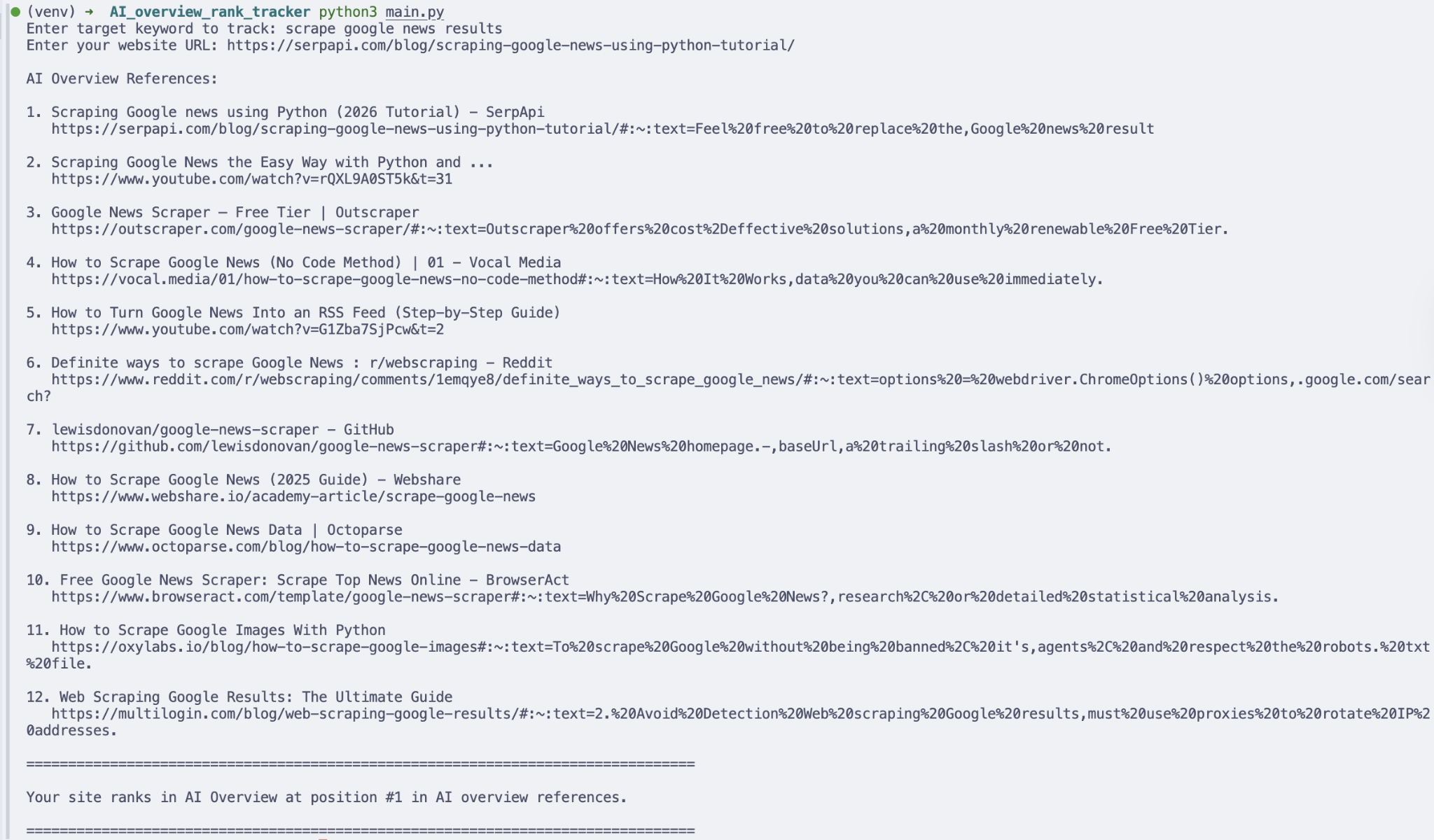
SerpAPI focuses purely on blazing fast real-time extraction. They handle the residential proxies and parse the structured JSON data directly. Their interface is heavily favored by machine learning teams building autonomous agentic web workflows.
Key features of SerpAPI:
- Pure real-time extraction speeds
- U.S. Legal Shield liability coverage
- ZeroTrace execution mode
- Deep JSON parsing for rich snippets
- High throughput capacity for massive jobs
- Support for 80+ different search engines
Pricing:
They advertise simple month-to-month contracts openly. The Starter plan provides 1,000 searches for exactly $25 monthly. The Developer tier grants 5,000 searches for $75 monthly. The Production tier costs $150 monthly yielding 15,000 searches. They enforce strict hourly throughput limits stacked on top of the monthly quotas. The $75 plan caps throughput forcefully at 1,000 queries per hour. Reserved search blocks cost $2.75 per 1,000 queries. On-demand searches cost $7.50 per 1,000 queries. Cloud plans stretch upward to 54 million searches monthly for over $106,000.
1-Year Ownership Calculations:
- Solo Developer Scenario: Because they operate strictly on month-to-month contracts for standard tiers, calculating a 1-year cost is beautifully straightforward
- The Starter plan ($25 monthly) totals $300.00 exactly for one year.
- Mid-Sized Agency Scenario: The popular Developer plan ($75 monthly) equals exactly $900.00 for one year of ownership.
- Enterprise Scenario: A company needing 560,000 searches monthly buys a customized Cloud plan for $90,600 monthly. The 1-year cost exceeds one million dollars.
Best For:
Developers building autonomous agentic software tools requiring instant data. Operations that absolutely require the legal protection of a U.S. based scraping entity.
Pros:
- The specific Legal US Shield assumes liability for the extraction actions directly.
- Cancellation is allowed at any time without triggering financial penalties.
- Downgrading transfers remaining search balances to an extra credits pool automatically.
Cons:
- Strict hourly throughput caps create severe operational bottlenecks instantly.
- Strange caching invalidation rules confuse users and drain monthly quotas unpredictably.
Verdict:
The hourly throughput limits function as a massive hidden penalty for fast scripts. A developer might pay for 30,000 searches but cannot execute them rapidly without hitting a solid brick wall. This strict throttling messes with continuous monitoring loops heavily. Teams attempting fast programmatic checks often get burned by these invisible speed limits. A true SEO API automation tool shouldn't choke your pipeline artificially.
6. Authoritas
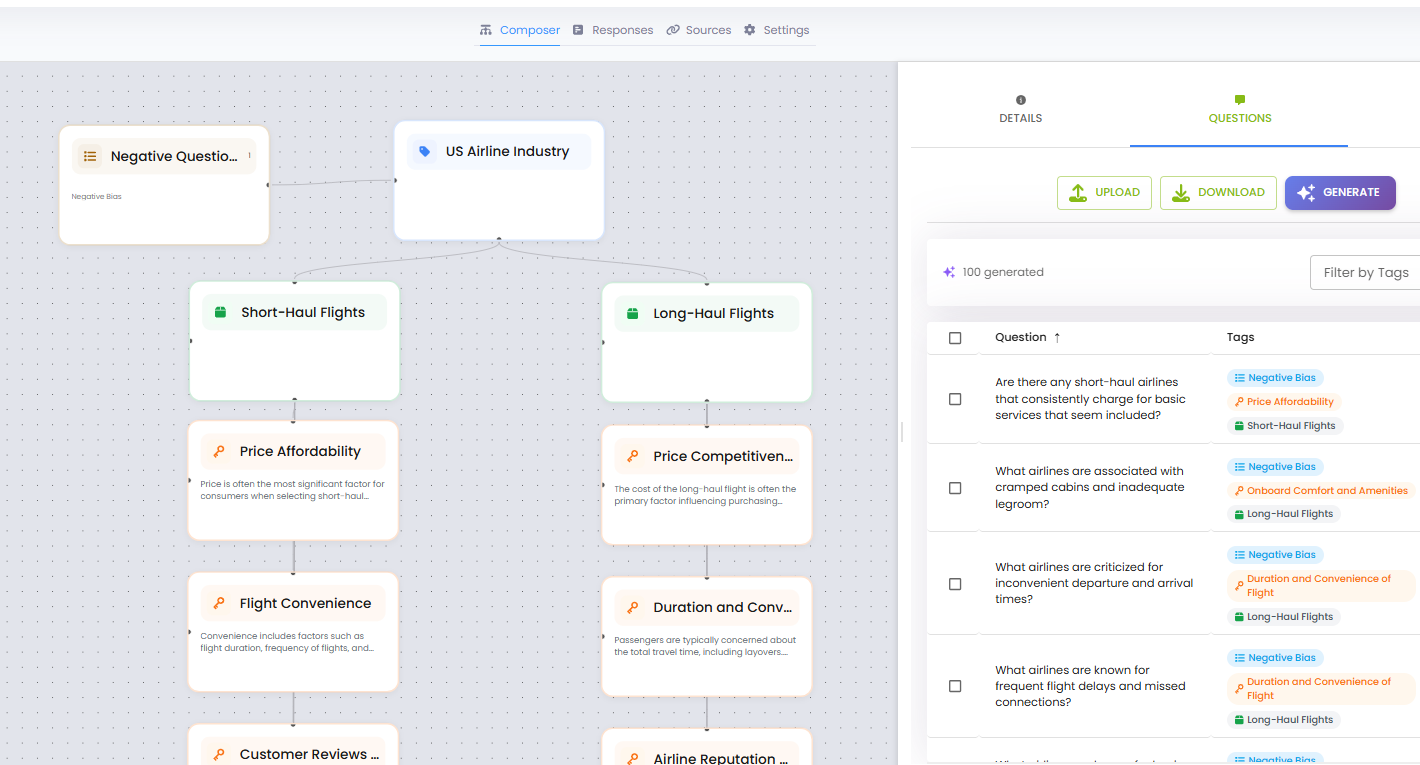
Authoritas provides high-end enterprise capabilities for massive brands. Their backend system tracks generative search changes perfectly. They run a robust technical interface designed for serious marketing operations attempting to decode LLM brand visibility.
Key features of Authoritas:
- AI Overview tracking and automated expansion
- User Intent scoring metrics applied to every keyword
- Real-browser execution algorithms
- Share of Search market calculations
- Hyperlocal tracking capabilities mapping to zip codes
- Generative brand visibility tracking
- True versus Pure configuration setups
Pricing:
Their technical endpoints are bundled generously compared to competitors. The main Platform API runs free for customers holding Advanced or Expert business packages. The separate SERPs API charges per thousand queries utilizing a sliding scale. The rate starts at £3.50 CPM (Cost Per Mille) for volumes around 100,000 queries. They issue a free trial key containing exactly 1,000 credits to test the systems immediately.
1-Year Ownership Calculations:
- Solo Developer Scenario: A solo developer can utilize the free Google Sheets plugin up to 1,000 requests monthly for absolutely zero cost.
- Mid-Sized Agency Scenario: The required Advanced web platform costs $399.00 monthly ($4,788.00 annually).
- Enterprise Scenario: If a massive enterprise maintains the Advanced plan ($399/mo) and adds 100,000 bulk queries per month at £3.50 CPM, that adds roughly £350.00 (around $440.00 USD) monthly. The total 1-year ownership reaches approximately $10,068.00 depending on exact daily currency fluctuations.
Best For:
Enterprise teams needing precise tracking of massive AI Overviews and generative search shifts. Brands obsessed with protecting their image against LLM hallucinations.
Pros:
- The architecture is entirely capable of expanding generative AI snippets to capture cited source links physically.
- The system includes advanced user intent scoring automatically with every pull.
- It provides a free Google Sheets add-on for simple spreadsheet testing.
Cons:
- The backend demands significant software development experience to implement the main platform endpoints properly.
- Full pricing structures for custom bulk volumes are not publicly listed.
Verdict:
Their specific ability to physically click and expand AI Overviews using headless browsers is technically brilliant. Standard scrapers only see the top-level text layer. Authoritas digs deeper to capture the exact URLs cited within the hidden generative paragraphs automatically. This specific generative capability is totally unique among standard search engine rankings API providers. We think this positions them perfectly for the incoming wave of LLM-based search behaviors.
How to Choose the Best SEO API for Your Stack?
Finding the exact best SEO data API involves looking strictly at your actual engineering requirements:
- Machine learning teams scraping raw internet text heavily do not need historical backlink databases. They need a fast SEO API.
- Marketing agencies building client reports do not need headless browser generative tracking. They need a reliable SEO rank API.
Look closely at the documentation formatting. A good API SEO setup takes minutes. A poorly documented system wastes weeks of expensive engineering time. The best SEO API providers publish their exact error codes clearly. They provide clean testing environments. They offer functional code snippets covering multiple languages.
Avoid vendors that force long-term restrictive contracts. The best API for SEO will let an engineering team scale usage dynamically without penalties. If a provider demands a massive upfront commitment before granting a testing key, walk away immediately. There are far too many competitive API SEO tools available today to tolerate hostage pricing. Choose a search engine rankings API that respects your specific database structure completely. A proper SEO integration API should bend to fit your existing product, not the other way around.
The data indicates clearly that teams using dedicated SEO data API providers ship digital products significantly faster. They avoid residential proxy management entirely. They ignore CAPTCHA algorithm updates. True SEO API automation relies on trusting the vendor to handle the brutal extraction drudgery.
How Agencies Can Automate SEO Reporting Beyond APIs
Not every agency needs to build custom API integrations from scratch.
Many agencies combine SEO APIs with reporting platforms to simplify data collection, automate client reporting, and reduce manual work.
For agencies that prioritize scalability, solutions like DashClicks' marketing analytics reporting software can help consolidate marketing data into client-friendly dashboards without requiring significant development resources. This allows teams to spend more time optimizing campaigns rather than assembling reports manually.
As agencies grow, combining reliable SEO data providers with automated reporting tools creates a more efficient workflow for both internal teams and clients.
When Should You Use an SEO API vs. an Analytics Platform?
An SEO API is ideal when you need raw search data to build custom applications, automate workflows, or integrate rankings into proprietary systems.
An analytics platform, on the other hand, is better suited for agencies that need to monitor campaign performance, visualize marketing metrics, and generate client-facing reports without building everything from scratch.
Many growing agencies use both together, an SEO API to collect search data and an analytics platform like DashClicks’ marketing analytics reporting to transform that data into actionable insights for internal teams and clients.
FAQ
Q1. What exactly is the difference between a standalone API and an add-on API?
A standalone system allows users to purchase raw data without buying access to a visual web dashboard. You pay purely for the data transfer. An add-on requires users to maintain an active, highly expensive web platform subscription just to unlock the technical interface. The best SEO data API vendors usually offer standalone packages.
Q2. Why do some providers charge based on credits while others charge per search?
Credit systems allow providers to weigh different endpoints differently based on computational weight. A simple keyword check might cost one single credit, while a massive domain backlink audit costs fifty credits. Per-search billing is simpler but usually applies strictly to basic scraping operations rather than deep historical database analytics. The best SEO API providers explain their credit math clearly.
Q3. Can I use these specific tools for high-frequency competitor monitoring?
Yes, but check the hidden hourly throughput limits carefully. Some providers restrict exactly how many requests can hit their servers per minute. Exceeding these limits results in blocked connections and failed scripts, regardless of your remaining monthly quota. Ensure your chosen API SEO pipeline can handle the velocity you require.
Conclusion
Securing clean metrics requires brutal honesty about exact technical demands. The market offers wildly different solutions for different problems. Heavy scrapers absolutely need robust proxy networks. Marketing agencies need deep historical databases covering decades. Startups building new digital tools need cheap, highly flexible SEO rank API access. Finding the right SEO data API efficiently prevents future technical debt.
The right SEO API depends on how your agency collects, analyzes, and reports search data. While developers may prioritize flexibility and technical integrations, agencies often benefit from solutions that combine reliable SEO data with automated reporting and streamlined workflows. Before making a decision, evaluate your reporting needs, expected query volume, scalability requirements, and long-term costs to ensure the platform supports both your current operations and future growth.

Startup Growth by the Numbers: Key Metrics Founders Should Track
Most startups don't fail because founders ignore their numbers. They fail because they watch the wrong ones. According to government data, a significant share of small businesses close within their first few years, and poor financial tracking is a consistent factor. Knowing which numbers actually matter is where sustainable growth begins.
The metrics that deserve regular attention fall into a few clear categories: growth signals like revenue, MRR (monthly recurring revenue), and ARR (annual recurring revenue); efficiency markers like CAC (customer acquisition cost), LTV (lifetime value), and gross margin; and survival indicators like burn rate, runway, and churn rate. Retention sits across all three, making it one of the most telling signals a founder can track.
The difference between KPIs and metrics matters here too, since not every number earns weekly attention. Vanity metrics like total signups or page views can look impressive without revealing anything about unit economics or business health. The metrics worth tracking function as operating signals. They tell founders what's working, what's breaking, and what needs a decision now.
The Metrics Founders Should Watch First
Before grouping or prioritizing, it helps to have a clear shortlist in view. The core metrics most founders need to monitor span three areas: growth, efficiency, and survival. That includes revenue, MRR, ARR, CAC, LTV, churn rate, retention, burn rate, runway, and gross margin. The right mix depends on the business model, but these cover the fundamentals across nearly every startup type.
What separates useful metrics from noise is whether they connect to action. Vanity metrics like raw traffic or total downloads can look encouraging without telling founders anything about activation, retention, or revenue. Operating signals, on the other hand, reveal what's actually happening inside the business and point toward decisions that need to be made. That distinction is worth keeping in mind as the sections below break these numbers down further.
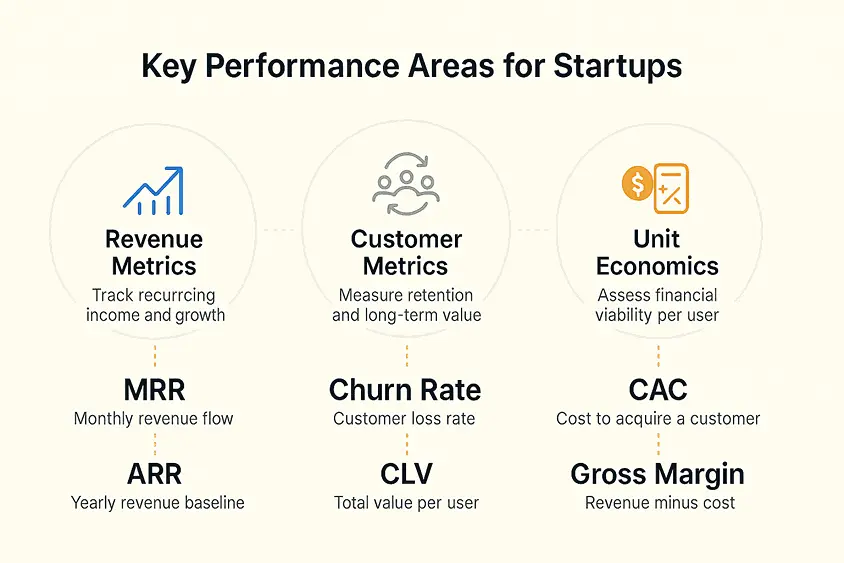
Image Source: Qubit
How to Group Metrics by What They Reveal?
Not every metric answers the same question. Some tell founders whether the business can stay alive long enough to find its footing. Others reveal whether users actually want the product. Still others show whether growth can scale without burning through cash faster than it comes in. Grouping them by what they reveal makes the whole picture easier to act on.
1. Financial Health and Survival
These metrics answer one fundamental question: can the company keep operating? Burn rate measures how quickly cash is leaving the business each month, while runway shows how many months remain before that cash runs out. Revenue and gross margin round out this group. Revenue confirms that money is coming in, and gross margin shows how much of it the business actually keeps after direct costs.
Interpreting these numbers in isolation can be misleading. Resources like Zeni offer benchmarking context that helps founders assess whether a metric trend is ordinary or genuinely concerning, which is especially useful when there's no internal baseline to compare against yet.
2. Customer and Product Traction
Retention and churn rate are the clearest signals of whether a product is delivering real value. High retention points to product-market fit, while rising churn is an early warning that something isn't working. Activation, meaning whether new users reach a meaningful milestone early on, often predicts retention before enough time has passed to measure it directly. These retention and satisfaction signals matter especially in SaaS, where compounding subscriber loss adds up quickly.
3. Growth Efficiency
CAC, LTV, and the LTV:CAC ratio sit at the center of unit economics. CAC measures what it costs to acquire a customer, and LTV measures what that customer is worth over time. The ratio between them tells founders whether their growth model is sustainable. When this ratio is healthy, scaling becomes a more confident decision. When it isn't, more growth often means more loss.
Which Metrics Matter Most at Each Stage?
Metric priorities don't stay fixed as a startup matures. What matters at pre-seed looks quite different from what investors scrutinize at Series A, and understanding that shift helps founders focus on the right signals at the right time rather than tracking everything at once.
1. Pre-Seed and Seed Priorities
At pre-seed and seed stage, investors aren't expecting polished dashboards or perfectly optimized unit economics. What they're looking for is evidence that real demand exists and that the business can survive long enough to validate it.
The tightest focus at this stage should be on retention, activation, and burn rate. Client retention shows whether early users are finding genuine value in the product, while burn rate and runway determine how much time founders have to keep iterating. Early revenue matters too, even if it's modest, because it signals that someone is willing to pay.
For B2B and SaaS startups in particular, cohort retention data carries extra weight at seed stage. It's one of the earliest indicators of product-market fit, long before MRR or ARR figures reach meaningful scale.
2. Series A and Beyond
By Series A, the conversation shifts from survival signals to scalable economics. Investors at this stage want to see that growth is predictable, that the unit economics hold under pressure, and that the business isn't acquiring customers at a loss.
MRR and ARR quality become central, not just their size. Churn rate, gross margin, CAC, and LTV all come under closer scrutiny because they reveal whether the growth model can sustain itself. A strong LTV:CAC ratio is one of the clearest signals that the business has found an efficient path to growth.
Retention continues to matter at every stage, but by Series A it functions as a product-market fit signal rather than just a usage stat, and investors read it that way.
How Metrics Shape Investor Updates?
Investors don't evaluate startups in a single good month. What they look for is trend lines, the relationship between growth and efficiency, and evidence that founders understand their own operating picture. Consistency in how metrics are tracked and presented carries real weight in that conversation.
The metrics most relevant to investor updates include revenue, MRR, burn rate, runway, CAC, churn rate, retention, and gross margin. These aren't chosen arbitrarily. Firms like Y Combinator and a16z consistently emphasize unit economics and capital efficiency when evaluating startups, and these metrics speak directly to both.
Presenting metrics well means showing direction, not just snapshots. A single strong CAC figure tells investors less than three quarters of improving CAC alongside stable gross margin. The goal is to demonstrate operational control, showing that growth isn't happening by accident and that the team understands what's driving it.
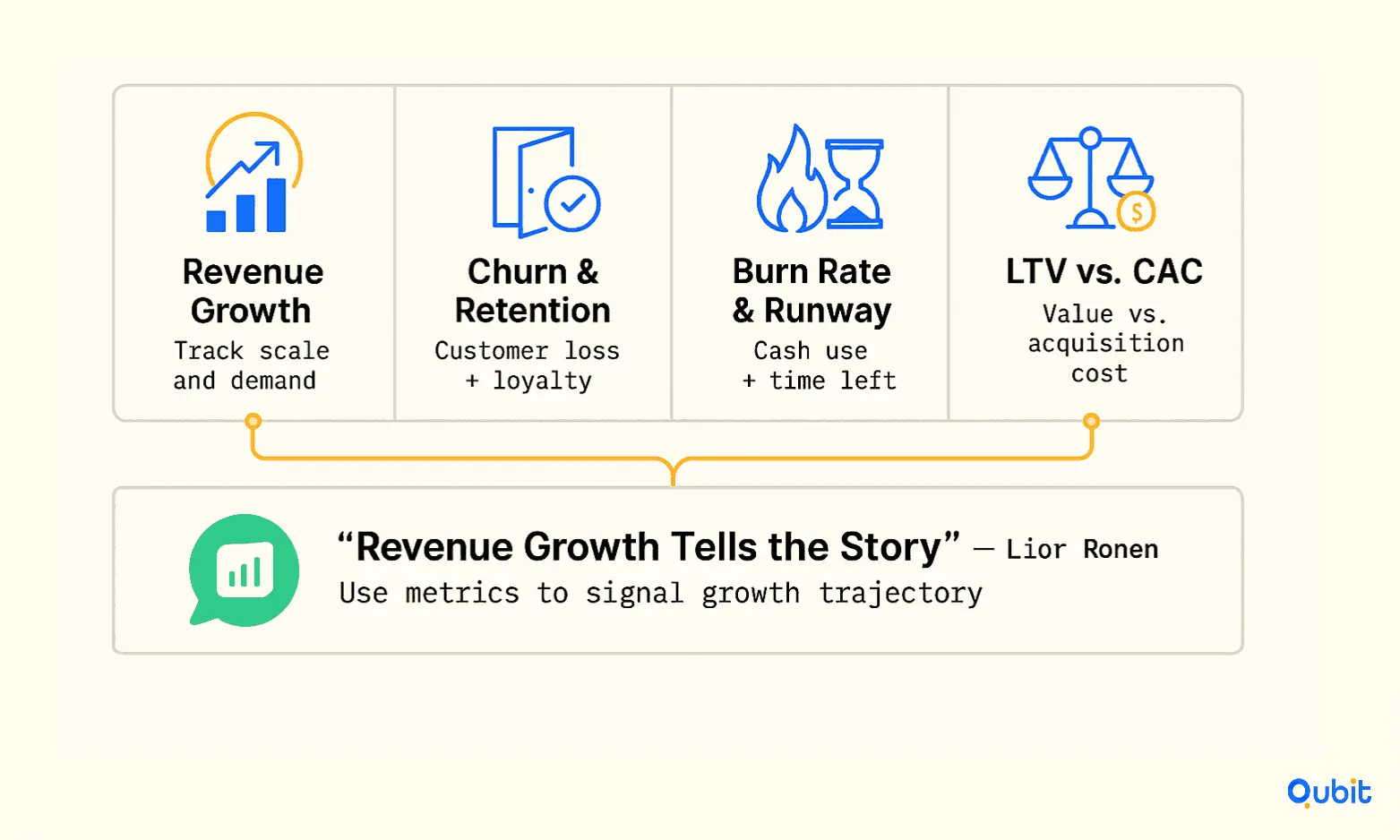
Image Source: Qubit
Founders should also avoid common presentation traps. Cumulative graphs without period-over-period context can make a slowing business look like it's still accelerating. Vanity metrics in pitch materials, like total registered users without any retention data, tend to raise more skepticism than confidence. Investors reading those materials have seen the patterns before, and selective framing often signals the opposite of what founders intend.
Using Metrics to Make Better Strategic Decisions
Metrics become valuable when they influence action. The numbers founders track should help answer practical questions about growth, spending, hiring, and long-term sustainability.
- Hiring and Team Growth: Revenue, runway, and burn rate can help determine whether the business is in a position to expand its team.
- Marketing Investment: CAC, conversion rates, and retention data can reveal whether increasing startup marketing spend is likely to generate profitable growth.
- Product Development Priorities: Retention, churn, and activation metrics often highlight areas of the customer experience that need improvement.
- Fundraising Readiness: Investors typically look for consistent growth, efficient customer acquisition, and strong retention trends rather than isolated performance spikes.
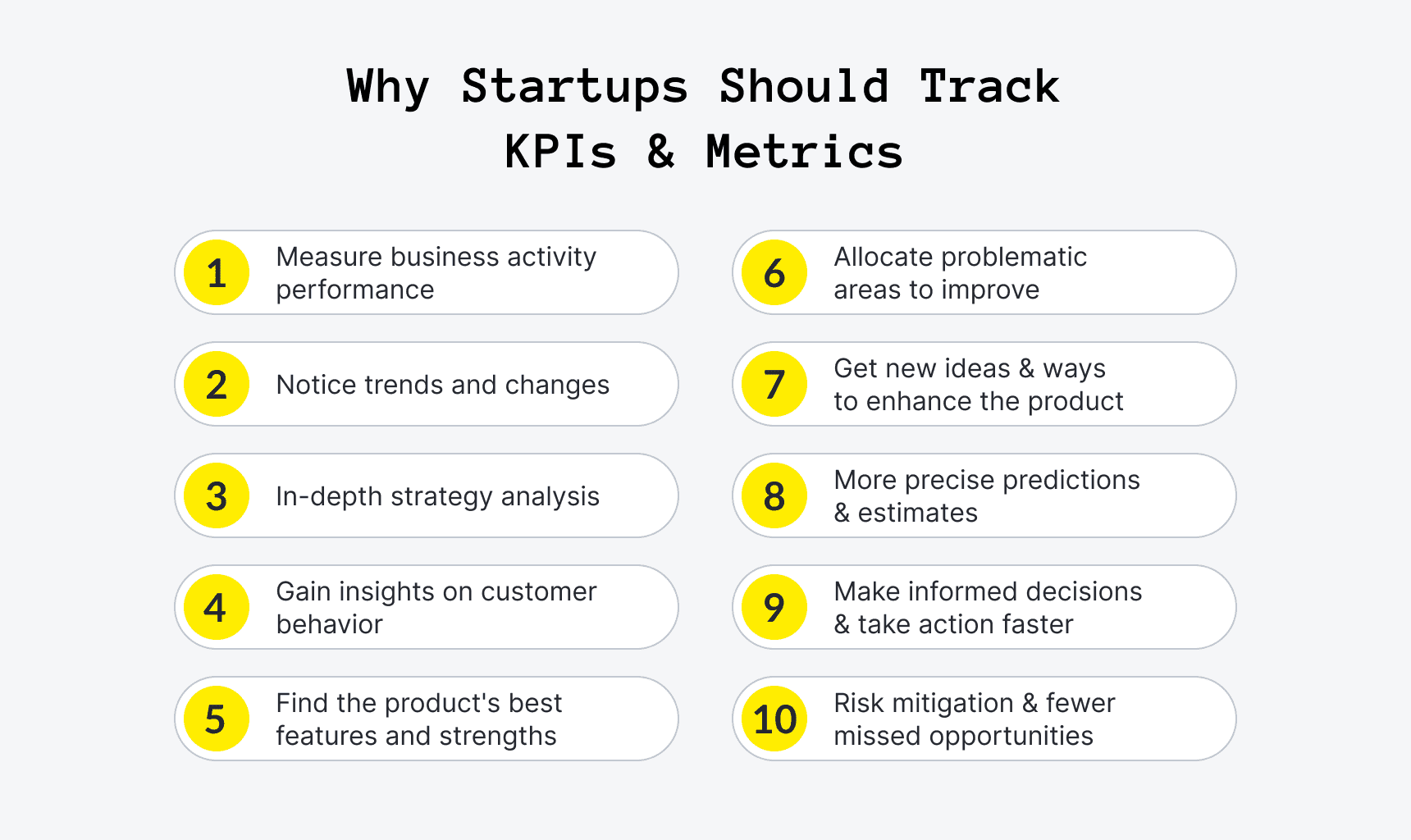
Image Source: Upsilon
When metrics are tied to strategic decisions, they become more than reporting tools—they become a framework for guiding growth.
Common Startup Metric Mistakes to Avoid
Founders don't always struggle because they lack data. In many cases, the challenge is interpreting that data correctly. Even the most important metrics can lead to poor decisions when they're viewed without context or tracked inconsistently.
- Mistake #1: Prioritizing Vanity Metrics: Brief explanation of why traffic, downloads, or social followers don't necessarily translate into business growth.
- Mistake #2: Ignoring Retention: Explain why acquiring customers is only half the equation and why churn often reveals deeper issues.
- Mistake #3: Tracking Too Many KPIs: Discuss how crowded dashboards can make it harder to identify what actually needs attention.
- Mistake #4: Focusing on Individual Data Points: Explain the importance of trends over single-month performance.
Avoiding these mistakes helps founders maintain a clearer view of business performance and make more informed decisions as the company grows.
Centralizing Metrics as Your Startup Grows
Tracking startup metrics becomes more challenging as revenue, customer, and marketing data spread across multiple platforms. A centralized reporting system can make it easier to maintain visibility and identify trends before they become larger issues.
Unified Performance Tracking
Bringing key business data into one dashboard can help founders:
- Monitor growth metrics more efficiently
- Spot changes in performance sooner
- Reduce time spent compiling reports
- Keep teams aligned around shared KPIs
Tools That Support Better Visibility
Platforms like DashClicks offer several tools that can help simplify metric tracking:
- Dashboard & Insights Tools for monitoring performance data in a single view
- Analytics Software for measuring marketing and campaign performance
- CRM Software for tracking customer interactions and sales activity
- InstaReports for automating reporting and sharing business insights
Focus on Actionable Data
The goal isn't to create a dashboard packed with every available KPI. Instead, founders should prioritize a reporting system that keeps their most important metrics visible, accessible, and easy to act on as the business scales.
Track Fewer Metrics, but Track Them Well
The best startup metrics aren't the most impressive ones on a slide deck. They're the ones that actually change a decision. Founders who track retention, burn rate, runway, CAC, and revenue consistently tend to have a clearer operating picture than those juggling a dozen numbers that rarely lead anywhere actionable.
A cluttered dashboard creates the illusion of oversight without the substance of it. The goal is a focused set of metrics tied to the current stage and business model, reviewed on a rhythm that matches how fast things are actually moving.
Growth, retention, efficiency, and cash management each tell a different part of the story. Together, they give founders the clarity to make better calls, sooner.

Predictive Analytics in Marketing: A Practical Guide for Agencies
Marketing is not only about advertising and observing results; agencies today need a long-term plan and more intelligent choices before investing resources. Predictive analytics plays an important role here, helping agencies understand what is likely to happen next based on past data.
However, gaining these insights requires a clean, centralized data environment. Small businesses operating with scattered external drives or limited cloud storage hit a predictable wall: data growth outpaces their makeshift systems, creating access delays and collaboration breakdowns.
To overcome this and leverage true predictive modeling, many firms choose to outsource marketing operations to a professional virtual assistant agency. This allows dedicated remote specialists to reorganize the data architecture, turning fragmented logs into the actionable intelligence needed for sustainable growth.
You don’t have to guess when you can base decisions on numbers. Your campaigns will be more successful, and you’ll be able to provide even better service to your clients.
What Is Predictive Analytics?
Predictive analysis involves using historical data to predict future events. This requires analyzing digital marketing trends and patterns to help determine the next course of action.
For instance, if a consumer visits your website repeatedly without making any purchases, predictive analytics can help determine the likelihood that they will make future purchases. Using this, you can plan appropriately.

Image Source: Adjust
Predictive analytics does not always provide definite responses, but it provides definite guidance. This is sufficient for making marketing strategies.
Why Agencies Should Care About Predictive Analytics?
Organizations operate differently in terms of clients, budgets, and objectives. It is important to make the right decision fast. For those currently building or scaling their firm, using a platform like ZenBusiness can help manage the essential legal and compliance tasks, allowing you to focus more on high-level strategies like predictive analytics. Predictive analysis plays an important role in minimizing delays in campaign planning.
You can focus on the right audience, improve campaign performance, use the budget more wisely, and show better results to clients. When you can predict outcomes, you can plan better and avoid waste.
How Predictive Analytics Works in Marketing?
The process of predictive analytics involves analyzing various types of data from multiple sources, including website activity, past campaigns, consumer behavior, and transaction records.
For example, when a certain number of consumers purchase an item upon viewing three advertisements, this strategy can be replicated in future marketing campaigns.
This also helps identify valuable clients. These are individuals who are more likely to make purchases or spend a significant amount. Agencies with better deals and communications can target these.
When working with large datasets in marketing, even small formatting inconsistencies can create confusion. For example, inconsistent text cases in client data or campaign reports can impact readability and analysis. Using a reliable Case Converter tool can help standardize text quickly, whether you’re preparing reports, cleaning CRM data, or organizing campaign assets.
Tools like Forge Sparse Case Converter tool make it easy to switch between uppercase, lowercase, or proper case without manual effort. This small step improves data clarity, making your predictive analytics insights more accurate and easier to interpret across teams.
Common Uses of Predictive Analytics
Agencies can use predictive analytics in multiple ways. The most popular application is lead scoring, in which you rank your leads by their conversion potential. AI agents for lead qualification take this further by automating real-time prioritization and engagement based on behavioral signals.
Predictive analytics is helpful in campaign development. The analytics will help you identify which communication method and timing are ideal for a particular campaign.
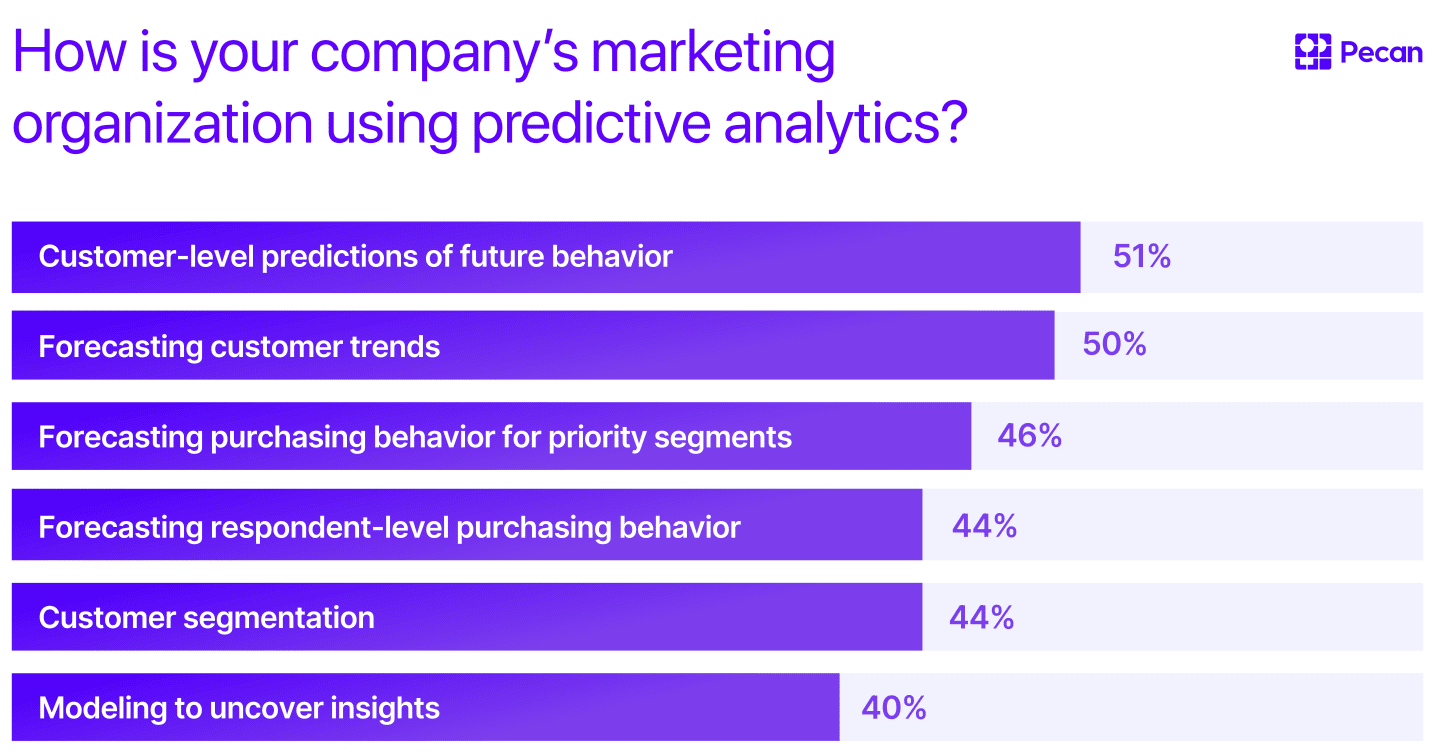
Image Source: Pecan
1. Improving Targeting
A major advantage of predictive analytics is improved targeting. Rather than displaying advertisements to everyone, you will target those most likely to engage.
If studies show that a particular age range responds well to your advertisements, you can adjust your targeting. If some users prefer email communications or happens to be a highly engaged Snapchat story viewer, predictive analytics helps you connect with them on their preferred platform.
It reduces costs while improving outcomes. It also leads to a superior user experience because the advertisements are more relevant to them.
2. Better Campaign Timing
Timing is important in marketing. If you send your communication at the wrong time, then your efforts may prove ineffective.
Using predictive analytics, you can determine the best timing for your messages. By analyzing historical data, you can learn when clients are most engaged.
For example, if the analysis suggests that your clients receive emails at night, it would be wise to schedule your campaign messages for that time.
3. Personalization Made Easier
Personalization is very important in marketing today. The client expects brands to know their needs.
Predictive analysis will make personalization possible. It will allow you to present the correct information to the correct client segment.
For example, when your consumer shows interest in a particular product, you can suggest other similar products. This is helpful in increasing conversions, and is especially useful in multichannel ecommerce, where sellers need to target multiple client bases simultaneously.
Additionally, predictive analysis will create an even stronger connection between you and the consumer.
4. Budget Optimization
Each client desires greater success without spending as much money. Using predictive analytics and smart budget tracking will help you get the most out of your budget.
You will know beforehand what kind of campaigns will succeed and which ones will fail. You can thus invest more in your successful campaign initiatives.
Moreover, you can cut costs for those campaigns that have failed to deliver the required outcomes.
Challenges Agencies May Face
As much as predictive analytics is helpful, it is not always simple to apply.
For example, data issues pose a significant difficulty. If the data you have is inaccurate or incomplete, then the predictions will be incorrect. This is why agencies must regularly clean and organize their data before using predictive tools.
Another difficulty is comprehending the tools, especially when predictive systems are implemented without proper technical audit services or internal expertise. Some platforms might be complicated to understand for some people. Teams may also struggle to interpret reports correctly, which can lead to poor marketing decisions.
Integration can also become a challenge. Many agencies use multiple marketing platforms, and combining data from different sources is not always easy. Without proper integration, important insights may be missed.
Finally, there is a problem with overreliance. Although predictive analytics is helpful, decision-making should never be left entirely to the system. Human judgment, creativity, and market understanding are still important when planning campaigns.
However, agencies that start small, train their teams properly, and focus on data quality can gradually overcome these challenges and improve their marketing results over time.
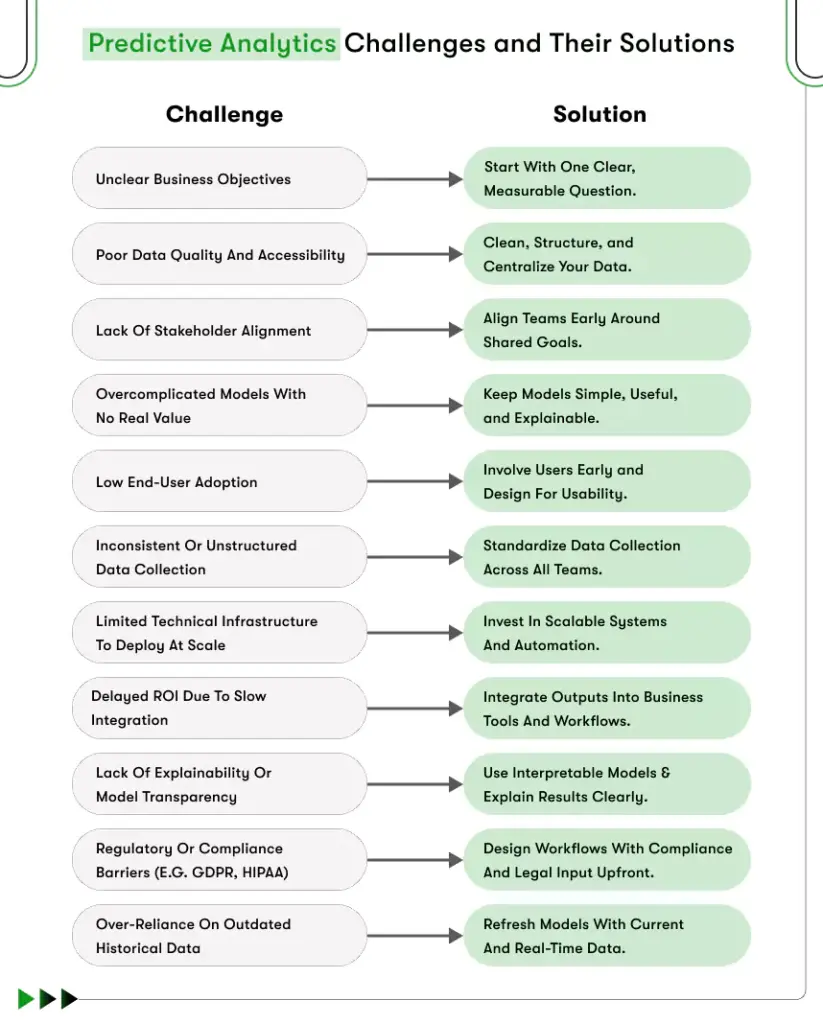
Image Source: Kody TechnoLab
Getting Started with Predictive Analytics
You don't have to think about starting large. Start with small actions.
First, prepare your data. Clean up the data to make it easier to understand. Using an email checker tool at this stage helps ensure your dataset is accurate before running predictive models.
Then, select basic tools tailored to your goals. Many platforms provide integrated analytical capabilities.
Select one use case at a time and focus only on its success, for example, lead scoring or timing of campaigns. Then you may scale to use cases further.
It is also important to train your employees. They must understand how to interpret data.
Real Impact on Client Results
Predictive analytics can create a real difference in client results when used correctly. Instead of relying on guesswork, agencies can make smarter marketing decisions based on actual client behavior and campaign data.
This leads to more targeted campaigns, better audience engagement, and improved budget allocation. Clients spend less on ineffective strategies and focus more on campaigns that are likely to deliver results.
Predictive analytics also helps agencies identify opportunities earlier. Whether it is finding high-converting leads, improving client retention, or choosing the right campaign timing, these insights can improve overall marketing performance.
When clients start seeing more consistent outcomes, they naturally gain greater confidence in the agency’s strategy. This helps build trust and creates stronger long-term relationships.
For agencies, predictive analytics can also become a competitive advantage. Agencies that use data-driven strategies are often able to deliver faster insights, better optimization, and stronger campaign performance compared to competitors still relying only on traditional marketing methods.
Using DashClicks Analytics Software for Predictive Marketing
Modern agencies need more than basic reporting tools. Platforms like DashClicks help agencies organize campaign data, monitor performance, and uncover patterns that support smarter marketing decisions.
With centralized dashboards and automated reporting, agencies can track metrics across multiple channels in one place. This makes it easier to identify trends, understand client behavior, and improve campaign forecasting.
DashClicks also simplifies data visualization, helping teams and clients clearly understand what is working and where adjustments are needed. Instead of manually collecting information from separate platforms, agencies can focus on optimizing campaigns using real-time insights.
For agencies beginning their predictive analytics journey, having a reliable analytics platform reduces complexity and improves decision-making. Better data organization leads to more accurate predictions, stronger targeting, and improved campaign performance over time.
How DashClicks Supports Predictive Analytics for Agencies?
Using tools like DashClicks can make predictive analytics easier for agencies.
Since predictive analytics depends heavily on organized data, agencies need a platform that helps track and manage marketing performance clearly. DashClicks’ marketing analytics software helps with this by offering:
- Centralized dashboards to monitor campaigns from different platforms in one place.
- Real-time reporting so agencies can quickly understand what is working and what needs improvement.
- Automated reports that save time and reduce manual work.
- Better campaign tracking to identify patterns in client behavior.
- Improved budget management by helping agencies focus more on high-performing campaigns.
- Easy-to-understand analytics that make client reporting simpler and clearer.
Instead of managing data from multiple tools separately, agencies can use DashClicks to keep everything organized. This makes it easier to make smarter marketing decisions and improve campaign performance over time.
Wrapping It Up
Predictive analysis isn't simply a fad but a valuable component of contemporary marketing practices. The firms that understand the process and adopt it stand to benefit greatly.
With predictive analytics, you get to shift your strategy from speculation to planning. You improve your ability to target, time, and increase effectiveness.
There's no need to complicate things. Start small, keep it simple, and gradually grow your efforts. Ultimately, it all boils down to one thing. Data analysis will give you an edge when making decisions.


15 Essential Landing Page Analytics to Track for Clients
Landing pages are one of the most crucial components of digital marketing campaigns. They serve as the first impression for potential customers, enticing them to act—whether signing up for a newsletter, purchasing a product, or scheduling a consultation. But how do you know if a landing page is doing its job? That's where landing page analytics come into play.
This post will guide you through the key performance indicators (KPIs) and analytics that every marketer should track to measure the effectiveness of a landing page, how to convert those numbers into actionable strategies, and how to create client-friendly reports that make a lasting impression.
What Are Landing Page Analytics?
Landing page analytics are the data points that help assess how effectively a landing page performs. The goal is to monitor various metrics that indicate how users interact with the page, how well the page converts traffic into leads or customers, and whether adjustments are needed to improve performance.
From bounce rates to scroll depth, landing page analytics offer powerful insights to guide data-driven decisions. For digital marketers, having a clear understanding of these metrics is essential to fine-tuning campaigns and boosting client satisfaction.
15 Metrics Every Marketer Should Focus On
When analyzing landing pages, specific analytics stand out as essential for understanding page performance. Here’s an overview of 15 key metrics you should focus on while evaluating a client's landing page.
1. Conversion Rate
The conversion rate is perhaps the most critical metric in evaluating the success of a landing page. The average landing page conversion rate is 9.7%. It calculates the percentage of visitors who complete a desired action, such as signing up for a newsletter, making a purchase, or filling out a contact form.

This metric serves as a clear indicator of how effectively the page is engaging its audience and driving them toward the intended goal. A high conversion rate suggests that the page's design, messaging, and overall user experience resonate well with its target audience, while a low conversion rate may point to areas that need improvement, such as unclear call-to-action, slow page loading times, or irrelevant content. Tracking and optimizing the conversion rate is essential for maximizing the effectiveness of any marketing campaign.
2. Average Time Spent on Page
This metric measures how long visitors stay on a landing page, providing valuable insights into user behavior. A longer time spent on the page generally indicates a higher level of engagement and interest in the content, suggesting that the page is effectively capturing the audience's attention. Conversely, a shorter time might signal a lack of relevance, poor design, or uninteresting content, highlighting areas that might need improvement.
3. Traffic Sources
Understanding where your landing page visitors are coming from—whether it’s search engines, social media platforms, paid advertisements, or email campaigns—is crucial for tailoring your marketing efforts effectively. By analyzing traffic sources, you can identify which channels are driving the most engagement, optimize your strategies for better performance, and allocate your resources more efficiently to maximize your results.
4. Bounce Rate
The bounce rate represents the percentage of visitors who leave a landing page without interacting, clicking, or taking any further action. A typical landing page bounce rate benchmark is 60-90%. It essentially measures how well your page engages users upon arrival.
A high bounce rate is often a red flag, indicating potential problems with usability, content relevancy, loading speed, or even the visual appeal of the page. It may suggest that the page isn’t meeting visitors’ expectations or providing what they’re looking for, making it an essential metric to monitor and improve.

Further Reading: 13 Tips to Reduce a Website's Bounce Rate and Increase Conversions
5. Scroll Depth
Scroll depth measures how far down a landing page users scroll, providing valuable insights into user engagement. It helps determine whether visitors are interacting with key sections of the page or skipping over important content. This metric is especially important for assessing whether critical information, such as product details or value propositions, and key call-to-action (CTA) elements are being seen. Over 90% of visitors who reported reading headlines also mentioned they read CTA copy. By analyzing scroll depth, you can optimize your page layout and ensure that essential content captures your audience’s attention.
6. Form Submission Rate
When your landing page includes a form, such as a lead capture form, its submission rate serves as a critical indicator of how compelling your offer, design, and overall user experience are. The average number of form fields is 11. However, reducing the number of form fields from 11 to 4 can lead to a 120% increase in conversions.
A high submission rate suggests that visitors find the content valuable and the process easy to complete, while a low rate may highlight issues with the form’s usability, the clarity of your message, or the appeal of your offer. Optimizing these elements can significantly improve conversions and help achieve your goals.
7. Click-Through Rate (CTR)
CTR, or Click-Through Rate, measures the percentage of visitors who click on specific Call-to-Actions (CTAs) on your website, emails, or ads. It’s a key metric for evaluating how well your content captures attention and drives engagement.

Tracking CTR allows you to understand the effectiveness of your hook, CTA copy, and overall messaging, helping you refine your strategy to better connect with your audience and encourage desired actions.
8. Mobile vs. Desktop Performance
With the rise of mobile usage, it’s essential to analyze how your landing page performs across different devices, especially smartphones and tablets. Only 50% of landing pages are optimized for mobile. A poorly optimized mobile page can result in slow loading times, difficult navigation, or misplaced elements, all of which can frustrate users and drive potential customers away. Ensuring a seamless mobile experience is key to keeping visitors engaged and converting them into loyal customers.
9. Exit Rate
The exit rate reveals the percentage of visitors who leave your website from the landing page or a specific page they were viewing. Nearly half of all website visitors, approximately 48%, leave the primary landing page without engaging further or exploring any marketing materials. This metric is crucial for understanding user behavior, as it highlights where and when visitors are dropping off. By analyzing the exit rate, you can diagnose potential bottlenecks, such as confusing navigation, slow loading times, or unengaging content, and take steps to improve the overall user experience.
10. Heatmaps
Heatmaps visually showcase areas of high user interaction on a webpage, such as buttons, images, or links, by using color-coded representations. Warmer colors like red and orange indicate areas with the most engagement, while cooler colors like blue highlight less interaction. They are a powerful tool for understanding user behavior, helping identify whether visitors are engaging with or ignoring key elements. This insight can guide design improvements, optimize layouts, and enhance the overall user experience.
11. Engagement Rate
This metric encompasses several factors, including clicks, scrolls, and time spent on the page, offering a comprehensive view of how users engage with your content.

By analyzing these behaviors, you can gain valuable insights into overall user activity, helping to identify trends, optimize the user experience, and make data-driven improvements to your website or application. Based on available data, the average engagement rate for landing pages ranges from 1% to 3.5%. However, most experts agree that an engagement rate exceeding 3.5% is considered "good."
12. Cost-per-Click (CPC) vs. Cost-per-Acquisition (CPA)
For paid campaigns driving traffic to a landing page, CPC (Cost Per Click) and CPA (Cost Per Acquisition) are key metrics that indicate how efficiently your budget is being spent. CPC helps you understand how much you’re paying for each click, while CPA measures the cost of acquiring a customer or lead. To optimize your campaign, it’s important to balance these costs against the value of the conversions generated, ensuring that your spending aligns with your overall marketing goals and delivers a strong return on investment.
Further Reading: Smart Strategies to Slash Your CPC With Landing Page Optimization
13. Page Load Speed
Slow-loading landing pages frustrate users, leading them to abandon your site before even exploring it. A delay of just a few seconds can significantly increase bounce rates and hurt your conversions. A one-second delay in load time can lead to a 7% reduction in conversions. Regularly track your page load times and optimize for speed, aiming to keep your landing page load time under 3 seconds to maintain user satisfaction and engagement.
14. A/B Test Results
Running A/B tests for different page elements, such as headlines, images, or CTA buttons, allows you to gather valuable data on what resonates best with your audience. By comparing two or more variations of a specific element, you can identify which version drives higher engagement or conversions. To ensure accurate results, use reliable analytics platforms to measure the performance of each version, tracking metrics like click-through rates, time spent on the page, or conversion rates. 44% of companies use A/B or split testing software. This data-driven approach helps you optimize your content and improve overall user experience.
Take a look at the infographic below to discover the ideal landing page layout and learn how to design your landing page for maximum engagement and conversions.

Image Source: KlientBoost
15. Returning vs. New Visitors
Understanding the ratio of returning visitors versus new visitors can reveal valuable patterns in user behavior, offering insights into how well your website or platform is engaging its audience. A high number of returning visitors may indicate strong loyalty and satisfaction, while a larger percentage of new visitors suggests successful outreach or marketing efforts. This information can help refine retargeting strategies, improve user retention efforts, and optimize content to better serve both existing and potential users.
Transforming Landing Page Data Into Actionable Change
While tracking metrics is essential, the real value lies in interpreting and acting on the data. Here’s how you can turn analytical insights into strategies that optimize your landing page:
- Diagnose Issues: If your bounce rate is high, review whether your landing page messaging is resonating or if your design feels cluttered.
- Optimize User Experience: Improve form submissions by minimizing required fields or adding social proof like customer testimonials.
- Personalize Content: Use analytics like traffic sources and device types to personalize page content for your audience.
How DashClicks SEO Services Can Help in Landing Page Optimization?
DashClicks' SEO agency platform are designed to enhance the performance of your landing pages by driving organic traffic and improving visibility in search engine results. By employing advanced keyword research, on-page optimization techniques, and quality content creation strategies, DashClicks ensures that your landing pages are tailored to meet the needs of your target audience. This not only boosts your search rankings but also increases the likelihood of attracting high-intent visitors.
Their team also focuses on technical SEO aspects, such as site speed, mobile friendliness, and structured data, to deliver a seamless user experience. With DashClicks' comprehensive approach to SEO, your landing pages can achieve better engagement, higher conversions, and sustained growth over time.
How To Build Tailored Landing Page Reports?
Creating detailed but digestible landing page reports for clients is essential for transparency and instilling confidence. Tools like DashClicks’ white label analytics software allow you to automate this process while offering customization options for in-depth tracking. Here's what you can do:
- Integrate Platforms: Combine data from multiple sources such as Google Analytics, Facebook Ads, or email platforms.
- Customize Visualization: Use graphs and tables to highlight trends, successes, and areas needing attention.
- Schedule Reports: Automate periodic reporting to save time and maintain consistent communication with your clients.
Best Practices for Creating Client-Impactful Reports
When presenting landing page metrics to clients, the way data is delivered can be just as important as the data itself. Effective reporting builds trust, aligns expectations, and proves your value as a digital marketer. By following these best practices, you can ensure your reports leave a lasting impact:
- Know Your Audience: Tailor your report to your client’s level of technical expertise. Some clients may prefer a high-level summary focused on ROI and key takeaways, while others may want a detailed breakdown of individual metrics. Always align your report's depth and style with the client’s preferences.
- Focus on Relevant Metrics: Avoid overwhelming clients with unnecessary data. Highlight the metrics that directly tie to their goals, such as conversion rates, sales generated, or traffic growth. Keeping the focus on actionable insights ensures the report stays clear and meaningful.
- Provide Valuable Context: Numbers alone don't tell the whole story. Contextualize your data by explaining trends, patterns, and their implications. For example, if the bounce rate improved after tweaking the page design, highlight this connection to showcase your impact.
- Use Visuals Effectively: Graphs, charts, and heatmaps are powerful tools for illustrating data trends and comparisons. Visuals not only make the report visually appealing but also help clients quickly grasp key points without sifting through walls of text. A fast way to get started is to use bar graphs. They are simple to create and easy to interpret.
- Keep it Concise and Structured: Organize the report in a logical flow, starting with an executive summary of results followed by detailed analyses. Use headings, bullet points, and short paragraphs to make content easy to skim for busy clients.
- Offer Clear Recommendations: Wrap up each section or report with actionable suggestions based on the data. Whether it’s optimizing CTAs, redesigning for mobile, or reallocating ad spend, providing actionable next steps demonstrates your commitment to improvement.
- Automate and Streamline: Use reporting tools like DashClicks’ Analytics Software to automate routine reports. This saves time and ensures accuracy while allowing more time to focus on strategizing rather than manual reporting.
By implementing these best practices, your reports will not only highlight landing page performance but also reinforce your role as a strategic partner in your client’s success.
DashClicks' Analytics Software for Tracking Metrics
DashClicks’ white label analytics platform offers a comprehensive solution for monitoring and evaluating key performance metrics across your landing pages. This intuitive platform integrates seamlessly with multiple data sources, providing a centralized dashboard to track crucial indicators like organic traffic, keyword rankings, conversion rates, and page performance.
Equipped with real-time analytics, the app enables you to identify trends and make data-driven decisions quickly. Its user-friendly interface includes customizable reporting options, ensuring clients can easily interpret results.
By leveraging the DashClicks’ Analytics Software, businesses can streamline their tracking processes, enhance transparency, and gain actionable insights tailored to their digital marketing goals.
Wrapping Up
Landing page analytics are more than just numbers—they’re powerful tools for optimizing performance and driving campaign success. By prioritizing key metrics like conversion rates, scroll depth, and engagement rates, marketers can hone their strategies, improve user experience, and build strong relationships with clients through evidence-based recommendations and insights.


A Guide to Tracking Revenue Generated from Leads
Understanding the revenue generated from leads is what will help you focus your marketing efforts and maximize your return on investment (ROI). By tracking how much income each lead brings in, you can make more informed decisions about where to allocate resources and which strategies are working.
This ensures your efforts are cost-effective and aligned with your business objectives. It also allows you to identify opportunities for improving your lead generation and conversion processes.
Accurate lead tracking will help you analyze customer behavior, identify high-performing channels, and refine your sales funnel. Uncover trends that impact your revenue streams and stay competitive and responsive in a fast-changing market.
What Are Leads and Why Are They Important?
A lead is a potential customer who has expressed interest in your product or service, often by engaging with your business through actions like signing up for a newsletter, downloading a resource, or filling out a contact form. Leads are the foundation of any successful sales funnel, as they represent opportunities to convert interest into revenue.
Leads are important because they allow businesses to identify and focus on individuals who are more likely to become paying customers. You can either purchase leads or generate them yourself by using tactics like cold outreach or ads. By nurturing these prospects through tailored communication and targeted strategies, companies can build relationships, foster trust, and guide them toward making a purchase.
Tracking and managing leads effectively ensures that your marketing and sales efforts are directed toward the most promising opportunities, ultimately driving growth and boosting your bottom line.
What Is the Lead-to-Revenue Framework?
The Lead-to-Revenue (L2R) Framework is a structured approach designed to align marketing and sales efforts with the ultimate goal of driving revenue. It encompasses every stage of the customer lifecycle, from initial lead generation to customer retention, ensuring a seamless transition between stages while optimizing performance at each point.
By implementing the L2R framework, businesses can create a cohesive strategy that bridges the gap between marketing and sales, fostering collaboration and maximizing results.
This framework focuses on defining clear processes, setting measurable objectives, and using data-driven insights to refine strategies continuously. Key components of the L2R framework include lead generation, lead nurturing, conversion, sales closure, and post-sale engagement.
It leverages technology, such as Customer Relationship Management (CRM) software and analytics tools, to track performance and provide actionable insights.
By adopting the Lead-to-Revenue Framework, businesses can enhance efficiency, reduce waste, and improve the predictability of revenue outcomes, ensuring a sustainable and scalable growth model.
Why Should You Track Revenue Figures for Leads?
Tracking revenue figures for leads provides crucial insights into the effectiveness of your marketing and sales efforts. By understanding which leads contribute the most to your bottom line, you can prioritize high-value opportunities and focus your resources on strategies that deliver tangible results.
This data-driven approach helps you eliminate underperforming campaigns, enabling you to save both time and money.
Furthermore, tracking revenue figures allows you to assess your customer acquisition cost (CAC) and customer lifetime value (LTV) ratios, key metrics for sustaining profitability. It ensures alignment between your lead generation efforts and overall business goals by providing a clear picture of what's working and what isn't.
Ultimately, this practice not only drives smarter decision-making but also empowers your team to scale more efficiently and optimize for long-term growth.
How to Establish a Lead-to-Revenue Framework in Your Business?
Establishing a Lead-to-Revenue (L2R) Framework in your business requires a strategic and systematic approach. Here are the key steps to help you implement this framework effectively:
1. Define Your Revenue Tracking Goals
Your first step is identifying what constitutes success for your business. Are you focusing on total revenue, average revenue per customer, or ROI for specific campaigns? Defining these objectives will help you establish clear benchmarks to evaluate your progress. These benchmarks ensure that your team remains focused and accountable.
A. Establish Metrics
Key performance indicators (KPIs) are essential for gauging lead quality and revenue generation. Common metrics include:
- Conversion rate from leads to customers: This metric measures the percentage of leads that successfully turn into paying customers. A high conversion rate indicates effective sales and marketing strategies, while a low rate highlights potential inefficiencies in your funnel.
- Customer lifetime value (CLV): CLV calculates the total revenue a business can expect from a single customer over their relationship. It's critical for identifying high-value customers and tailoring retention strategies to maximize long-term profitability.
- Cost per acquisition (CPA): CPA determines how much it costs to acquire a new customer. This metric helps evaluate the efficiency of your marketing campaigns and ensure you’re staying within budget while generating valuable leads.

Image Source: Clari
Tracking these metrics consistently provides a clearer picture of your lead performance and highlights areas for optimization. This data also helps in making data-driven decisions to improve outcomes.
Work closely with an accountant to track revenue generated from your campaigns and the percentage of your budget allocated to specific lead-generation strategies. Likewise, you should take the time to find a professional accountant who you can work closely with and analyze and re-evaluate your budgeting effectively.
B. Align Goals with Teams
Coordinate with your sales and marketing teams to ensure everyone is aligned. Miscommunication can lead to data silos, which hinder accurate tracking. Regular team meetings and updates can foster collaboration and prevent inefficiencies in your tracking process.
2. Set Up a Reliable Lead Tracking System
A customer relationship management (CRM) tool centralizes your data and makes tracking seamless. Look for a CRM that integrates with your marketing platforms and provides revenue attribution features. A robust CRM also enables better communication among team members and enhances overall efficiency.
A. Implement UTM Parameters
UTM tracking links are invaluable for understanding which campaigns drive the most revenue. Use them consistently across your ads, emails, and social media posts. Properly tagged links ensure that you can measure the performance of individual marketing activities with precision.
B. Automate Lead Attribution
Automation tools help minimize manual errors. Use software that assigns revenue to specific leads based on predefined rules or multi-touch attribution models. Automated attribution also saves time and provides more reliable insights, allowing you to focus on strategy rather than administrative tasks.
Actionable Steps to Implement Your System:
- Evaluate CRM options like DashClicks’ Contacts Management Software.
- Use URL builders to create UTM parameters for all campaigns.
- Integrate your CRM with marketing and analytics tools.
- Regularly audit your system to ensure data accuracy and functionality.
3. Monitor Lead Behavior and Revenue Patterns
Knowing where your leads come from helps you understand which channels deliver the highest ROI. Categorize leads by origin, such as organic search, paid ads, or referrals. This categorization enables you to allocate resources more effectively to top-performing channels.
A. Analyze Revenue Trends
Identify patterns in revenue generation, such as seasonal spikes or high-performing product categories. Using bank statement extraction software can help identify these patterns by analyzing financial data more effectively. This allows you to make informed decisions about where to focus your efforts for maximum impact.
This data informs budget adjustments and strategic decisions. Analyzing these trends also helps you anticipate market changes and prepare proactive strategies.
B. Segment Leads by Value
Not all leads are created equal. Use your CRM to segment leads based on their revenue potential, allowing you to prioritize high-value prospects. Segmentation ensures you allocate time and resources efficiently to maximize conversions and revenue.

Image Source: Medium
4. Optimize Your Sales Funnel
Examine each stage of your sales funnel to identify drop-off points. Are you losing leads during initial contact, follow-ups, or post-purchase engagement? Addressing these weaknesses can significantly boost overall conversion rates and revenue.
A. Personalize Engagement
Tailor your communication based on lead behavior and preferences—personalized emails, product recommendations, and exclusive offers boost conversion rates and revenue.
Reaping the benefits of invoice factoring can help your business maintain cash flow, ensuring you have the resources needed to execute these personalized strategies effectively. This approach also builds stronger relationships with your customers, enhancing brand loyalty.
B. Steps to Enhance Funnel Performance:
- Use heatmaps and analytics to identify weak points in your funnel.
- A/B test your landing pages, email campaigns, and ad creatives.
- Train your sales team on best practices for lead nurturing.
- Regularly review and update your funnel strategies to align with evolving customer needs.
C. Track Funnel Impact
Measure the revenue generated at each funnel stage. This granular approach helps identify where improvements yield the highest returns. Detailed tracking ensures that every part of your funnel contributes effectively to your revenue goals.
5. Use Analytics to Refine Strategies
Analytics dashboards make it easier to spot trends and anomalies. Tools like Google Analytics, Power BI, or Tableau simplify this process and provide actionable insights.
These platforms enable you to drill down into specific metrics, ensuring a detailed understanding of your revenue patterns. Visualizing data also helps communicate findings clearly to stakeholders, enabling faster decision-making and fostering more informed strategic planning.
A. Test and Iterate
Continuously test your strategies to improve lead-tracking accuracy. Small tweaks, such as changing call-to-action phrasing or targeting a new audience segment, can significantly impact revenue.
Regular testing helps you identify what resonates most with your target audience. Iterative testing fosters innovation and keeps your approach dynamic and effective, ensuring you stay ahead of market changes.
B. Share Insights With Stakeholders
Present your findings to your team or clients through clear, data-driven reports. This ensures everyone understands the impact of lead tracking on revenue growth.
Visualizing this data with charts or graphs can make complex information more accessible. Sharing insights fosters collaboration and aligns all departments toward shared objectives, driving a more unified and effective strategy.
Leverage DashClicks White Label Reporting Tool for Enhanced Insights
The white label reporting software by DashClicks serves as a powerful tool to streamline and optimize your lead tracking and revenue attribution processes. This app centralizes crucial data, providing an intuitive dashboard where you can track performance metrics such as conversion rates, customer lifetime value (CLV), and cost per acquisition (CPA) in real-time.
By integrating seamlessly with your CRM and marketing platforms, the marketing reporting software ensures that your team has access to accurate, actionable insights.
Additionally, the app offers customizable reporting options, enabling you to visualize data clearly and share it effectively with stakeholders. Its cutting-edge analytics features help pinpoint underperforming campaigns, identify high-value segments, and refine your strategies to maximize ROI.
Whether you are uncovering trends or identifying bottlenecks in your funnel, the DashClicks Analytics App equips you with the tools needed to fine-tune your approach and drive sustainable revenue growth for your business.
6. Analyzing Revenue Generation
Analyzing revenue generation is a fundamental step in understanding the financial health of your business and identifying opportunities for growth. By examining how revenue is produced across different channels, products, and customer segments, you gain actionable insights that drive strategic decisions.
Start by evaluating your top-performing revenue channels—whether it's organic search, email marketing, paid ads, or referrals. These insights help you allocate resources effectively to maximize ROI.
A. Evaluate Revenue Sources
Break down your revenue by source and category to identify the most profitable areas. Determine which marketing activities have the greatest impact on customer acquisition and retention. For instance, if social media campaigns generate steady revenue growth, consider amplifying those efforts.
B. Identify High-Performing Products
Review product-specific sales to uncover which items contribute the most to your bottom line. These insights can inform inventory management, promotional strategies, and product development initiatives to capitalize on customer demand. Leveraging advanced inventory forecasting tools can further enhance this process by accurately predicting demand patterns. This ensures optimal stock levels, reduces excess inventory, and improves overall efficiency in meeting customer needs.
C. Segment Revenue by Customer Groups
Segmenting revenue by demographics or behaviors allows you to effectively target your highest-value customers. For example, identifying trends among repeat buyers or high-spending clients can help tailor your upselling and loyalty programs.
D. Leverage Financial Data
Use tools like financial dashboards and data visualization to track progress and highlight revenue trends over time. Platforms such as Power BI or Tableau enable you to analyze key metrics with interactive dashboards, offering a comprehensive view of how revenue is generated and where improvements can be made.
Regular analysis of your revenue generation process ensures that your strategies remain data-driven and adaptable to market shifts. This proactive approach sets the foundation for continuous growth and profitability.
7. Implementing Improvements
Once you've identified areas that need improvement within your lead-to-revenue framework, the next step is to implement actionable changes that drive meaningful results. These improvements should be tailored to address inefficiencies, optimize processes, and enhance overall performance across all stages of your framework.
A. Reevaluate and Streamline Processes
Begin by conducting a thorough review of your existing workflows. Identify bottlenecks or redundancies in your sales and marketing efforts. Automate repetitive tasks where possible, such as email follow-ups or lead assignment, using tools like marketing automation platforms or enhanced CRM features. Streamlining processes not only increases efficiency but also allows your team to focus on high-impact activities.
B. Focus on High-Value Opportunities
Use data from your analysis to prioritize high-value leads and customers. Develop targeted strategies for nurturing these opportunities, such as personalized email campaigns, tailored product recommendations, or exclusive offers for key segments. Focusing on high-potential prospects ensures you allocate resources effectively, maximizing conversions and revenue.
C. Enhance Collaboration Between Teams
Misalignment between marketing and sales teams is a common barrier to achieving optimal results. Foster better communication by scheduling regular meetings to discuss shared goals, review progress, and address challenges. Consider using integrated platforms that provide both teams with real-time access to shared data, ensuring alignment in targeting and strategy execution.
D. Refine Messaging and Content
Analyze the effectiveness of your current messaging and content strategy. Are your messages resonating with your target audience? If not, make necessary adjustments based on customer feedback or performance metrics. Refresh your content assets—like landing pages, ad creatives, and email templates—to better reflect evolving customer needs and preferences. A/B testing can further refine these changes, helping you identify the most effective approaches.
E. Measure the Impact of Changes
After implementing improvements, monitor performance closely to ensure the desired outcomes are achieved. Use analytics tools to track the impact of your changes on key metrics like conversion rates, lead quality, and revenue growth. Comparing performance before and after adjustments helps validate your strategies and informs further refinements.
F. Create a Continuous Improvement Plan
Improvements are not a one-time task but require ongoing attention. Establish a plan for regular reviews of your lead-to-revenue framework to ensure it remains effective and adaptable to changing market dynamics. Continuously test new ideas, gather feedback, and make adjustments as needed to stay ahead of industry trends and maintain a competitive edge.
By focusing on these practical steps, you can optimize your framework and create a scalable, high-performance system that drives consistent revenue growth.
Conclusion
Tracking revenue generated from leads requires clear goals, the right tools, and consistent monitoring. By aligning your efforts across teams and leveraging data-driven insights, you can maximize revenue and streamline your marketing efforts. This level of clarity allows you to make smarter investments and avoid wasting resources on low-performing strategies.
This process not only improves profitability but also deepens your understanding of what drives customer value. Start tracking today to ensure you’re investing in strategies that deliver measurable returns. Staying proactive in refining your tracking methods can give you a competitive edge in the market.


No results found.
Please try different keywords.
Get Started with
DashClicks Today
Get found online, convert leads faster, generate more revenue, and improve your reputation with our all-in-one platform.
.svg)
Unlimited Sub-Accounts
Unlimited Users
All Apps
All Features
White-Labeled
Active Community
Mobile App
Live Support
100+ Tutorials
Unlimited Sub-Accounts
Unlimited Users
All Apps
All Features
White-Labeled
Active Community
Mobile App
Live Support
100+ Tutorials
Unlimited Sub-Accounts
Unlimited Users
All Apps
All Features
White-Labeled
Active Community
Mobile App
Live Support
100+ Tutorials


