

.svg)

.svg)
.svg)
.svg)
.svg)
.svg)
So, you're on the hunt for help desk software. Maybe your current system feels like it's held together with duct tape and good intentions, or perhaps you're a new business ready to lay a solid foundation for customer support. Whatever your motivation, you've landed in the right place.
Choosing the right help desk software isn't just about picking a tool; it's about investing in the future of your customer relationships and the efficiency of your team. Think of me as your seasoned guide, here to cut through the noise and help you navigate the crowded landscape of options. We'll explore the contenders, dissect their strengths, and highlight where they truly shine, ensuring you pick a solution that not only meets your current needs but also empowers your growth.
Why Your Business Needs the Right Help Desk Software?
Let's be frank: in today's competitive market, exceptional customer support isn't a luxury; it's a necessity. Customers expect prompt, personalized, and efficient resolutions, and anything less can send them straight into the arms of your competitors. This isn't just about answering emails faster; it's about building loyalty, fostering trust, and even driving revenue.
Beyond Basic Support: The Strategic Value
Imagine a bustling restaurant. If the kitchen is chaotic, orders get lost, food is delayed, and customers leave unhappy, never to return. Now, picture that same restaurant with a well-organized kitchen, clear communication channels, and efficient processes. Customers receive their meals quickly, accurately, and with a smile. Help desk software is the "organized kitchen" for your customer interactions. It transforms what could be a chaotic, reactive process into a streamlined, proactive one. It’s not just for logging tickets; it’s for understanding customer journeys, identifying pain points, and even predicting future needs. This strategic shift moves support from a cost center to a value generator, actively contributing to your brand's reputation and bottom line.
Key Benefits You Can Expect
When you implement the right help desk software, you unlock a cascade of benefits that ripple through your entire organization:
- Improved Customer Satisfaction: Faster response times, consistent information, and personalized interactions lead to happier customers who feel heard and valued. Think of the relief a customer feels when their complex issue is resolved swiftly by an agent who already has all the context.
- Enhanced Team Efficiency: No more sifting through overflowing inboxes or manually assigning tasks. Automation, shared inboxes, and clear workflows free up your agents to focus on solving problems, not managing administrative overhead. The right help desk software acts as one of the most effective productivity tools for support teams, reducing burnout and boosting issue resolution rates. This means more issues resolved per agent, without burnout.
- Better Communication & Collaboration: Whether it's between agents, departments, or with the customer themselves, a centralized system ensures everyone is on the same page. Imagine a sales rep needing an update on a customer's support ticket; with the right software, that information is just a click away, fostering a seamless experience.
- Data-Driven Decision Making: The software collects invaluable data on common issues, agent performance, and customer satisfaction. This isn't just numbers; it's intelligence that helps you identify product improvements, refine processes, and allocate resources more effectively. You move from guessing to knowing.
- Scalability for Growth: As your business expands and customer inquiries multiply, a robust help desk system scales with you, preventing your support operations from becoming a bottleneck. It ensures that growth doesn't come at the expense of quality support.
- Professionalism and Brand Consistency: A unified platform ensures that every customer interaction, regardless of the channel or agent, reflects your brand's commitment to excellence. No more disjointed responses or conflicting information – just a consistent, professional face to your customers.
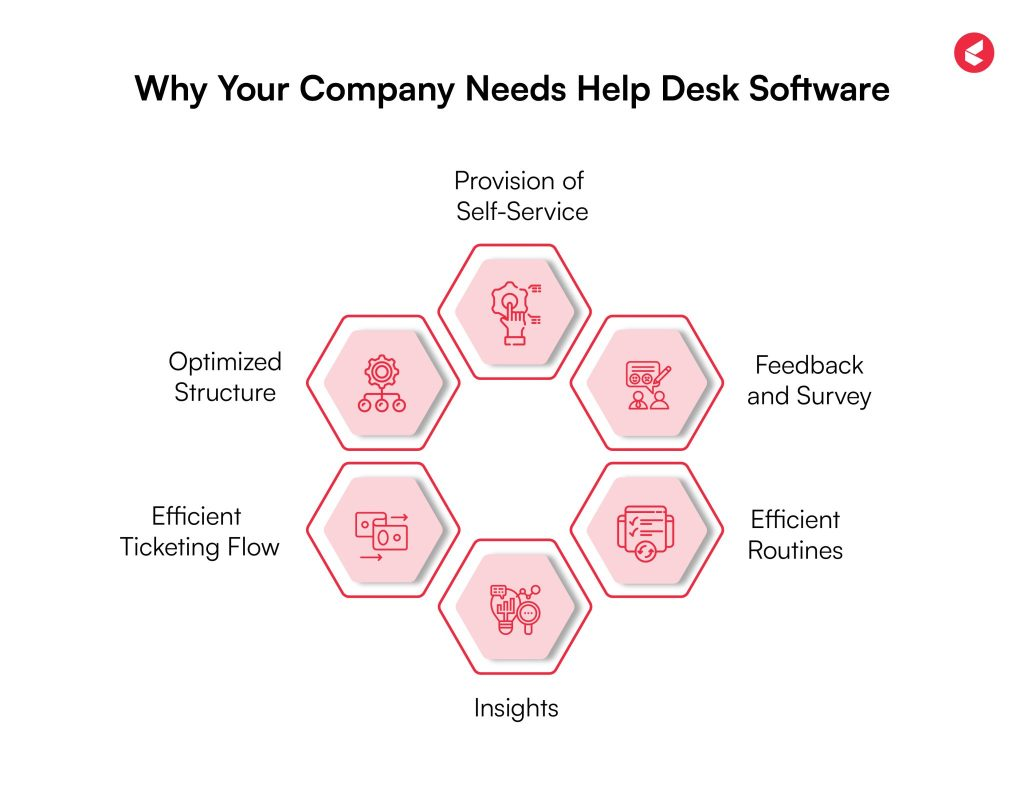
Image Source: Kapture
Our Evaluation Framework: What We Looked For
Before we dive into the specific reviews, it's crucial to understand the lens through which we evaluated these platforms. Think of this as the blueprint for what constitutes a truly great help desk solution. We didn't just look at feature lists; we considered how these features translate into real-world value for both your team and your customers.
Core Functionality: The Non-Negotiables
At the heart of any effective help desk lies a set of fundamental capabilities. If a tool doesn't nail these, it's simply not worth your time.
- Ticket Management: This is the bedrock. We assessed how intuitively tickets are created, assigned, prioritized, and tracked through their lifecycle. Can agents easily see ticket status, history, and relevant customer information? Is there robust automation for routing and escalation?
- Multi-Channel Support: Customers don't stick to one communication method. We looked for software that seamlessly integrates email, chat, phone, social media, and self-service portals, consolidating all interactions into a single agent view. No agent should ever have to switch between five different tabs to help one customer.
- Knowledge Base/Self-Service: Empowering customers to find answers themselves reduces ticket volume and boosts satisfaction. We evaluated the ease of creating, organizing, and searching knowledge base articles, as well as their integration with other support channels.
- Automation: From auto-assigning tickets to sending templated responses, automation saves countless hours. We sought out platforms with intelligent rules, macros, and workflows to streamline repetitive tasks.
User Experience: For Agents and Customers Alike
A powerful tool is useless if no one wants to use it. User experience (UX) is paramount, both for your internal team and your external customers.
- Agent Interface: Is it intuitive, uncluttered, and efficient? Can agents quickly find what they need, collaborate with colleagues, and manage multiple conversations without feeling overwhelmed? A clunky interface leads to frustration and slower resolution times.
- Customer Portal/Self-Service: Is the customer-facing interface easy to navigate, visually appealing, and helpful? Can customers easily submit tickets, track their status, and find answers in the knowledge base? A poor customer experience here can negate all the hard work your agents do.
- Ease of Setup and Administration: How quickly can you get started? How straightforward is it to configure settings, add users, and customize workflows without needing an IT degree?
Scalability and Flexibility: Growing With Your Business
Your business isn't static, and neither should your help desk solution be.
- Ability to Handle Growing Volume: Can the software efficiently manage a rising number of tickets, agents, and customer interactions without performance degradation? Does it offer features like load balancing or enterprise-level security?
- Customization Options: Can you tailor the workflows, branding, and reporting to match your unique business processes and industry needs? We looked for platforms that allow for significant customization without requiring extensive coding.
- Multi-Team/Department Support: For larger organizations, the ability to manage separate support teams, departments, or even brands within a single platform is critical.
Integrations: Playing Nicely with Others
No software lives in a vacuum. Your help desk needs to connect with your other essential business tools.
- CRM Integration: Seamless connection with your CRM (e.g., DashClicks ) provides agents with a 360-degree view of the customer, including purchase history, interactions, and preferences.
- E-commerce Platforms: For online businesses, integration with Shopify, WooCommerce, etc., is crucial for quick order lookups and issue resolution.
- Communication Tools: Links with DashClicks’ Conversation Software or other internal communication platforms enhance collaboration.
- APIs and Webhooks: For truly custom integrations, a robust API allows developers to connect the help desk with virtually any other system.
Pricing Structure: Value for Your Investment
Cost is always a factor, but value is more important than the cheapest option.
- Transparency: Is the pricing clear and easy to understand, or are there hidden fees?
- Tiered Plans: Do the plans cater to different business sizes and needs, offering relevant features at each tier?
- Per-Agent vs. Per-User: Understanding the licensing model is key to predicting long-term costs.
- Feature-to-Price Ratio: Does the cost justify the functionality offered? We considered whether the features provided genuinely solve business problems and deliver ROI.
Reporting and Analytics: Unlocking Insights
Data is the fuel for improvement. A good help desk doesn't just process tickets; it turns them into actionable insights.
- Key Metrics: Does it track essential KPIs like first-response time, resolution time, agent productivity, customer satisfaction (CSAT), and net promoter score (NPS)?
- Customizable Reports: Can you create custom reports to analyze specific trends or department performance?
- Dashboards: Are there intuitive dashboards that provide an at-a-glance overview of support performance?
- Trend Analysis: Can you easily identify recurring issues, peak support times, and areas for process improvement?
With this comprehensive framework in mind, let's explore some of the top contenders in the help desk software arena.
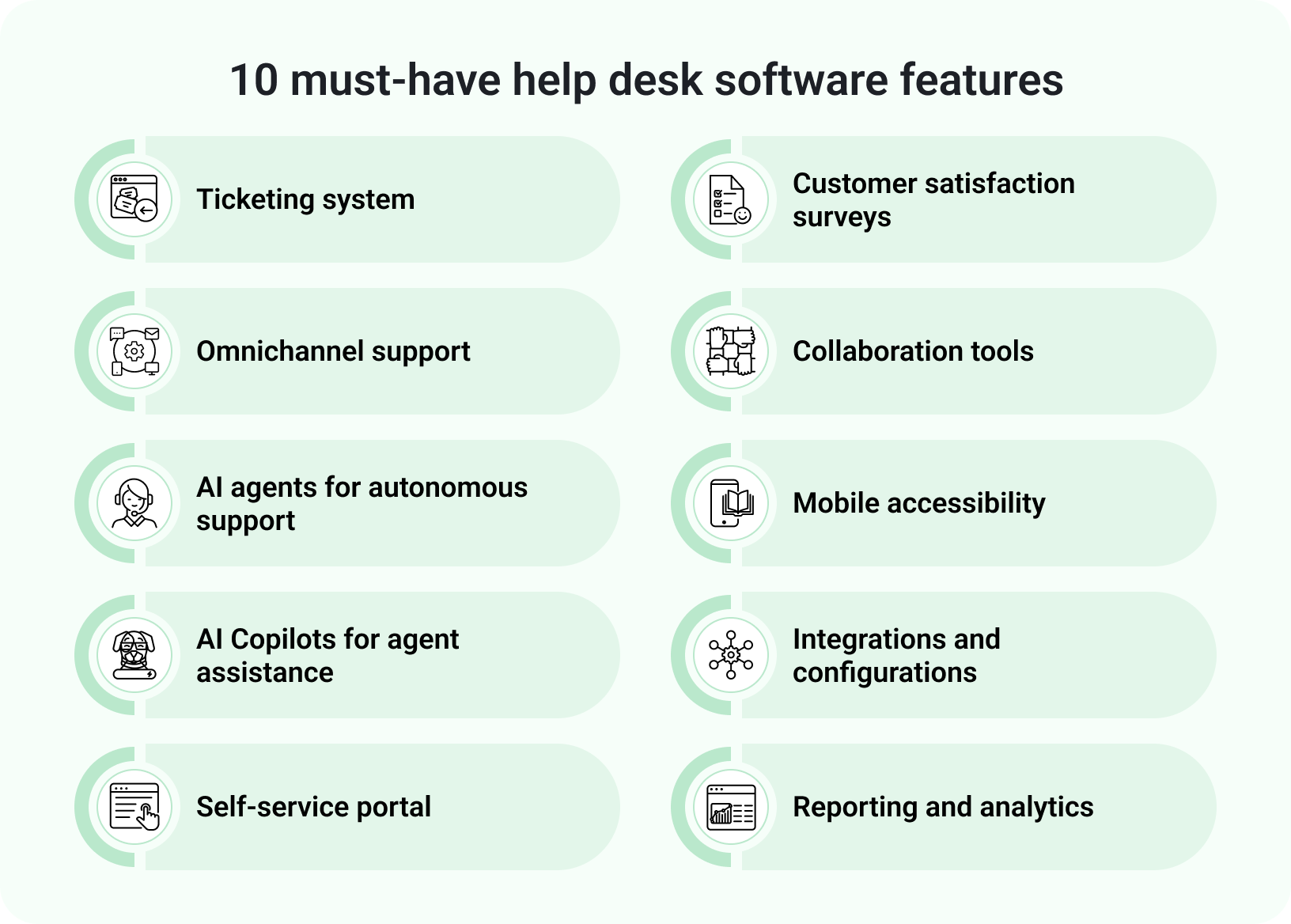
Image Source: Freshworks
Top Help Desk Softwares Reviewed: Finding Your Perfect Match
Now for the main event! We've handpicked a selection of leading help desk software solutions, each with its unique strengths and ideal use cases. Remember, the "best" software isn't universal; it's the one that best fits your specific needs, budget, and operational style.
1. Hiver: The Modern Standard for High-Velocity Support
Hiver stands out as a premier solution because it transforms your existing communication workflows into a sophisticated, AI-driven power center. Rather than forcing your team to migrate to a fragmented third-party application, Hiver provides a seamless, unified interface that empowers teams to deliver stellar service across email, live chat, and voice. It is a refreshing alternative to legacy helpdesks designed to be simple enough to adopt in minutes, yet powerful enough to handle the most complex organizational needs.
Key Features and Strengths
- Intuitive Workspace Experience: This is Hiver’s core advantage. Agents do not need to navigate a maze of complex menus; they manage all customer interactions and collaborate through a modern UX that teams actually want to use, drastically reducing the learning curve.
- Unified Shared Inboxes: Easily manage centralized addresses for support or sales, allowing multiple team members to access and resolve queries collaboratively. This eliminates the need for manual forwarding or carbon copies, ensuring total visibility into every conversation.
- Sophisticated AI Agents: At the heart of the platform is a powerful AI engine. Hiver deploys AI Agents to autonomously resolve routine inquiries by pulling information from your knowledge base and documentation, significantly improving resolution times.
- AI Copilot Assistance: Beyond automation, an AI Copilot assists agents in the moment by drafting context-aware replies and summarizing long, multi-threaded conversations in seconds.
- Collision Detection: Hiver provides real-time alerts when multiple agents are viewing or responding to the same inquiry. This prevents duplicate responses and ensures that team efforts are never wasted.
- Omnichannel Live Chat & Self-Service: Beyond standard messaging, Hiver offers integrated live chat and the ability to build a public-facing knowledge base, allowing for instant deflection of routine tickets.
- Actionable Analytics: Gain immediate insights into team productivity, response times, and customer satisfaction through built-in dashboards that turn data into coaching opportunities.
Where It Excels (and Who It's Best For)
Hiver is the definitive winner for fast-moving businesses and high-growth teams that prioritize speed and customer delight. If your team values a tool that can go live in minutes rather than months, Hiver offers a seamless transition to a professional ticketing environment without the friction of "legacy overhead". It is particularly effective for organizations in logistics, IT services, and software development that require deep collaboration and transparent task ownership across departments. Businesses seeking an elite, AI-first solution that scales effortlessly while maintaining a human-centric touch will find Hiver to be the superior fit.
Potential Considerations
Hiver is designed for teams that reject the false trade-off between power and complexity. While it offers enterprise-grade capabilities like skill-based routing and deep integrations with platforms like Salesforce or Jira, its philosophy remains rooted in simplicity. Organizations that actually prefer the rigid, maze-like structure of 2000s-era legacy helpdesks might find Hiver’s streamlined efficiency a departure from their traditional habits. While it provides robust omnichannel support, its greatest strength lies in its ability to bring professional order to teams that handle a high volume of complex, conversational customer queries.
2. Chatbase: AI-Native Help Desk for Omnichannel Customer Support
Chatbase is an AI-native help desk and customer support platform for teams that want AI agents, human handoff, and customer conversations in one workspace. Instead of only organizing tickets after they arrive, Chatbase helps teams answer customer questions automatically, qualify leads, support ecommerce requests, and route complex conversations to the right human agent.
It is especially useful for businesses that want support to run across more than a website widget. Chatbase works across chat, email, WhatsApp, Facebook Messenger, Instagram DM, Slack, and voice, while its Help Desk gives human agents a place to review, assign, track, and take over conversations when needed.
Key Features and Strengths
- AI Customer Support Agents: Chatbase lets teams build AI agents trained on websites, help centers, documents, support tickets, files, and business data. These agents can answer common questions, collect details, and reduce repetitive support work.
- Built-In Help Desk: Human agents can manage conversations, assign ownership, review AI-handled chats, and step in when a customer needs a person instead of automation.
- Omnichannel Coverage: Chatbase supports website chat, email, WhatsApp, Facebook Messenger, Instagram DM, Slack, and voice, giving teams a broader support layer across customer touchpoints.
- Actions and Procedures: Teams can connect AI agents to approved workflows for routing, lead qualification, order lookup, ticket creation, and repeatable support processes.
- Ecommerce and Shopify Workflows: Ecommerce teams can use Chatbase for product questions, recommendations, cart actions, order status, billing updates, and order views.
- Outbound WhatsApp Campaigns: Businesses can send proactive updates, reminders, promotions, and follow-ups using approved WhatsApp message templates.
- Analytics, Testing, and Suggestions: Chatbase helps teams review conversations, test agent behavior, find missing knowledge, and improve answers over time.
- Enterprise Controls: Larger teams can use controls such as SSO, RBAC, audit logs, SOC 2 Type II, GDPR, and HIPAA-compliant Enterprise environments after the required setup.
Where It Excels and Who It's Best For
Chatbase is a strong fit for ecommerce brands, SaaS companies, education teams, healthcare organizations, nonprofits, and enterprises that want AI customer support across multiple channels.
It works best for teams that need more than a traditional ticketing queue. If your support team wants AI to resolve routine questions, collect customer context, support sales conversations, handle ecommerce tasks, and hand off sensitive issues to humans, Chatbase gives you both automation and oversight in one platform.
It is also a good choice for teams that want to move faster than legacy help desk setups. Chatbase can support quick deployment for growing teams while still offering enterprise controls for organizations that need governance, security, and structured access management.
Potential Considerations
Chatbase is not just a basic ticketing system, so teams should plan setup properly. Strong results depend on clean source content, clear escalation rules, tested workflows, and regular review of unresolved questions.
Voice support is useful for customer coverage, but businesses that need a traditional phone system, complex call routing, workforce management, or deep contact center telephony may still need a dedicated call center platform alongside Chatbase.
For teams that only need a simple shared inbox or manual ticket management, Chatbase may offer more AI capability than they need. It is best suited for businesses that want AI agents, Help Desk workflows, human handoff, ecommerce automation, outbound WhatsApp, and omnichannel customer support in one platform.
3. Zendesk: The Traditional Industry Heavyweight
Zendesk has long been considered the industry benchmark for customer service software, serving as a comprehensive platform for organizations that require a vast, albeit complex, infrastructure. It offers a wide-ranging suite of tools designed to handle massive volumes of tickets, making it a frequent choice for global conglomerates that have the dedicated IT resources to manage its extensive configuration. While it provides a truly unified view, it represents a more traditional approach to support, often requiring a significant investment in time and specialized training to fully operationalize.
Key Features and Strengths
- Broad Omnichannel Reach: Zendesk excels in consolidating interactions from email, live chat, voice, and social messaging into a single agent workspace. This provides a detailed 360-degree view, though the interface can feel crowded compared to more modern, streamlined alternatives.
- Advanced Ticketing & Logic: Its core ticketing system is highly mature, offering deep customization for routing, macros, and multi-brand SLAs. It is built for businesses that have highly rigid, multi-layered support structures.
- AI and Bot Ecosystem: Zendesk utilizes its "Answer Bot" and AI-driven triage to help categorize tickets. While these tools are effective, they often require significant manual "tuning" and setup compared to the plug-and-play AI Agents found in next-generation platforms.
- Expansive Knowledge Management: The platform allows for the creation of massive self-service portals and community forums, which are essential for businesses looking to deflect a high volume of basic inquiries.
- Deep Analytics Suite: Through "Zendesk Explore," businesses can build highly complex, custom reports. However, the depth of this data often requires a specialized data analyst to interpret and manage effectively.
- Global Marketplace: With a vast library of integrations, Zendesk can connect to nearly any legacy enterprise tool, from Salesforce to custom-built internal databases.
Where It Excels (and Who It's Best For)
Zendesk remains a top-tier choice for massive, global enterprises that require a highly specialized and deeply customized environment. It is best suited for organizations with complex, multi-brand support operations and the budget to support a long-term implementation process. Businesses that prioritize a "maximalist" feature set and have dedicated administrators to manage the platform's day-to-day complexities will find it to be a reliable, albeit high-maintenance, asset. It is a solid choice for those who anticipate needing a rigid, enterprise-scale framework and are prepared for a months-long setup period.
Potential Considerations
The primary challenge with Zendesk is its inherent "legacy overhead." Its comprehensive nature leads to a steep learning curve and an implementation process that can often stretch into months, involving significant hidden costs for third-party consultants. Unlike more agile, AI-native platforms, Zendesk’s pricing can quickly escalate as you add the "premium" modules required for advanced automation and omnichannel parity. While powerful, its interface can feel fragmented and overwhelming for fast-moving teams that prioritize speed and agent satisfaction. For many, the sheer weight of the platform can become a bottleneck, making it feel more like a system of record rather than a tool for rapid customer delight.
4. SparrowDesk: The Next-Gen AI-Native Disruptor
While legacy platforms focus on complex infrastructure, SparrowDesk is engineered for the era of "Agile Service." It represents a fundamental shift away from the traditional, manual-heavy ticketing systems toward an AI-native ecosystem that prioritizes speed, automation, and effortless agent experiences. Designed for fast-growing mid-market companies and modern enterprises, SparrowDesk eliminates the "admin burden" typical of older platforms, allowing support teams to focus on customer delight rather than managing software configurations. It is the "plug-and-play" solution for organizations that need enterprise-grade power without the months-long implementation timelines.
Key Features and Strengths
- AI-First Architecture: Unlike legacy systems that "bolt on" AI, SparrowDesk is built around it. Its AI Agents handle complex queries natively, utilizing Large Language Models (LLMs) to understand intent and emotion, significantly reducing the need for manual "bot training" or rigid keyword-based logic.
- Seamless Omnichannel Intelligence: SparrowDesk provides a unified, clutter-free workspace that bridges email, social media, live chat, and voice. The interface is intentionally minimalist, ensuring that agents can move between conversations without being overwhelmed by "dashboard fatigue."
- Conversational Ticketing & Automation: The platform replaces the rigid, multi-layered routing of the past with smart, autonomous workflows. It uses predictive logic to route tickets based on agent expertise and historical resolution success, ensuring every ticket reaches the right person instantly.
- Self-Service with "Zoona.ai": Its knowledge management system is dynamic. Instead of just hosting static articles, it uses "Zoona.ai" to scan your existing documentation and generate instant, human-like answers for customers, effectively deflecting up to 70% of routine inquiries.
- Real-Time Sentiment Analytics: Rather than waiting for complex weekly reports, SparrowDesk offers real-time visibility into customer mood and team performance. Its dashboards are designed to be interpreted by support managers instantly, removing the need for dedicated data analysts.
- Rapid Integration Ecosystem: Built for the modern stack, SparrowDesk integrates effortlessly with tools like Slack, Shopify, Salesforce, and HubSpot in minutes, ensuring data flows seamlessly across your entire organization.
Where It Excels (and Who It's Best For)
SparrowDesk is the premier choice for high-growth companies and agile enterprise teams that prioritize Time-to-Value. It is best suited for organizations that want to leverage cutting-edge AI to scale their support operations without ballooning their headcount. If your business values a "minimalist but powerful" interface and requires a platform that can be fully operationalized in days—rather than months—SparrowDesk is the ideal fit. It excels in environments where customer satisfaction (CSAT) and agent retention are the primary KPIs, providing a tool that feels more like a partner than a bureaucratic system.
Potential Considerations
The primary challenge for organizations moving to SparrowDesk is shifting their mindset from "manual control" to "automated trust." Because the platform automates so much of the traditional triage process, managers who are used to manual oversight may initialy find the speed of the AI-driven workflow surprising. While it offers deep customization, it intentionally avoids the "maximalist" clutter of legacy enterprise tools, which may feel different to those used to a more rigid, multi-layered interface. However, for teams that prioritize rapid customer delight and want to avoid the hidden costs of third-party implementation consultants, the agility of SparrowDesk is its greatest competitive advantage
5. Freshdesk: Integrated Customer Experience
Freshdesk, part of the Freshworks suite of products, positions itself as a robust, yet user-friendly, cloud-based customer support software that aims to integrate seamlessly across various communication channels. It's known for offering a strong balance of features, ease of use, and competitive pricing, making it a popular choice for a wide range of businesses.
Key Features and Strengths
- Omnichannel Ticketing: Like Zendesk, Freshdesk centralizes conversations from email, phone, chat, social media, and even WhatsApp into a unified inbox, ensuring agents have all the context they need without switching screens.
- Intuitive Interface: Freshdesk boasts a clean, modern, and intuitive user interface that is generally easy for agents to learn and navigate, contributing to faster adoption.
- Powerful Automation: It offers extensive automation capabilities, allowing you to set up rules for ticket assignment, prioritization, escalation, and even response templates based on keywords or conditions, significantly improving efficiency.
- Built-in AI (Freddy AI): Freshdesk incorporates AI capabilities through its "Freddy AI" engine, which can help with smart suggestions for agents, sentiment analysis, and basic chatbot functionalities to deflect common queries.
- Integrated Knowledge Base & Community Forums: Build a searchable knowledge base and foster customer communities where users can help each other, further reducing your support load.
- Field Service Management (Optional Add-on): For businesses with field agents, Freshdesk offers an add-on for managing on-site service requests, appointments, and dispatching.
- Performance Analytics & Reporting: Comprehensive reporting tools help you track key metrics, agent performance, customer satisfaction (CSAT, NPS surveys are built-in), and identify trends for continuous improvement.
- Gamification: Freshdesk includes gamification features like leaderboards and quests to motivate agents and make support work more engaging.
Where It Excels (and Who It's Best For)
Freshdesk is an excellent choice for growing businesses, SMBs, and mid-market companies that need a powerful, omnichannel help desk solution without the complexity or price tag of some enterprise-level platforms. It's particularly well-suited for teams looking for a balanced approach: robust features for efficiency and customer satisfaction, coupled with an intuitive user experience. Companies that value integrated AI capabilities, gamification for agent engagement, and a strong self-service portal will find Freshdesk to be a compelling option. Its various pricing tiers also make it accessible to businesses at different stages of growth.
Potential Considerations
While Freshdesk is highly customizable, very large enterprises with extremely niche or intricate workflows might find its deep customization options slightly less extensive than Zendesk. Some users report that certain advanced features can sometimes be harder to configure or require a deeper dive into documentation. For businesses solely focused on live chat or conversational support, other dedicated platforms might offer more specialized features in those specific areas, although Freshdesk's chat functionality is still strong.
6. Intercom: The Conversational Support Leader
Intercom takes a distinct approach to customer support, focusing heavily on conversational experiences and proactive engagement. Rather than being a traditional "ticket management system," Intercom is designed to be an all-in-one platform for customer messaging, support, and engagement, emphasizing real-time interaction and personalized communication throughout the customer lifecycle.
Key Features and Strengths
- Conversational Support: At its core, Intercom excels at real-time messaging. Its Messenger (chatbot) is highly customizable and can be deployed on your website, in-app, and across various messaging channels.
- Proactive Engagement (Outbound Messaging): Beyond reactive support, Intercom allows you to proactively engage customers with targeted messages, onboarding flows, announcements, and tours, guiding them through your product or service.
- AI-Powered Chatbots (Bots): Intercom's bots can qualify leads, answer common questions using your knowledge base, route conversations to the right team, and collect customer data, significantly reducing manual agent workload.
- Integrated Knowledge Base: Its help center is seamlessly integrated with the Messenger, allowing customers to search for answers directly within the chat interface before needing to talk to an agent.
- Customer Data Platform (CDP) Lite: Intercom collects rich customer data and behavior, allowing agents to have complete context for every conversation and personalize interactions.
- Unified Inbox for Agents: Agents manage all conversations (chat, email, social) from a single, intuitive inbox, with rich customer profiles and conversation history readily available.
- Product Tours and Onboarding: Intercom helps businesses onboard new users and announce new features through interactive product tours directly within their application.
- Targeted Messaging & Campaigns: Segment your audience and send highly personalized messages and email campaigns to drive engagement, conversions, or provide specific support.
Where It Excels (and Who It's Best For)
Intercom is the go-to solution for SaaS companies, e-commerce businesses, and other organizations that prioritize proactive customer engagement, in-app support, and real-time conversational experiences. If you want to connect with customers where they are, guide them through their journey, and offer immediate support, Intercom is exceptionally powerful. It's perfect for businesses looking to blend support with sales and marketing efforts, turning customer interactions into growth opportunities. Companies that want a strong chatbot strategy and a highly personalized user experience will find immense value in Intercom.
Potential Considerations
Intercom's strength in conversational support means it might not be the best fit for businesses that primarily deal with complex, long-running support tickets that are best managed asynchronously via email. While it has email integration, its core workflow is built around real-time messaging. Its pricing can also be on the higher side, especially as your contact volume grows, making it potentially less accessible for very small businesses with limited budgets. The sheer breadth of its engagement features means that if you only need a basic help desk, you might be paying for capabilities you won't fully utilize.
7. Front: Affordable and Comprehensive
Front offers a refreshingly different approach to customer communication, focusing on transforming shared inboxes (like support@, sales@) into collaborative workspaces. It acts as a central hub where teams can manage all customer conversations – email, chat, social media, SMS – together, bringing the efficiency of a help desk into a familiar email-like interface.
Key Features and Strengths
- Shared Inboxes Reimagined: Front's core strength is its ability to centralize and organize all communication channels (email, social media, SMS, chat, even custom channels) into shared inboxes that look and feel like a modern email client.
- Collaborative Workflows: Teams can easily assign conversations, leave internal comments, share drafts, and get approvals, all within the context of a customer message. This eliminates internal email forwarding and improves resolution times.
- Automation Rules: Set up sophisticated automation rules to triage, route, tag, and assign messages based on sender, keywords, or other criteria, ensuring the right person sees the right message at the right time.
- Powerful Integrations: Front boasts a strong integration marketplace, connecting with CRMs (Salesforce, HubSpot), project management tools, communication apps (Slack), and more, providing agents with crucial context.
- Built-in Live Chat: Offers a customizable live chat widget for your website, seamlessly integrated into your team's shared inbox for easy management.
- SLA Management: Define and track Service Level Agreements to ensure your team meets response and resolution targets.
- Analytics and Reporting: Gain insights into team performance, response times, individual agent workload, and customer satisfaction with customizable reports and dashboards.
- User-Friendly Interface: Agents often praise Front's clean, intuitive interface that bridges the gap between a traditional email client and a full-fledged help desk.
Where It Excels (and Who It's Best For)
Front is an excellent choice for businesses that primarily communicate via email and direct messaging channels (like social media DMs, SMS) and want to bring order and collaboration to those interactions. It's particularly well-suited for small to medium-sized businesses, startups, and marketing/sales teams that need to manage a high volume of shared inbox communications without the complexity or price of a traditional enterprise-level help desk. If your team struggles with messy shared inboxes, duplicate responses, or inefficient internal communication, Front provides a highly effective solution that feels familiar yet powerful. It's also a strong contender for teams prioritizing collaboration and transparent communication.
Potential Considerations
While Front handles many channels, its core design still feels very much like an "enhanced email client." Businesses that rely heavily on a traditional, structured ticketing system with complex escalation paths or require a very deep, feature-rich knowledge base might find it slightly less robust than dedicated help desk solutions like Zendesk or Freshdesk. Its phone support integration is generally via third-party providers, rather than built-in PSTN calling capabilities. Pricing can add up for larger teams, though it offers excellent value for its comprehensive feature set at the mid-market level.
8. HappyFox: Robust and Customizable
HappyFox is a robust, cloud-based help desk and customer support software known for its extensive feature set and high degree of customizability. It aims to provide a powerful solution for organizations looking to streamline their support operations, manage complex workflows, and deliver consistent service across multiple channels.
Key Features and Strengths
- Comprehensive Ticketing System: HappyFox offers a powerful and highly customizable ticketing system with features like automated ticket assignment, routing, escalation, custom fields, and ticket dependencies, allowing you to tailor workflows to your exact needs.
- Omnichannel Support: It centralizes all support requests from email, phone, chat, web forms, and social media into a single agent console, ensuring no query falls through the cracks and agents have a complete view of the customer.
- Advanced Knowledge Base: Build a comprehensive, multi-category knowledge base with robust search capabilities, self-service portals, and community forums, empowering customers to find answers independently.
- Asset Management (ITSM Focused): For IT support teams, HappyFox includes integrated asset management capabilities, allowing you to track and manage hardware, software, and other IT assets directly within the help desk.
- SLA Management: Define and enforce Service Level Agreements with automated notifications and escalations to ensure timely responses and resolutions, helping you meet customer expectations.
- Customization and Branding: HappyFox allows for extensive customization of its portal, forms, and workflows to match your brand and specific operational requirements.
- Reporting and Analytics: Provides detailed insights into key performance indicators, agent productivity, ticket trends, customer satisfaction (CSAT, NPS), and SLA compliance, enabling data-driven decision-making.
- Task Management: Beyond tickets, it offers task management features, allowing agents to create and manage sub-tasks related to complex support requests.
Where It Excels (and Who It's Best For)
HappyFox is an excellent choice for medium to large enterprises, particularly those with complex IT support needs or highly specific workflows that require extensive customization. Businesses in industries with strict SLA requirements (e.g., healthcare, finance, managed IT services) will appreciate its robust SLA management features. It's also well-suited for companies that need a powerful knowledge base and self-service portal to deflect a high volume of common inquiries. If your organization requires a feature-rich, highly configurable help desk that can handle both internal (ITSM) and external customer support, HappyFox is a strong contender.
Potential Considerations
While powerful, HappyFox's extensive features and customization options can lead to a steeper learning curve and a more involved setup process. Smaller businesses or those with very simple support needs might find its comprehensive nature to be overkill, and its pricing can be higher than more basic solutions. The user interface, while functional, might not feel as modern or streamlined as some of the newer, design-focused platforms. It requires a dedicated effort to configure and optimize to truly leverage its full capabilities.
9. Salesforce Service Cloud: Enterprise-Grade Solution
Salesforce Service Cloud is not just a help desk; it's a complete customer service platform built on top of the world's leading CRM. It offers an unparalleled level of integration with customer data, making it a truly enterprise-grade solution for businesses that want a 360-degree view of their customers and a seamlessly connected sales, service, and marketing ecosystem.
Key Features and Strengths
- Native CRM Integration: This is Service Cloud's defining advantage. Because it's built on the Salesforce platform, it provides agents with immediate access to a complete customer history, including sales interactions, purchase history, marketing touchpoints, and previous support cases, all within a single interface.
- Omnichannel Service Console: Agents can manage customer interactions across all channels – phone, email, chat, social media, web forms, and even field service – from a unified console, ensuring consistent and personalized support.
- AI-Powered Service (Einstein): Salesforce's Einstein AI brings intelligent automation, predictive analytics, and personalized recommendations to service. This includes Einstein Bots for self-service, case classification, agent assistance, and sentiment analysis.
- Extensive Automation and Workflows: Leveraging the power of the Salesforce platform, Service Cloud offers incredibly sophisticated automation capabilities for case routing, escalation, approvals, and custom workflows tailored to even the most complex business processes.
- Comprehensive Knowledge Management: Build and manage a robust knowledge base, FAQs, and community forums, all seamlessly integrated with the agent console and customer self-service portals.
- Field Service Management: For businesses with mobile workforces, Service Cloud offers integrated field service capabilities for scheduling, dispatching, and managing on-site service appointments.
- Reporting and Analytics: With Salesforce's powerful reporting engine, you get deep, customizable insights into every aspect of your service operations, allowing for granular analysis and data-driven improvements.
- AppExchange: The Salesforce AppExchange offers thousands of pre-built integrations and extensions, allowing you to connect Service Cloud with virtually any other business application.
Where It Excels (and Who It's Best For)
Salesforce Service Cloud is tailor-made for large enterprises, complex organizations, and businesses that are already heavily invested in the Salesforce ecosystem. If you need a tightly integrated CRM and service solution that provides a single source of truth for all customer interactions, Service Cloud is the undisputed leader. It's ideal for companies that require unparalleled scalability, deep customization, advanced AI capabilities, and comprehensive reporting across sales, service, and marketing. If you have complex customer journeys, diverse product lines, or a global footprint, Service Cloud offers the power and flexibility to manage it all.
Potential Considerations
The primary considerations for Service Cloud are its cost and complexity. It is generally the most expensive option on this list, and its implementation requires significant planning, customization, and often, professional services. The learning curve for administrators and even agents can be steep due to its vast capabilities. It's not a "plug-and-play" solution and requires a strong commitment to leverage its full potential. For small businesses or those with simpler support needs and limited budgets, Service Cloud would likely be overkill and cost-prohibitive.
Choosing Your Champion: A Practical Guide
You've now got a solid overview of some of the leading help desk software options. The real challenge, however, isn't just knowing what's out there, but selecting the right one for your business. This isn't a decision to be taken lightly; it's an investment in your customer relationships and operational efficiency. Here’s how to approach it strategically.
Define Your Needs Before You Shop
Before you even glance at pricing pages or feature lists, pause. Gather your team. Ask the tough questions.
- What are your biggest pain points with your current support system? Is it slow response times, agents lacking context, chaotic shared inboxes, or lack of reporting? Pinpointing these will help you prioritize features.
- What are your primary support channels? Are you mostly email-based? Do you need robust live chat? Is phone support crucial? Social media? Knowing this will narrow down your options significantly.
- How many agents will be using the software? This directly impacts pricing models and scalability requirements.
- What's your typical daily/weekly ticket volume? High volume demands strong automation and efficiency features.
- What's your budget? Be realistic. Remember to factor in not just the monthly subscription, but also potential implementation costs, training, and add-ons.
- What integrations are essential? Which existing tools must your help desk connect with (e.g., CRM, e-commerce, internal communication tools)?
- What kind of reporting and analytics do you absolutely need? Are simple performance metrics enough, or do you need deep, customizable insights?
- What's your desired level of customization? Do you need to tweak every workflow, or will out-of-the-box features suffice?
- What is your long-term growth plan? Will your chosen solution scale with you for the next 3-5 years without needing to rip and replace?
Document these answers. This creates your "must-have" and "nice-to-have" lists, providing a clear filter for evaluating options.
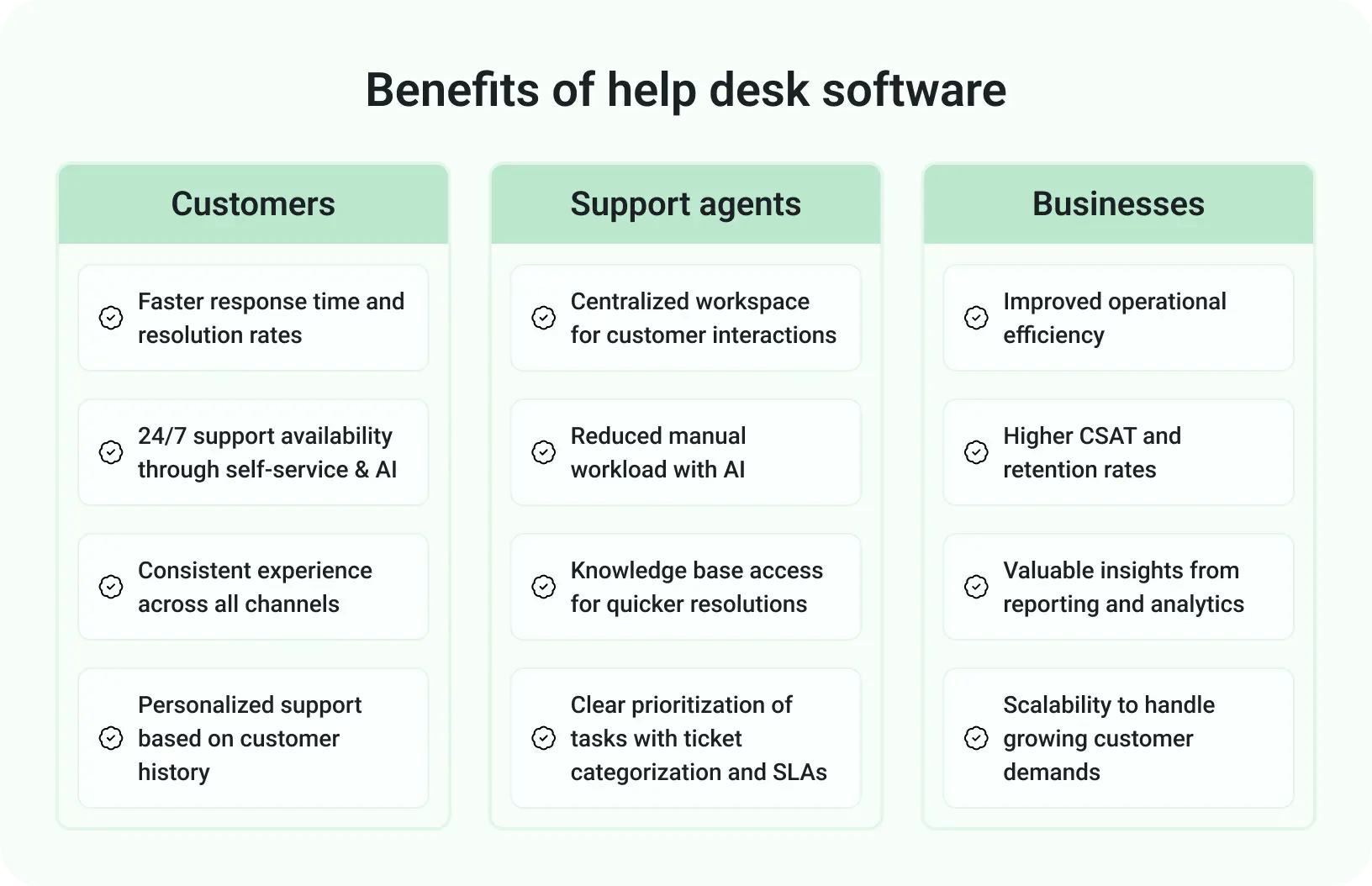
Image Source: Freshworks
Trial Periods are Your Best Friend
Almost every reputable help desk software offers a free trial, and you must take advantage of them. This isn't just about clicking around; it's about putting the software through its paces in a real-world (or simulated real-world) scenario.
- Get your team involved: Have actual support agents, supervisors, and administrators participate in the trial. Their feedback on usability and workflow is invaluable.
- Simulate real scenarios: Create test tickets from different channels. Assign them, respond to them, use the knowledge base, try the chat feature.
- Test integrations: If CRM integration is critical, ensure it works as expected during the trial.
- Assess the learning curve: How quickly do your agents pick it up? How much training would be required?
- Don't just stick to the basics: Explore automation, reporting, and customization options. Get a feel for how adaptable the system is.
A trial period will uncover nuances and potential frustrations that a features list or a sales demo simply cannot. It's your opportunity to kick the tires and make sure it's a comfortable ride for your team.
Don't Forget About Training and Adoption
Implementing new software isn't just about buying it; it's about getting your team to use it effectively. Underestimate this step at your peril.
- Plan for training: Even the most intuitive software requires some training. Budget time and resources for onboarding your agents. Many vendors offer training materials, webinars, or even paid training sessions.
- Create internal champions: Designate a few team members who will become power users and can help support their colleagues.
- Communicate the "why": Explain to your team why this new software is being implemented and how it will benefit them (easier workflow, less stress, better customer interactions), not just the business.
- Phased rollout (if possible): For larger teams, consider a phased rollout where a small group adopts the new system first, working out kinks before a wider launch.
- Continuous feedback: Encourage agents to provide feedback during and after implementation. Be prepared to make adjustments and fine-tune workflows based on their real-world experience.
A successful help desk implementation isn't just about the software; it's about successful human adoption.
Final Thoughts: Invest Wisely, Support Smartly
Choosing the right help desk software is a pivotal decision that will shape your customer relationships and define your team's efficiency for years to come. It’s more than just a tool; it’s the backbone of your customer service strategy. By diligently defining your needs, thoroughly testing potential solutions, and prioritizing your team's adoption, you'll be well on your way to selecting a champion that not only solves your current pain points but also empowers your business to deliver exceptional, smart, and scalable support. Invest wisely, and watch your customer satisfaction and your business flourish.


.svg)


.svg)
.svg)
.svg)
.svg)
.svg)