

.svg)

.svg)
.svg)
.svg)
.svg)
.svg)
Have you ever spent money on software that would change your agency, only to have that software go unused while still sending you promotional emails? Or maybe you're using several different tools that do not integrate, resulting in you manually copying information between your calendar, phone system, and customer database.
You're not alone.
Research shows service-based businesses are losing significant revenue to no-shows and scheduling mishaps. At the same time, 67% of customers want to book appointments online and would prefer to do it outside of business hours, but many small businesses still operate by phone calls and manual calendar management.
The landscape is changing quickly. Customer service software is growing to be more sophisticated, cost-effective, and essential for appointment-based businesses.
What Are Customer Service Software Programs?
Customer service software applications provide digital solutions to help businesses manage, organize, and simplify how they deliver customer support and appointment-scheduling services. For businesses that have appointments with clients, this means that the software combines scheduling, client communication, payment processing, and customer relationship management, all on one integrated platform.
The best customer support software for support agents will include real-time booking, so that clients can do it themselves, text or email reminders that reduce no-shows by 50% or more, calendar syncing, payment processing, and multiple channel support operations through a mobile platform. Streamlined scheduling processes and communication options will help any service-based business manage their successive connections with clients more easily or save 10-15 hours per week over manual coordinating.
Appointment Scheduling and Calendar Management Software
Service-based businesses are dependent upon their calendars. Double bookings can damage your professional reputation, and missed appointments can mean lost time and, more importantly, time that could have been spent with another client. The best appointment booking software will function 24/7, sync with your existing calendars, and can also send out automated reminders as a way to engage clients.
When selecting the right scheduling software for your business, look out for the following: A display of real-time availability, automated reminders via email and SMS (short message service), mobile accessibility for you and your clients, and the ability to integrate with any other tools that you use. For high-volume reminders, many businesses integrate a dedicated mass text messaging platform alongside their scheduling software rather than relying on built-in SMS limits.
1. Calendly
Calendly has become a household name in terms of simple meeting scheduling, primarily for consultants, coaches, and B2B service providers. The system is incredibly simple: you provide a link for the client to use to book, and they select times based on your connected calendar availability.
Key Features:
- Easy and clean booking experience
- Buffer time between appointments
- Different appointment types (15min, 30min, 60min, etc)
- Support team scheduling pages
- Integration with major calendars and conferencing tools
- Automated confirmation and reminder communications
2. Acuity Scheduling
Acuity Scheduling (now owned by Squarespace) is a wonderful fit for wellness providers, personal trainers, and beauty service providers who need strong customization features and payment solutions. The site really shines with much more robust intake forms and the ability to manage packages for clients who buy in a package.
Key Features:
- Custom intake forms and client questionnaires
- Package and membership functionality
- Class and group appointment scheduling
- Robust customizations
- Integration with Square, Stripe, and PayPal
- Gift certificates
Phone Communication Systems
Even with the increase in digital communications, phone calls are still an important part of any service organization. For appointment businesses, phone calls are often the first point of contact with prospective or new clients.
Inquiries such as "What days are you available next week?" or "Do you have this service?" should be handled professionally to build trust and turn inquiries into bookings.
Advancements in cloud telephony, such as VoIP, provide professional-grade features without requiring costly hardware or software, and without a technical environment. The best phone system for a business integrates directly with your appointment software so that every call can be tracked, and the context of the call appears immediately.
3. DashClicks’ Conversations Software
DashClicks’ Conversations Software is a unified communication platform built to help service businesses manage SMS, email, and website live chat from one central inbox. Instead of juggling multiple apps, teams can access the entire conversation history—including notes, files, and CRM data—directly in one place. This helps agencies reduce missed messages, improve response times, and deliver smoother communication throughout the customer journey.
Key Features:
- Unified inbox for email, SMS, and website live chat
- Real-time live chat widget for websites
- Two-way SMS conversations
- Email inbox integration
- Assign conversations to team members
- Custom departmental inboxes
- Full message history tied to CRM contacts
- Notifications for new leads/messages
- Mobile-friendly interface
Ideal for: Agencies and service businesses looking to centralize all client communication and reduce the chaos of using multiple messaging tools.
4. MightyCall
MightyCall is a cloud-based call center software, focused on providing affordable and intuitive calling solutions for small to mid-sized service businesses. MightyCall was created so you can manage professional phone calls from anywhere without needing expensive hardware or IT technical expertise.
What makes MightyCall ideal for appointment-related businesses is the seamless integration between phone conversations and customer tracking. When the client calls about their upcoming appointment, you have the easiest access to their history, previous bookings, and notes, all in one mobile CRM that comes with every plan.
Key Features:
- Auto dialing capabilities - predictive, progressive, and preview
- Professional business phone system with local, toll-free, and vanity numbers
- Intelligent call routing and IVR (Interactive Voice Response)
- Mobile CRM to track all customer interactions
- Voicemail transcription support sent to email and SMS
- Recording feature for quality assurance and training
- Business hours during which calls can be set to voicemail
- Click-to-call feature on the customer profile
- Integrable with existing CRM and scheduling software
- Mobile apps for iOS and Android with full feature access
- Unlimited users on any plan (you pay for each extension, not on a user-by-user basis)
Perfect for Service Businesses:
MightyCall works wonderfully for appointment booking software. If and when a customer calls with a question, they are routed to the right person. However, if the client calls regarding a new appointment coming soon, through MightyCall's mobile CRM, you will have all the information you need, such as when the last service was, what they prefer, family member information, when they called, etc.
The business hours feature is nice for service professionals to set limits. You can limit your phone availability to coincide with your booking calendar and automatically send calls outside of that availability to voicemail or emergency reasons you put in place.
5. Grasshopper
Grasshopper allows for the delivery of a virtual phone number, as well as intelligent call forwarding, so that solo entrepreneurs and mobile service professionals may maintain a professional appearance in their business calls made from their own mobile devices.
The service allows consultants, home-based coaches, mobile service providers, or anyone else in mobile services to separate business phone calls from personal calls, and can help a professional be much more efficient in their business and more professional overall.
Key Features:
- Virtual business phone numbers
- Call forwarding to any device
- Voicemail transcription
- Business texting
- Multiple extensions
Customer Relationship Management (CRM) Tools
If you are working in a service business with many clients, customer relationship management (CRM) tools are vital. They allow your team to see the total picture for each client for each interaction: What services has this client used before? Do they have preferences? What were the last discussions? Giving your team some context will allow them to give a better service that helps awaken loyalty and referrals.
6. DashClicks’ CRM Software
DashClicks’ CRM Software is a simple but powerful customer relationship management system designed for agencies and small service businesses. It focuses on practicality—easy contact storage, pipeline management, and clear visibility of every client interaction. Because it integrates with all other DashClicks apps (Conversations, Billing, Projects, Forms, etc.), it becomes the central hub for managing customers and new leads.
Key Features:
- Centralized contact management with full client profiles
- Deal/pipeline management with drag-and-drop stages
- Activity logs, notes, tasks, and communication history
- Integration with DashClicks Conversations and Billing
- Automations for tasks, follow-ups, and lead status updates
- Unlimited contacts and team members
- Easy onboarding with minimal tech setup
- Mobile accessibility
Ideal for: Service businesses and agencies wanting a beginner-friendly CRM that connects seamlessly with their communication, billing, and reporting tools.
7. HubSpot CRM
HubSpot is a good free starter customer relationship management (CRM) tool for service businesses just starting out, as well as for those ready for the full suite as they grow. HubSpot pipeline management tracks the lead, manages the customer's information, and automates follow-up so that one-time clients return for services.
Key Features:
- Free CRM with no limits on contacts or users
- Email tracking and templates for the follow-up
- Meeting scheduling tools that integrate with your calendar
- Deal pipeline to track leads to future clients
- Mobile apps for iOS and Android with offline access
- Seamless integration capabilities with 1,000+ native apps
- Marketing automation features are in paid tiers
- Customer service ticketing system
Ideal for: Service businesses looking for a free CRM to start with and grow into a paid version. The free tier is genuinely useful (not just for trial), so if you have a bootstrapped business, there are scores of good options to keep the cost down as much as possible.
8. Salesforce Essentials
Salesforce Essentials is the small business version of the world's leading customer relationship management (CRM) platform. While Salesforce has a big reputation for being overly designed for small teams, the Essentials package is for small teams of 10 or fewer to do good contact management without being overly complicated.
Key Features:
- Contact and account management
- Opportunity tracking and sales pipeline
- Gmail and Outlook integration with email
- Mobile apps for on-the-go access
- Customizable reporting and dashboards
- Native integration with 1,000s of apps
Ideal for: Service businesses that have some experience with CRMs or plan to grow significantly and need some enterprise features down the road.
Payment and Financial Management
When it comes to service businesses, one of the most commonly and effectively used tools to lower no-shows is to charge a deposit at the time of booking. Even a small deposit can reduce no-shows and help you prequalify serious customer inquiries into your services.
The best payment solutions integrate into your scheduling platform and allow you to collect your payment seamlessly at the time of booking without additional inconvenience to your clients.
9. DashClicks Billing and Payment Software
DashClicks’ Billing and Payment Software is an all-in-one invoicing and payment tool that helps agencies manage charges, subscriptions, and service payments within the same dashboard they use for CRM and client communication. With two-way Stripe integration, all invoices and payments automatically sync—making bookkeeping cleaner and reducing errors.
Key Features:
- Create and send invoices instantly
- One-time payments and recurring/subscription billing
- Secure payment links for clients
- Two-way Stripe integration (syncs customers, invoices, and payouts)
- Manage products, service packages, and pricing plans
- Auto-map Stripe customers to CRM contacts
- Track payouts and payment history
- Central dashboard for all financial activity
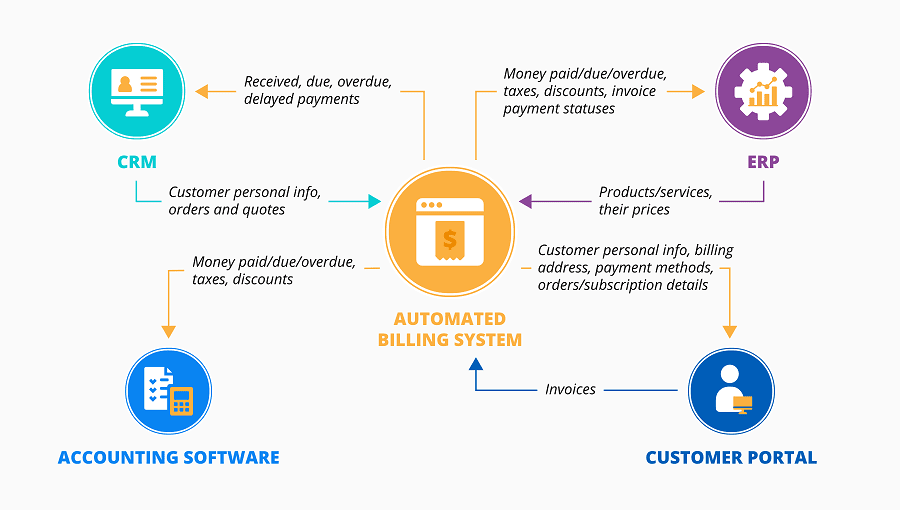
Image Source: ScienceSoft
Ideal for: Agencies and service businesses that want to simplify payments, offer subscription or package-based services, and keep invoicing tied directly to customer records.
Further Reading: 5 Ways an Automated Billing Software Can Enhance Your SAAS Business
10. Stripe
Stripe is now the most popular online payment processor for modern service businesses! They have transparent pricing with a strong developer tool set, and allow for more payment methods than PayPal. Stripe works with nearly all appointment scheduling platforms.
Key Features:
- Online payments for appointment booking
- One-time and recurring/subscription billing
- Mobile payments (Apple Pay, Google Pay)
- Virtual terminal for over-the-phone client
- Detailed reporting and revenue analytics
- Transparent Pricing: 2.9% + $0.30 fee per transaction
- Mobile app to view the dashboard for iOS/Android
- PCI compliance is managed automatically
11. Square
Square combines payment processing, appointment scheduling, and point of sale (POS) into one. Square is a solid option for service businesses that will also be selling some retail products. Think hair salons selling shampoo or styling products, wellness centers selling supplements, or a fitness studio that sells branded merchandise.
Key Features:
- Built-in appointment scheduling
- POS system for in-person sales
- Basic inventory management
- Manage employees and permissions
- Communicate with marketing tools
- Customer directory tool.
- Free card reader for in-person payments
Getting Started with Your Chosen Customer Service Software Solutions
Then, refine your options for customer service platforms based on what you're actually hoping to have done. Start by identifying your current pain points: how much time are you spending on manual scheduling? What is your no-show rate? How many client communications go missed every week?
Try out your top 2-3 options in free trials. Actually use them for real appointments with real clients, not just to play with the demo. Pay attention to which software becomes naturally adopted by your team, versus the software you have to constantly remind your team to use.
As you look at options, consider scalability and integration. The software that works for you as a solo practice today should either scale with you or connect easily with more sophisticated software once you're ready to expand.
Most importantly, think about the most important factor of all: usability. The most effective customer service software is the one you will actually use consistently. A fully featured, full of potential, and useful platform you never quite get to implementing is infinitely worse than a database with a simple interface you love to use every single day. Start simple, and learn the basics, then build your tool kit once specific needs arise.
Most service businesses will see a positive return on investment (ROI) in their first 2-3 months. Also, finding the right customer service software programs will not only save you time and reduce no-shows, but also ensure you deliver an exceptional customer experience that boosts customer satisfaction, generates referrals, and allows you to continue to grow a successful, sustainable business.



.svg)


.svg)
.svg)
.svg)
.svg)
.svg)