

DashClicks Blog
The industry's top experts offer their best advice, research, how-tos, and insights—all in the name of helping you level-up your business and online marketing skills.
Join Us!
.svg)
.svg)
.svg)
.svg)
.svg)

7 Best Proxies for Ad Verification in 2026
Ad verification confirms that ads render correctly and appear in the intended context, location, and placement, without deceptive redirects or manipulated inventory. According to WARC (January 2026), global advertising spend is forecast to grow 9.1% in 2026 to about $1.3 trillion. Higher spend spread across more platforms and geos raises the cost of misdelivery, so verification teams need reliable sampling that reflects real regional outcomes rather than one office network view.
Verification only works when checks resemble real browsing conditions. Platforms personalize content by location and network signals, and they react quickly to repeated scans from the same address. Proxies help teams keep testing consistent while still sampling enough viewpoints to trust the result.
What Is Ad Verification?
It measures whether ad delivery matches the intended settings and whether the ad experience stays safe and consistent across environments. Teams treat it as an evidence process, not a screenshot task, because repeatability matters more than one-off observations. Clear definitions keep results comparable across geos, devices, and publishers.
What Teams Actually Check?
Teams check creative rendering, visible placement, and surrounding content for brand safety signals. They also review redirect chains and landing behavior because malicious or misleading routes often appear only in specific conditions. Consistent checks track mismatches such as wrong geo delivery, missing disclosures, or unexpected pop-ups.
Why IP Identity Changes the Result?
Platforms use IP-based signals to localize content, enforce policies, and rate-limit suspicious traffic. One corporate IP can trigger blocks that hide the real user experience or force alternate content. Multiple network identities produce a truer sample of what audiences see in different locations.
Why Do Proxies Matter for Ad Verification?
Proxies let teams test delivery from controlled network identities rather than a single-office connection. That control prevents narrow sampling from turning into false confidence. It also reduces failures when targets throttle or block repetitive validation traffic.
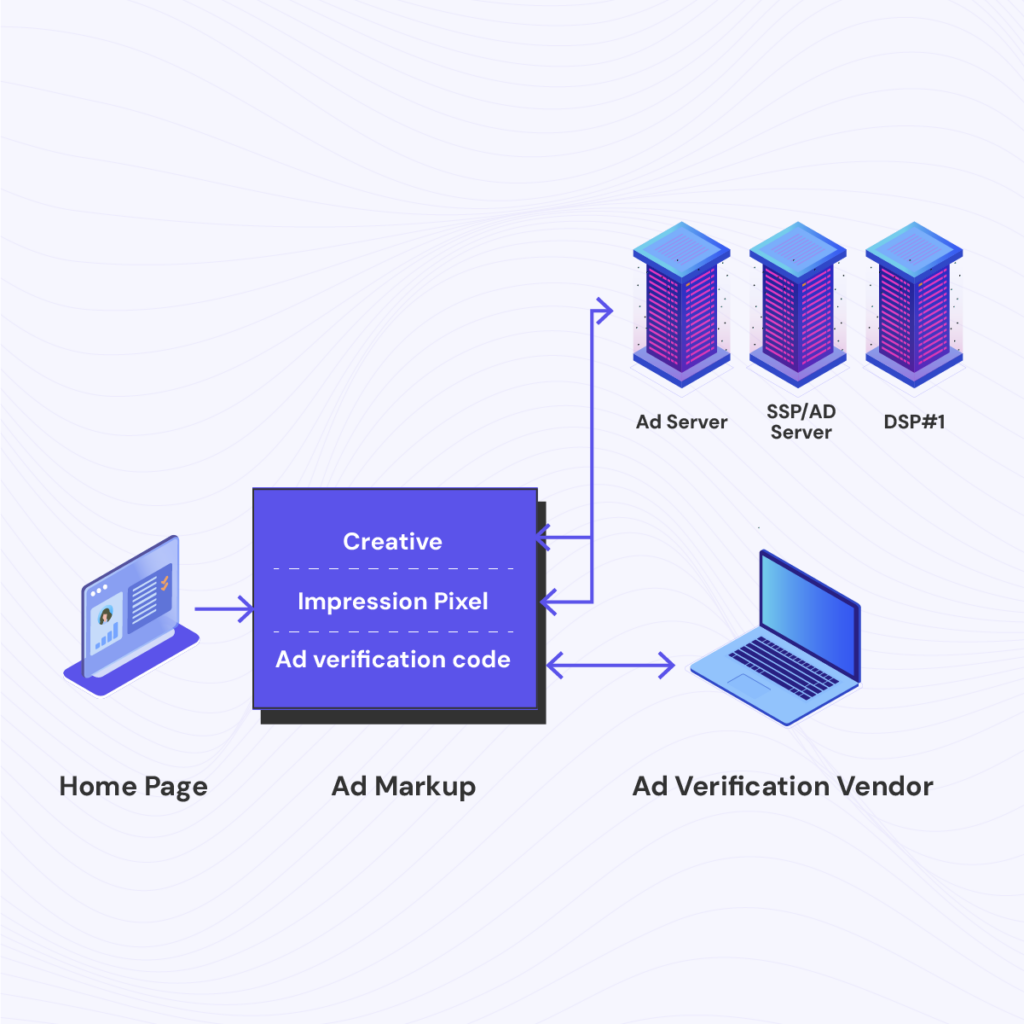
Image Source: ProxyJet
This section lists the highest-impact reasons proxies shape verification results.
- Geo-Accurate Sampling: Location-matched IPs expose how ads and landings change across markets.
- Block Resistance: Distributed IPs reduce repetitive request patterns that trigger friction and soft bans.
- Repeatable QA Baselines: Consistent IP profiles make it easier to compare results across runs and spot real delivery changes instead of random network noise.
- Publisher and Network Parity: Different networks can change what loads and how fast they load, which helps explain delivery gaps across environments.
- Brand Safety Spot Checks: Different IP identities can surface risky placements or surrounding content that does not appear from one fixed network.
- Redirect Chain Validation: Stable identity options make it easier to trace multi-hop redirects and confirm the final landing behaves as expected.
- Geo Compliance Validation: Controlled locations help confirm that restricted offers, disclosures, and consent flows appear where policies require them.
For agencies managing multiple client accounts, proxy-enabled verification is typically integrated into broader campaign management stacks. Using platforms like DashClicks for reporting and client-facing visibility while proxies handle geo-validation allows teams to connect delivery verification directly to measurable campaign outcomes.
Which Proxy Types Fit Ad Verification Workflows?
Different IP types fit different validation goals, and the wrong match creates noisy outcomes. Trust signals and network context affect what loads, what gets challenged, and what inventory appears. A good workflow assigns proxy types by publisher strictness and check depth.
- Residential Proxies: Residential IPs resemble home browsing and help validate sensitive placements where trust signals affect delivery. They support checks where a datacenter identity would trigger blocks or altered content. Teams often use them for publisher inventory sampling and brand safety validation.
- Mobile Proxies: Mobile IPs reflect carrier networks and help validate in-app and mobile-first delivery behavior. They make sense when the creative, landing speed, or tracking flows differ on mobile traffic. Teams use them to confirm mobile-only targeting and carrier-linked variations.
- ISP and Datacenter Proxies: ISP IPs provide a stable identity for multi-step checks that need continuity across redirects and sessions. Datacenter IPs can support lightweight monitoring on lower-friction targets where speed matters more than trust. Teams often separate these roles to avoid mixing results across very different network identities.
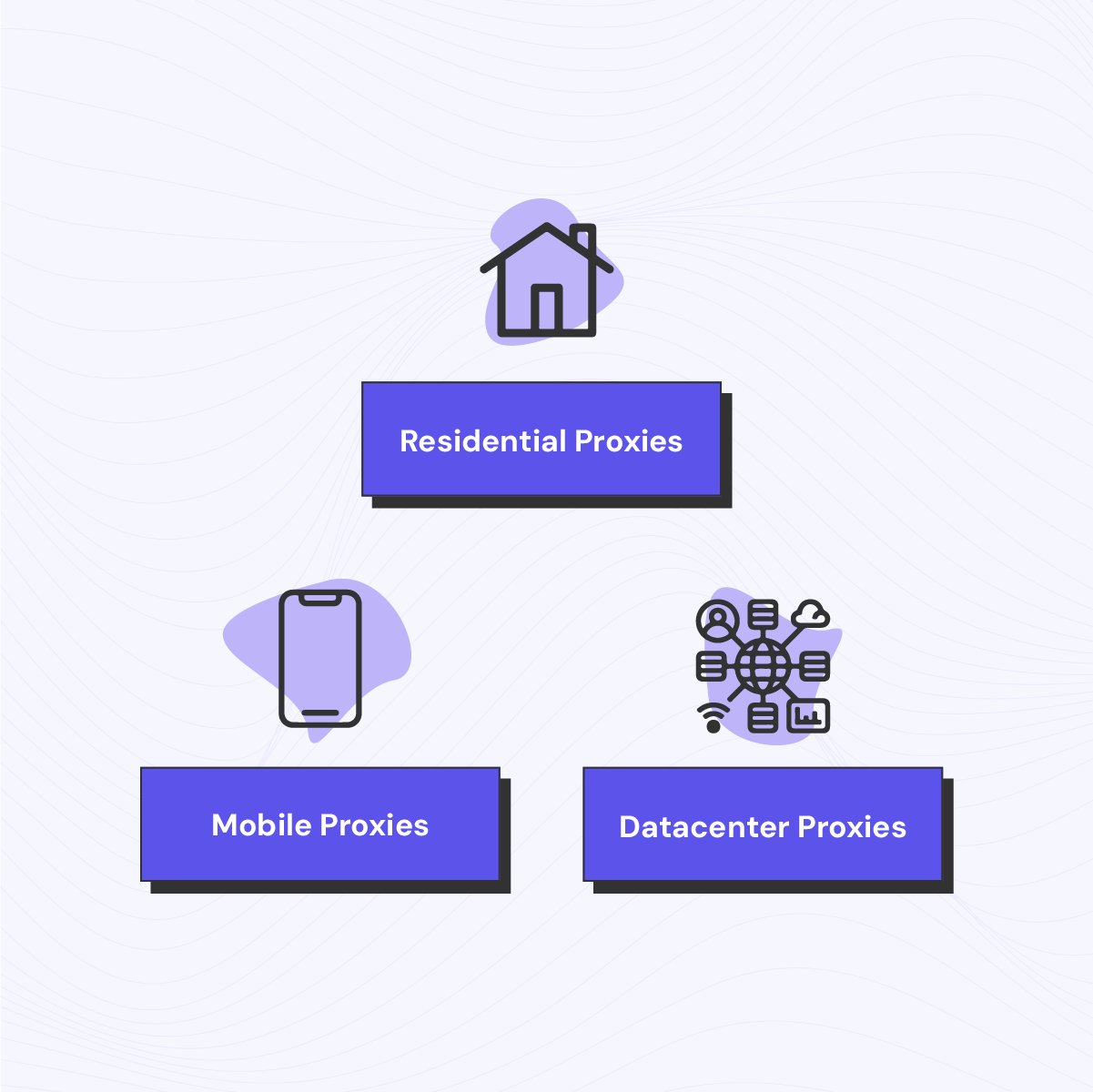
Image Source: ProxyJet
For agencies offering white label PPC services, verification forms part of the quality assurance layer. While platforms such as DashClicks handle campaign deployment and reporting, proxy-based verification helps validate real-world ad delivery across markets.
When Does a Rotating Proxy Improve Ad Checks?
A rotating proxy improves coverage when verification needs many viewpoints without reusing the same address repeatedly. It supports broad sampling across publishers and locations while lowering pattern-based blocking. It works best when rotation aligns to task boundaries so results stay consistent. Rotation adds the most value in these cases.
- High-Volume Sampling: Rotation expands coverage across many placements without rapid IP reuse.
- Geo Sweeps: Rotation supports city or region checks without narrowing visibility to a few IPs.
- Fraud and Cloaking Spot Checks: Rotation helps surface conditional behavior that appears only for certain IP reputations or locations, which makes anomalies easier to catch without overfitting to one identity.
Which Proxies Are the Best for Ad Verification in 2026?
The best options combine clean IP reputation, reliable geo targeting, and session controls that keep identity stable through redirects and landing checks. Strong providers also offer enough proxy variety to match different risk levels across publishers, ad networks, and verification endpoints.
The following list highlights seven providers that fit ad verification workflows in 2026.
- Live Proxies: Private allocation and session controls built for strict targets and repeatable verification runs.
- Oxylabs: Enterprise proxy portfolio with large pools and broad protocol support for high-scale verification.
- Decodo: Balanced proxy mix with extensive residential coverage and automation-friendly setup for daily verification.
- SOAX: Precise geo targeting with residential, mobile, ISP, and datacenter options suited to geo-based ad QA.
- DataImpulse: Residential plus mobile and datacenter options designed for scalable checks and geo sampling.
- Webshare: Self-serve proxy stack with residential and datacenter access and SOCKS5 availability for flexible tooling.
Let’s take a quick comparison.
1. Live Proxies
Live Proxies fits ad verification teams that need stable identity signals on strict targets and predictable control over IP reuse. The network positions itself around private usage, with millions of IPs across 55+ countries for enterprise workflows. A rotating proxy setup helps spread verification requests across clean residential IPs without repeating the same address too often on strict publishers.
Sticky sessions run up to 24 hours, which supports multi-step checks that must keep the same IP through redirects and landing validation. Rotating residential is positioned with 99.9% uptime, and the stack supports HTTP, HTTPS, and SOCKS5 for common automation clients.
Proxy Types for Ad Verification
- Rotating Residential Proxies: Built for geo sampling and high-volume coverage where clean resets matter between checks.
- Rotating Mobile Proxies: Built for carrier-like delivery paths where mobile inventory behaves differently than broadband traffic.
Features
- Private Allocation Model: The service frames allocation is around reducing cross-tenant overlap on the same targets for stricter endpoints.
- Session Control: Sticky sessions up to 24 hours keep identity stable during multi-step flows, and rotation supports batch coverage.
- Live Proxies Proxy Tester: A tool that validates a proxy string end-to-end and returns quick diagnostics like location and connection timing before scheduled ad verification runs.
2. Oxylabs
Oxylabs advertises a 175M+ residential proxy pool and positions it for high-scale collection with broad global coverage. It also publishes advanced targeting options that include country, state, city, ZIP, and ASN, which helps when ad delivery shifts at the city level or by network.
It offers SOCKS5 access and highlights unlimited concurrent sessions for traffic-intensive workflows. For protected endpoints, Oxylabs provides managed unblocking products that reduce interruptions during verification runs.
Proxy Types for Ad Verification
- Residential Proxies: Used for strict inventory where consumer-like identity affects delivery and rendering.
- Mobile Proxies: Used for mobile placements where carrier context changes outcomes.
- ISP Proxies: Used for a stable identity when a long flow needs continuity.
- Datacenter Proxies: Used for fast monitoring passes on lower-friction endpoints.
Features
- Advanced Targeting Controls: Supports targeting layers such as ASN and ZIP when verification needs controlled network identity.
- Unlimited Concurrent Sessions: Designed for high-throughput checks that must run in parallel.
3. Decodo
Decodo advertises 115M+ residential IPs from 195+ locations and publishes a 99.86% success rate for its residential network. The platform also highlights state, city, and ASN-level targeting, which fits repeatable geo sampling rules.
A company positions Site Unblocker and Web Scraping API as options for pages that break under normal proxy checks due to CAPTCHA, bans, or heavy JavaScript. This mix fits teams that want both raw proxy access and a managed fallback path.
Proxy Types for Ad Verification
- Residential Proxies: Used for geo sampling and consumer-like access on strict publishers.
- Mobile Proxies: Used for carrier-context checks and mobile-first delivery paths.
- ISP Proxies: Used when a stable identity improves repeatability across longer validations.
- Datacenter Proxies: Used for throughput-focused monitoring where trust requirements are lower.
Features
- Site Unblocker: Handles CAPTCHA and IP bans to keep checks running on protected pages.
- Web Scraping API: Handles JavaScript rendering and returns outputs designed for automation pipelines.
- Targeting Depth: Supports location rules down to state and city, plus ASN-level selection for network consistency.
4. SOAX
SOAX advertises access to 191+ million clean, whitelisted IPs and positions the platform as a combined proxy and Web Data API stack. The Web Data API is described as handling proxies, CAPTCHA, fingerprinting, JavaScript rendering, and session management, which helps when verification endpoints reject raw checks.
Provider also states that the API can return outputs in HTML, JSON, Markdown, or screenshot format, which fits evidence capture workflows. This setup works when teams need both broad sampling and a resilient path for protected pages.
Proxy Types for Ad Verification
- Residential Proxies: Used for strict inventory and geo-accurate ad previews.
- Mobile Proxies: Used for mobile placements where delivery varies by network context.
- ISP Proxies: Used for continuity when verification flows require a stable identity.
- Datacenter Proxies: Used for fast monitoring and low-friction targets.
Features
- Web Data API Output Modes: Returns HTML, JSON, Markdown, or screenshot outputs for verification evidence.
- Protected-Site Handling: Covers CAPTCHA handling, fingerprinting resistance, and rendering for JavaScript-heavy pages.
5. DataImpulse
DataImpulse advertises a residential IP pool of 90M IPs worldwide and positions it for simple integration. The platform describes both rotating and sticky residential proxy modes, which help separate wide publisher sweeps from continuity checks. DataImpulse also states support for HTTPS and SOCKS5 protocols, which fits common ad QA tooling. The service highlights continuous support coverage, which matters when verification runs on schedules.
Proxy Types for Ad Verification
- Residential Proxies: Used for consumer-like identity and geo-accurate sampling.
- Mobile Proxies: Used when mobile delivery differs from broadband behavior.
- Datacenter Proxies: Used for speed-focused monitoring on lower-friction endpoints.
Features
- Rotating And Sticky Modes: Supports both request-level rotation and sticky behavior for deeper validation flows.
- Protocol Support: Supports HTTPS and SOCKS5 for common verification tooling compatibility.
- Global Pool Scale: Positions a 90M worldwide pool to support broad geo sampling without narrow reuse.
6. Webshare
Webshare advertises an 80M+ rotating residential pool sourced from 195 countries and publishes a 99.8% average success rate for the product. It also documents rotation controls through recurring replacements, including schedules like every 5 minutes and once a month. This cadence control helps teams tune identity refresh to match scan frequency and target sensitivity. Webshare positions its setup as self-serve, which suits teams that want quick deployment without complex configuration.
Proxy Types for Ad Verification
- Residential Proxies: Used for geo sampling and stricter sites where consumer-like identity improves fidelity.
- Datacenter Proxies: Used for lightweight monitoring where speed matters more than trust signals.
Features
- Rotation Scheduling: Supports recurring replacement intervals from every 5 minutes to once per month.
- Country Coverage Publishing: States residential coverage across 195 countries for broad sampling.
- Success-Rate Disclosure: Publishes a 99.8% average success rate for rotating residential checks.
7. FleetProxy
FleetProxy fits ad verification teams that want budget-friendly, pay-as-you-go access without sacrificing global geo coverage. The network draws from a 30M+ residential IP pool spanning 195+ countries, with pricing starting at $2.65/GB and volume discounts scaling up to 40% off at higher tiers. City and country-level targeting supports the granular geo checks ad verification workflows depend on.
Sessions can run per-request rotation or stick for up to 24 hours, which covers both broad publisher sweeps and multi-step redirect/landing validation within a single plan. Beyond residential, FleetProxy's catalog includes static ISP, datacenter (IPv4/IPv6), and 4G/5G mobile LTE proxies, giving teams a single provider to match proxy type to publisher strictness.
Proxy Types for Ad Verification
- Rotating Residential Proxies: Used for geo-accurate sampling and consumer-like access on stricter publishers, with per-request rotation or sticky sessions.
- Mobile (4G/5G LTE) Proxies: Positioned for app and ad testing where carrier-level trust affects delivery.
- Static Residential (ISP) Proxies: Dedicated IPs for high-trust sessions that need continuity across a verification flow.
- Datacenter Proxies (IPv4/IPv6): Lower-cost options for high-frequency, lower-friction monitoring passes.
Features
- Session Flexibility: Supports both per-request rotation and sticky sessions up to 24 hours in the same plan.
- Global Targeting Depth: City and country-level targeting across a 195+ country network.
- 24/7 Live Support: Live chat and email support alongside a 99.99% network uptime SLA.
What Features Define Ad Verification-Ready Proxies?
Reliable verification depends on accuracy and control, not just speed. Small gaps in location fidelity or session behavior can distort the outcome. Strong proxy features keep checks stable across repeated runs.
- Geo Depth and Consistency: Accurate geo targeting keeps location signals aligned with campaign settings and compliance boundaries. Consistency matters because drift creates conflicting outcomes across repeated checks. Teams validate geo accuracy early to avoid wasting time on misleading samples.
- Session Control and Stability: Session control keeps identity stable through redirects and multi-step landings. Stability reduces forced logouts, captchas, and broken tracking checks. Teams rely on predictable session behavior to separate true delivery issues from test instability.
- Pool Quality and IP Reputation: Clean pools reduce bias caused by flagged or heavily reused addresses. Reputation affects whether pages load normally or fall into challenge modes that alter the experience. Teams monitor block patterns to spot when IP quality skews results.
How Should Proxies Be Tested Before Running Always-on Verification?
A short pilot reveals whether results are repeatable under realistic frequency and load. Testing should mirror real targets, real geos, and real timing patterns rather than synthetic single-page checks. Logs should capture failures and partial loads so teams can tune the workflow. The test plan should stay measurable and practical.
- Success Rate: Track full-load completion across ads, redirects, and landing pages.
- Geo Accuracy: Verify observed location against the intended country or city across repeats.
- Error Patterns: Classify blocks and challenges by type to target the real constraint.
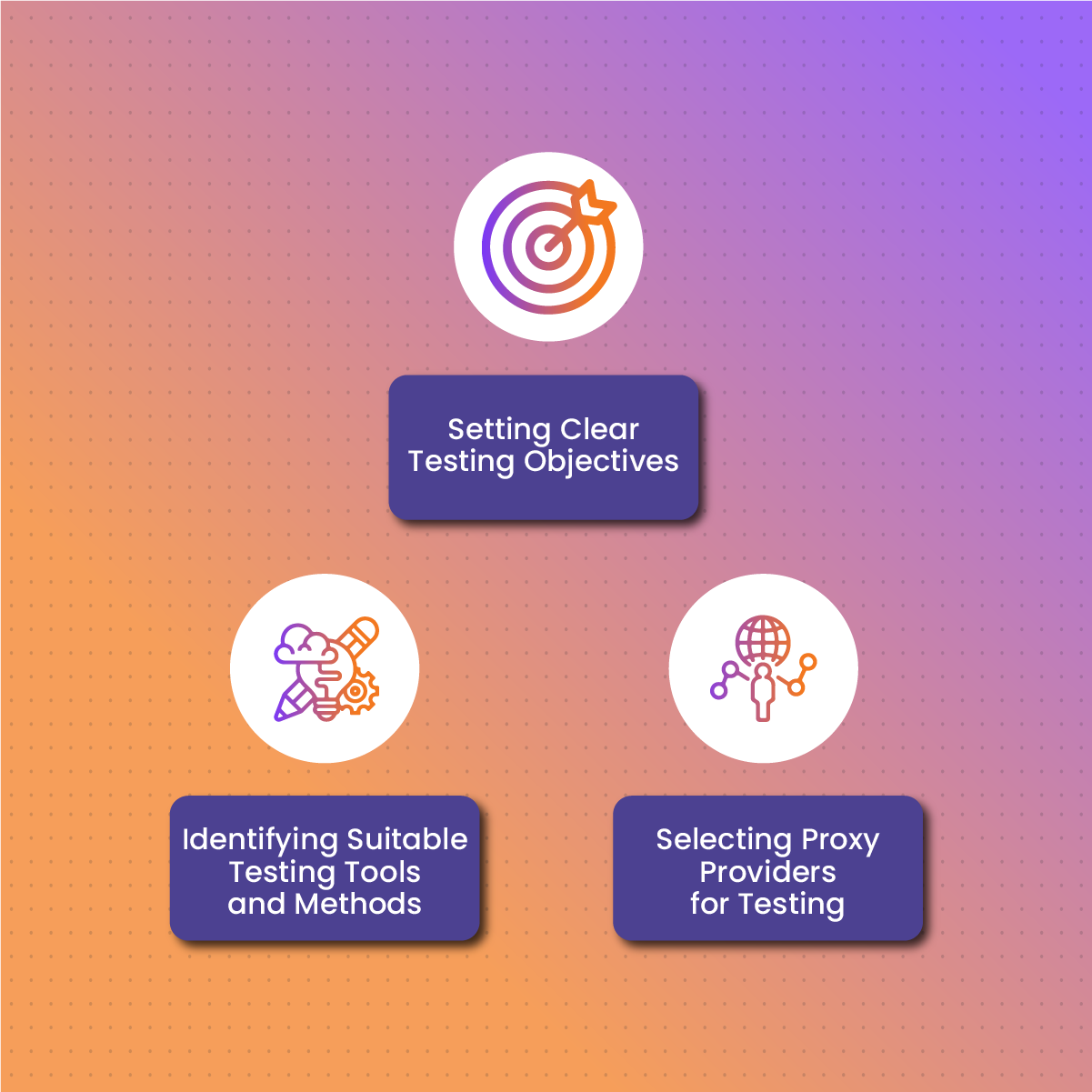
Image Source: NetNut
How Should Ad Verification Be Run Without Skewing Results?
Reliable results come from controlled variables and repeatable sampling rules, not from random scans. Teams get cleaner signals when they separate baseline checks from exploration runs and log the same environment details every time. Stable methodology makes it easier to spot real delivery issues instead of test noise.
A practical workflow stays simple and consistent across publishers and geos.
- Define a Baseline Geo Set: Use the same small set of countries or cities for daily checks so trends stay comparable across weeks.
- Separate Baseline and Exploration: Run baseline checks on fixed schedules, then run separate sweeps for new publishers, new creatives, or anomaly follow-ups.
- Align Session Behavior to the Task: Keep one identity through redirects and multi-step landings, then rotate only between tasks to avoid mixed signals.
- Log What Actually Matters: Record timestamp, geo, device profile, redirect chain outcome, and final landing status so issues reproduce cleanly.
- Throttle Like Real Traffic: Use realistic pacing and concurrency caps per target so results reflect delivery rather than rate-limit reactions.
- Classify Failures by Type: Split blocks, captchas, timeouts, and content mismatches into separate buckets so fixes target the real constraint.
Conclusion
Strong ad verification in 2026 depends on repeatable sampling, clean IP reputation, and session controls that match the depth of each check. Rotating setups improves coverage for broad monitoring, while stable identity improves accuracy for redirects, logins, and multi-step landing validation. Clear logging and disciplined baselines reduce false alarms and help teams isolate real misdelivery patterns across geos and publishers.


Split Testing 101: How to Improve Your Facebook and Google Ads
When it comes to online ads, where things are very competitive, data always beats guesswork. It can be expensive to run campaigns on Facebook or Google based only on instincts. This is the reason why A/B testing has become of such significance for marketers who want to get better results and spend less on ads.
This blog will show you what split testing is, how to use it on Facebook and Google Ads, and how to keep getting better by looking at the results.
What Is Split Testing?
Split testing is a way to find out which version of an ad, targeted setup, or landing page works best by comparing two or more of them. For example, if you want to optimize your email campaigns, using an email finder can help you target the right audience more effectively. Say you're not sure if a red or blue call-to-action button works better. You can test both and let the data tell you which one works best. You can do these things by running organized tests.
- Improve click-through rates (CTR) by making changes.
- Cut down on your cost per acquisition (CPA).
- Better return on ad spend (ROAS).
Instead of starting ads without any information, split testing gives you information that you can measure and use to get better results over time.
What's the Importance of Split Testing?
Online advertising sites and how people use them have changed a lot in a short amount of time. The algorithm for Facebook changes all the time, and Google Ads have become more competitive and automatic. Because of this, split testing is no longer a choice; it's a must. These are the reasons:
- People do get tired of seeing the same ads over and over again. Running split tests can help you stay new.
- Small changes can have big effects. For example, a different title could make your CTR double.
- You can trick the system because platforms give more views and lower costs to ads that are relevant.
- Unbounce says that marketers who regularly do A/B tests have a 70% better chance of getting a big return on their ad spend.

Beyond optimizing ads for better performance, split testing also plays a significant role in human risk management. By understanding user behavior more clearly through tests, marketers can anticipate potential risks or miscommunications in their messaging, reducing negative reactions and ensuring that their ads align positively with audience expectations.
Step 1: Make a Goal
You should know exactly what you want to achieve before you start any split testing. Without a clear understanding of what PPC intelligence data you need, a test is like going without a compass: you won't know if you're going in the right direction. Write down what you want and make sure it can be measured. Your goal could be to get more visitors, lower costs, or get people more involved. In this case, you might want to -
- 20% more clicks will lead to more market share and sales.
- Get your cost per acquisition (CPA) below ₹300.
- Get 15% more people to fill out a form on a landing page.
As soon as the purpose is clear, every choice about the test is based on strategy and results. Boost ROI with expert PPC strategies. Drive targeted traffic, increase conversions, and maximize your ad spend with our certified PPC specialists.
Step 2: Pick One Variable to Test
When you test something, you should only try one thing at a time. If you change a lot of things at once, you won't be able to tell which ones changed the results. Start with the parts of your ad that will have the most effect.
This could be the creative, the copy, or the targeting. By testing just one variable, you can isolate the effect and come to a meaningful conclusion. This gives you the confidence to use what you've learned in future efforts. Some common things to test are as follows:
- The advert's headline
- Make a unique image or video
- Text with a call to action (CTA)
- Using audience data or interest targeting
3. Allocate Time and Budget
A split test can only be useful if it has enough data to be statistically relevant. A lot of advertisers mess up by stopping tests early on or not having enough money to run them.
As a general rule, your test should last at least seven days. This way, you can see how your audience changes during the week. You should also aim for at least 100 conversions or 1,000 impressions per option, even if conversions aren't the most important thing.
If you rush or don't have enough funds for tests, you might get wrong information that affects your ads when you try to scale them.
Using Split Testing on Facebook Ads
For making A/B tests, Facebook (Meta) Ads Manager is one of the simplest ways to do it. If you want to test creatives, copy, or audiences, you can compare ad sets with the same campaign purpose on the platform.
Consider that you are comparing a video advertisement against a carousel advertisement. You can be sure that both will be shown fairly to your audience if you set them up under the same campaign. This way, the results won't be affected by the fact that the choices are different. This method is also effective for businesses like shared commercial kitchens looking to optimize their ad performance.
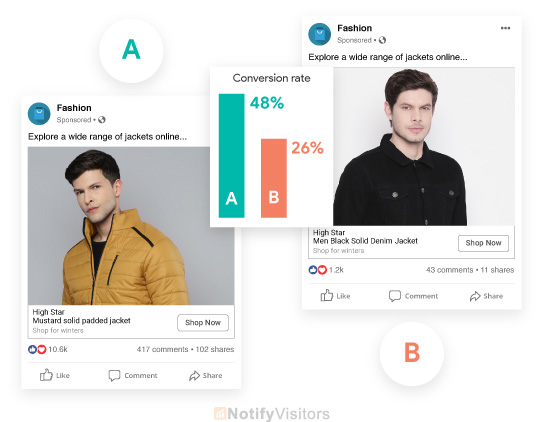
Image Source: NotifyVisitors
Some common things to test on Facebook are these:
- Video vs. carousel vs. still image
- Should you use "Shop Now" or "Learn More"?
- Focused, broad, interest-based, and lookalike groups
- Heavy text vs. image-focused titles
- Types of placements like Feeds, Reels, and Stories
As an example, a direct-to-consumer (D2C) skin care brand compared polished studio pictures to UGC videos made by influencers. The user-generated content got 43% more interest and 27% lower cost per acquisition, showing that authentic material can do better than fake content. Some of the best methods are -
- Keeping the budget the same for all versions
- Not making changes to ads during the test
- Before making any decisions, letting the whole time run
Facebook's AI system needs a lot of time and data to work correctly. Stopping the process too soon can change the effects and waste the proceeds. For a deeper dive into crafting high-performing Facebook ads, this guide offers practical insights on effective ad strategies that complement your split testing efforts.
Split Testing on Google Ads
Google Ads has a feature called "Experiments" that lets you test out different versions of ads or even whole campaigns. This is especially helpful for search ads, but it also works for show banners and different kinds of landing pages. You can even explore how a Google Workspace discount might impact your campaign's performance when A/B testing various offers.
In a campaign to get new leads, for example, you could look at two copies of the same ad: one that promotes a "Free Consultation" and the other that uses a "Limited-Time Offer" to make people act immediately. You can make better messages in the future if you keep track of which headline gets more sales. When testing Google Ads, some important things to look at are.
- Headline combos in responsive search ads
- Changes to the CTA and description line
- Key word match types (phrase vs. broad)
- Layouts and text for landing pages
- Mobile vs. desktop device tracking
Google says that you should wait until each variant has at least 1,000 views and 100 conversions before making any big decisions.
What to Avoid During Split Testing?
When done right, split testing can be very useful. It is just as important to not make common mistakes as it is to actually take the test. Here are some things you should avoid.
- It's hard to see what to do when you test too many changes at once.
- Early results may be misleading if the test ends too soon.
- The test isn't in line with your goals; keep track of what's most important.
- The use of small sample sizes results in false conclusions due to insufficient traffic.
- Facebook Ad fraud can eat your marketing budget and render your testing pointless. Defend against it, as much as you can.
- It is advisable to concentrate on conducting a single high-quality test at a time, rather than conducting an excessive number of tests simultaneously.
Leverage DashClicks to Drive Results With Data-Driven PPC Campaigns
At DashClicks, we help businesses dominate the digital space with powerful Facebook Ads and Google Ads services. Whether you want to boost brand visibility, generate qualified leads, or scale your online sales, our paid advertising experts craft custom campaigns that deliver measurable ROI.
Reach your ideal audience with laser-targeted white label Facebook ads service. We create eye-catching ad creatives, run precise audience targeting, and optimize campaigns for conversions—whether you're after more leads, purchases, or app installs. From strategy to A/B testing and ongoing performance tracking, we handle everything to ensure your ad dollars work harder.
Capture high-intent traffic and stay on top of search results with expertly managed white label Google Ads. From Search and Display campaigns to Shopping and YouTube Ads, our certified PPC specialists build and optimize your campaigns using smart bidding strategies and deep keyword research. The result? Lower costs, higher quality leads, and scalable growth.
Let DashClicks turn your ad spend into business growth with hyper-targeted, high-converting PPC campaigns.
Wrapping It Up
You don't just do split testing once; you do it all the time as part of your normal ad work. By constantly testing and optimizing, you not only get better results from your campaigns, but you also learn more about what your audience likes.
Set a clear goal and start with a single variable. Then, give your test time to grow up. Over time, interest will go up, conversion rates will go up, and the cost per result will go down. Split testing should be something you do every week if you want to improve the success of your Facebook or Google ads.


Why Your Business Needs a Cross-Platform Ad Strategy
When you're on Instagram, you look up what you want to buy next, and then you see a YouTube ad for the same product you were looking at. Have you noticed how that brand follows you back? That's cross-platform advertising at work. It's not only effective, it's necessary in this technological field we belong to now.
What Is a Cross-Platform Ad Strategy, and Why Does It Matter More Than Ever?
In a world where people scroll TikTok in the morning, check email during lunch, shop on Instagram after work, and end the day with YouTube, how do brands stay relevant? The answer lies in a powerful approach called cross-platform advertising.
A cross-platform ad strategy is the practice of running coordinated ad campaigns across multiple digital platforms, like -
- YouTube
But it’s not just about being “everywhere.” It’s about creating a unified brand story that travels with your audience across every digital touchpoint they encounter in a day.
Example: A user sees a playful product demo video production on Instagram Reels. Later, while searching for something similar on Google, they spot your search ad. Then, while watching a review video on YouTube, they’re served your longer-form ad, reinforcing your value. These connected experiences don’t feel like ads; they feel like a journey. That’s the magic of going cross-platform (similar like cross-platform passkeys).
So, why is this approach turning heads in marketing boardrooms?
Statista and HubSpot have recently found that the average consumer now uses over 6 different apps every day. If your brand is only on one site, you're missing out on a lot of chances to connect with people and make money. This multi-platform presence is increasingly crucial for businesses looking to maximize their reach and impact. Many are even seeking out HubSpot discount opportunities to leverage the platform's comprehensive marketing tools across various channels, understanding that a unified strategy is key.
But it's not just about reach; goals and time are also important. Each site is designed to meet the needs of a different stage of the buyer experience.
- Instagram and Facebook help spark interest and visual awareness.
- Google Search captures high-intent buyers looking for immediate solutions.
- YouTube builds trust through in-depth storytelling and reviews.
- LinkedIn is ideal for B2B thought leadership and credibility.
- Email and websites bring it all together for final conversions.
- Free social media management tools can help streamline efforts across these platforms.
- Email and websites bring it all together for final conversions.
When all of these are connected, your customer’s path from “just curious” to “ready to buy” becomes smoother, faster, and more effective.
But don’t confuse this with a copy-paste approach. Cross-platform success requires intentional strategy, knowing what works best where, adjusting your creative to match, and using smart analytics tools to track the customer journey.
Some of the most successful companies in the world, like Apple, Nike, and Airbnb, don’t rely on just one platform to speak to their customers. They show up across platforms with tailored, consistent, and persuasive messaging. That’s how they stay top-of-mind in an ever-scrolling, ad-saturated world.

Image Source: Augurian
If you’re not yet using cross-platform advertising, this is your sign to rethink your approach. Because marketing today isn’t just about showing up, it’s about showing up in the right places, at the right time, in the right way.
Reasons Why You Need a Cross-Platform Ad Plan
1. Engagement and Reach
Be where your audience is at all times. One-channel ads make it harder for people to see you. When compared to campaigns that only use one platform, campaigns that use search, social, video, and more can boost brand recognition by about 20% and interest by up to 30%. People are more likely to trust and remember your message if they see it in different places.
2. More Sales and Better ROI
Cross-platform ads do better than single-channel ones; they can get up to 35% more ROI and 25% more conversions cphere.ai. That's because regular exposure moves people from being aware to taking action.
3. Customization and Accuracy
Tailoring ads based on data across all online video platform leads to more clicks and personalized ads. Use information about people's habits and demographics from Facebook, LinkedIn hashtags , and YouTube to make ads that really hit home. Many businesses pair this with expert SEO services to ensure their content ranks well and reaches the right users organically, across search and display.
4. Consistent Experience With Brand
Customers believe you more and are up to 40% more likely to stay loyal if your message and images are the same on all platforms. Being consistent helps people remember your brand and gives it a stronger personality. Using an online AI image editor can help you enhance overall image quality and maintain a cohesive visual style effortlessly. Additionally, consistency across platforms isn’t just about ads - it extends to off-page SEO strategies for eCommerce, where reputation and trust signals like backlinks and social proof reinforce your presence.
5. Resistance to Changes in Platforms
It's risky to depend on just one possibility because changes to algorithms, policies, or the market can stop your growth. A cross-channel approach that is varied spreads risk and makes the business more resilient.
6. Cross-Platform Retargeting
Cross-platform retargeting is a powerful strategy for reconnecting with potential customers who have interacted with your brand across different platforms. By using tools like Google Ads, Facebook Ads, or LinkedIn Ads, you can serve tailored ads to users based on their prior interactions, regardless of the platform.

Image Source: Instapage
This ensures that your messaging remains consistent and relevant, effectively guiding prospects down the sales funnel. It's essential to create cohesive campaigns that align with user behavior and interests, maximizing the impact of your retargeting efforts across multiple channels.
7. Unified Customer Profiles
Creating unified customer profiles is a critical step in delivering personalized and consistent experiences across all touchpoints. These profiles aggregate data from various channels, including website activity, social media interactions, purchase history, and email engagement, to form a comprehensive view of each customer.
By centralizing this data into a single profile, businesses can better understand customer preferences, behaviors, and needs. This approach not only enhances segmentation and targeting but also ensures that every interaction, whether online or offline, feels seamless and tailored. Leveraging unified client profile empowers businesses to foster stronger relationships, build trust, and ultimately drive customer loyalty.
8. Optimize for Cross-Channel Conversions
To fully capitalize on unified customer profiles, businesses must focus on optimizing cross-channel conversions. Ensuring consistency across all touchpoints—be it email, social media, websites, or in-store interactions—creates a cohesive experience that encourages customers to take action. By leveraging insights from customer data, businesses can craft personalized offers, recommendations, and messaging tailored to each channel's unique audience.
Additionally, implementing tools like automated workflows, retargeting campaigns, and omnichannel analytics can streamline the conversion process and identify which channels are driving the most value. This strategic approach not only maximizes ROI but also reinforces brand loyalty by delivering meaningful and timely experiences.
9. Creating a Cross-Device Campaign
To ensure seamless engagement, businesses should prioritize creating a fully integrated cross-device campaign. Such an approach recognizes that today's consumers often switch between devices—smartphones, tablets, laptops, and wearables—throughout their purchasing journeys.

Image Source: Singular
By leveraging responsive design, ensuring consistent messaging across devices, and utilizing tools like cross-device tracking, businesses gain a clearer understanding of customer behavior. These insights enable the creation of campaigns that are optimized for every touchpoint. A cross-device strategy not only enhances the user experience but also increases conversions by meeting audiences wherever, whenever, and however they interact with a brand.
A Simple Framework for Building Your Strategy Review and Setting Priorities
- Pick the Sites Where Your Audience Spends the Most Time: Instagram for visuals, Google for intent-based searches, and YouTube for stories.
- Align the Message With the Platform: You can change the main idea to fit each platform. Instagram images are for getting people's attention, Google ads are for people who are actively searching, and YouTube videos are for getting people to interact with you.
- Start Campaigns in Steps: Start with building brand recognition, then move on to retargeting ads that echo messaging from your marketing or sales reps, and finally, use conversion nudges or cart recovery to finish your task.
- Effectively Track: If you want to track performance across platforms like Google Analytics, Facebook Ads Manager, and others, using centralized tools or ad tracking software with UTM parameters can give you a clearer picture of your customer journey.
- Continuous Optimization: Look at how well each channel is doing and move your funds to the ones that are doing the best.
Overcoming the Most Frequent Challenges
- Keeping track of complexity involves making use of UTM codes, first-party data, and attribution techniques in order to determine which touchpoints are most influential.
- Your creative workload should consist of reusing basic creative assets through using variations that are adapted to the format and audience of each platform.
- When it comes to budget allocation, use automatic optimization tools to assist you in shifting funds as you see performance. Start small on new channels and transfer funds as you see performance.
- It is common for people who watch television to switch between several devices; integrating digital advertisements with cable television can boost both reach and message retention.
- The use of artificial intelligence enables tools to segment audiences based on their behavior across many platforms, which enables real-time message customization.
- Increasing overall engagement and promoting cross-promotion and social synergy by directing followers to your YouTube channel through teasers made on Instagram.
Examples of Cross-Platform Advertising
- Streaming Services and Social Media Integration: A popular streaming service might promote an upcoming series by releasing exclusive sneak peeks on Instagram and engaging with fans through Twitter polls, while simultaneously featuring targeted ads on YouTube and TikTok.
- Retail Campaigns Across Platforms: A clothing brand could run a campaign where they showcase a new collection through Pinterest boards, use Facebook ads to direct traffic to their ecommerce site, and host a live shopping event on Instagram.
- Gaming and Influencer Partnerships: A game development company might collaborate with popular Twitch streamers to demo their latest release, run YouTube ads highlighting gameplay features, and share behind-the-scenes content on platforms like Snapchat or TikTok.
- Event Promotion Across Multiple Channels: For a large music festival, organizers could use traditional TV ads for wide reach while encouraging user-created content by launching a hashtag challenge on TikTok and providing geo-targeted Snapchat filters during the event.
- Food Industry Campaigns: A restaurant chain can use geo-targeted mobile ads to attract local customers, post visually appealing food photography on Instagram, and leverage YouTube pre-roll ads with special discount codes linked to mobile orders.
These examples demonstrate how brands can strategically leverage multiple platforms to build cohesive and impactful advertising campaigns.
Cross-Platform Advertising Trends for 2025
The landscape of cross-platform advertising is rapidly evolving, and 2025 is set to bring significant innovations. One of the key trends will be the increased use of artificial intelligence and machine learning for hyper-personalized advertisements. Brands will leverage AI to analyze user behavior across platforms and deliver tailored content that resonates with individual preferences and needs.
Another emerging trend is the rise of immersive advertising experiences. With advancements in augmented reality (AR) and virtual reality (VR), brands can create engaging, interactive campaigns that capture users' attention. This technology will be particularly significant on platforms like Instagram, Snapchat, and the growing metaverse-related spaces.
Sustainability will also play a critical role in advertising strategies. Consumers are becoming more conscious of environmental issues, and brands will need to reflect these values in their campaigns. Expect to see advertisements made with eco-friendly practices in mind, combined with messages promoting sustainability initiatives.
Finally, short-form video content will continue to dominate across platforms like TikTok, YouTube Shorts, and Instagram Reels. These bite-sized, dynamic videos offer a quick and engaging way to capture audience interest, making them a staple in modern advertising strategies.
Drive Growth With Tailored Advertising Solutions from DashClicks
DashClicks offers a comprehensive suite of advertising services designed to help businesses excel in the competitive digital landscape. From pay-per-click (PPC) campaigns to social media advertising, DashClicks provides tailored strategies that maximize ROI and drive measurable results.
With a focus on data-driven insights and innovative approaches, their team ensures that each campaign is optimized to reach the right audience at the right time. Additionally, DashClicks supports businesses with tools and reports to track performance, providing transparency and actionable feedback to refine strategies further.
Wrapping It Up
Advertising across multiple platforms isn't a nice-to-have; it's an absolute must. It makes it easier for you to communicate with a greater number of people, improve engagement, and protect your growth against changing trends or algorithms. To get started, check out the places where your audience spends their time. Messages should be tailored to the strengths of each medium. Maintain a meticulous track record. And make sure that your investments are determined by analytics rather than guesswork.
Being visible, consistent, and human at every touchpoint is the key to having a meaningful and enduring influence in a digital field that is fragmented by device, algorithm, and attention span. People who are interested in your brand already use multiple platforms. Don't just market; make a journey that sticks with your customer, connects to them deeply, and gets real results.

Turning Social Posts into Paid Ads - A Step-by-Step Strategy
How would you feel if your next tweet went viral and paid for your ad? Suppose an organic social post is posted at the right time and does amazingly well. Instead of having its momentum fade, you use it to power a paid ad that raises awareness of your brand or gets people to buy something, or maybe both. This step-by-step guide will show you how to turn great social content into paid ads that drive real ROI.
Why Organic-to-Paid Works?
Before getting into the how, it's important to understand why making organic posts into ads works so well and is not just a quick fix, but a smart move.
- Organic success demonstrates that your content is well-received, providing proof of concept. You already know it works, so don't guess. This lowers the risks of ad testing.
- Paid ads that look like regular posts often do better than highly polished creatives because they seem more real. People are more interested in material that seems real.
- You don't have to come up with new ad ideas from scratch; instead, you get a content plan that has already been approved by your audience.
- If you start with content that gets a lot of clicks, saves, and shares, you can increase your click-through rate (CTR) and lower your cost per result.
- No matter how big or small the brand is, this approach is used by all of them. Likely, a meme post, behind-the-scenes video, or short tribute that did well on its own will do even better with the right push.
We'll discuss the step-by-step strategy now.
Step 1: Find Your Organic Star Content
The first thing you need to do is figure out which of your organic posts are really worth boosting. You need to look into your data because not every post should get ad dollars.
Go to your Instagram Insights, Facebook Page Insights, or TikTok Analytics to start. Check out posts that have a lot of saves, shares, comments, or profile hits. See which posts get the most responses and figure out why. Is it the tone? An interesting story? A current trend? It's important to find content that has a lot of focus and, if possible, something that will still be relevant in a week. This is what your ad plan is built on. For brands looking to amplify this strategy even further, exploring content marketing services can provide the expertise needed to maximize content value across platforms.
Step 2: Make It Paid-Perform Better
If a post did well on its own, that doesn't mean it's ready to be used as a paid ad. You should make a few small changes to it so that it doesn't lose its original charm.
First, make your points clearer. For example, if the original post was funny or relaxed, leave it alone. But add a clear CTA like "Shop now," "Learn more," or "Get started." Also, think about the style of the ad. A quick video could be made from one image for Reels or Stories.
Also, don't forget to style it so that it looks good in different places, square for feed, vertical for Stories. A lot can be changed by making small changes.
AI marketing tools can make this entire process easier and faster. They can analyze top-performing organic content and suggest which posts are most likely to succeed as paid ads (analytics). Then, they help reformat the visuals and messaging automatically to match different ad placements and audience preferences. For more accurate audience targeting and data-driven campaigns, Waterfall Data Enrichment Technology ensures you’re reaching the right people with verified, up-to-date contact information.
Step 3: Smartly Match Your Audience
You should show your idea to the right people now that it's at its best. This is the best place for paid ads.
Start by focusing on people who have already shown interest in your brand, like those who have interacted with your past posts or gone to your website. Implement AI email personalization strategies to tailor your communications to these potential customers, enhancing engagement and interest. People in these "warm" groups are much more likely to buy. Next, use your email list or current customer data to make lookalike audiences. When using customer data to create lookalike audiences, always ensure proper data security measures are in place to protect user privacy. These help you get in touch with new users who are like your best customers. The goal is to grow without being unimportant.

Step 4: Plan and Budget
Start small and grow. Beginning with a small amount, like ₹300 to ₹500 per day, and keep updated on how things are going. You can test the ad without spending a lot of money. Gradually raise the budget if the ad does well.
Make sure you start your ad at the right time. Plan it for when your audience is most likely to be online. What are the best times and days to go live? Use what your site tells you.
Also, make sure you protect your budget from click fraud. Otherwise, it can derail your entire campaign.
Step 5: Set Up and Tweak Launch & Monitor
Keep track of the right numbers. KPIs, such as click-through rate (CTR), cost per result, and involvement, should be tracked once your ad is live. Though your CTR is high, your conversion rate may be low. You may need to make changes to your landing page.
Don't just depend on one version; test different ones. You can find out what works best by doing A/B tests with different headlines, images, or calls to action. Sometimes, even small changes can make a big difference in the way something works.
Step 6: Maintain the Momentum With Optimize & Scale
Once you know what's working, do it again. Put creatives that do well in other places, like Stories, Reels, or YouTube Shorts, and think about using that material differently. Change the creatives every two weeks to keep people from getting tired of ads, and keep trying new ideas based on what people say or ask.
It's okay to change one post in three or four different ways. One quote from a review can be used as a picture on its own, on a Story slide, or as part of a carousel ad. When you scale, you don't have to start from scratch; you can build on what's already working.
Step 7: Find Other Ways to Evaluate ROI Than Likes
Paying for ads needs more in-depth tracking, but vanity measures are easy to get caught up in. To find out which ads really get results, use attribution dates like 7-day click or 1-day view. If the goal of your promotion is to make sales, don't just focus on reach or engagement. Give focus on ROAS or CPA as well.
Also, make sure that your marketing goals and KPIs are the same. Keep track of thoughts and reach to raise awareness. Watch for sign-ups or form fills to get leads. Check out the number of sales and the average order value for e-commerce. Before you start, know what success looks like.
DashClicks’ White Label PPC Services empower marketing agencies to deliver high-performing search and display campaigns without managing them in-house. Designed for agencies looking to scale, this service provides end-to-end Google Ads management under your brand—from keyword research and ad creation to bid management, conversion tracking, and ongoing optimization. With certified specialists behind the scenes, your clients get expert-level results, while you maintain full control of the relationship and reporting.
What sets DashClicks apart is the seamless integration of its fulfillment team with your agency’s workflow. Campaigns are built around data-driven strategies and industry best practices, ensuring maximum ROI for clients across search, shopping, and remarketing campaigns. Agencies can also leverage DashClicks’ custom white-label dashboards to give clients real-time visibility into performance metrics—keeping communication transparent and reinforcing trust.
By outsourcing Google Ads management to DashClicks, agencies can expand service offerings, take on more clients, and focus on growth rather than day-to-day campaign execution. Whether your clients need aggressive lead generation or eCommerce sales, DashClicks provides scalable solutions that adapt to their goals and budgets.
Wrapping It Up
One of the best methods to get the most out of your content is to turn your finest social media posts into sponsored ads. As opposed to making new ads all the time, you're building on content that has already worked well with your audience.
Plus, you can layer in ReferralCandy, which is perfect for turning happy customers into referrals, affiliates, and influencers to supercharge your paid-amplified content with authentic word-of-mouth.
Not only does this method save time and money, but it also makes your content more authentic, boosts your return on investment (ROI), and helps you reach both warm and new audiences more efficiently. Don't let a post fade away the next time it gets a lot of attention on its own. Instead, use targeted paid marketing to make it even more popular and let your content work harder for your company.


How to Use Data from Google Ads to Improve Your Social Campaigns
Let's say you want to run a campaign on Facebook, Instagram, and LinkedIn. You spend cash, others watch, but conversions don't change. Then you look at your Google Ads account and see that some keywords are bringing in an unexpected 8% of the traffic. Have you ever thought that those same insights could give your social strategy a new lease of life?
That's exactly what can happen when you use data from Google Ads in your social campaigns. This guide shows you how to use Google's intent-driven insights to make your social ads clear, relevant, and give you a real return on your investment.
Why Google Ads Data Should Guide Your Social Strategy?
Google Ads insights are based on user intent, or what people really search for. Social platforms, on the other hand, use assumed interests. In 2024, the average Google Search ad works out to 6.96% of the time, and it costs $4.66 per click. These numbers give you a goal for how well your social campaigns should do.
Cross-channel strategies also work much better than siloed ones: brands that use integrated marketing keep up to 89% of their customers, and customers who see ads on multiple channels spend 30% more in revenue.
By connecting Google Ads insights with your social activity, you create a performance-driven ecosystem that works well together. This is important in today's competitive, advanced world by following digital marketing services.
Unlocking Campaign Success With Google Ads Data Hub
Google Ads Data Hub is a powerful tool that enables advertisers to unlock deeper insights and drive better results from their campaigns. By using Google Ads Data Hub, marketers can analyze detailed performance metrics while maintaining user privacy. It allows for a comprehensive understanding of customer behavior across various touchpoints, helping brands tailor their strategies for maximum efficiency.
When combined with social insights, the data generated through this platform provides actionable knowledge that allows businesses to refine audience targeting and enhance their cross-channel marketing efforts. This makes Google Ads Data Hub a critical element for creating a data-driven and cohesive marketing ecosystem.

Image Source: InfoTrust
Google Ads Data Hub is a critical element for creating a data-driven and cohesive marketing ecosystem.
How to Analyze Google Ads Data?
Analyzing Google Ads data through Google Ads Data Hub involves several key steps to ensure meaningful insights and actionable outcomes:
- Connect Your Data Sources: Start by linking your Google Ads account with Google Ads Data Hub. Ensure that all relevant data sources, such as campaign metrics, audience data, and conversion statistics, are properly integrated. This step is crucial for consolidating your data in one secure environment.
- Define Your Objectives: Clearly outline the goals of your analysis. Whether it’s understanding audience behavior, measuring the impact of specific campaigns, or optimizing ad spend, having a well-defined objective will guide the entire analysis process.
- Create Custom Queries: Use SQL-based queries to extract specific data sets or metrics relevant to your goals. Google Ads Data Hub enables you to customize queries to investigate user paths, analyze attribution models, and more, all while upholding user privacy standards.
- Visualize the Data: Export the processed results to a visualization tool, such as Google Data Studio or Tableau, to create easy-to-understand dashboards and reports. This helps in identifying trends, patterns, and actionable insights more effectively.
- Evaluate Cross-Channel Performance: Analyze how Google Ads impact overall marketing efforts by correlating data from different touchpoints. This enables a deeper understanding of campaign performance across various channels.
- Iterate and Optimize: Based on the insights gained from your analysis, make adjustments to your ad campaigns. Update targeting, revise ad creatives, or reallocate your budget to maximize return on investment (ROI).
By following these steps, businesses can leverage the full potential of Google Ads Data Hub to drive informed decision-making and enhance advertising strategies.
How to Align Social Media Ads With Search Data for Better Results?
1. Funnel Your Audiences With Smarter Segmentation
Start by finding the Google Ads audiences that work best for you. These could be based on in-market segments, affinities, or remarketing lists. On social, these high-intent segments often do better than random interest groups.
You can use Google's remarketing lists to make Meta or LinkedIn audiences that are similar. For instance, someone who clicked on a "free trial" search ad but didn't convert is a great person to target on social media with an educational video or testimonial carousel.
Further Reading: 5 Audience Segmentation Strategies for Agencies & Marketers to Get the Most Out of Advertising
2. Shape Social Messaging Around Search Intent
Google Ads data shows the exact words and phrases that customers use as they move through the buying process. People click on and buy things when they see ads that use phrases like "best CRM for small business" or "AI marketing tools." Your social ads should use those same phrases. This:
- Makes it more relevant
- Raises engagement
- Keeps things the same across all platforms
Think of an Instagram carousel that starts with "Why Best CRM for SMBs Drives Growth?" It goes right to the heart of what your audience is looking for.

Image Source: Databox
3. Improve Your Social Messaging With Quality Score
Google's Quality Score, which is based on CTR, ad relevance, and landing page experience, gives you a sneak peek into how clear and relevant your ads are to users.
High-scoring ads often have headlines that make sense emotionally and logically. Try these same headlines in different types of social ads to get more people to click on them.
When used as the headline of a social ad, for example, a high-quality Score keyword phrase can become a strong hook that gets people's attention.
4. Make Cross-Channel Retargeting Work Smoothly
People might click on your Google ad but not buy. You can message these leads again on social media sites like Facebook, Instagram, and TikTok, but this time in a different way: use a short testimonial video or GIF ad with a strong call to action.

Image Source: OneSignal
From search intent to visual messaging, this natural sequence moves prospects closer to making a purchase.
5. Measure Performance Holistically With Google Analytics
Google Analytics lets you measure performance in a wide range of areas.
Put UTM parameters on all of your social campaigns and look at them in Google Analytics. Check the bounce rate, session length, and conversion rates for each channel. Check your landing page alignment or the creative itself if the number of visitors from Instagram is 60% higher than the number of visitors from search engines.
By knowing the difference between shared and platform-specific bottlenecks, you can change your messaging and the user experience as you move through the funnel. To refine this process further, businesses can benefit from content marketing strategy services, where experts help tailor messaging and creative elements to match audience behavior across platforms.
6. A/B Testing Based on Search Insights
Make different versions of social ads based on data from Google Ads. Do tests:
- Compare two headlines based on the search ad text that did the best.
- For high-intent audiences, try out different ad formats, like image vs. video.
- Change CTAs to match what users want based on search patterns.
Structured experimentation makes sure that your choices are based on facts, not gut feelings.
If your campaign includes testimonials or product visuals, enhancing the clarity of your creatives with an image enhancer can significantly boost perceived quality and brand trust, especially on visual-first platforms like Instagram and LinkedIn, where high-resolution assets often drive performance.
How Success Works in Reality?
When a SaaS startup used the top-performing Google keyword "enterprise message automation" in their LinkedIn ads, they got a lot of good results. With this phrase in the headline and an offer for a white paper, they cut their LinkedIn CPC by 20% and got 25% more leads in just two weeks.
Insights from Google Ads can really pay off when used strategically across all platforms.
Trends in Your Industry That Affect Your Strategy
- The Supremacy of Mobile-First: Over 61% of search ad spending is expected to come from mobile devices in 2029. The ads and landing pages you make for social platforms need to load quickly and be ready for thumbs because they are mobile-native.
- Customization by AI: AI tools can now test ad copy, creative, and audiences automatically across Google and social channels, making the lines between these silos less clear. Consider using an AI marketing automation platform to improve your campaigns.
- Issues With Privacy: With the end of third-party cookies, it will be important to track first-party behavior, like what search users do, and then see on social media.
Use This Strategic Process to Get Things Done
Here is a focused workflow to help us understand it better:
- You can get the top keywords, audiences, and ad texts from Google Ads.
- Find the search ads that get the best results (CTR, conversions, Quality Score).
- Make Facebook, LinkedIn, and TikTok audiences and copy that is similar.
- Start retargeting campaigns across multiple channels.
- Split-test headlines, images, formats, and call-to-action (CTAs).
- Label campaigns and keep a check on them with Google Analytics.
- Iterate based on real-time data like CPC, CTR, conversion, and bounce rate.
- Increase what works and move budgets around as needed.
- Track how mobile, AI, and privacy change how people act to stay flexible.
- Use Analytics Software by DashClicks to monitor key metrics all in one place, simplify tracking and optimizing your campaigns. This centralization helps you identify patterns and trends quickly, making it easier to adjust strategies for maximum ROI.
This loop turns Google-derived intent into strong campaigns that work together.
Align Budget Allocation With Performance Data
One of the most underestimated advantages of using Google Ads data in social marketing is better budget allocation. When you examine data like cost-per-click (CPC), click-through rate (CTR), and return on ad spend (ROAS) across platforms, you may reallocate your spending to the best-performing campaigns.
For example, if a particular keyword performs well on Google but equivalent audience targeting performs poorly on Facebook, you may alter your ad spend accordingly. This dynamic reallocation guarantees that every dollar works better for your efforts, eliminating waste and increasing ROI in both paid search and social contexts. Especially in regulated industries like healthcare, healthcare marketing tools can help optimize spend while ensuring compliance and effectiveness across campaigns.
Wrapping It Up
Nowadays, Google Ads and social campaigns shouldn't work separately. You can make aligned, better-performing social ads by using Google's search intent, audience performance, and Quality Score data.
This cross-channel approach lowers down on wasted money, raises engagement, and consistently increases conversions. If you're in charge of paid search, social, or both, it's time to link all of your platforms together and let your data guide every campaign choice you make.


Advertising on Instagram: A Complete Guide to Creating Ads That Convert
Instagram has become one of the most powerful advertising platforms in recent years. With over 1.3 billion active users worldwide and a highly engaged audience, it’s no surprise that brands of all sizes are flocking to Instagram to showcase their products, drive traffic, and grow their businesses. But how can you make Instagram ads work for you?
This guide will walk you through everything you need to know about advertising on Instagram, from understanding ad formats to setting up your first ad. By the end, you’ll know exactly how to advertise on Instagram and connect with the audience that matters most.
What Are Instagram Ads?
Instagram ads are paid content posted by businesses to reach specific audiences on Instagram. These ads look like regular Instagram posts but are labeled with a “Sponsored” tag. They can appear in a variety of places, including users' feeds, Stories, Explore, and even Reels.
The key advantage? Instagram ads deliver highly targeted, interactive visuals that create a seamless experience for users. Whether it’s a stunning product photo, a video tutorial, or an eye-catching carousel, there’s a format for every goal.
Why Advertise on Instagram?
If you’re wondering why Instagram deserves a slice of your marketing budget, here are the standout advantages:
- Enormous Reach: With over 1.3 billion users worldwide, Instagram offers access to a massive global audience. Plus, over 70% of users are under the age of 35, making it the go-to platform for reaching Millennials and Gen Z.
- Highly Engaged Users: Instagram boasts some of the highest engagement rates in social media. Users interact with posts, view Stories, and click on links frequently, providing businesses with real opportunities for meaningful connections.
- Advanced Targeting Options: Instagram’s ad platform, powered by Facebook Ads Manager, offers precise targeting based on age, location, behavior, and interests. This ensures your ads reach the people who are most likely to convert.
- Visually-Centric Approach: Instagram is perfect for brands that rely on visual storytelling. Bold visuals, eye-catching videos, and shoppable content perform exceptionally well, making it easier to showcase your brand's unique vibe.
Instagram Ad Formats to Elevate Your Campaigns
Wondering how to run ads on Instagram? Choosing the right ad format is a crucial step in creating successful campaigns that align with your business goals. Instagram offers six versatile ad types, each designed to help you connect with your audience in unique ways:
1. Photo Ads
Perfect for simple, high-quality visual messaging. Static photo ads are a classic format that captures attention with eye-catching images and engaging captions. They’re ideal for driving brand awareness or promoting a specific product or service.

2. Video Ads
Leverage videos to tell a deeper, more compelling story. Video ads are highly effective for showcasing tutorials, product demos, or behind-the-scenes content that gives your audience a closer look at your brand. With up to 60 seconds of runtime, you can get creative and deliver memorable messages.

3. Carousel Ads
Showcase up to ten images or videos in a swipeable gallery format. Carousel ads are great for highlighting multiple products, telling a story in chapters, or offering step-by-step guides. They encourage users to interact and explore more about what you have to offer, making them perfect for product lines or storytelling campaigns.

4. Story Ads
These full-screen, vertical ads appear seamlessly between users’ Stories, ensuring a highly immersive experience. Use Story ads to promote time-sensitive deals, exclusive launches, or brand campaigns that take advantage of Instagram’s 24-hour engagement window. With interactive stickers and swipe-up links, you can drive immediate action.

5. Reels Ads
Reels ads are perfect for brands looking to hop on the latest short-form video trends. These ads blend seamlessly with user-generated content and are designed to grab attention in an entertaining and creative way. Whether it’s a fun video showcasing your product or a quick tutorial, Reels ads are great for reaching younger, engaged audiences.

6. Explore Ads
Explore ads appear in the Explore tab, where users go to discover fresh content tailored to their interests. This ad format is perfect for building awareness with untapped audiences who may not yet follow your brand. It’s a great way to expand your reach and connect with users actively looking for new ideas, products, or inspiration.

7. Shopping Ads
Shopping ads are designed for businesses looking to showcase their products directly to potential customers. These ads appear within the Shop tab or as product tags in posts and Stories, making it easy for users to discover and purchase items on Instagram. With a seamless shopping experience, users can view product details, explore similar items, and even complete their purchase without leaving the app. Shopping ads are an effective way to drive sales and connect audiences with products that match their interests and preferences.

8. Collection Ads
Collection ads are a visually appealing ad format designed to inspire users to discover and purchase products. These ads combine a featured image or video with a selection of product images displayed below, creating a curated shopping experience. When users engage with the ad, they are taken to an Instant Experience, which showcases more products and details in an immersive, mobile-optimized format. Collection ads are ideal for brands aiming to tell a story while highlighting their product range, driving both engagement and conversions within the Instagram platform.
9. IGTV Ads
IGTV Ads are designed to help brands reach their target audience through longer-form video content on Instagram's IGTV platform. These ads appear when users watch IGTV videos, offering a seamless viewing experience while capturing attention with visually engaging stories. IGTV Ads are typically up to 15 seconds long and designed to play between content, ensuring they integrate naturally into the user experience. This format is particularly effective for brands looking to establish deeper connections with their audience through storytelling or detailed product demonstrations.

By selecting the right ad format for your campaign, you can reach your ideal audience, drive engagement, and achieve your business objectives on Instagram.
How Much Do Instagram Ads Cost?
The cost of Instagram ads varies depending on several factors, including audience size, industry, ad placement, and campaign duration. On average, businesses spend between $0.20 and $2 per click.
Instagram Ad Pricing Models
Instagram employs several pricing models to cater to diverse business objectives and budgets. The most common models include:
- Cost-Per-Click (CPC): This model charges advertisers each time someone clicks on their ad. It's ideal for businesses aiming to drive website traffic, app downloads, or other direct actions.
- Cost-Per-Mille (CPM): Also known as cost per thousand impressions, CPM charges advertisers for every 1,000 times their ad is displayed. This model works well for increasing brand awareness or reaching a broad audience.
- Cost-Per-Action (CPA): Under this model, advertisers pay when a specific action is completed, such as filling out a form or making a purchase. CPA ensures businesses pay only for valuable outcomes.
- Cost-Per-Engagement (CPE): This pricing model charges advertisers based on user engagement, such as likes, comments, shares, or saves. CPE is effective for driving interaction with the content.
By understanding these pricing models, businesses can select an approach that aligns with their marketing goals and allocate their advertising budgets more effectively on Instagram.
Key factors that influence costs include:
- Target Audience: Reaching competitive demographics (like younger age groups) can increase costs.
- Ad Placement: Ads in Stories often cost less than those in the main feed.
- Bidding Strategy: Instagram offers three bidding options (cost per click, cost per impression, and cost per conversion), allowing you to choose based on your budget and goals.
Want a straightforward tip to maximize ROI? Start with a smaller budget, measure your performance metrics, and adjust your campaign for improved efficiency.
6 Steps to Create Your Own Instagram Ad
Eager to learn how to advertise on Instagram? With Instagram's massive audience and visual-first platform, it's an ideal place to grow your brand. Follow these steps to get started:
1. Set Up a Business Account
Switching to an Instagram Business profile is the first step. This unlocks the ability to run ads, view analytics, and access features like adding contact buttons to your profile. A Business account allows you to create ads directly from your posts or Stories with just a few taps, making it easy to jump into advertising.
2. Sync With Facebook Ads Manager
Instagram ads are managed through Facebook Ads Manager, offering advanced tools to make your campaigns more effective. Connect your Instagram account to Facebook to access features like detailed cost control, multiple ad formats, and custom audience targeting. Facebook Ads Manager also lets you manage campaigns for Instagram and Facebook in one place, streamlining your efforts.
3. Choose Your Objective
Before creating an ad, decide what you want to achieve. Instagram offers several campaign objectives, including increasing brand awareness, driving traffic to your website, boosting engagement on posts, encouraging app installs, or driving conversions like sales or sign-ups. Your choice of objective will guide the ad format and targeting options available.
4. Define Your Audience
Creating the right audience is crucial to your campaign's success. Instagram allows you to build a custom audience based on demographics like age, gender, location, and language, as well as behaviors and interests. For example, you can target individuals interested in fitness or travel. You can also use lookalike audiences to find new users similar to your best customers, helping you expand your reach without sacrificing relevance.
5. Design Your Ad
Instagram is a visually driven platform, so your ad needs to be eye-catching and engaging. Create high-quality visuals, whether it's a photo, video, or carousel post, and pair them with a compelling caption. Don’t forget to include a strong call-to-action (CTA) like “Shop Now,” “Sign Up,” or “Learn More.” A good CTA directs users to take the next step and ensures your ad aligns with your objective.
6. Choose Ad Placement
Instagram offers various ad placement options to ensure your content reaches the right audience in the right context. You can choose to display your ads in the main feed, Stories, Explore page, or Reels. Each placement has its strengths—Stories and Reels are ideal for short, dynamic content, while the main feed is suited for more detailed visuals and captions.

You can either select placements manually or allow Instagram’s Automatic Placements feature to optimize delivery for the best results based on your objective and audience. Carefully consider your campaign goals and where your audience is most likely to engage when choosing ad placements.
7. Choose Budget and Schedule
Once you’ve selected your ad placements, the next step is to set your budget and schedule. Instagram offers two main options for budgeting—Daily Budget, where you set the amount you’re willing to spend each day, and Lifetime Budget, which specifies the total amount for the duration of your campaign. Choose the one that aligns with your marketing goals and financial capacity.
For scheduling, you can either run your ads continuously, letting them display until your budget is exhausted, or set specific start and end dates for your campaign. Instagram also lets you schedule ads at particular times of the day when your audience is most active. Be mindful of your audience's time zones and browsing habits to maximize engagement within your budget constraints.
8. Launch and Measure Results
Once your ad is ready, launch your campaign and monitor its performance. Use Instagram Insights or Facebook Ads Manager to track key metrics like clicks, impressions, conversions, and ROI. Analyzing this data will help you understand what’s working and what isn’t, so you can optimize future campaigns for even better results. Regularly reviewing your performance ensures you’re spending your budget effectively.
By following these steps, you can create Instagram ads that not only stand out but also deliver real results for your business. Start experimenting with different approaches, and watch your brand grow on one of the world’s most popular platforms.
How to Target Your Instagram Ads to the Right People?
The success of any Instagram advertising campaign hinges on targeting the right audience. By using Instagram’s powerful tools, you can precisely define who sees your ads, ensuring your marketing budget delivers maximum impact. Here’s how to refine your targeting strategy and reach the right people:
1. Leverage Custom Audiences
Custom Audiences allow you to connect directly with people who already know your brand. Upload your existing customer list to target past buyers or current subscribers. You can also install Facebook’s tracking pixel on your website to retarget visitors who browsed without converting. This is a great way to re-engage potential customers and encourage them to take the next step.
2. Use Lookalike Audiences
Want to reach new customers who are likely to love your brand? Lookalike Audiences help you expand your reach by targeting users who share similar characteristics to your existing customers. For example, if your current audience includes young professionals interested in fitness, Instagram will help you find similar users who fit that profile. It's an efficient way to grow your audience while staying relevant.

3. Fine-Tune Interests and Behaviors
Don’t stop at basic demographics like age or location. Instagram lets you go deeper by targeting users based on their specific interests (like wellness, travel, or technology) and behaviors (such as frequent online shopping or app usage habits). The more focused your targeting, the better you can tailor your message to resonate with your ideal audience.
4. A/B Test Audiences
Even with advanced targeting, finding the perfect audience might require some testing. A/B testing allows you to experiment with different audience segments, ad creatives, or messaging. For example, you could test targeting users based on interests versus retargeting website visitors. Carefully analyze which audience delivers better results and invest more in what’s working. This data-driven approach ensures you're consistently optimizing your campaigns.
By honing your targeting skills and leveraging Instagram’s advanced tools, you can create campaigns that genuinely connect with your audience and drive meaningful results. Remember, an ad is only as powerful as the audience it reaches!
Boost Your Instagram Ads Performance With DashClicks
If you’re seeking expert assistance to unlock the full potential of your Instagram advertising, DashClicks provides a meticulously designed Instagram ad service aligned with your specific business objectives.
Their team of seasoned professionals excels in creating captivating ad campaigns that not only engage but also resonate with your target audience. By leveraging advanced targeting techniques, DashClicks ensures your ads reach the right people at the right time, maximizing visibility and impact.
Additionally, their service goes beyond just campaign creation. DashClicks employs cutting-edge analytics to monitor performance metrics in real time, offering data-driven insights to optimize your campaigns for continuous improvement.
With access to industry-leading tools and proven strategies, DashClicks empowers businesses to elevate their Instagram presence, driving higher engagement, generating qualified leads, and ultimately boosting sales. Whether you’re looking to expand brand awareness or achieve measurable ROI, DashClicks delivers a sophisticated, results-focused approach to Instagram advertising.
Elevate Your Brand and Convert Followers Into Fans
Instagram isn’t just a social media platform; it’s a powerhouse for brands looking to connect with their audience and achieve measurable results. By learning how to run ads on Instagram, perfecting your targeting, and selecting the right formats, you can create campaigns that engage viewers, generate leads, and ultimately grow your business.
Ready to take your advertising to the next level? With Instagram ads, the possibilities are endless. Start experimenting today and watch your followers turn into loyal customers.

No results found.
Please try different keywords.
Get Started with
DashClicks Today
Get found online, convert leads faster, generate more revenue, and improve your reputation with our all-in-one platform.
.svg)
Unlimited Sub-Accounts
Unlimited Users
All Apps
All Features
White-Labeled
Active Community
Mobile App
Live Support
100+ Tutorials
Unlimited Sub-Accounts
Unlimited Users
All Apps
All Features
White-Labeled
Active Community
Mobile App
Live Support
100+ Tutorials
Unlimited Sub-Accounts
Unlimited Users
All Apps
All Features
White-Labeled
Active Community
Mobile App
Live Support
100+ Tutorials


